
If you’ve logged into ARC Raiders and received the dreaded “connection error” or “server unavailable” message, you’re not alone. Many players are asking: is ARC Raiders server down? In this article we’ll break down the current server situation, how to check the ARC Raiders server status, what might cause issues, and finally introduce a tool called LagoFast Game Booster that can help minimize connection problems.

- ✅ Reduce Lag and High Ping.
- ✅ Boost FPS at the Same Time.
- ✅ Support 2000+ Popular Online Games.
- ✅ Fix High Ping Easily
- ✅ Change Server without Latency
Part 1: What’s going on with ARC Raiders servers?
Part 2: How to check ARC Raiders server status
Part 3: Why you might see “ARC Raiders server down” even when servers are up
Part 4: What to do if you can’t log in
Part 5: Use LagoFast Game Booster to Stabilize Your Connection
Part 1: What’s going on with ARC Raiders servers?
The game launched on October 30, 2025, and saw a massive influx of players. Reports indicate that the servers are indeed under heavy load at launch. Many players got kicked with a screen that read ‘online connection error’.
While the servers are not broadly offline, many players may experience issues such as delays, disconnections or error messages due to high demand.
Part 2: How to check ARC Raiders server status
If you want to verify whether the servers are up (or whether you’re the only one having issues), here’s how to check:
- Visit live‑status monitoring sites that show real‑time outage reporting.
- Check official channels: the developer’s Twitter/X feed or Discord for updates.
- Visit community forums (Steam discussions, Reddit) and search for “ARC Raiders server down” or “ARC Raiders server status” to see if other players report issues.
- In the game client or launcher, check for server/connection status messages such as queues or error codes.
By combining these sources, you can get a clearer picture: if many users are reporting problems and status pages show alerts, you may indeed be dealing with a broader outage rather than a local connection issue.
Part 3: Why you might see “ARC Raiders server down” even when servers are up
Here are some common reasons you might experience problems even though the official status says “up”:
- Server overload/queue times: Launch‑day surges cause long login queues or timeouts.
- Regional or platform‑specific issues: Servers may be operational globally but you might be routed to a problematic regional node.
- Client‑side issues: Cached data, network settings, antivirus/firewall, router/NAT issues might cause you to appear ‘offline’ to the game.
- Maintenance or brief outages: Even during “All Systems Operational” periods, the developer may perform short maintenance windows which are not always pre‑announced.
So when you see the message “ARC Raiders server down”, it’s useful to check whether the issue is global or in your local connection.
Part 4: What to do if you can’t log in
If you suspect the servers are fine but you still can’t connect, try the following steps:
- Confirm server status using the methods above.
- Restart your client/launcher and try reconnecting after a few minutes.
- Verify game files or reinstall if connection errors persist.
- Check your internet connection, router, NAT type, and firewall to make sure nothing is blocking the game.
- Wait for the backend to stabilize: at launch, heavy loads often cause intermittent issues that resolve after the initial peak.
If the status trackers show a spike in error reports (e.g., “ARC Raiders server down for many”), then the problem is likely on the server side and you’ll have to wait for the developer to fix it.
Part 5: Use LagoFast Game Booster to Stabilize Your Connection
Since you’re dealing with online connection issues, consider enhancing your network performance using a tool like LagoFast Game Booster. This kind of software is designed to optimize your PC’s network settings (reduce latency, prioritize game traffic, clear background network usage) and may help in cases where your local connection is the bottleneck—even when the servers are up. Using it in combination with checking “check ARC Raiders server status” and approaching the session when the server load is lower can improve your experience.
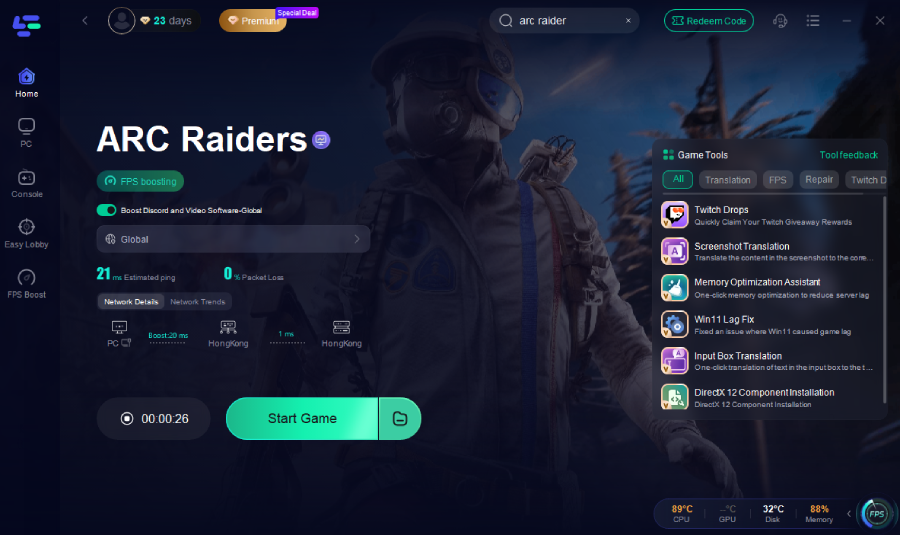
How to use LagoFast Game Booster:
Step 1: Click the "Free Trial" button below to download and install the LagoFast for free.
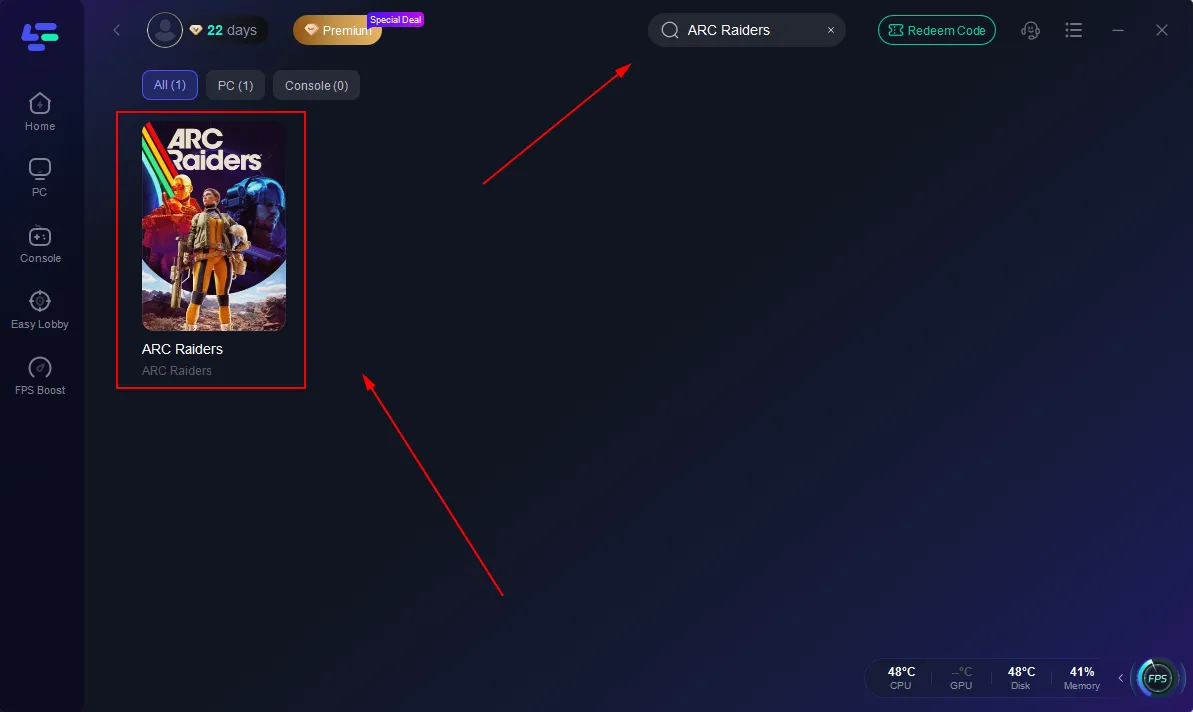
Step 2: Launch LagoFast, search for "ARC Raiders" in the search bar, and select the game.
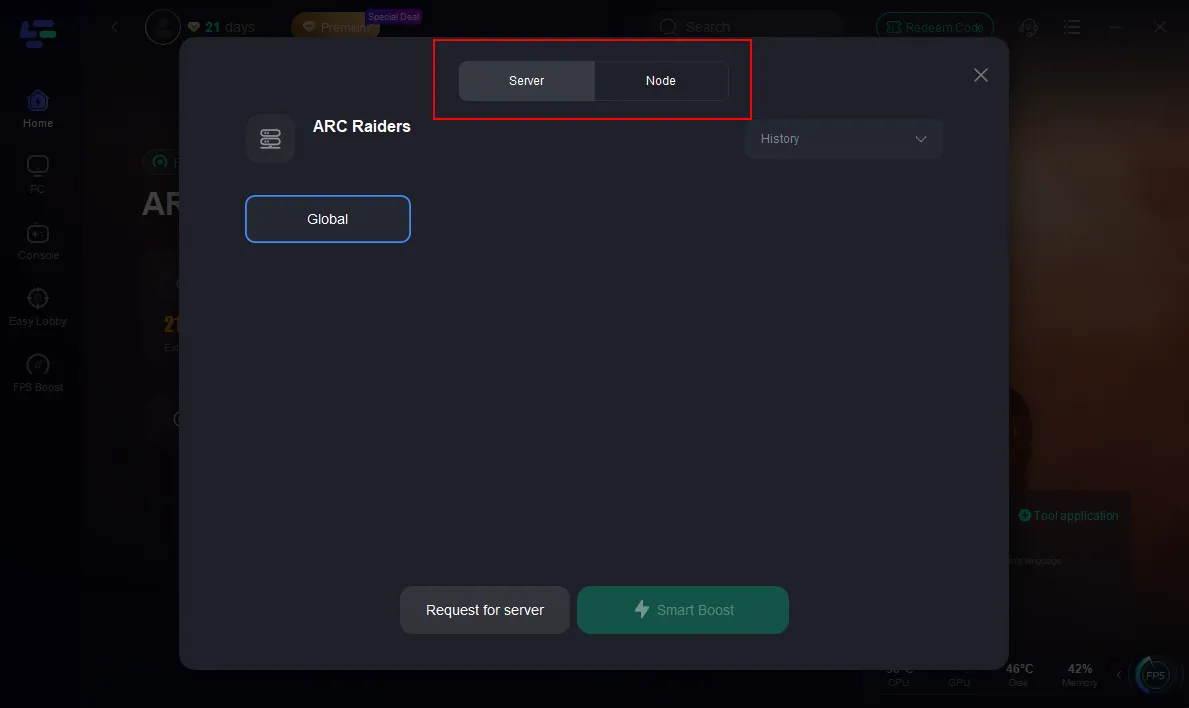
Step 3: Click the "Select Server" button to connect to an stable server node, then activate optimization via "Smart Boost".
Step 4: After enabling real-time optimization, check the live ping and packet loss rates, then click "Start Game" to begin playing.
Part 6: FAQ
Q 1: I’m getting “Online Connection Error” when launching ARC Raiders — is it server definitely down?
Not necessarily. While server overload can cause this, it may also be a local issue (network, NAT, firewall) or a regional node problem. Use server status trackers and community reports to confirm.
Q 2: How often does ARC Raiders go down for maintenance?
No official schedule has been published yet. Given the heavy load at launch, brief maintenance windows or hot‑fixes may occur with minimal notice.
Q 3: My friends are playing fine but I cannot — what should I do?
If others can access the game, the problem is likely on your end. Try verifying game files, restarting your router, checking NAT type, temporarily disabling firewall/antivirus, and verifying with server status trackers.
Q 4: Does using a game‑booster like LagoFast guarantee better connectivity?
No guarantee. It can help under certain conditions (high latency, background bandwidth usage) but cannot fix server‑side overload. It’s a useful tool when your local network is limiting your experience.
Conclusion
To summarise: many players are experiencing problems right now asking is ARC Raiders server down? The servers are online but under heavy load, causing connection errors, queues, and timeouts. You can check the ARC Raiders server status via live trackers, developer channels, and community reports. If you’re still unable to connect, try local fixes and consider using tools like LagoFast Game Booster to optimize your network. With a little patience and the right checks, you’ll be back topside soon.

Boost Your Game with LagoFast for Epic Speed
Play harder, faster. LagoFast game booster eliminates stutter and lags on PC, mobile, or Mac—win every match!
Quickly Reduce Game Lag and Ping!
Boost FPS for Smoother Gameplay!