

Quick Answer: Can You Slow Down HOT Drop Rush?
Yes, you can effectively slow down the PUBG HOT Drop Rush mini-game to improve your reaction time and achieve higher scores. While the game's speed naturally increases over time, specialized tools and strategic gameplay adjustments can significantly reduce the perceived pace, making movements and obstacle timing much easier. This allows players to more consistently reach the coveted 7,000-point reward and efficiently use their limited daily tickets.

- ✅ Reduce Lag and High Ping.
- ✅ Boost FPS at the Same Time.
- ✅ No more PBE Queue Issues.
- ✅ Full Guides For Novice Players.
- ✅ Support 8000+ Online Games.
Part 1: The Easiest Way to Slow Down HOT Drop Rush
Part 2: How to Play HOT Drop Rush at 0.25x Speed
Part 3: How to Survive Longer Without a Speed Tool
Part 4: Why HOT Drop Rush May Still Feel Too Fast
Part 5: Does Slowing Down HOT Drop Rush Affect Your Score?
Part 6: How to Enhance Your Game Experience with LagoFast Game Booster
Part 7: Frequently Asked Questions
The Easiest Way to Slow Down HOT Drop Rush
The most direct and effective method to slow down the HOT Drop Rush mini-game is by using a dedicated speed manipulation tool. These tools are designed to alter the game's execution speed, giving players a crucial advantage in a fast-paced environment.
Use a 0.25x Speed Tool for the HOT Drop Rush Web Game
For the PUBG HOT Drop Rush web mini-game, a highly recommended solution is the LagoFast Game Booster's Hot Drop Rush Tool. This specialized feature allows you to play the mini-game at a 0.25x speed. This significant reduction in speed makes movement and obstacle timing considerably easier, transforming a frantic challenge into a more manageable experience. The primary goal of this tool is to help players target the 7,000-point reward, reduce failed attempts, and use their limited daily tickets more efficiently.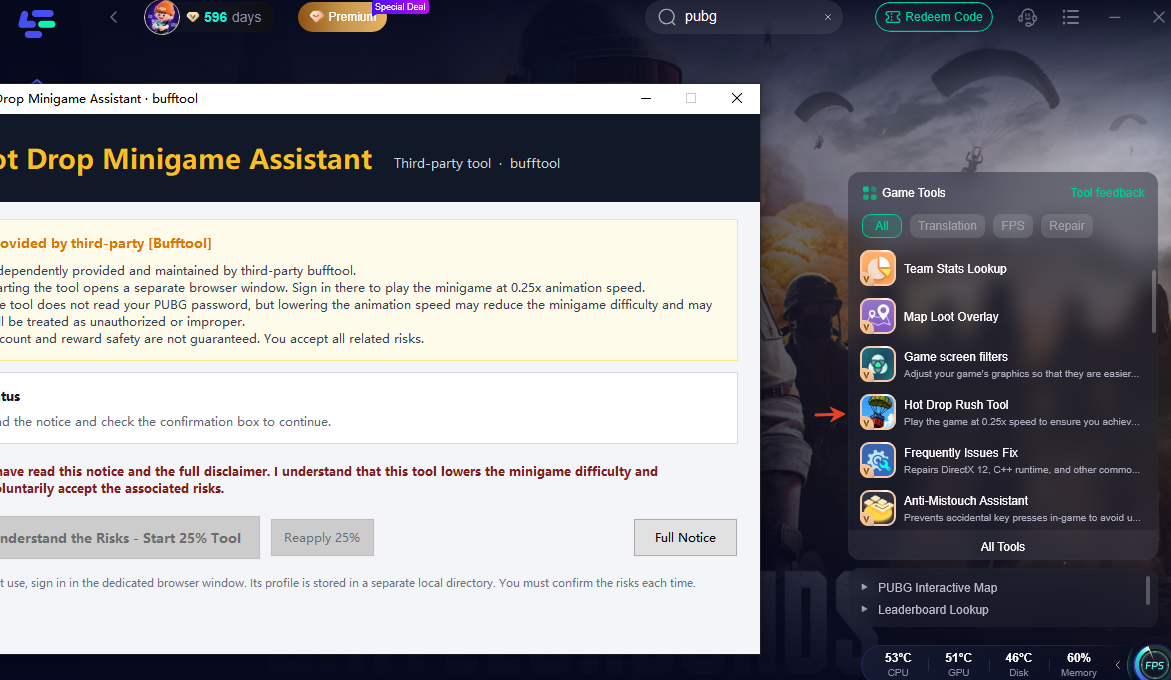
How Slower Game Speed Gives You More Reaction Time
Playing at a reduced speed directly translates to increased reaction time. In HOT Drop Rush, where parachutes and NPCs fall rapidly, and the Red Zone is a constant threat, every millisecond counts. At 0.25x speed, you have four times the normal duration to perceive incoming obstacles, plan your movements, and execute jumps. This drastically lowers the chance of collision, allowing for longer survival times and, consequently, higher scores.
Normal Speed vs. 0.5x vs. 0.25x Speed
At normal speed, the game quickly becomes overwhelming, especially as the timer progresses. A 0.5x speed reduction offers a noticeable improvement, but 0.25x speed provides an even greater margin for error and precision. This ultra-slow mode is particularly beneficial for players struggling with the game's inherent speed or those aiming for perfect runs to maximize their score per ticket.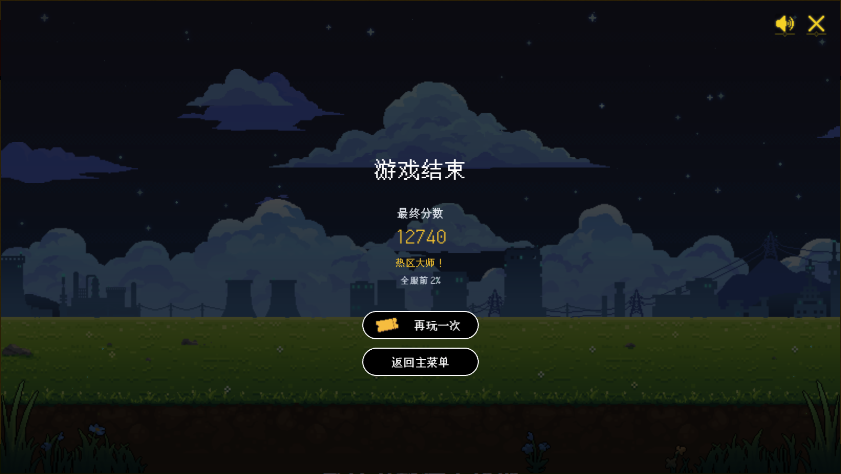
How to Play HOT Drop Rush at 0.25x Speed
To leverage the LagoFast(LagoFast Game Booster - Get No Lag and Lower Ping) Game Booster's Hot Drop Rush Tool and play the mini-game at 0.25x speed, follow these steps:
Download and Install LagoFast: First, ensure you have the LagoFast Game Booster client installed on your PC. If not, download it from the official LagoFast website and complete the installation.
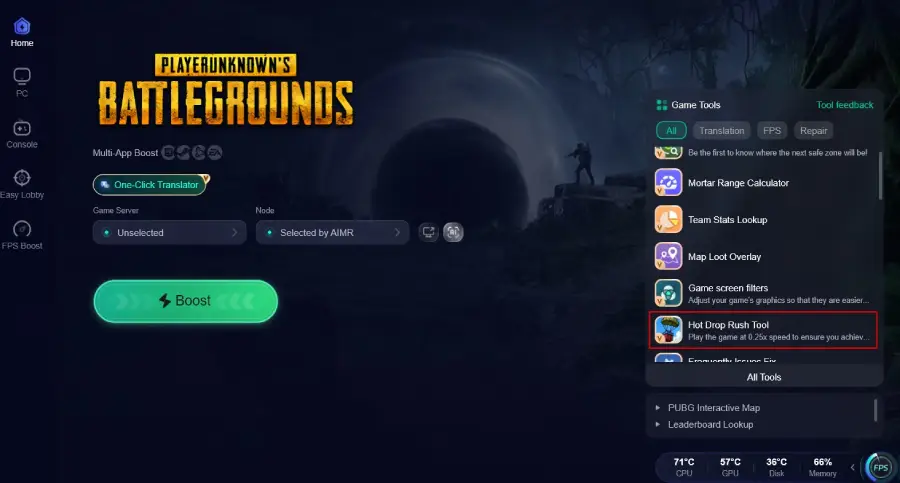
Launch LagoFast and Access the Tool: Open the LagoFast application. Within the booster, locate and select the dedicated Hot Drop Rush Tool. This tool is specifically designed for the PUBG web mini-game.
Open the Game Webpage: The LagoFast Hot Drop Rush Tool will open an independent game webpage. Log in with your KRAFTON ID and link your PUBG account as required by the event.
Activate 0.25x Speed: Once the mini-game is loaded through the LagoFast tool, the 0.25x speed functionality will be active. You will immediately notice the reduced pace of the game.
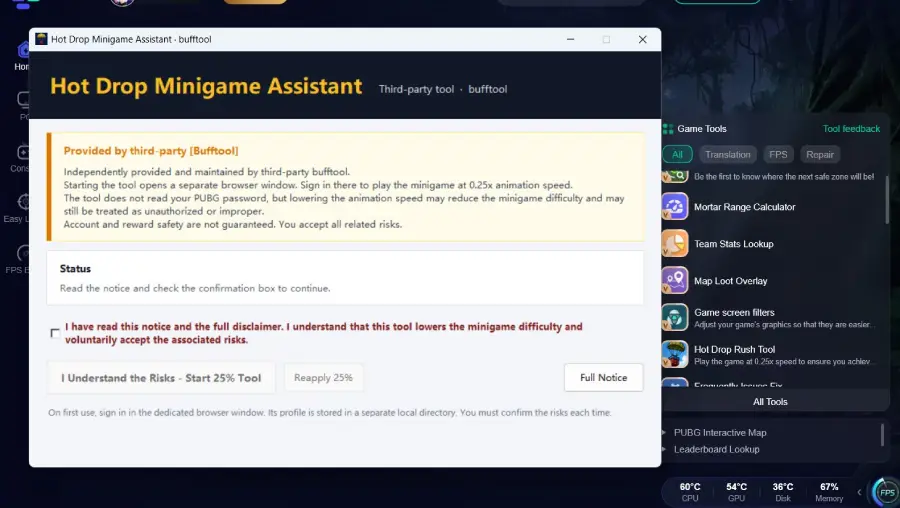
Play and Score: Start your attempt and focus on avoiding obstacles and collecting supply crates. The slower speed will allow for precise movements and easier navigation, helping you achieve higher scores.
Target the 7,000-Point Reward: With the game running at 0.25x speed, consistently aiming for and surpassing the 7,000-point mark becomes a much more attainable goal, ensuring you unlock valuable G-COIN rewards.
How to Survive Longer Without a Speed Tool
While a speed tool offers the most significant advantage, you can still improve your performance in HOT Drop Rush through strategic play and optimization, even at normal speed:
- Anticipate Movement: Instead of reacting to obstacles as they appear, try to anticipate their trajectory. Observe patterns in how parachutes and NPCs fall.
- Prioritize Survival: Focus on avoiding collisions rather than aggressively collecting every supply crate. Survival time is key to high scores.
- Master Jumping: Use jumps strategically to clear multiple obstacles or gain a brief moment of reprieve. Practice precise jumps to land safely.
- Optimal Input: Ensure your keyboard or mobile touch inputs are responsive. A good gaming keyboard or a clean mobile screen can make a difference.
- Practice: Like any skill-based mini-game, consistent practice will improve your muscle memory and reaction times, even at higher speeds.
Why HOT Drop Rush May Still Feel Too Fast
Even with practice, some players might find the HOT Drop Rush mini-game overwhelmingly fast. Several technical and environmental factors can contribute to this perception:
Browser Input Delay
Web-based games can sometimes suffer from input delay, where there's a slight lag between your keypress or touch and the character's action. This can make precise movements feel sluggish and unresponsive, exacerbating the feeling of speed.
Low or Unstable Frame Rate
If your PC or mobile device struggles to maintain a consistent high frame rate, the game can appear choppy or stutter. This visual inconsistency makes it incredibly difficult to accurately time jumps and movements, as the game world isn't updating smoothly.
Playing on Mobile Instead of PC
While the mini-game is accessible on mobile via a QR code, playing on a PC generally offers more precise controls (keyboard) and potentially better performance. Mobile touch controls, while convenient, can sometimes be less accurate for rapid, precise inputs required in HOT Drop Rush.
Network Problems Preventing Inputs or Scores from Registering
Even though it's a mini-game, network stability can impact your experience. Packet loss or high latency can cause your inputs to register late or even prevent your score from being recorded accurately, leading to frustrating losses of progress and tickets.
Does Slowing Down HOT Drop Rush Affect Your Score?

No, using a tool to slow down HOT Drop Rush does not inherently affect how your score is calculated by the game's system. The game records your survival time and collected points, regardless of the speed at which you perceive the game. The key is to ensure your score is properly registered.
How HOT Drop Rush Calculates Scores
The scoring system in HOT Drop Rush is straightforward: you gain +20 points for avoiding parachutes and NPCs, and +100 points for collecting supply crates. The longer you survive, the more opportunities you have to accumulate points. The game ends after three collisions with parachutes/NPCs or one collision with the Red Zone. The total score is based on these accumulated points and your survival duration.
Why Refreshing or Force-Closing Can Lose Your Score
It's crucial to avoid any abnormal exits from the mini-game. Refreshing the browser page, force-closing the tab, or experiencing a sudden network disconnection can prevent your score from being properly recorded. Always complete your run, even if you know you won't hit your target, to ensure your attempt is registered.
Important Event Rules and Account-Risk Notice
PUBG's event guidelines explicitly state that
records obtained through abnormal methods (including abuse) may result in reward revocation and exclusion from reward eligibility. While using a speed tool like LagoFast for a single-player web mini-game is generally considered a client-side enhancement and not a hack, it is always advisable to review the official event rules to ensure compliance. The game tracks records based on server records, and any attempts to manipulate these records through unauthorized means will not be recognized.
How to Enhance Your Game Experience with LagoFast Game Booster
LagoFast Game Booster is not just for slowing down mini-games; it's a comprehensive solution designed to optimize your overall gaming experience, especially for PC and mobile titles. It addresses common issues like high ping, lag spikes, and unstable network routes, ensuring smoother gameplay in your favorite titles, including PUBG: Battlegrounds.
Here are the detailed steps to use LagoFast Game Booster:
Download and Install the LagoFast Client: Visit the official LagoFast website and download the appropriate client for your PC or mobile device. Follow the installation instructions to set it up.
Register/Sign In: Open the LagoFast application and either register for a new account or sign in with your existing credentials.
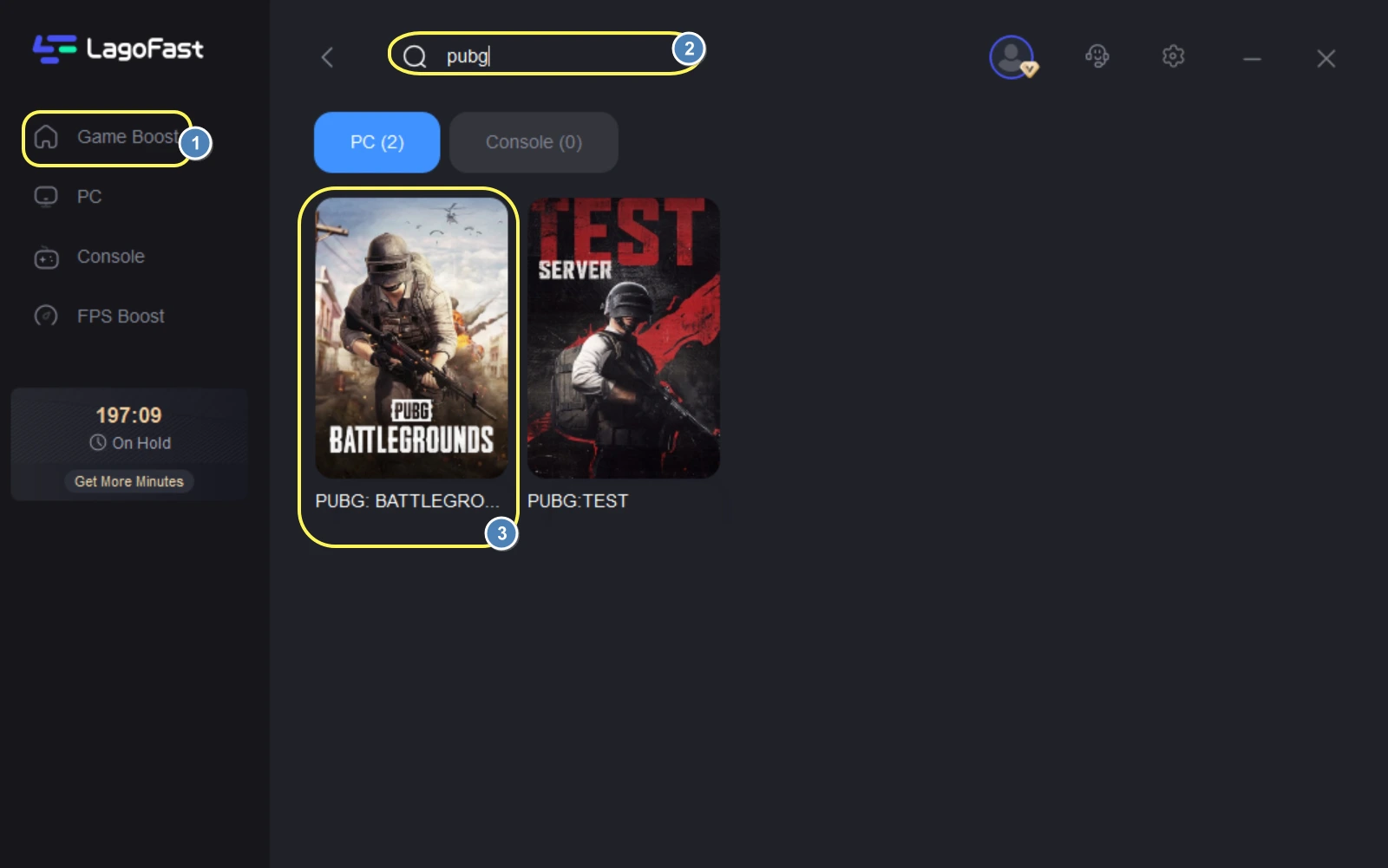
Choose Your Game: In the LagoFast interface, use the search bar or browse the game list to find the game you wish to optimize. For example, you would search for "PUBG: Battlegrounds" for the main game.
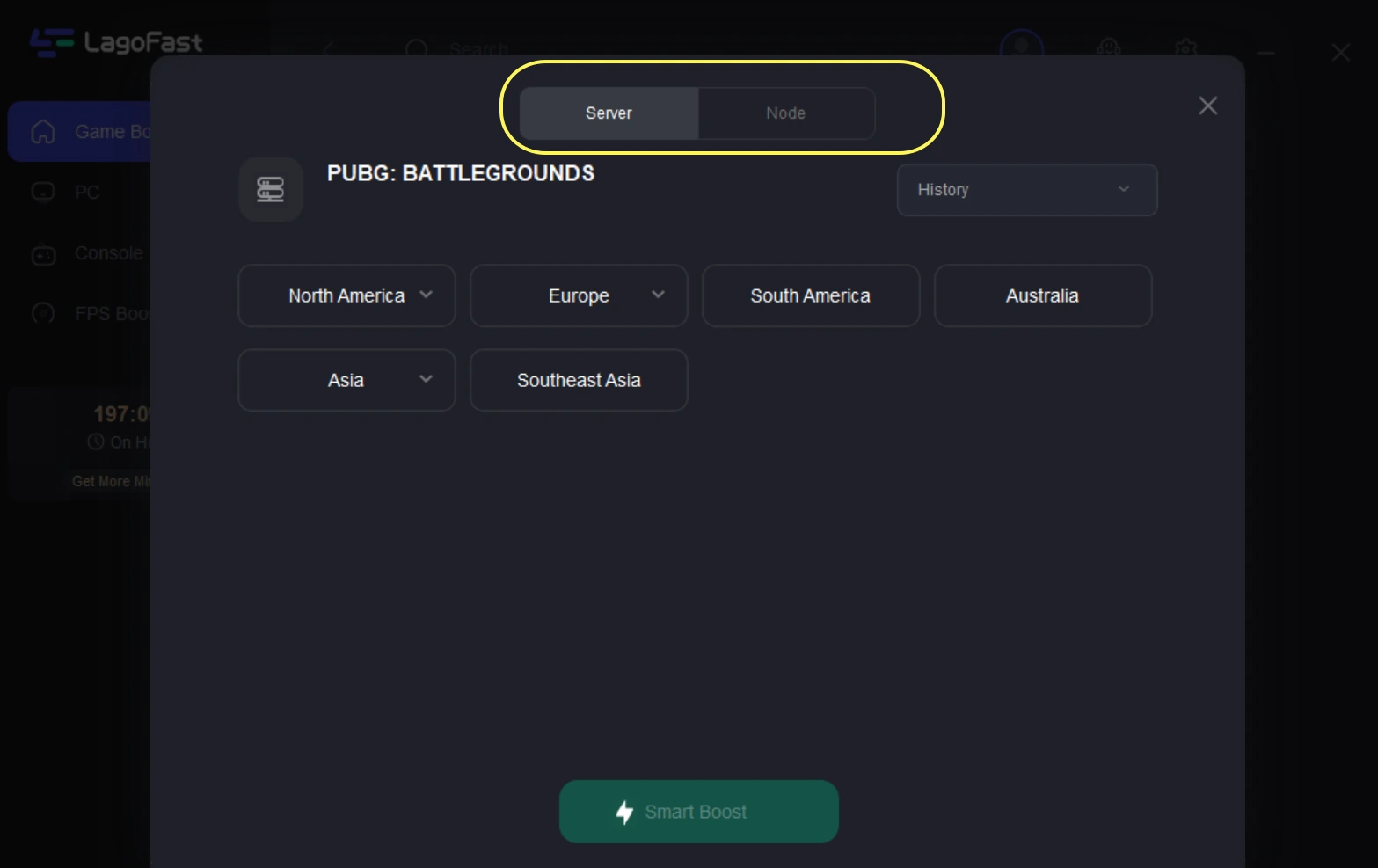
Select Your Server Region: After selecting your game, choose the server and node that offers the lowest ping for your location. LagoFast often provides an "Automatic Server" option that intelligently selects the best connection route for you.
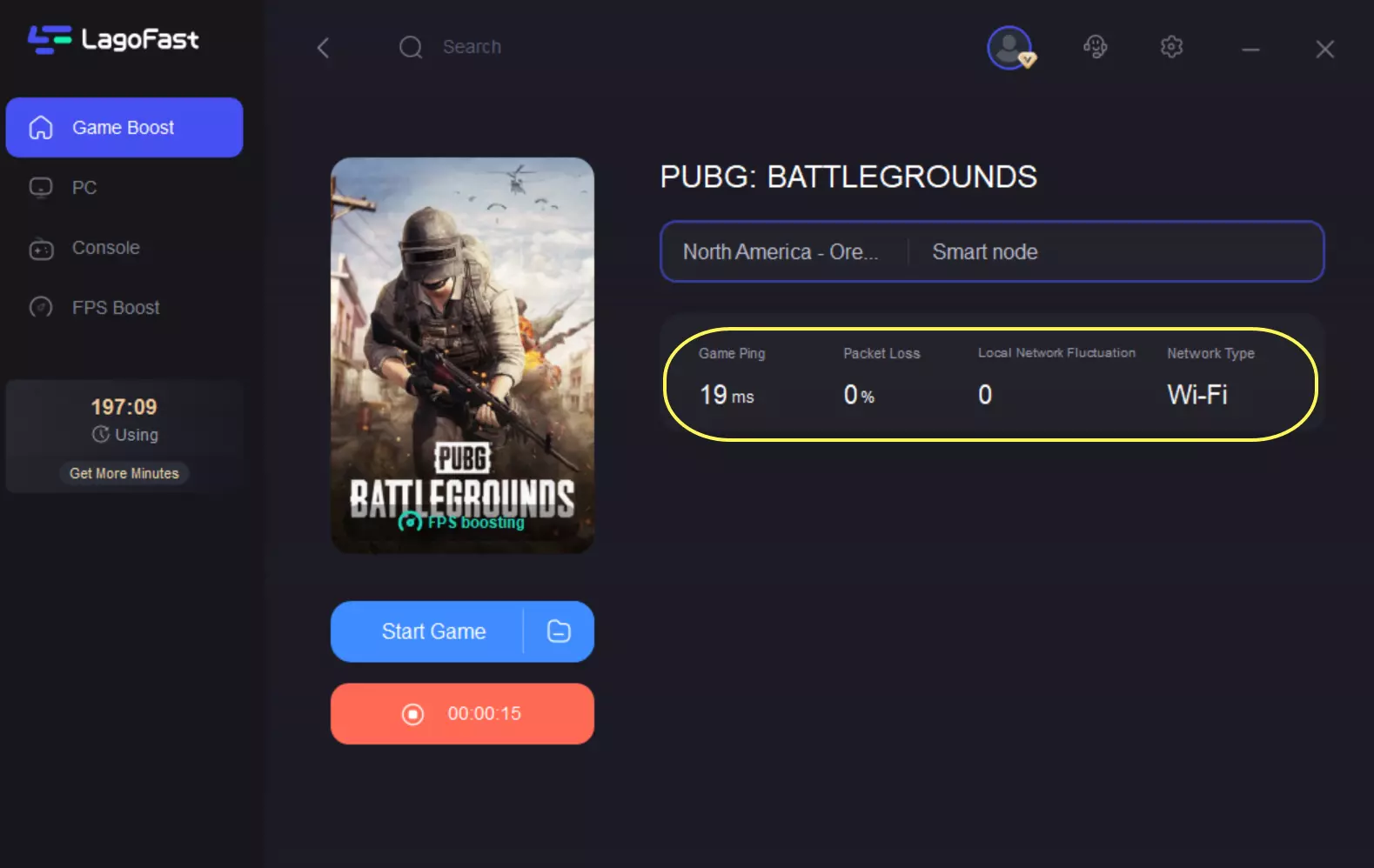
Start Boosting: Click the "Boost" button. LagoFast will then optimize your network connection, routing your game traffic through the most efficient path to reduce latency and improve stability.
Launch Your Game: With the boost active, launch your game and experience a noticeable improvement in ping and overall network performance.
Frequently Asked Questions
1. What is the PUBG HOT Drop Rush mini-game?
The HOT Drop Rush mini-game is a web-based event where players control a character avoiding falling parachutes and NPCs while collecting supply crates. The goal is to survive as long as possible to achieve a high score and earn in-game rewards.
2. How do I get tickets for the HOT Drop Rush mini-game?
Players receive 2 tickets daily upon logging in with their KRAFTON ID and linking their PUBG account. Additionally, 1 ticket can be earned per HOT Drop mode play in the main game, up to 3 extra tickets per day.
3. What are the rewards for the HOT Drop Rush mini-game?
Rewards are based on both your highest score and cumulative score achievements. These can include cosmetic items like pants, t-shirts, gloves, and masks, as well as G-COIN (30 Days) . The 7,000-point milestone typically grants 500 G-COIN (30 Days).
4. Does the HOT Drop Rush mini-game have a time limit?
The mini-game itself doesn't have a strict time limit; instead, the speed of falling obstacles increases over time. Your score is based on how long you survive and how many points you collect before colliding with obstacles.
5. Can I play the HOT Drop Rush mini-game on console?
No, the HOT Drop Rush mini-game cannot be played directly on console. Console players can access and play it on mobile devices via a QR code provided on the event page.
Key Takeaway
Mastering the PUBG HOT Drop Rush mini-game is achievable by strategically slowing down the gameplay. Utilizing tools like the LagoFast Hot Drop Rush Tool for a 0.25x speed advantage can significantly improve your scores and ensure you claim those valuable event rewards. Even without such tools, optimizing your reaction time and understanding game mechanics will lead to better performance and a more rewarding experience.

Boost Your Game with LagoFast for Epic Speed
Play harder, faster. LagoFast game booster eliminates stutter and lags on PC, mobile, or Mac—win every match!
Quickly Reduce Game Lag and Ping!
Boost FPS for Smoother Gameplay!