

If you’re getting ready to install Apex Legends, one of the first questions you’ll probably ask is: how many GB is Apex Legends? The answer depends on which platform you’re using, as the file size varies across PC, console, Switch, and mobile. This article breaks down the Apex Legends download size on each platform and provides tips to ensure you have enough storage for updates and seasonal content.

- ✅ Reduce Lag and High Ping.
- ✅ Boost FPS at the Same Time.
- ✅ Support 2000+ Popular Online Games.
- ✅ Fix Game not Working Issues.
- Apex Legends Download Size Across Platforms
- Why Apex Legends File Size Keeps Growing
- Tips for Managing Storage Space
- Is Apex Legends Worth the Download Size?
- Fix Lag and Boost Game Performance with LagoFast
1. Apex Legends Download Size Across Platforms
Apex Legends is a live-service game that receives frequent updates, which means the file size isn’t static. New legends, maps, events, and optimizations are added regularly, and that can increase the storage required. Here’s a detailed look at the current base download size per platform.
PC (Windows)
- Base Download Size: ~53 GB
- Additional Storage for Updates: ~3 GB
- Recommended Free Space: 56 GB or more
Whether you’re downloading via Origin, Steam, or the EA App, the base game hovers around 53 GB. However, regular patches and seasonal updates will require more space, so it’s best to keep at least 60 GB free to avoid issues during installations.
PlayStation (PS4/PS5)
- Base Download Size: ~80 GB
- Additional Space Needed for Updates: Yes
PlayStation users face the largest initial download size. This is due to how content is packaged and optimized for console performance. Be prepared to allocate even more space over time for new maps, modes, and legends. Keeping 100 GB free is a smart move.
Xbox (Xbox One/Series X|S)
- Base Download Size: ~60 GB
Apex Legends on Xbox takes up slightly less space than on PlayStation, but it still requires frequent storage management. Updates may add several gigabytes, so it’s a good idea to keep at least 70 GB of free space on your console to ensure smooth installations.
Nintendo Switch
- Base Download Size: ~25 GB
Due to hardware limitations, the Switch version is compressed, which significantly reduces the file size. However, seasonal updates will still increase the total size over time. Players are advised to use a high-capacity microSD card to prevent storage issues.
Mobile (Android and iOS)
- Android Download Size: ~3 GB
- iOS Download Size: ~4 GB
The mobile versions of Apex Legends are optimized for smaller devices and therefore have the smallest file sizes. Despite the lean download, updates can gradually increase the size, so users should monitor their device storage regularly and leave a few extra gigabytes free.
2. Why Apex Legends File Size Keeps Growing
As a live-service title, Apex Legends receives regular seasonal content, including new legends, limited-time events, battle passes, and map updates. These updates often come with new assets such as textures, audio files, and animations, all of which contribute to a growing file size. Even bug fixes and performance patches can slightly increase storage requirements over time.
To keep your game running smoothly and avoid interrupted downloads, it’s a good idea to regularly clear out unnecessary files or games you’re no longer playing.
3. Tips for Managing Storage Space
If you’re tight on storage, especially on consoles or mobile devices, here are a few tips to keep Apex Legends running without problems:
- Use an external hard drive (for PS4, Xbox One) or expandable SSD (for next-gen consoles)
- Regularly delete unused games or apps to make room for Apex updates
- Enable auto-update to avoid failed downloads due to insufficient space
- Clear cache or temp files on PC for smoother operation
- Use cloud storage on mobile devices to free up internal memory
Planning ahead ensures you’re not caught off guard by large seasonal patches.
4. Is Apex Legends Worth the Download Size?
Absolutely. Despite its growing size, Apex Legends delivers high-quality gameplay, stunning visuals, and constant new content—all without a price tag. Its fast-paced action, hero-based mechanics, and frequent seasonal updates make it one of the most content-rich free-to-play shooters available. If you’re a fan of competitive multiplayer or team-based shooters, the storage space is a small tradeoff for the experience it offers.
5. Fix Lag and Boost Game Performance with LagoFast
Experiencing lag spikes, high ping, or unstable connections during gameplay? LagoFast is a dedicated game booster designed to fix those issues in just a few clicks. Whether you’re playing competitive shooters or expansive MMOs, LagoFast helps you stay ahead by delivering a more stable and responsive connection.
How to Use LagoFast
Getting started is quick and easy:
Step 1: Click the Free Trial button to download and install LagoFast.
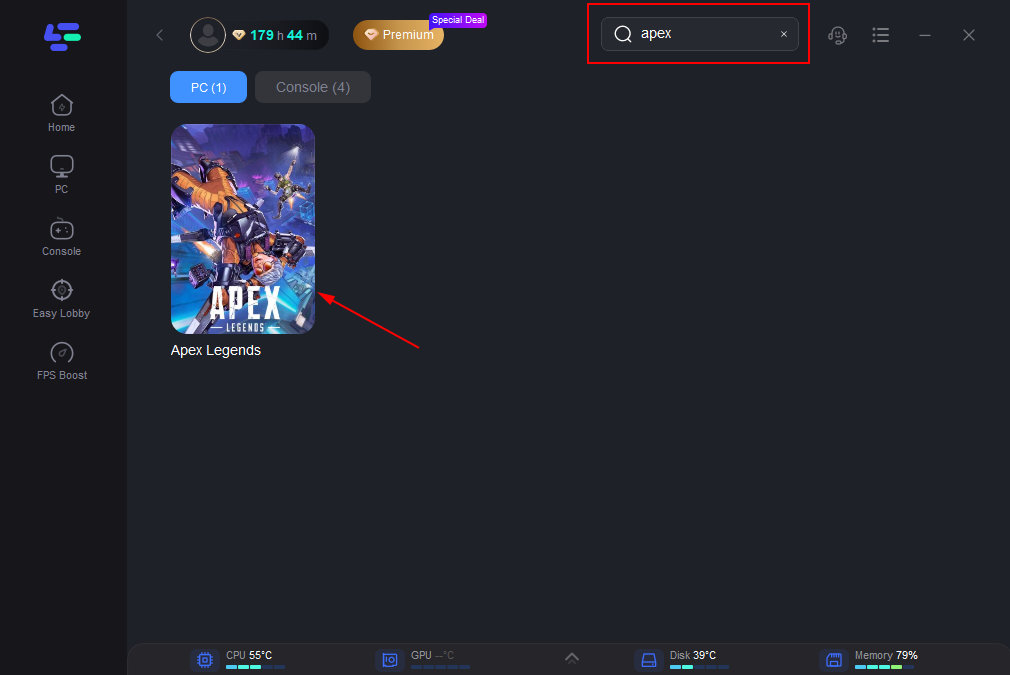
Step 2: Open LagoFast, click the PC icon on the left, and type Apex Legends in the search bar. Click on the game when it appears.
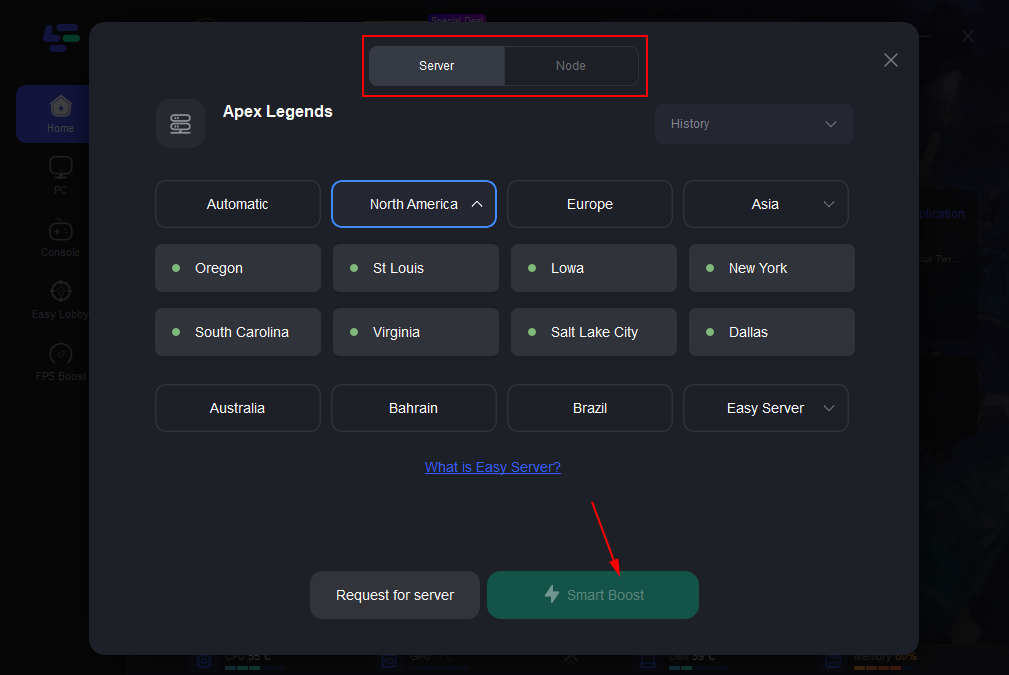
Step 3: Click “Server” to select the best server for a stable game, then click “Smart Boost”.
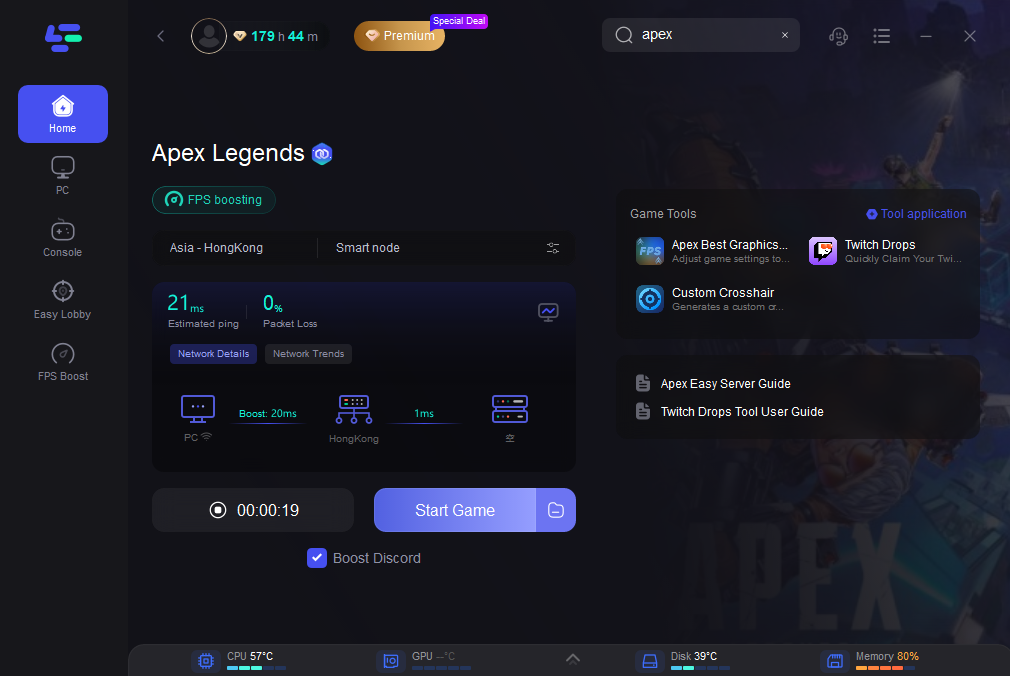
Step 4: On the right, check your ping, packet loss, and multi-path metrics. Then click “Start Game” to launch the game.
Key Benefits of LagoFast
- Lower ping and reduced lag
- Real-time monitoring of ping, packet loss, and network quality
- Stable server routing for smoother gameplay
- Smart acceleration that adapts to your game and region
Whether you’re chasing wins in ranked matches or exploring vast open worlds, LagoFast ensures your network won’t hold you back. In competitive shooters, every millisecond counts—one lag spike could mean the difference between clutching a round or losing it. In open-world RPGs or MMOs, rubberbanding or disconnections can ruin immersion and disrupt progress. LagoFast actively reduces ping, prevents packet loss, and maintains consistent network quality so your focus stays on the game, not the connection.
Conclusion
So, how many GB is Apex Legends? The answer varies:
- PC: ~53 GB (base), ~56 GB with updates
- PlayStation: ~80 GB
- Xbox: ~60 GB
- Nintendo Switch: ~25 GB
- Android: ~3 GB | iOS: ~4 GB
Keep in mind that these are base download sizes and do not account for future updates or temporary event files. To avoid performance or installation issues, always maintain a buffer of additional free storage on your device. Apex Legends is a dynamic game that evolves with every season—so your storage needs will too.
Boost Your Game with LagoFast for Epic Speed
Play harder, faster. LagoFast game booster eliminates stutter and lags on PC, mobile, or Mac—win every match!
Quickly Reduce Game Lag and Ping!
Boost FPS for Smoother Gameplay!