

League of Legends has remained one of the most iconic multiplayer online battle arena games ever since its launch in 2009. Despite its age, Riot Games consistently updates League with new champions, skins, and gameplay tweaks, keeping it fresh and relevant for millions around the globe. However, if you’re planning to jump into the Rift or reinstall the game, you’re probably wondering: how big is League of Legends in 2025?
The size of a game matters for many players, especially those with limited disk space or slower internet connections. Whether you’re curious about the League of Legends download size, how much storage it eats up after patches, or how it varies across systems and regions, this guide has you covered. Let’s break it down step-by-step so you’ll know exactly what to expect before hitting the download button.
Vietnamese Version: League of Legends lớn như thế nào vào năm 2025?

Part 1: How Many GB is League of Legends on PC?
Part 2: How Big Is the League of Legends Download for Different Regions?
Part 3: How Big Is League of Legends Storage After Patches?
Part 4: How Big Is League of Legends on Different Systems?
Part 5: How to Check League of Legends' Current Storage Size on Your PC
Part 6: Best Way to Ensure a Smooth Gaming Experience
Part 1: How Many GB is League of Legends on PC?
When you first set out to download League of Legends, you might be pleasantly surprised: it’s not nearly as massive as many modern AAA titles. In 2025, the initial League of Legends download size is around 9 to 10 GB. However, that’s just the beginning. Once installed and fully updated, League of Legends occupies approximately 22 GB of storage space on your PC.
Riot Games recommends players have at least 16 GB of free space before installing, but realistically, keeping around 20 to 25 GB available is much safer. Why? Because League updates often include new champions, skins, maps, and event files that can cause the storage needs to fluctuate slightly over time.
In short, if you’re wondering how many GB is League of Legends right now, plan for at least 22 GB after installation, with a bit of buffer space for future patches.
Part 2: How Big Is the League of Legends Download for Different Regions?
Interestingly, the League of Legends download size can vary a little depending on the region from which you’re downloading. Riot’s servers host region-specific files, such as different voice packs, language localizations, and sometimes small variations in client settings.
- North America and Europe servers generally stick close to the standard 10 GB download.
- Korea and China servers often include extra security programs like anti-cheat tools and region-specific assets, slightly increasing the initial download size by an extra 500 MB to 1 GB.
- Latin America and Oceania sometimes have smaller initial downloads but still reach around 22 GB after full installation.
If you’re setting your client to a language other than English, expect a tiny increase (100–200 MB) as well, mainly due to additional voice files.
Although the difference isn’t massive, it's good to be aware if you’re trying to plan downloads around a limited data plan or slower speeds.
Part 3: How Big Is League of Legends Storage After Patches?
One of the biggest factors influencing how big League of Legends storage becomes over time is the regular patch updates. Riot releases new patches roughly every two weeks, ranging from small tweaks to full-blown seasonal updates.
Here’s a rough breakdown:
- Minor patches (bug fixes, balance changes): about 300 MB to 500 MB.
- Major patches (new champions, massive event content): around 700 MB to 1.5 GB.
These patches usually replace older files, so they don’t necessarily cause the game size to balloon dramatically. However, after several months of continuous updates, League of Legends can creep up slightly to 23–24 GB if you haven't cleaned up residual files.
If you want to avoid any update or installation problems, it’s always a smart move to maintain at least 5-10 GB of free space beyond what League itself requires.
Part 4: How Big Is League of Legends on Different Systems?

The League of Legends download size is relatively consistent across platforms but has some small variations:
- Windows PC: After a fresh installation and all updates, League takes up about 22 GB.
- Mac: Installation size is slightly smaller initially (9 GB download), but after patches and full updates, the total disk usage also lands around 20-22 GB.
While both systems end up needing similar amounts of storage, installation times and performance can vary. Generally speaking, League is slightly more optimized on Windows, offering smoother patching and fewer client issues compared to Mac OS.
Another small tip: make sure you're installing to an SSD if possible. League doesn't demand it, but using an SSD improves loading times significantly.
Part 5: How to Check League of Legends' Current Storage Size on Your PC
Checking how much space League of Legends is currently using is quite simple and takes only a minute. Here’s how:
On Windows:
- Step 1. Open "File Explorer."
- Step 2. Navigate to the folder where League is installed (typically under C:\Riot Games\League of Legends).
- Step 3. Right-click the "League of Legends" folder and select "Properties."
- Step 4. Look under "Size" to see the total GB usage.
On Mac:
- Step 1. Open "Finder."
- Step 2. Go to the "Applications" folder and locate "League of Legends."
- Step 3. Right-click the application and select "Get Info" to view the storage size.
By checking every few months, you can keep an eye on how much space patches are adding and clear any unnecessary files if needed.
Part 6: Best Way to Ensure a Smooth Gaming Experience
Even with enough storage, high ping and packet loss can ruin your game. LagoFast Game Booster optimizes network routes, reducing lag spikes and improving stability. LagoFast is a specialized gaming optimization tool that not only reduces ping but also helps free up system resources before you start playing. By using LagoFast, you can experience faster loading screens, reduced packet loss, and fewer random disconnections.
Key Benefits of LagoFast:
- Reduces ping by selecting the best server path.
- Prevents packet loss in high-traffic regions.
- Easy setup, no complicated configurations needed.
For competitive players, a smooth connection is just as important as storage space.
Follow the tutorial to use LagoFast to ensure a smooth gaming experience:
Step 1: Click the Free Trial button to download and install LagoFast.
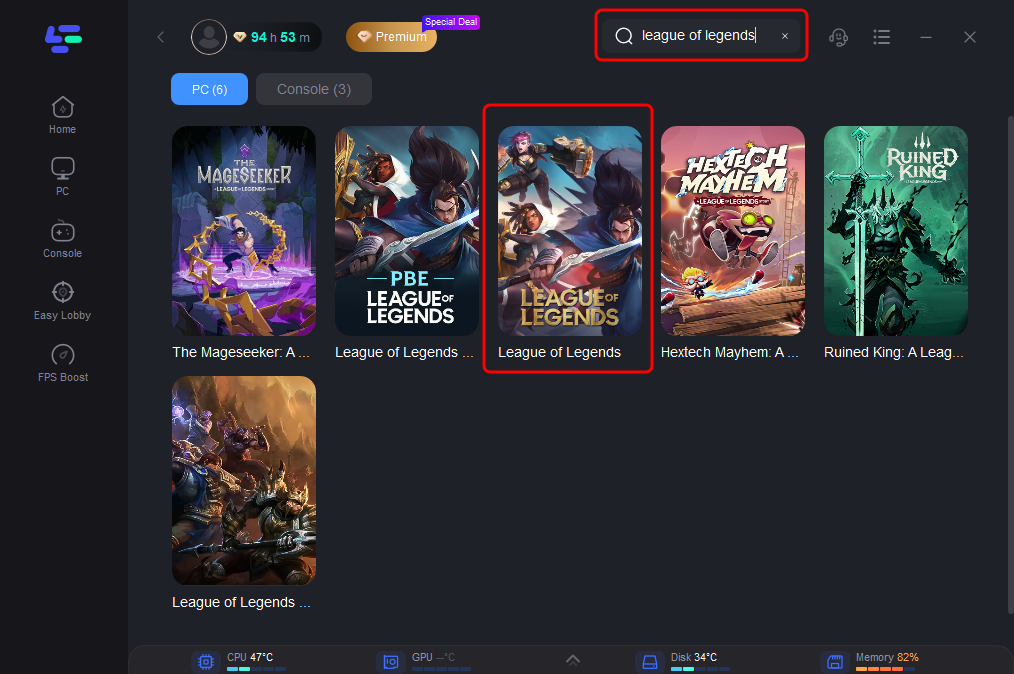
Step 2: Open LagoFast, then click the PC button on the left and search for League of Legends in the search bar, click it after it appears.
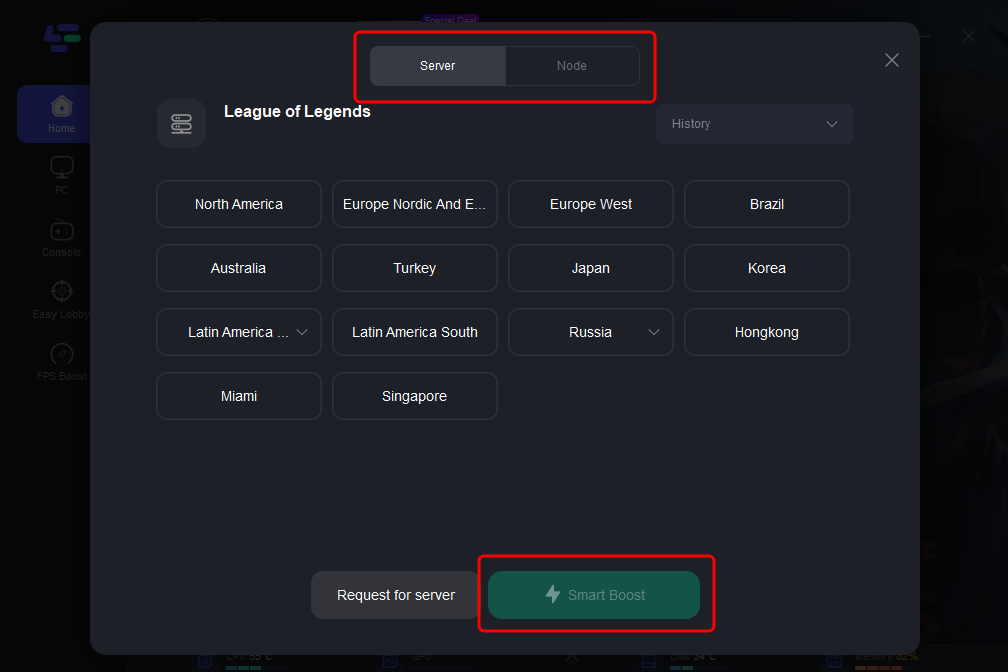
Step 3: Click on “Server” to change to a stable server that can ensure a smooth gaming experience, then click on “Smart Boost”.
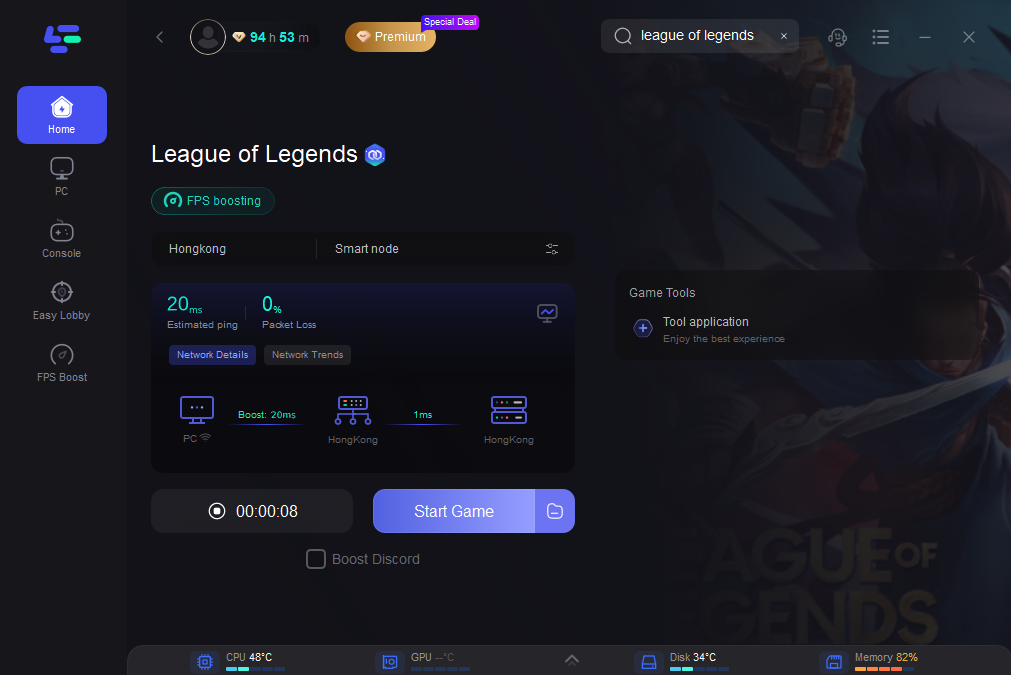
Step 4: Check the specific game ping, packet loss, and multiple path connection on the right side. Finally, click the “Start Game” to play the game.
Conclusion
In conclusion, understanding the download size and storage requirements of League of Legends in 2025 is essential for a smooth and hassle-free gaming experience. Whether you're installing it on PC or Mac, knowing what to expect can help you prepare your system and avoid common issues like lag or long loading times. To further enhance your gameplay, consider using tools like LagoFast, which can optimize your network connection and reduce lag, ensuring you get the best performance possible. With the right setup and a little preparation, you’ll be ready to jump into Summoner’s Rift and enjoy everything League has to offer without any interruptions

Boost Your Game with LagoFast for Epic Speed
Play harder, faster. LagoFast game booster eliminates stutter and lags on PC, mobile, or Mac—win every match!
Quickly Reduce Game Lag and Ping!
Boost FPS for Smoother Gameplay!