

With Black Ops 7 set to launch on November 14, 2025, one of the most common questions players ask is how big is Black Ops 7 or how many GB is COD Black Ops 7. While the official numbers aren’t confirmed, past Call of Duty releases give us a strong idea of what to expect across different platforms.

- ✅ Reduce Lag and High Ping.
- ✅ Boost FPS at the Same Time.
- ✅ Ensure Stable Server Connection.
- ✅ Change Server without Latency.
- ✅ Fix Crashing and Stuck Errors.
- ✅ 0% Packet Loss Rate
- ✅ Boost Game Downloading Speed.
Part 1. How Big Is Call of Duty Black Ops 7 on PC?
Part 2. How Big Is COD Black Ops 7 on Xbox?
Part 3. How Many Gigabytes Is Black Ops 7 on PlayStation?
Part 4. Is Black Ops 7 Actually 300 GB?
Part 5. Enhance Your Gameplay with LagoFast
Part 1. How Big Is Call of Duty Black Ops 7 on PC?
On PC, Call of Duty: Black Ops 7 requires more storage than console versions due to high-resolution textures and multiple content packs. The total file size varies depending on which modes you install—Campaign, Multiplayer, Zombies, or the full package—and is estimated to range from around 100 GB to 160 GB. To ensure fast load times and stable performance, installing the game on an SSD is highly recommended.
Part 2. How Big Is COD Black Ops 7 on Xbox?
For Xbox Series X|S and Xbox One, the file size is expected to be similar to PC. Players should plan for around 100 GB or more, though modular installation may let you reduce the footprint by skipping certain modes.
Part 3. How Many Gigabytes Is Black Ops 7 on PlayStation?
On PlayStation, recent Call of Duty titles have benefited from improved storage optimization. For instance, PS5 versions of past CoD games have seen significant reductions in size compared to earlier entries. Black Ops 7 is expected to follow this trend, though a full installation with all modes and high-resolution content could still require around 100 GB or more.
Part 4. Is Black Ops 7 Actually 300 GB?
Many players ask, “Is Black Ops 7 actually 300 GB?” The answer is no. That number usually comes from adding up multiple Call of Duty games or optional packs. BO7 alone is very unlikely to require 300 GB. Instead, you should expect 100–160 GB, depending on your platform and mode selection.
Part 5. Enhance Your Gameplay with LagoFast
Even if you clear enough storage for Black Ops 7, performance issues like lag, high ping, or unstable servers can ruin the fun. That’s where LagoFast comes in.
LagoFast is a game booster and connection optimizer designed for competitive titles like Call of Duty. Its main focus is keeping your network stable so every shot, movement, and reaction feels smooth. By routing your traffic through its smart server network, it helps reduce ping, cut down packet loss, and stabilize jitter. This means fewer frustrating moments where your bullets don’t register or enemies appear to teleport across the map.
Another advantage of LagoFast is its flexibility. Whether you’re on PC, Xbox, or PlayStation, it works across platforms, giving you consistent results no matter where you play. It’s also easy to set up—install, select your game, and let it run in the background. Players don’t need to mess with complicated settings to see improvements.
For a game like Black Ops 7, where every millisecond matters in Multiplayer and Zombies, a tool like LagoFast can make a big difference. Instead of blaming servers or unstable connections, you can focus on improving your skills and enjoying smoother matches.
How to use LagoFast on PC
Step 1: Click the Free Trial button to download and install LagoFast.
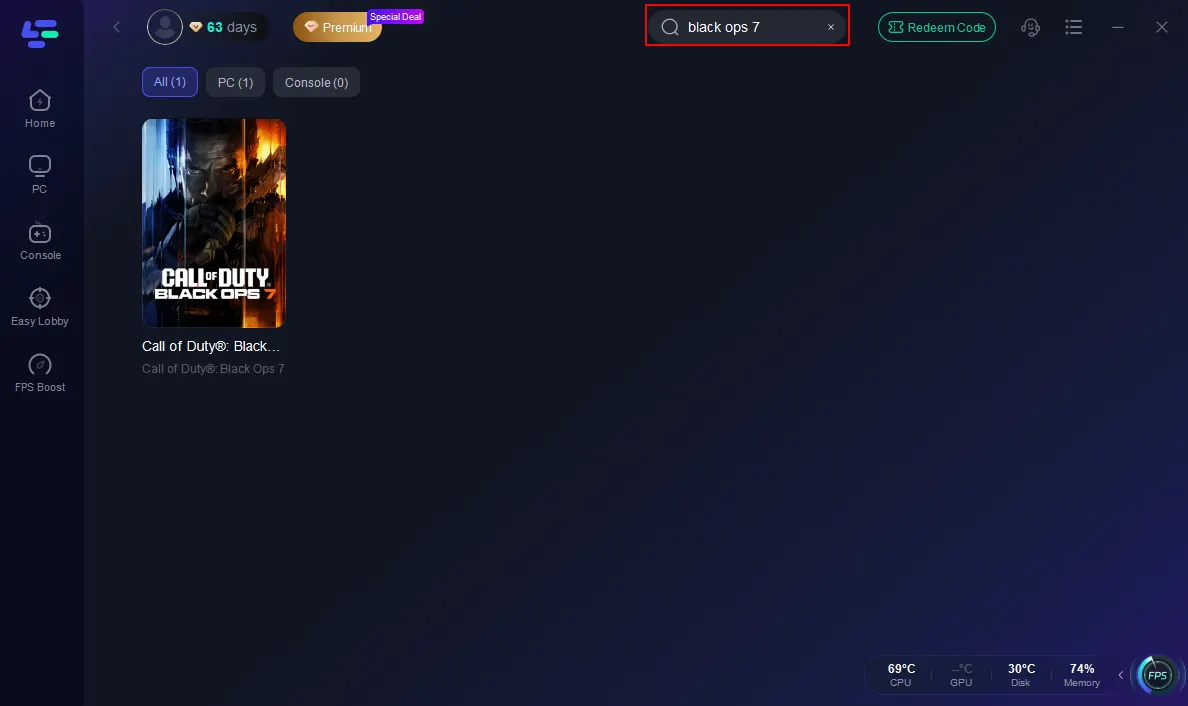
Step 2: Open LagoFast, then click the PC button on the left and search Black Ops 7 in the search bar, and click it after it appears.
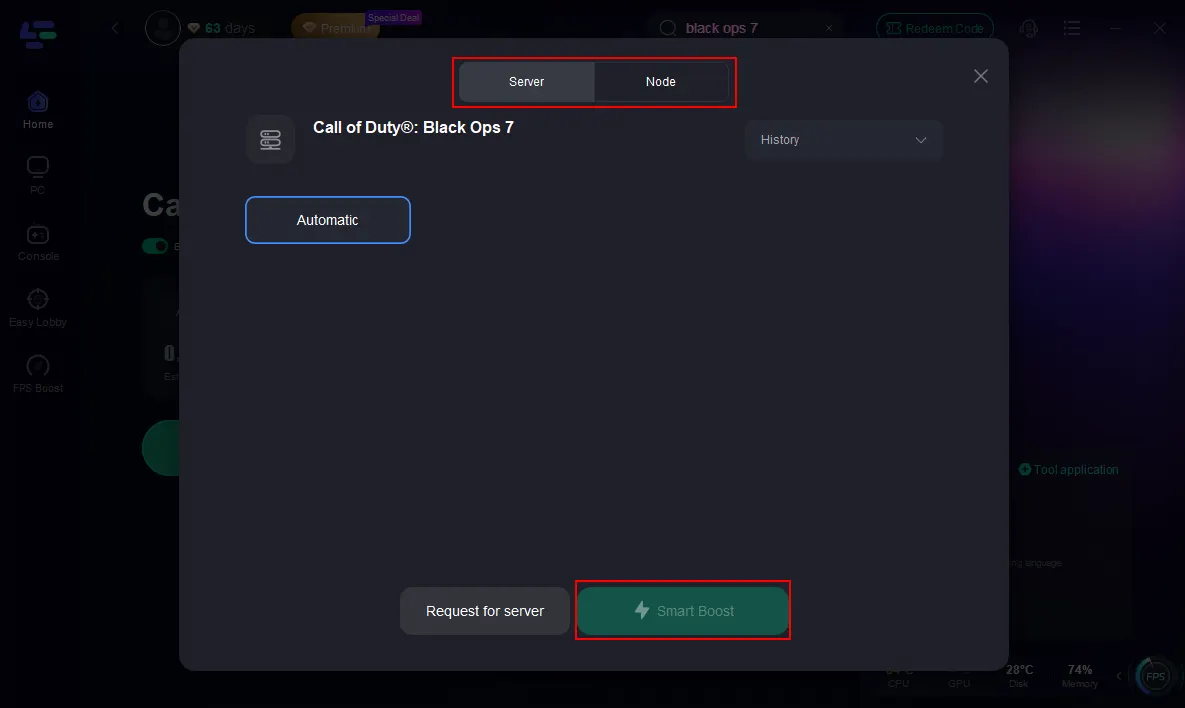
Step 3: Click on “Server” to change to a better server that ensures the Black Ops 7 gaming experience, then click on “Smart Boost”.
Step 4: Launch game and enjoy an enhanced gaming experience with reduced lag and improved stability.
How to Use LagoFast on Console
Console players may face disconnects as well, especially during high-traffic times. With the LagoFast Box, you can keep your connection stable even when servers are under stress:
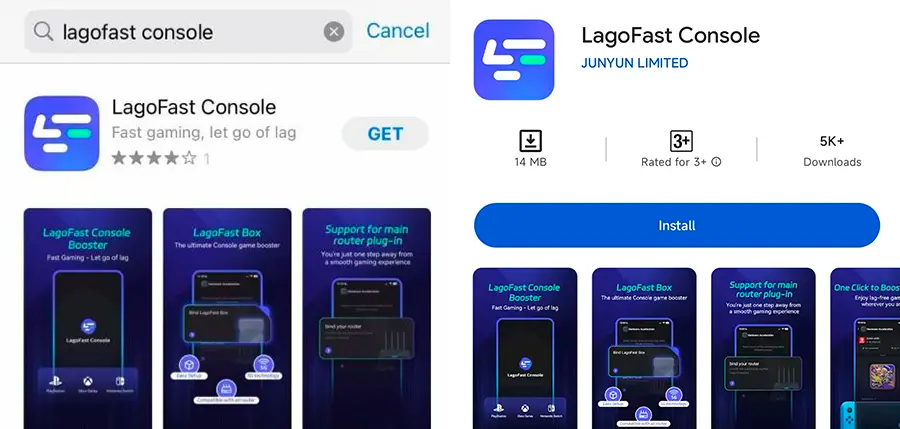
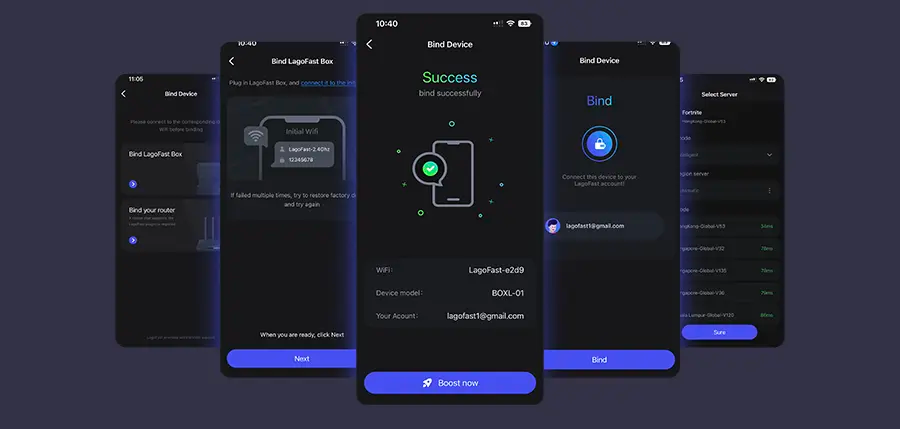
Step 1: Download the LagoFast Console App on your phone to control the LagoFast Box.
Step 2: Establish a connection between your LagoFast Box, router, and console, choosing between a wired or wireless connection.
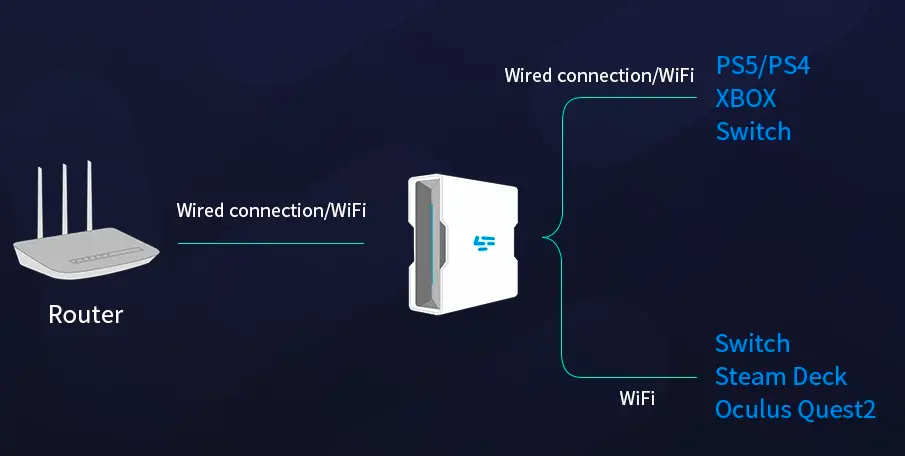
Step 3: Launch the LagoFast Console App and boost FC 26. Once you have completed the binding process with the LagoFast Box, proceed to boost this game within the LagoFast Console App.
Part 6. FAQ
Q: How many GB is COD Black Ops 7 at launch?
A: Around 100–160 GB, depending on platform, installed modes, and high-resolution texture packs.
Q: How many GB is BO7 if I only want Multiplayer?
A: Likely less than half the full size, depending on modular install support.
Q: How big is Call of Duty Black Ops 7 compared to Black Ops 6?
A: They’re similar in overall size, though improved compression and modular installs in BO7 may slightly reduce total storage.
Q: How many gigabytes is Black Ops 7 on PS5?
A: Approximately 96–100 GB for the full installation, potentially less if you skip certain modes
Q: Can I reduce storage space requirements for BO7?
A: Yes. You can uninstall unused packs or choose not to install Campaign or Zombies modes to save significant space.
Conclusion
If you’re asking how big is COD Black Ops 7, the safe estimate is 100–160 GB. The exact number will depend on your platform, whether you’re on PC, Xbox, or PlayStation, and which modes you install.
Rumors of Black Ops 7 being 300 GB are exaggerated—expect a more manageable size. And once you’ve cleared the space, make sure to enhance your experience with tools like LagoFast, so storage isn’t the only thing optimized.
Boost Your Game with LagoFast for Epic Speed
Play harder, faster. LagoFast game booster eliminates stutter and lags on PC, mobile, or Mac—win every match!
Quickly Reduce Game Lag and Ping!
Boost FPS for Smoother Gameplay!