

Heartopia is quickly becoming one of the most talked-about games, praised for its rich adventure, engaging quests, and immersive world. However, not every player can experience it in their own language. Imagine missing crucial quest instructions or story details because you can’t read the text—it can ruin the fun.
That’s where a game translation tool comes in. With the right tool, you can break language barriers, understand every detail, and enjoy Heartopia just like any other player.
In this guide, we’ll walk you through language support and how to play smoothly in any language.

- ✅ Reduce Lag and High Ping.
✅ Boost FPS at the Same Time.
✅ Support 2000+ Popular Online Games.
✅ Change Server without Latency.
✅ Boost Game Loading Speed.
Part 1: Heartopia Release Date, Platforms, and Game Features
Part 2: What Languages Does Heartopia Support?
Part 3: The Best Translation Tool to Play Heartopia Smoothly
Part 1: Heartopia Release Date, Platforms, and Game Features
Heartopia officially launched on January 7, 2026 for PC and Mobile, with the Steam version released on January 17, 2026. Players can now jump straight into its exciting fantasy world.
Key features that make Heartopia stand out:
- Immersive Storytelling: Follow a deep, engaging narrative full of twists, memorable characters, and interactive quests that make you feel part of the world.
- Dynamic Combat System: Combine flashy skills and combos for smooth, fast-paced battles that keep you on your toes.
- Open-World Exploration: Discover a beautifully designed world packed with secrets, side quests, and hidden treasures at every turn.
- Solo or Co-op Play: Enjoy the game on your own or team up with friends for cooperative challenges and epic encounters.
- Stunning Graphics and Audio: From breathtaking visuals to immersive sound design, every moment of Heartopia feels alive.
Heartopia blends adventure, exploration, and combat smoothly, giving players a fun and engaging experience from start to finish.

Part 2: What Languages Does Heartopia Support?
Heartopia officially supports a wide range of languages, including English, French, German, Japanese, Thai, Simplified Chinese, Traditional Chinese, Portuguese, Spanish, and Korean. This allows most players to enjoy the game in a language they’re comfortable with.
But what if your language isn’t included? For players who speak Russian, Italian, or other unsupported languages, menus, dialogue, and quest instructions can be difficult to follow. You might miss essential quests or misunderstand storylines, making the game frustrating. Guessing your way through can reduce overall enjoyment.
Part 3: The Best Translation Tool to Play Heartopia Smoothly
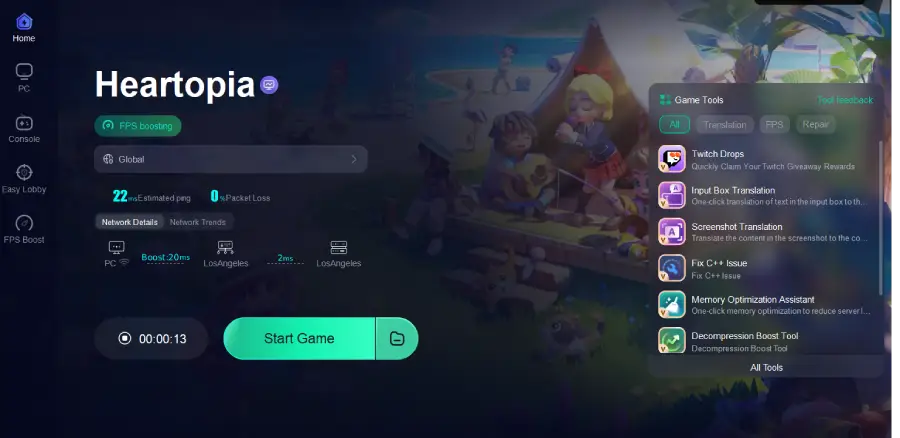
If you want to play Heartopia in a language that isn’t officially supported, a translation tool can help. Lagofast’s One-Click Game Translator lets you translate the game into languages like Russian, Italian, and others. This ensures menus, quests, and dialogue are fully understandable.
But it doesn’t stop there—Lagofast also helps with network issues, lowering ping, keeping your connection stable, and optimizing routing, while giving your FPS a boost and offering other handy in-game tools. With all that working together, you can actually enjoy Heartopia the way it was meant to be played, without struggling with language barriers or lag.
How to Use LagoFast for Heartopia Translation
Step 1: Click the Free Trial button to download and install LagoFast.
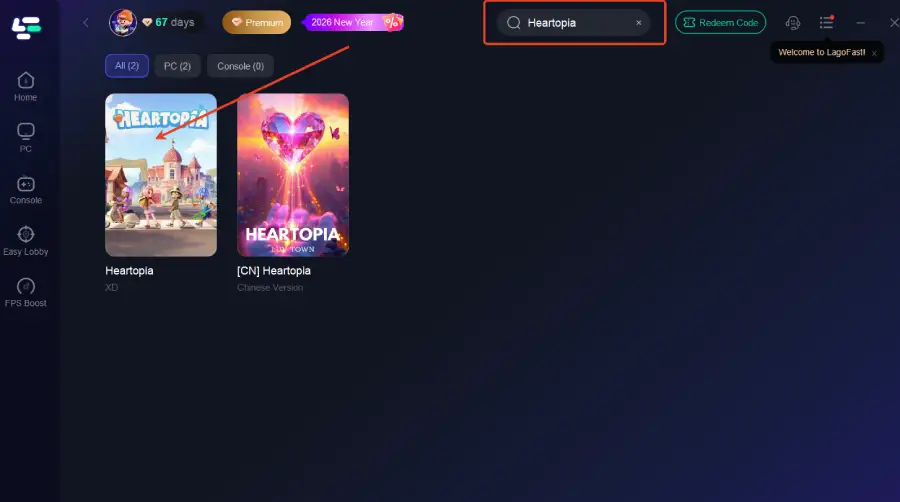
Step 2: After installation, search "Heartopia" in the search bar and select the game.
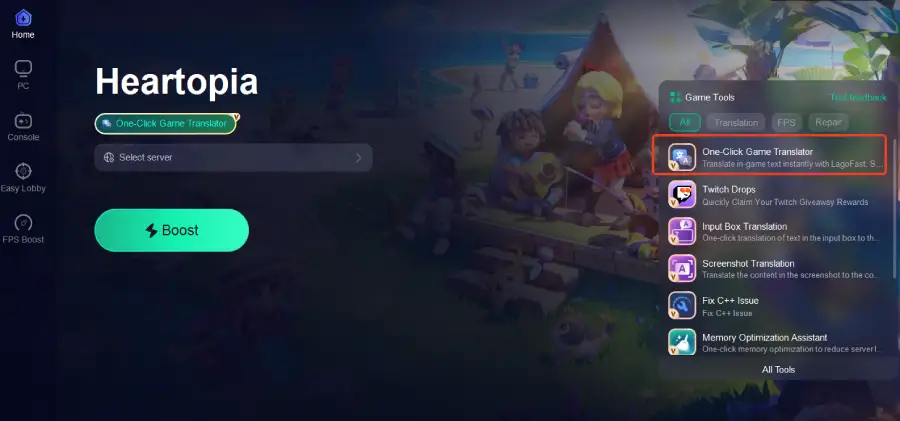
Step 3: Activate the Translation Tool—Click the One-Click Game Translator icon in LagoFast.
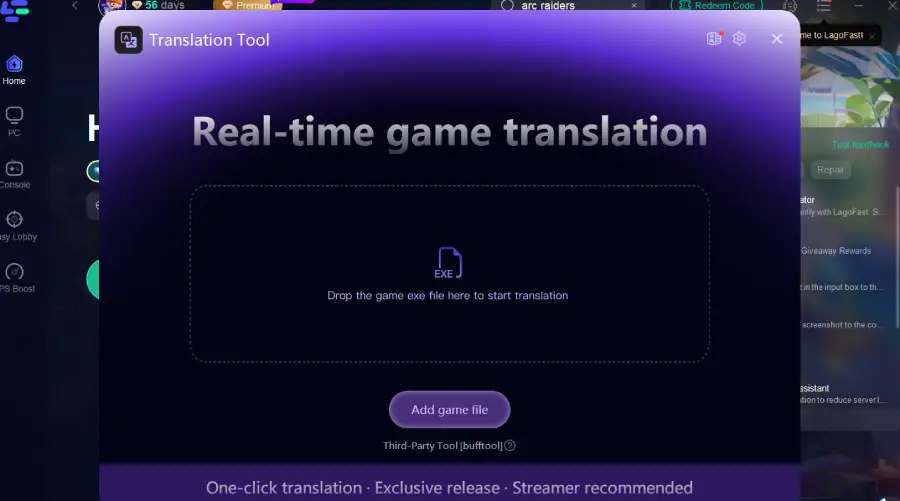
Step 4: Drop the game exe file here to start for instant translation.
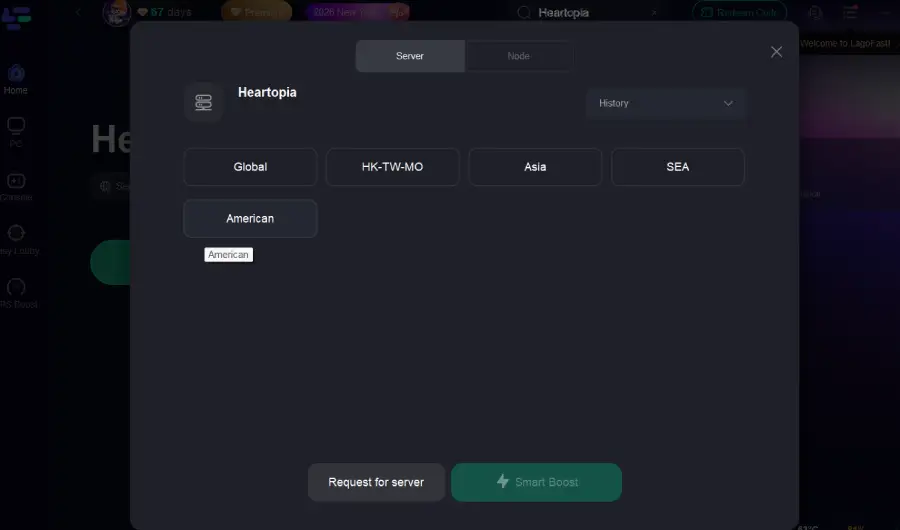
Step 5: Choose your preferred server node and click "Smart Boost" to start optimizing.
Step 6: Launch your game and enjoy smooth, optimized gameplay with lower ping and no stutter.
Conclusion
Heartopia is an exciting adventure, but language barriers can hold back the experience. Using a translation tool like Lagofast can help you play in any language, understand quests, and enjoy smoother gameplay.
Whether it’s translation support or network optimization, these tools make it easier to access the full Heartopia experience. Dive in and explore the game the way it was meant to be enjoyed.

Boost Your Game with LagoFast for Epic Speed
Play harder, faster. LagoFast game booster eliminates stutter and lags on PC, mobile, or Mac—win every match!
Quickly Reduce Game Lag and Ping!
Boost FPS for Smoother Gameplay!