
Quick Answer
Shortly after Early Access launched, many players turned to Reddit looking for answers. One player wrote:
"Game Pass Premium Edition Upgrade Campaign Evolved not launching. Any ideas how to launch on Xbox or PC if you got the upgrade? Xbox App on PC says I'm too early?"
Another shared a similar experience:
"Premium upgrade for Campaign Evolved won’t load"
If you're seeing the same error, the issue is usually not related to Early Access availability. Since Halo Campaign Evolved Early Access is already available across supported platforms, most launch problems are related to Premium Upgrade recognition, Game Pass entitlement, Xbox license syncing, or Xbox App issues.
This guide explains what's causing the problem and walks you through the fixes that have helped players regain access.
What Players Are Experiencing in Halo Campaign Evolved Early Access
Why Halo Campaign Evolved Early Access Is Not Working
Fix 1: Halo Campaign Evolved Premium Upgrade Not Working
Fix 2: Fix the "You're Too Early" Error
Fix 3: Halo Campaign Evolved Xbox App Not Launching
Fix 4: Halo Campaign Evolved Paid Early Access Not Working
Fix 5: Check Your Game Edition and Early Access Eligibility
Advanced Fix – Game Stability and Network Optimization with LagoFast Game Booster
Quick Checklist for Halo Campaign Evolved Early Access Not Working
Halo Campaign Evolved Early Access Not Working FAQ
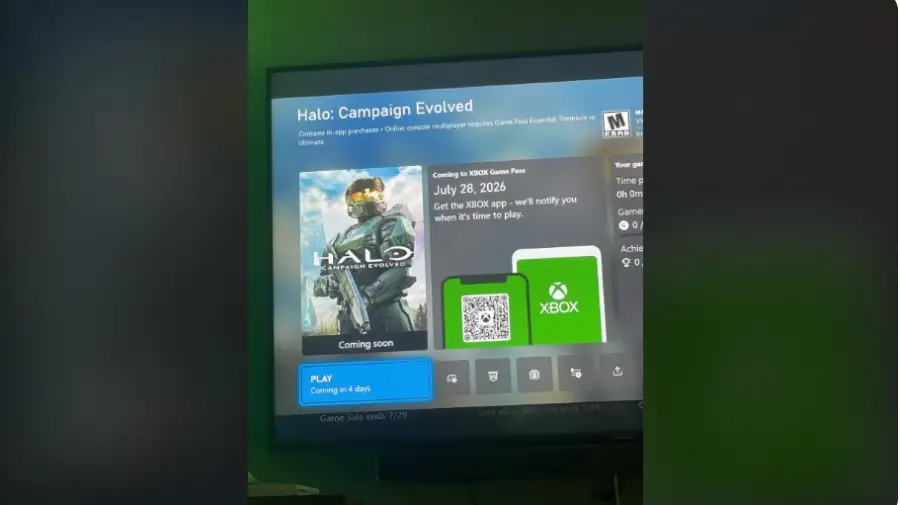
What Players Are Experiencing in Halo Campaign Evolved Early Access
Based on player reports across Reddit and the Xbox community, most Early Access issues fall into a few common categories. While the error messages aren't always the same, they usually point to the same underlying problem—your Premium Upgrade entitlement isn't being recognized correctly.
|
Problem |
What Players See |
|
"You're too early" error |
Purchased Premium but still locked out |
|
Premium Upgrade won't load |
Add-on purchased but not recognized |
|
Xbox App not launching |
Clicking Play does nothing |
|
Paid Early Access not working |
Payment completed but no access |
|
Game Pass confusion |
Unsure whether Premium Upgrade works with Game Pass |
Understanding which issue you're facing is the first step to fixing it. In the next section, we'll explain why each of these problems happens before walking through the solutions.
Why Halo Campaign Evolved Early Access Is Not Working
If you've purchased the Premium Upgrade but still can't access Early Access, the problem is usually related to licensing or account recognition, not the game servers. Below are the most common reasons players are unable to launch the game.
Premium Upgrade Isn't Being Recognized
The Premium Upgrade is an add-on, not a standalone version of the game. If Xbox or the Xbox App doesn't detect the add-on correctly, your account will only recognize the base game. As a result, you may continue to see the "You're too early" message even though the upgrade has been purchased.
Game Pass Standard Edition Doesn't Include Early Access
A common misunderstanding is that having access to Halo Campaign Evolved through Game Pass automatically includes Early Access. In reality, Early Access requires the Premium Upgrade or another edition that includes Early Access benefits.
Xbox License Hasn't Synced Yet
After a purchase is completed, it can take a short time for Xbox to update your license across all services and devices. If the entitlement hasn't synced yet, the game may not recognize that you own the Premium Upgrade, preventing Early Access from unlocking.
Xbox App or Microsoft Store Cache Issues
The Xbox App and Microsoft Store rely on locally cached account and licensing data. If that information hasn't refreshed properly after your purchase, the app may fail to detect your new entitlement, even if the transaction was successful.
You're Signed Into the Wrong Microsoft Account
Your Game Pass subscription, Premium Upgrade purchase, and Xbox profile must all be linked to the same Microsoft account. If you're signed into a different account in the Xbox App or Microsoft Store, the game won't be able to verify your Early Access entitlement.
Fix 1: Halo Campaign Evolved Premium Upgrade Not Working
The first thing to check is whether your Premium Upgrade has been installed correctly. In some cases, the purchase goes through, but the add-on isn't recognized by Xbox or the Xbox App.
- Open Manage Game & Add-ons on Xbox, or check the game's add-ons section in the Xbox App on PC.
- Make sure the Premium Upgrade is installed.
- If it's missing, install it manually and restart the game.
If the upgrade still doesn't appear, restart your device and check again.
Fix 2: Fix the "You're Too Early" Error
If you're stuck on the "You're too early" message, the problem is often related to your Xbox license not updating yet.
- Sign out of your Microsoft account on the Xbox App or console.
- Sign back in using the account that purchased the game or upgrade.
- Restart your PC or Xbox before launching the game again.
If you've just completed the purchase, waiting a short time before trying again may help if the purchase has not finished syncing yet.
Fix 3: Halo Campaign Evolved Xbox App Not Launching
If the Xbox App won't launch the game, make sure both the app and its supporting services are fully up to date.
- Update the Xbox App and Gaming Services.
- Install any available Windows updates.
- Restart your PC and launch the game again.
If the problem continues, repairing or resetting the Xbox App is worth trying.
Fix 4: Halo Campaign Evolved Paid Early Access Not Working
If your payment was successful but Early Access is still locked, it's worth checking whether your purchase has been applied to the correct account.
- Confirm the purchase appears in your Microsoft Order History.
- Verify you're signed into the same Microsoft account that made the purchase.
- Make sure you still have access to the base game through Game Pass if you're using that version.
In many cases, simply refreshing your account or waiting for the license to sync resolves the issue.
Fix 5: Check Your Game Edition and Early Access Eligibility
Not every edition includes Early Access, so it's important to confirm you're using the correct version.
- Standard Edition does not include Early Access.
- Premium Edition includes Early Access.
- Premium Upgrade requires access to the base game, either through Game Pass or a purchased copy.
If you're unsure which edition you own, check your Microsoft purchase history before trying other fixes.
Advanced Fix – Game Stability and Network Optimization with LagoFast Game Booster
If your Premium Upgrade is working but you're still experiencing slow login, high ping, or connection issues, the problem may be related to your network rather than the game itself.
LagoFast helps optimize your connection by reducing ping, fixing packet loss, stabilizing your network, and optimizing routing for a smoother gaming experience. It also includes additional gaming tools like Fixing Game Lag to help improve overall gameplay performance.
How to Use LagoFast to Play Halo Campaign Evolved
Step 1: Download and install LagoFast on your PC
Step 2: Search for the Game: Type "Halo Campaign Evolved" into the search bar.
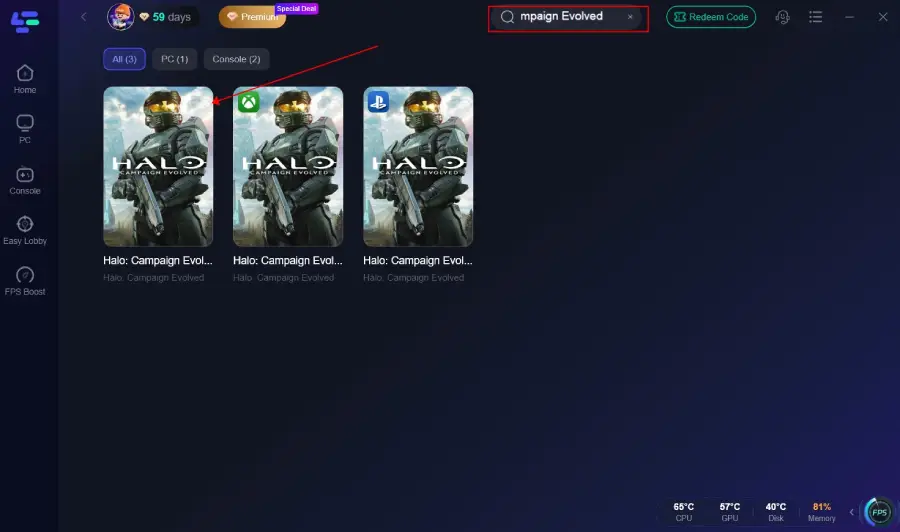
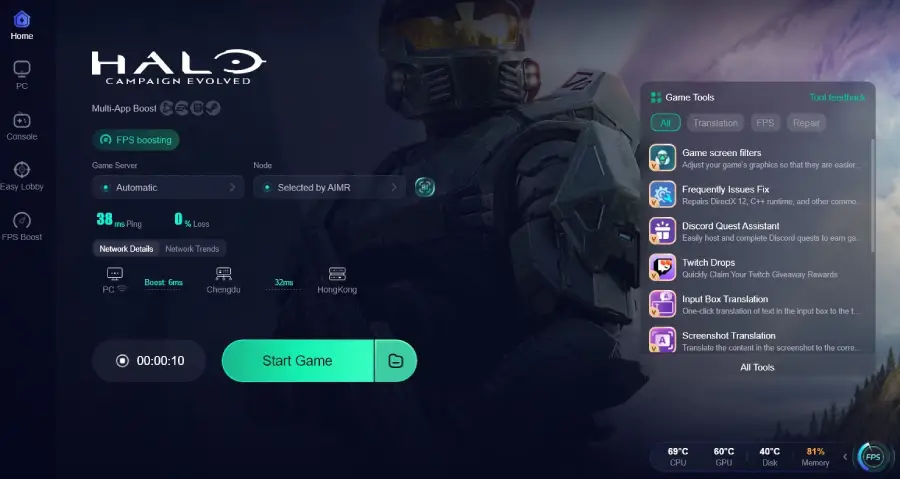
Step 3: Choose your preferred server node and click "Smart Boost" to start optimizing.
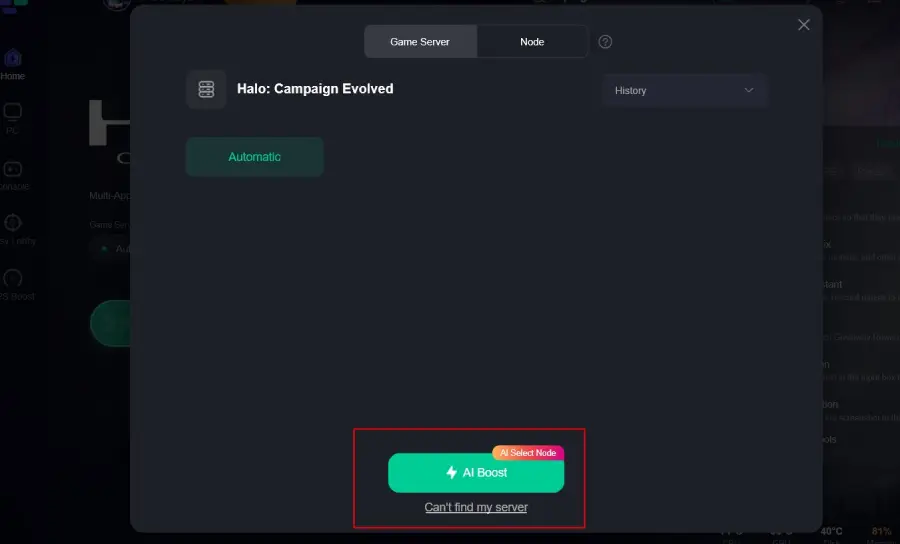
Step 4: Launch the game and enjoy a more stable connection with reduced ping and fewer network-related issues.
Quick Checklist for Halo Campaign Evolved Early Access Not Working
Before trying more advanced troubleshooting or contacting Xbox Support, take a minute to go through these basic checks:
- Confirm the Premium Upgrade is installed.
- Sign in with the Microsoft account used to purchase the game or upgrade.
- Make sure your Game Pass subscription is active (if applicable).
- Update the Xbox App, Gaming Services, and Microsoft Store.
- Restart your PC or Xbox to refresh your license.
- Launch the game again after everything has synced.
If everything on this list checks out and you're still unable to access Early Access, it may be worth contacting Xbox Support for further assistance.
Halo Campaign Evolved Early Access Not Working FAQ
Does the Premium Upgrade work with Game Pass?
Yes. Game Pass players can purchase the Premium Upgrade to unlock Early Access and Premium Edition benefits, as long as they have access to the base game.
Do I need to install the Premium Upgrade separately?
The Premium Upgrade is an add-on, so check that it appears as installed in the Xbox App or on your console. If it isn't detected, reinstalling the add-on may help.
Why can't I access Early Access after buying the Premium Upgrade?
This usually happens when the upgrade hasn't synced with your Microsoft account. Check your purchase history, confirm the add-on is installed, and restart the Xbox App or console.
Can I play Halo Campaign Evolved on Xbox and PC?
You can access the game on supported Xbox platforms as long as you're signed into the same Microsoft account that owns the game or Premium Upgrade.
What should I do if Halo Campaign Evolved Early Access is still locked?
Verify your edition, Premium Upgrade installation, and account details. If everything is correct, contact Xbox Support for further assistance.
Final Thought
If Halo Campaign Evolved Early Access is not working, the issue is usually related to account verification, Premium Upgrade recognition, or Xbox App syncing rather than the game itself. Checking your edition, refreshing your license, and confirming the Premium Upgrade is installed correctly can resolve most access issues. For ongoing connection issues after launching the game, optimizing your network can also help provide a smoother experience.
Boost Your Game with LagoFast for Epic Speed
Play harder, faster. LagoFast game booster eliminates stutter and lags on PC, mobile, or Mac—win every match!
Quickly Reduce Game Lag and Ping!
Boost FPS for Smoother Gameplay!