
Quick Answer:
To beat Fears to Fathom: Scratch Creek, players must navigate the roles of Tessa and Marcus through a series of psychological horror scenarios. The core walkthrough involves reaching the parsonage, completing the "towel" objective under the stairs for the Down in the Dark achievement, and surviving the final chase sequence by unhooking the trailer from the car. If you are stuck at the ending, ensure the car is fixed and the trailer is unhooked before the pursuer catches you. For a lag-free co-op experience, using LagoFast Game Booster is highly recommended to stabilize your connection.
Fears to Fathom: Scratch Creek is the sixth installment in the acclaimed anthology series by Rayll, and it introduces a major shift: online-only co-op. Playing as Tessa Langley and Marcus Reed, you’ll experience a terrifying detour that tests your communication and nerves. This guide provides a complete roadmap to surviving the creek, explaining the endings, and fixing the most common technical hurdles.

- ✅ Reduce Lag and High Ping.
✅ Boost FPS at the Same Time.
✅ Support 8000+ Popular Online Games.
✅ Change Server without Latency.
✅ Boost Game Loading Speed.
Part 1: What Is Fears to Fathom: Scratch Creek?
Part 2: Fears to Fathom Scratch Creek Full Walkthrough
Part 3: Fears to Fathom Scratch Creek Ending Explained
Part 4: Common Stuck Points in Fears to Fathom Scratch Creek
Part 5: Fears to Fathom Scratch Creek Bugs and Connection Issues
Part 6: How to Enhance Your Game Experience with LagoFast Game Booster
Part 7: Bonus Tips: Tips for Playing Scratch Creek with a Friend
Part 8: Fears to Fathom Scratch Creek FAQ
Part 1: What Is Fears to Fathom: Scratch Creek?
Fears to Fathom: Scratch Creek is a psychological horror game that follows the story of a young couple whose move to a new home takes a dark turn. Unlike previous episodes which were solo experiences, Scratch Creek is built from the ground up for two-player online co-op.
The game utilizes a VHS-style aesthetic to create an unsettling atmosphere, drawing inspiration from "true" horror stories shared by the community. Players must work together to solve environmental puzzles, manage limited resources, and make choices that determine their survival. The shift to co-op adds a layer of tension, as your partner's safety is just as important as your own.
Part 2: Fears to Fathom Scratch Creek Full Walkthrough
The walkthrough for Scratch Creek is divided into several key phases. Since the game is co-op, roles are often split between Tessa and Marcus.
- The Detour: The game begins with the couple driving. Pay attention to the dialogue as it sets the stage. When you reach the roadblock, you'll be forced to take the detour into Scratch Creek.
- The Parsonage: Once you arrive at the parsonage, exploration is key. Marcus should head to the basement to check the fuse box if the lights flicker. Tessa should stay in the main hall to monitor the entrance.
- The Towel Objective: One of the most missed objectives is the "towel" under the stairs. Marcus needs to interact with the hidden compartment under the staircase to find a blood-stained towel. This is crucial for the Down in the Dark achievement and adds significant lore context.
- The Stranger Encounter: Throughout the house, you'll hear noises. Do not open the door to anyone unless you've verified their identity through the peephole or dialogue.
- The Escape: The final act involves a frantic dash to the car. One player must focus on starting the engine while the other unhooks the trailer, which is "too heavy" for a quick getaway.
Part 3: Fears to Fathom Scratch Creek Ending Explained
Scratch Creek features multiple endings based on your performance during the final chase.
- The Survivor Ending: This is the "Good" ending. Both Tessa and Marcus successfully unhook the trailer, start the car, and drive away before the pursuer reaches them. This requires perfect coordination and no missed prompts during the car repair sequence.
- The Captured Ending: If one player is caught during the chase or if the car fails to start in time, the game ends with a chilling cinematic showing the couple's fate. This usually happens if the trailer isn't unhooked, slowing the car down significantly.
- The "Holy Cow" Secret: There is a hidden interaction involving the cattle found earlier in the game. If you interact with them in a specific sequence, you unlock a surreal secret ending that deviates from the main plot.
Part 4: Common Stuck Points in Fears to Fathom Scratch Creek
Even seasoned horror fans can find themselves stuck in Rayll's intricate level design. Here are the most frequent blockers:
Stuck and Don't Know Where to Go
If you've finished the dialogue but the objective hasn't updated, check the basement. Many players forget that Marcus has specific triggers in the laundry room and near the water heater that progress the story.
Door Won't Open
Some doors in the parsonage are "event-locked." If a door won't budge, it means you haven't triggered the necessary conversation or found the required item (like the keys in the kitchen drawer).
Objective Not Updating
This is often a co-op sync issue. Ensure both players have interacted with the "active" object. For example, both players might need to be present in the kitchen for the dinner sequence to begin.
Chase Sequence Keeps Failing
The most common reason for failure is the trailer. You cannot escape with the trailer attached. One player must manually unhook it at the back of the car while the other is in the driver's seat.
Game Not Progressing After Interaction
If you've picked up an item but the game doesn't acknowledge it, try dropping it and picking it up again. This is a known bug in the launch version of the game.
Part 5: Fears to Fathom Scratch Creek Bugs and Connection Issues
As an online-only co-op game, Scratch Creek is susceptible to network-related bugs. Players have reported:
- Input Lag: Actions taking a second to register, which is fatal during the chase.
- Desync: One player seeing the pursuer in a different location than the other.
- Voice Chat Failure: The in-game proximity chat cutting out, making coordination impossible.
These issues are often caused by high ping or unstable routes to the game's peer-to-peer servers.
Part 6: How to Enhance Your Game Experience with LagoFast Game Booster
To ensure your horror experience isn't ruined by technical glitches, using a dedicated game booster is essential. LagoFast (LagoFast Game Booster - Get No Lag and Lower Ping) Game Booster is the premier choice for PC gamers looking to stabilize their connection in co-op titles like Scratch Creek. It optimizes your network path, reduces ping, and eliminates packet loss.
Detailed Steps to Use LagoFast for Scratch Creek:
Click the Free Trial button to download and install LagoFast Free Trial.
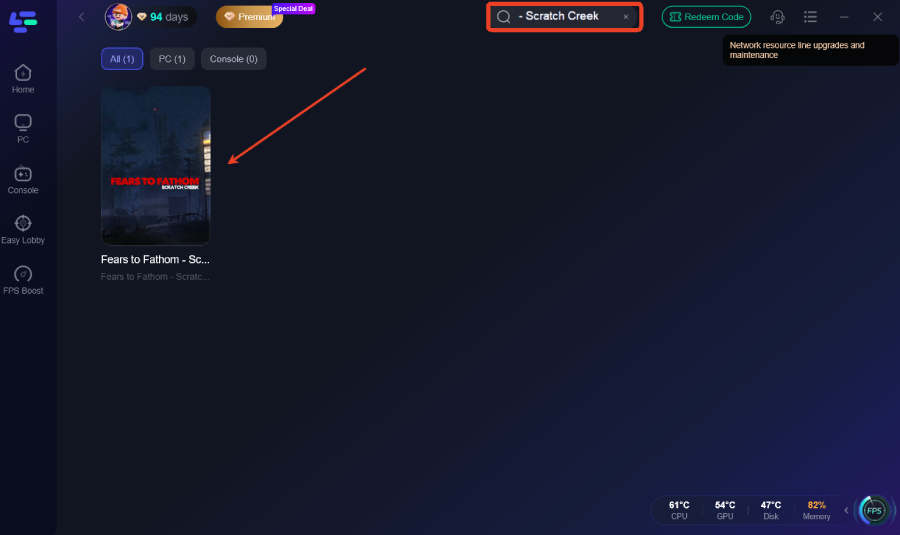
Search for the Game: Open LagoFast and type "Fears to Fathom: Scratch Creek" in the search bar.
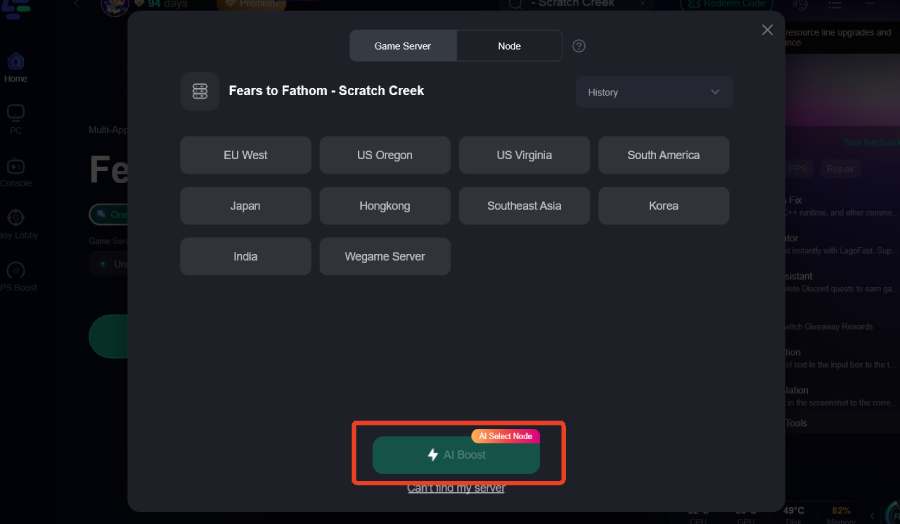
Select Your Region: Choose the server region closest to you and your co-op partner to minimize latency.
Smart Boost: Click the "Boost" button. LagoFast will automatically find the fastest route to the game's servers.
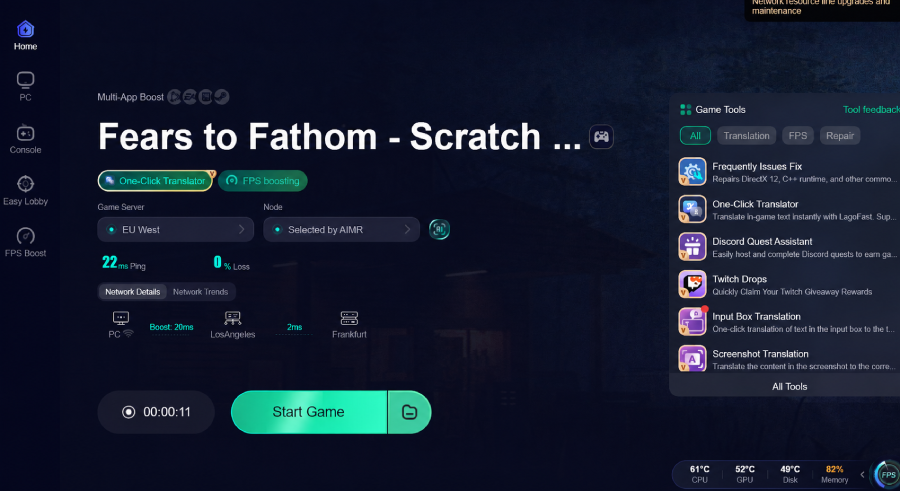
Launch the Game: With the boost active, launch Scratch Creek from Steam. You will notice a much smoother experience with zero desync issues.
Part 7: Bonus Tips: Tips for Playing Scratch Creek with a Friend
- Use Proximity Chat: The game is designed for it. The tension of your friend's voice fading as they walk into another room is part of the experience.
- Split the Tasks: Don't bunch up. Have one person check the windows while the other searches for items.
- Stay Quiet: The game uses your microphone. If you scream or talk too loudly during stealth sections, the pursuer will find you.
- Watch the VHS Glitches: If the screen starts flickering violently, it means the threat is nearby. Use this visual cue to hide.
Part 8: Fears to Fathom Scratch Creek FAQ
How Long Does Fears to Fathom Scratch Creek Take to Beat?
A single playthrough typically takes between 90 to 120 minutes. However, finding all secrets and achievements can extend this to 4 hours.
Is Fears to Fathom Scratch Creek Worth Playing?
Absolutely. It is widely considered the most ambitious entry in the series due to its co-op mechanics and expanded world-building.
Can I Play Scratch Creek Solo?
No, the game is strictly online co-op only. You will need a friend or use the matchmaking system to play.
What are the System Requirements?
You'll need at least an Intel i5-4670, 8GB of RAM, and a GTX 1050 to run the game smoothly at 1080p.
Does the Game Have Jump Scares?
Yes, but they are earned. The game focuses more on psychological dread and atmosphere than cheap scares.
Key Takeaways
- Co-op is Mandatory: You must have a partner to play Scratch Creek.
- Unhook the Trailer: This is the #1 reason players fail the ending chase.
- Check the Basement: Most "stuck" points are resolved by exploring the lower levels of the parsonage.
- Optimize Your Connection: Use LagoFast Game Booster to prevent desync and lag from ruining your immersion.
- Microphone Matters: Your real-world noise affects the in-game stealth.
By following this walkthrough and using the right tools, you and your partner can survive the horrors of Scratch Creek and uncover the truth behind Tessa and Marcus's terrifying detour.

Boost Your Game with LagoFast for Epic Speed
Play harder, faster. LagoFast game booster eliminates stutter and lags on PC, mobile, or Mac—win every match!
Quickly Reduce Game Lag and Ping!
Boost FPS for Smoother Gameplay!