
Quick Answer: How to Fix FC 26 Clubs Matchmaking Not Working
If your FC 26 Clubs matchmaking isn't working, start by restarting your game and console/PC, then check EA server status. Ensure all squad members have the latest game update and try restarting your Club lobby with a different captain. For PC players, updating EA AntiCheat can sometimes resolve issues. If these basic steps fail, optimize your internet connection by restarting your router, using a wired connection, and disabling VPNs. For persistent problems, especially those related to network stability or regional connectivity, consider using a game booster like LagoFast to optimize your connection and potentially bypass regional matchmaking discrepancies.

- ✅ Reduce Lag and High Ping.
✅ Boost FPS at the Same Time.
✅ Support 3000+ Popular Online Games.
✅ Change Server without Latency.
✅ Boost Game Loading Speed.
Part 1: Understanding FC 26 Clubs Matchmaking Problems
Part 2: Common FC 26 Clubs Matchmaking Issues & Solutions
Part 3: Troubleshooting Your Network for FC 26 Clubs Matchmaking
Part 4: Game-Specific Fixes for FC 26 Clubs Matchmaking
Part 5: How to Enhance Your Game Experience with LagoFast Game Booster
Part 6: FC 26 Clubs Matchmaking Not Working FAQ
Part 7: Summary of FC 26 Clubs Matchmaking Issues by Stage
Understanding FC 26 Clubs Matchmaking Problems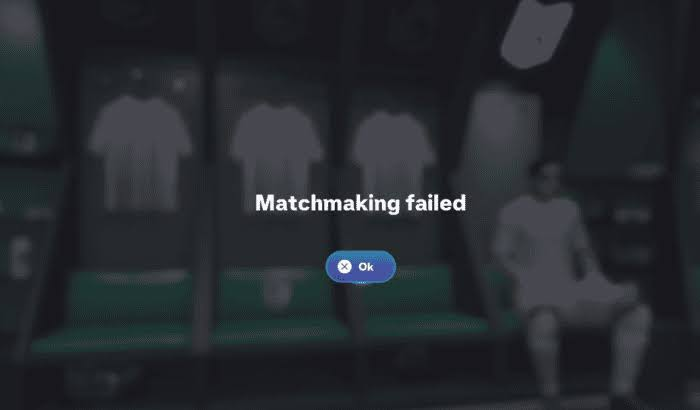
FC 26 Clubs, a beloved mode for many players, allows friends to team up and compete as a unified club. However, the experience can quickly turn frustrating when matchmaking fails to deliver. Players often encounter a range of issues, from being unable to find a match at all to experiencing disconnections mid-game. These problems can stem from various sources, including server-side outages, client-side bugs, network configuration issues, or even regional discrepancies in matchmaking pools. Understanding the nature of these problems is the first step toward finding an effective solution.
Common FC 26 Clubs Matchmaking Issues & Solutions
Matchmaking problems in FC 26 Clubs can manifest in several ways, each requiring a slightly different approach to troubleshooting. Here, we break down the most frequently reported issues and their corresponding fixes.
FC 26 Pro Clubs Matchmaking Failed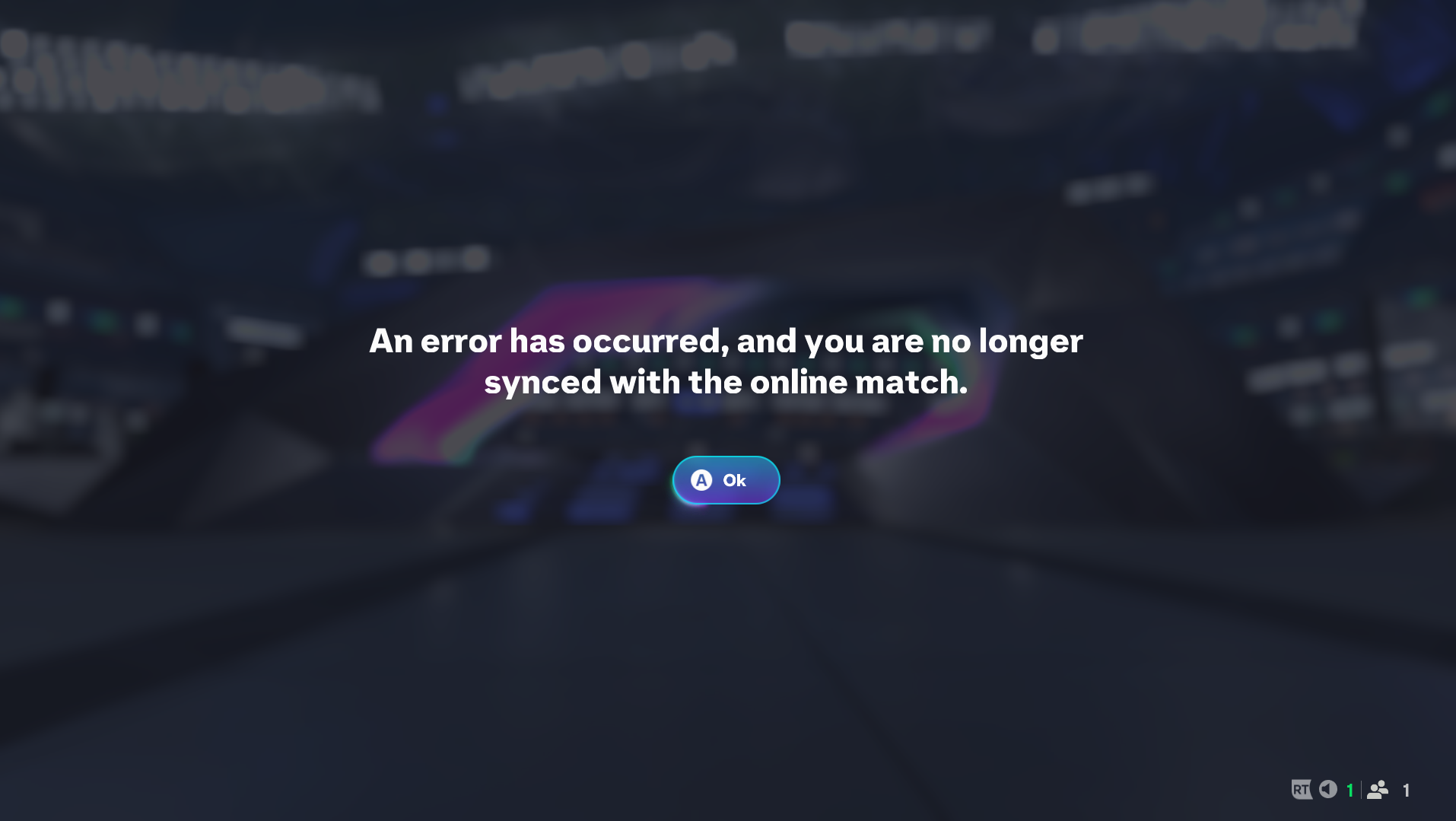
This is a general error indicating that the game could not successfully find or initiate a match. It's often the most common complaint.
- Solution: Begin by restarting your game and your PC/console. Verify that all players in your club have the latest game update installed. Sometimes, simply leaving your current Club lobby, creating a new one, and having all members rejoin can resolve this. Try having a different club member initiate the match search.
FC 26 Unable to Find League Match
Players might find that drop-in matches or friendly games work, but league matches specifically fail to connect. This points to an issue within the league matchmaking system.
- Solution: This can often be linked to server-side issues specific to league play. Check official EA forums and social media for announcements regarding server status. Ensure your club's region settings are correctly configured and consistent among all members. Some players have reported success by toggling cross-play settings off and on again.
FC 26 Stuck Searching for Match
An endless search queue where the game never finds an opponent, or the search timer keeps running indefinitely.
- Solution: This usually indicates a connection problem or a very low player count in your region/division. Try canceling the search and restarting it. If playing with friends, ensure everyone has a stable internet connection. Consider expanding your search parameters if possible (though FC 26 Clubs typically handles this automatically). If the issue persists, it might be a server-side problem with matchmaking pools.
FC 26 Failed to Connect to Opponent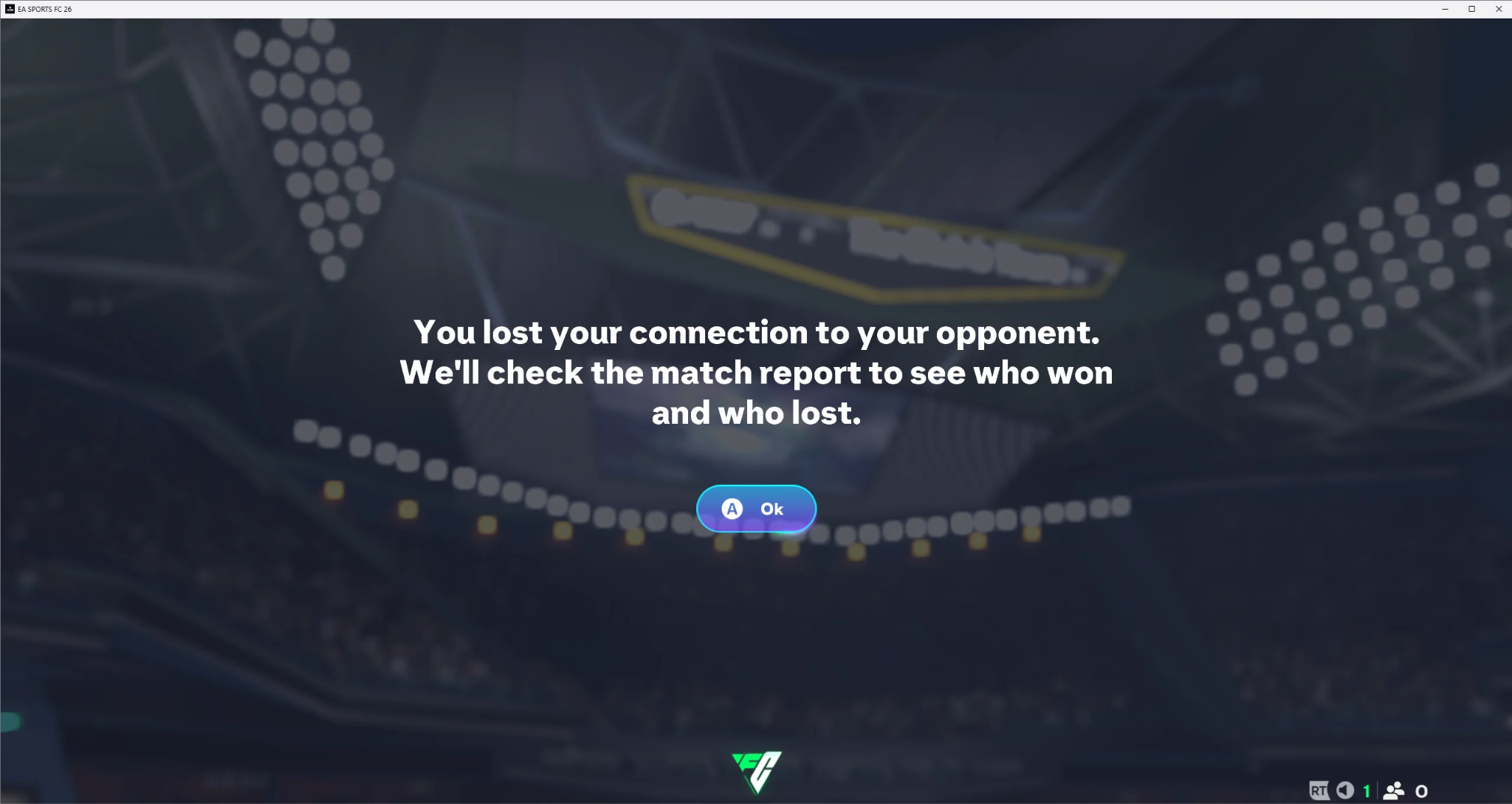
After a match is found, the game attempts to connect to the opponent but fails, often returning you to the lobby with an error message.
- Solution: This is frequently a network-related issue. Ensure your internet connection is stable and that your NAT type is Open. Check your firewall settings to ensure FC 26 is not being blocked. If playing with a squad, one player might have a connection issue that prevents the entire team from connecting. Try having different players host the lobby.
FC 26 Matchmaking Works After One Player Leaves
This peculiar issue suggests that a specific player in your squad might be causing the matchmaking to fail.
- Solution: If you identify a pattern where matchmaking only works after a particular player leaves the lobby, that player should troubleshoot their own connection and game installation. This could involve verifying game files, checking their internet connection, or even reinstalling the game. It's also possible their account has a temporary flag or issue with EA's matchmaking system.
FC 26 Matchmaking Failed After Update
Game updates, while necessary, can sometimes introduce new bugs that affect matchmaking.
- Solution: After an update, always restart your PC/console and the game. Verify game files through your platform's client (Steam, Origin/EA App). For PC players, reinstalling or updating EA AntiCheat has been a reported fix for some. Keep an eye on official EA channels and community forums for specific post-update bug reports and hotfixes.
Troubleshooting Your Network for FC 26 Clubs Matchmaking
A stable and optimized network connection is paramount for online gaming. Many matchmaking issues can be traced back to local network problems.
Restart Your Router and Modem
This is the classic first step for any internet-related issue. Power cycle your router and modem by unplugging them for 30 seconds, then plugging them back in. This can refresh your network connection and clear temporary glitches.
Use a Wired Ethernet Connection
Wi-Fi can be prone to interference and signal drops, leading to unstable connections. A wired Ethernet connection provides a more consistent and faster connection, significantly reducing latency and packet loss.
Disable VPNs and Proxies
While VPNs can be useful for privacy, they can also interfere with game matchmaking by routing your connection through distant servers, increasing ping, or causing conflicts with anti-cheat systems. Temporarily disable any VPNs or proxies while playing FC 26.
Check Your NAT Type
Your Network Address Translation (NAT) type affects how your device communicates with other players' devices. An
Open NAT type is ideal for online gaming, as it allows for direct connections with other players. Moderate or Strict NAT types can restrict connectivity and lead to matchmaking issues. You can usually check and change your NAT type through your router settings or console network settings.
Flush DNS and Renew IP
Sometimes, your DNS cache can become corrupted, leading to connectivity problems. Flushing your DNS and renewing your IP address can resolve these issues. This can be done through your operating system's command prompt (for Windows: ipconfig /flushdns and ipconfig /renew).
Check Firewall and Antivirus Settings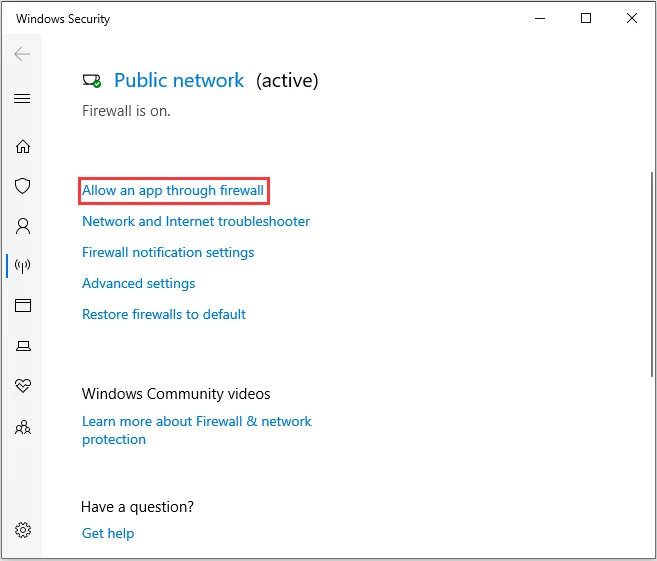
Your firewall or antivirus software might be blocking FC 26 from establishing proper connections. Ensure that FC 26 and its associated services (like EA AntiCheat) are whitelisted or allowed through your firewall. Temporarily disabling your antivirus (if safe to do so) can help diagnose if it's the culprit.
Game-Specific Fixes for FC 26 Clubs Matchmaking
Beyond general network troubleshooting, there are several game-specific actions you can take to address FC 26 Clubs matchmaking problems.
Verify Game Files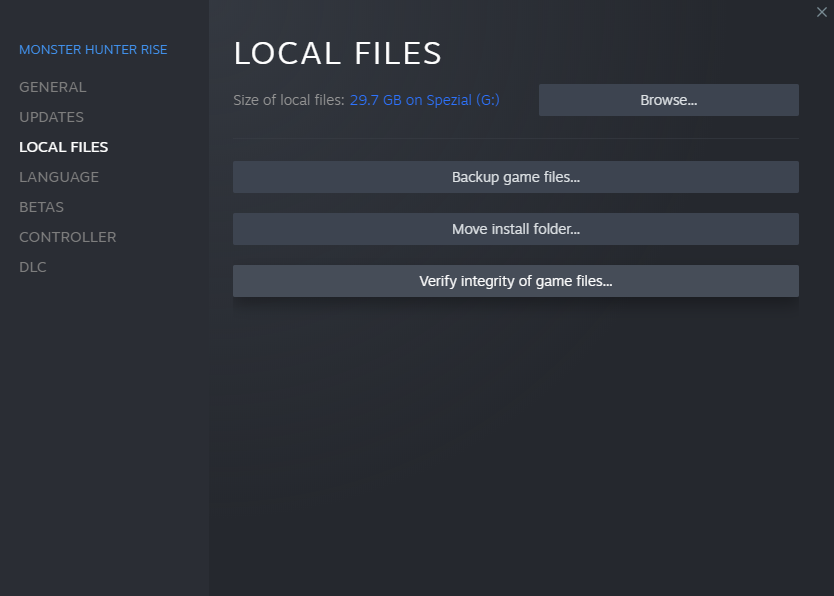
Corrupted or missing game files can lead to unexpected errors, including matchmaking failures. Use your game client (Steam, EA App) to verify the integrity of your game files. This process checks for any discrepancies and redownloads necessary files.
Update EA AntiCheat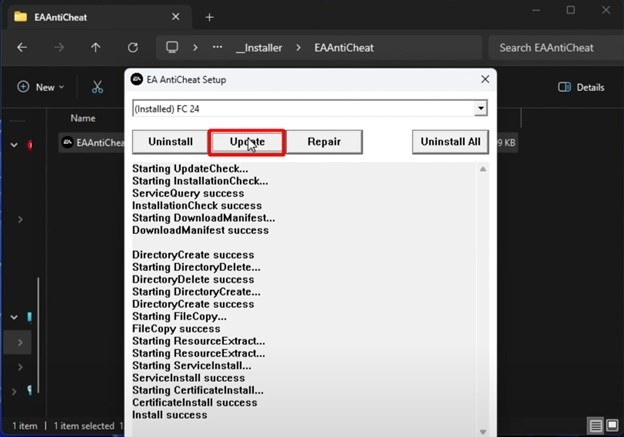
For PC players, EA AntiCheat is a critical component. Issues with this software can prevent the game from launching or connecting to online services. Navigate to your FC 26 installation folder, find the EA AntiCheat installer, and run it. Select FC 26 and choose the "Update" or "Repair" option. Restart your PC afterward.
Clear Cache Data
Both your game client and your console/PC can store cache data that, over time, might become corrupted and interfere with game functions. Clearing the cache can often resolve these issues. For PC, this might involve clearing the cache of the EA App or Steam. For consoles, there are specific steps to clear the system cache.
Reinstall the Game
As a last resort, if all other troubleshooting steps fail, a clean reinstallation of FC 26 can resolve deep-seated issues. Ensure you completely uninstall the game and delete any leftover files before performing a fresh installation.
Check for Game Updates and Server Status
Always ensure your game is fully updated to the latest version. Developers frequently release patches to address known bugs, including matchmaking issues. Additionally, check official EA Sports FC social media channels and forums for real-time server status updates. If the servers are down or experiencing issues, there's little you can do but wait for EA to resolve them.
How to Enhance Your Game Experience with LagoFast Game Booster
Even with a stable internet connection and a perfectly configured game, network congestion, routing inefficiencies, and regional server distances can still lead to high ping and unstable connections in FC 26 Clubs. This is where a specialized tool like LagoFast(LagoFast Game Booster - Get No Lag and Lower Ping) Game Booster becomes invaluable.
Why LagoFast is Essential for FC 26 Clubs:
- Optimized Routing: LagoFast intelligently analyzes network conditions and selects the most efficient route for your game data to reach the FC 26 servers. This bypasses congested internet pathways, significantly reducing ping and packet loss, which are critical for responsive gameplay in a fast-paced game like FC 26.
- Reduced Lag and Stutter: By stabilizing your connection, LagoFast minimizes lag spikes and micro-stutters that can disrupt your gameplay, especially during crucial moments in a match.
- Global Server Support: Whether you're playing on local servers or connecting to distant regions for a wider player pool, LagoFast optimizes your connection to ensure the best possible performance.
- One-Click Boost: With a simple click, LagoFast applies its optimizations, making it easy for any player to improve their game experience without complex network configurations.
Detailed Steps to Use LagoFast Game Booster:
Click the Free Trial button to download and install LagoFast Free Trial.
Register and Log In: Create a new account or log in with your existing credentials. Ensure your subscription is active to access all features.
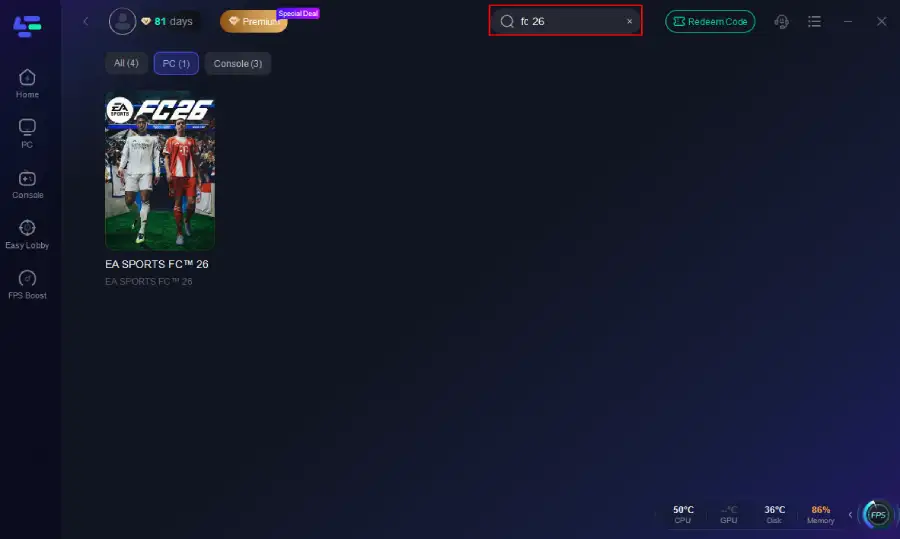
Search for FC 26: In the LagoFast application, use the search bar to find "FC 26" or "EA Sports FC" from the list of supported games.
Select Server and Node: Choose the game server region you typically play on. LagoFast will automatically recommend the optimal node for your connection. You can also manually select a node if you prefer.
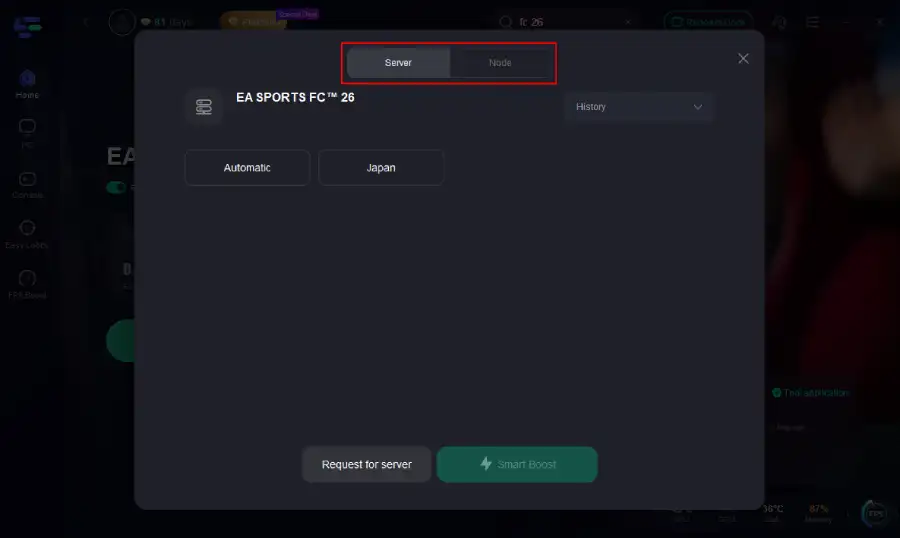
Start Boosting: Click the "Boost" button. LagoFast will begin optimizing your network connection, and you will see real-time statistics for ping and packet loss.
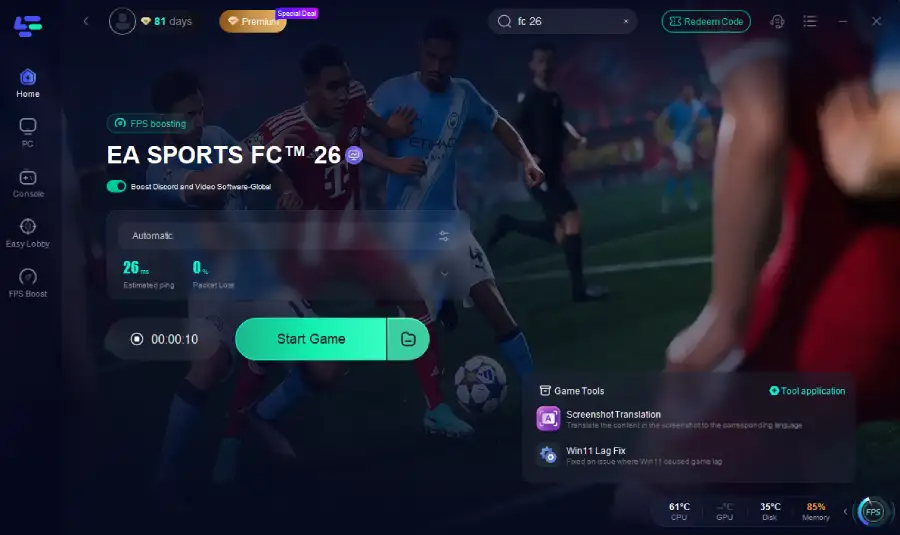
Launch FC 26: Start FC 26 through your usual launcher (Steam, EA App). You should immediately notice a more stable connection and potentially lower ping, leading to a smoother matchmaking and gameplay experience.
FC 26 Clubs Matchmaking Not Working FAQ
Q1: Why is my FC 26 Clubs matchmaking so slow?
A1: Slow matchmaking can be due to low player population in your region/division, server issues, or a poor internet connection. Ensure your game is updated and your network is stable.
Q2: Can a bad internet connection cause matchmaking to fail?
A2: Yes, an unstable or slow internet connection is a common cause of matchmaking failures, disconnections, and difficulty finding matches. A wired connection is always recommended.
Q3: Does cross-play affect FC 26 Clubs matchmaking?
A3: Cross-play expands the player pool, potentially speeding up matchmaking. However, if there are issues with cross-platform compatibility or network settings, it can sometimes contribute to problems. Toggling it off and on can help.
Q4: What is NAT type, and how does it relate to matchmaking?
A4: NAT (Network Address Translation) type affects your ability to connect with other players. An Open NAT type is best for online gaming, allowing direct connections. Moderate or Strict NAT can limit who you can connect with, leading to matchmaking issues.
Q5: Should I reinstall FC 26 if matchmaking isn't working?
A5: Reinstalling the game should be a last resort after trying all other troubleshooting steps. It can resolve corrupted files but is time-consuming.
Summary of FC 26 Clubs Matchmaking Issues by Stage
|
Issue Description |
Stage of Problem |
Common Causes |
Potential Solutions |
|
FC 26 Pro Clubs Matchmaking Failed |
Initial Search / Connection |
Server outages, game bugs, local network issues |
Restart game/PC, check server status, restart lobby, update game |
|
FC 26 Unable to Find League Match |
Search Phase |
Low player population, server-side league bugs, regional restrictions |
Check server status, toggle cross-play, use LagoFast for better routing |
|
FC 26 Stuck Searching for Match |
Search Phase |
Network instability, low player count, server congestion |
Restart search, check internet connection, use LagoFast to optimize connection |
|
FC 26 Failed to Connect to Opponent |
Connection Phase |
NAT type issues, firewall blocks, unstable internet, peer-to-peer conflicts |
Check NAT type, whitelist in firewall, use wired connection, use LagoFast |
|
FC 26 Matchmaking Works After One Player Leaves |
Lobby / Player-Specific |
Corrupted game files for one member, specific player network issues, account flag |
Affected player should troubleshoot game/network, verify files, or reinstall |
|
FC 26 Matchmaking Failed After Update |
Post-Update |
New bugs introduced by patch, server-side conflicts, outdated AntiCheat |
Restart game/PC, verify game files, update EA AntiCheat, wait for official hotfix |
Key Takeaway
Experiencing matchmaking issues in FC 26 Clubs can be incredibly frustrating, but most problems have identifiable causes and solutions. By systematically troubleshooting your network, verifying game files, and staying informed about server status, you can often resolve these issues yourself. For persistent or complex problems, especially those related to network routing, regional restrictions, or general lag, leveraging a game booster like LagoFast can provide a significant advantage, ensuring a smoother, more reliable, and ultimately more enjoyable FC 26 Clubs experience. Don't let technical glitches keep you off the pitch—take action and get back to dominating the virtual field with your club.
Boost Your Game with LagoFast for Epic Speed
Play harder, faster. LagoFast game booster eliminates stutter and lags on PC, mobile, or Mac—win every match!
Quickly Reduce Game Lag and Ping!
Boost FPS for Smoother Gameplay!