
Lilith Games' Farlight 84 caught players' attention from its PC launch, offering a fast-paced hero-based battle royale experience that blends gunplay, hero development, and pet capturing. To meet players' demands for cross-device access, the game will expand to mobile platforms and launch cross-platform testing for both PC and mobile in August 2025. This article will guide you through Farlight 84's available platforms, system requirements, and tips to enhance gameplay across different devices!

- ✅ Reduce Lag and High Ping.
- ✅ Boost FPS at the Same Time.
- ✅ Support 2000+ Popular Online Games.
- ✅ Change Server without Latency.
- ✅ Support Cross-Platform Gameplay.
Part 1: Introduction to Farlight 84
Part 2: Farlight 84 Platform Details
Part 3: Farlight 84 System Requirements on PC
Part 4: Farlight 84 System Requirements on Mobile
Part 5: How to Enhance Gaming Experience in Farlight 84
Part 1: Introduction to Farlight 84
Farlight 84 mixes traditional hero-building games with shooting games. It introduces a post-apocalyptic battle royale setting, taking place in the year 2084. Players enter a futuristic world to fight for survival.
Gameplay Features of Farlight 84
- Hero Diversity: Choose from over 16 heroes, each with distinct roles (Attack, Defense, Recon, Support) and ultimate abilities.
- Buddies System: Capture and deploy "Buddies"—cute yet powerful creatures that assist in combat. These pets can scan enemies, create cover, or even manipulate the toxic zone.
- Jetpack Mobility: Utilize jetpacks for vertical movement, enabling dynamic evasion and flanking tactics.
- Vehicle Warfare: Command futuristic vehicles like hoverbikes, mechs, and mobile turrets to dominate the battlefield.
- Respawn Mechanics: Unlike traditional battle royales, players can revive instantly within the first 8 minutes of a match or be rescued by allies.
Part 2: Farlight 84 Platform Details
On August 7, Farlight 84 CN launched its global open test on PC and Mobile, allowing players to download and enjoy the game via its official website, enabling seamless cross-device logins, progress syncing, and cross-platform multiplayer.
Part 3: Farlight 84 System Requirements on PC
Playing Farlight 84 on PC offers the best immersive experience with high-definition visuals. Meeting the system requirements ensures smooth gameplay. Below are the PC specifications:
Minimum System Requirements
- OS: 64-bit Windows 10
- Processor: Intel Core i3 6300 or Equivalent
- Memory: 6 GB RAM
- Graphics: NVIDIA GeForce® GT 640
- DirectX: Version 11
- Network: Broadband Internet connection
- Storage: 10 GB available space
Recommended System Requirements
- OS: 64-bit Windows 10
- Processor: Ryzen 5 CPU or Equivalent
- Memory: 8 GB RAM
- Graphics: AMD Radeon™ R9 290, NVIDIA GeForce® GTX 970
- DirectX: Version 11
- Network: Broadband Internet connection
- Storage: 10 GB available space
Part 4: Farlight 84 System Requirements on Mobile
The main reason Farlight 84 is getting popular again is that it's coming to mobile devices and starting a test. Knowing its system requirements for Mobile will help players enjoy smoother gameplay on their phones.
Minimum System Requirements
- CPU: Snapdragon 660 / MediaTek Helio G85 (Mali-G52 MP2)
- RAM: 4GB and above
- Version: Android 7.0 and above
Recommended System Requirements
- CPU: Snapdragon 8Gen2 processor and above
- RAM: 6GB and above
- Version: Android 12.0 and above
Part 5: How to Enhance Gaming Experience in Farlight 84
Meeting Farlight 84's system requirements is just the first step to smooth gameplay. To avoid lag or stuttering caused by network delays or server congestion, we recommend using LagoFast—a trusted game accelerator popular worldwide.
Key Features of LagoFast:
- Stable Connections: Avoids congested networks to minimize disconnects and maintain connection reliability.
- Ping Reduction: Lowers latency by optimizing data transmission routes and avoiding server congestion.
- Game-Specific Tool Support: Provides custom tools and mods for various games, enabling one-click installation to boost performance.
- Global Server Network: Deploys server nodes in over 60 countries and 150+ cities worldwide, offering diverse server options for players.
- Free Trial: After downloading, players can claim a 3-day free trial to test the service risk-free.
How to Play Farlight 84 on PC with LagoFast
Click the "Free Trial" button to download and install LagoFast.
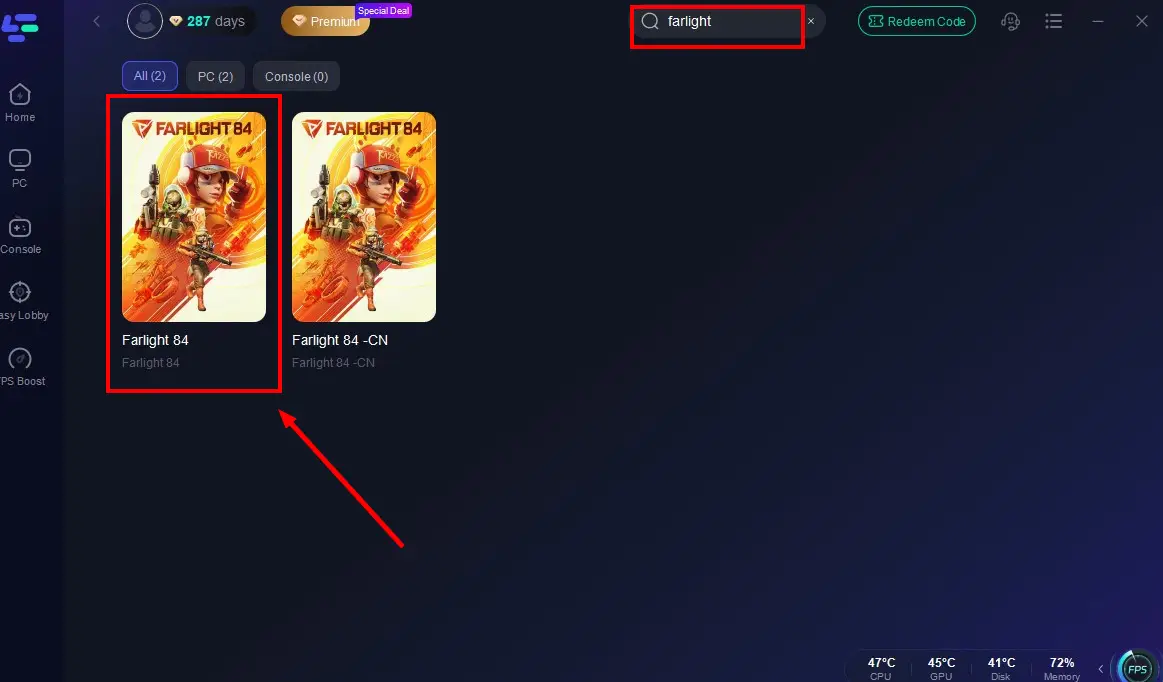
Launch LagoFast after installation, and search for "Farlight 84" in the search bar (LagoFast also supports accessing Chinese servers from other regions).
Select the optimal server to connect.

Once real-time game data optimization is confirmed, click "Start Game" to enjoy lag-free Farlight 84!

For Mobile Players
Since Farlight 84 CN's new open test is currently only available globally, mobile users can also use LagoFast Mobile to download and experience the game smoothly.
Step 1: Visit the official website of LagoFast, download the LagoFast Mobile APK file, and follow the prompts to complete the installation.

Step 2. Search for Farlight 84 CN: Open LagoFast, type the game’s name in the search bar, and select the first one.
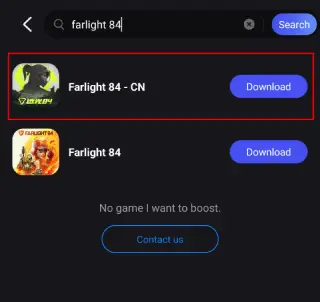
Step 3. One-Click Download: LagoFast will handle the APK download and installation, ensuring compatibility with your device.
Once installed, launch the game through LagoFast to enjoy optimized performance and reduced lag.
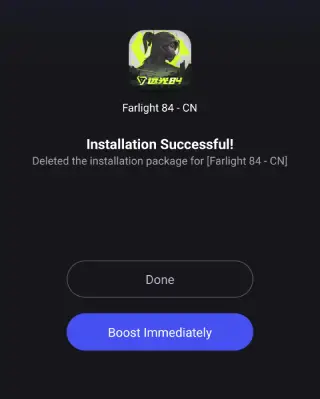
After successfully downloading Farlight 84 CN on Mobile, don't forget to activate LagoFast's optimization feature.
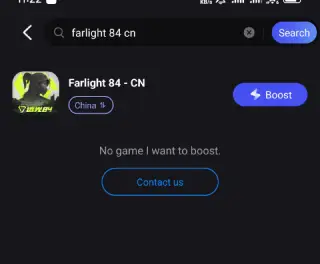
Search Farlight 84 in LagoFast Mobile's search bar.
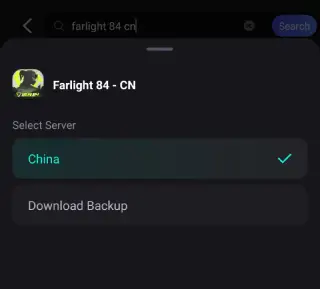
Choose a better server according to your location.
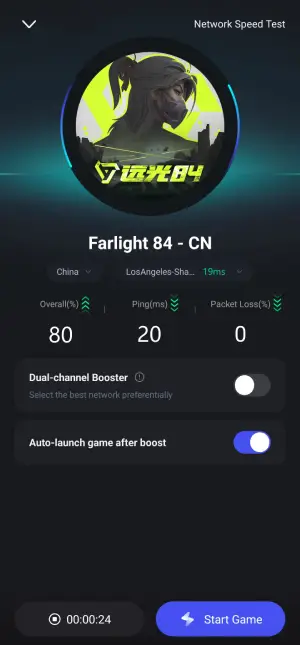
Check the game data in real-time and click the "Start Gane" button.
While playing Farlight 84 CN Mobile test server, the most difficult problem for international players is the language barrier, LagoFast can help to them to play Farlight 84 in native languages. Here are steps:
Step 1: Find Farlight 84 CN in the Boost tab of LagoFast Mobile, locate the Quick Translate tool below.
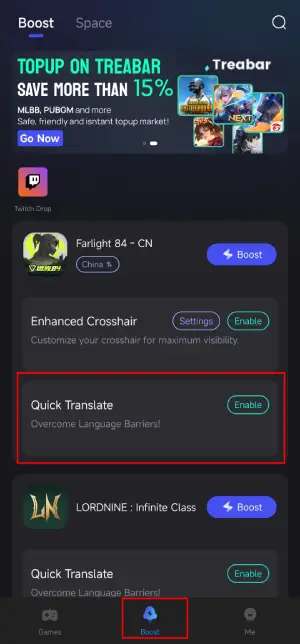
Step 2: Complete two settings:
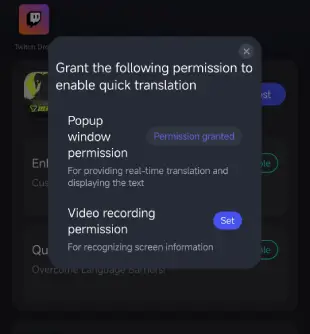
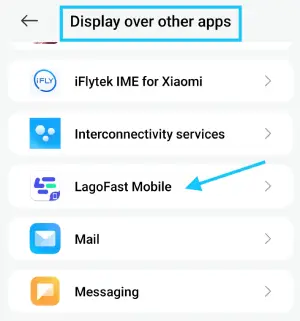
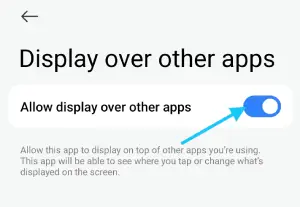
- Set popup window permissions: Enable "Display over apps.
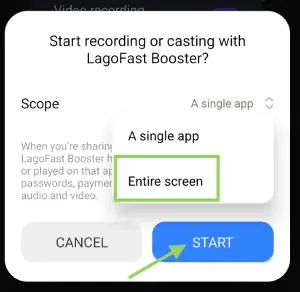
- Set video recording permissions: Tap the Set button, select Full Screen, then start the translation tool.
Step 3: Return to the game and use the floating translation ball provided by the tool to translate the Farlight 84 CN into your target language.
Important Note:
- This translation tool is only available for Android users.
- Before enabling the Valorant Mobile translation tool, ensure LagoFast's language settings are adjusted to your target language.
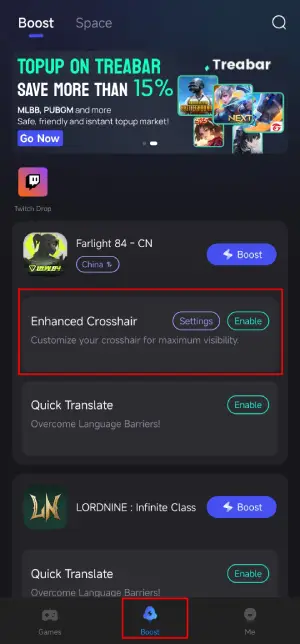
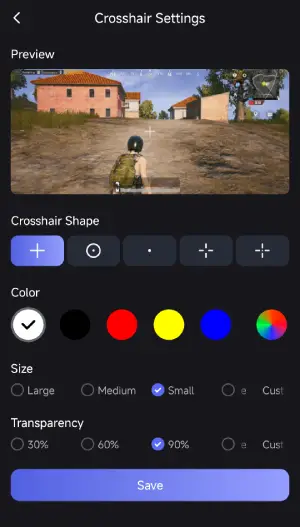
What's more, LagoFast provides the Enhanced Crosshair tool for players to further enhance their gameplay. This tool can help them to change the color and size of crosshair, improve the shooting experience. Here is how to use it:
Step 1: Find the Enhanced Crosshair tool in LagoFast Mobile.
Step 2: Complete the settings according to your gamplay habbit.
Now embark your seamless and enhanced gameplay in Farlight 84 CN open test with LagoFast!
Conclusion
Both Farlight 84 veterans on PC and new players will enjoy a fresh battle royale experience with the game's new content in this final test! Know Farlight 84 system requirements for PC and Mobile, and download LagoFast to help you play smoothly!
Boost Your Game with LagoFast for Epic Speed
Play harder, faster. LagoFast game booster eliminates stutter and lags on PC, mobile, or Mac—win every match!
Quickly Reduce Game Lag and Ping!
Boost FPS for Smoother Gameplay!