
Farever connection issues were heavily reported on May 7, 2026, but the latest live monitoring pages show the game operational or stabilizing now—so if you still can’t connect, check server status first, it may a regional or local problem instead of a full game-wide outage.
If you’re trying to log into Farever on its Wiki and getting “can’t connect to server,” “connection failed,” or repeated disconnects, don’t jump straight into deep PC fixes. “Trying to connect to both NA and Europe fails.” Another player wrote, “pretty sure servers just went down in the last few mins i was in but then got booted out.” That matters because if the servers are the problem, you can waste a lot of time fixing the wrong thing.

- ✅ Lower ping and fewer disconnects.
- ✅ More FPS and better PC performance.
- ✅ Support for 3000+ games.
- ✅ Stable connections and region switching.
Is Farever down right now?
Right now, the freshest public status pages point to Farever being up, or at least recovering.
According to Gamebezz’s Farever server status, “Farever is fully operational. No issues reported.” It states Farever received only a few reports in the past hour and that “the situation appears to be stabilizing.”
Downtester’s Farever status page also shows the game as operational, while noting that reports were received recently and that most player complaints were about server connection and login issues.
That lines up with the earlier spike on May 7, 2026. A Technobezz outage report for Farever said players were “currently experiencing connection problems,” with server connection listed as the top reported issue.
So:
If you’re checking right now, Farever does not appear fully down for everyone.
If you still can’t connect, the problem is more likely regional, route-related, patch-related, or local to your setup.
Status can change quickly, so always re-check a live monitor and recent player posts before spending 30 minutes troubleshooting.
What should you check first before fixing anything?
Check three things in this order:
A live status page
Recent community reports
Whether Steam finished updating the game
Start with Gamebezz’s Farever server status or Downtester’s Farever page, then look at recent posts in the Steam discussions for Farever.
If multiple players are posting the same error at the same time, that usually points to a server or region issue. If the game looks stable and nobody else is complaining, start checking your side.
Also confirm Steam actually finished patching. After updates, an outdated build or partial update can cause failed handshakes, login errors, or repeated connection attempts that never complete.
Why Farever says can’t connect to server
These are the most likely causes, in order of how often they matter for players:
1. Server outage or temporary instability
This is the first thing to rule out. Farever had a clear wave of connection complaints on May 7, 2026, and Steam posts show players failing to connect across regions.
If that’s happening again, the fix is usually to wait, retry later, and watch live status pages.
2. Region-specific problems
The evidence only clearly supports NA and Europe as selectable regions mentioned by players. One player specifically said both NA and Europe were failing, which suggests the issue can affect more than one region at once.
But if only one region is having trouble and another works, that points to a server-region issue rather than your whole PC or internet being broken.
3. Steam patch or version mismatch
If Farever updated and your client didn’t restart properly, you can get blocked at login or hit a connection failed message.
This is one of the fastest things to check because it’s common and easy to fix.
4. Local network or router issues
Temporary socket glitches, unstable Wi-Fi, router hiccups, or a bad route between your ISP and the game server can all break connection attempts.
If other games or websites are also struggling, this becomes much more likely.
5. DNS or cached network problems
Bad cached DNS entries can stop a clean connection even when the server is up.
This usually shows up as repeated failed attempts with no obvious reason.
6. Firewall, antivirus, or background app interference
Security tools, VPN conflicts, overlays, or background downloads can interrupt login traffic or make the handshake time out.
This is more likely if the issue started after installing new software or changing security settings.
Quick Fix Farever Connection With LagoFast
If Farever servers are online but you still cannot connect, the issue may be your route to the server. This is common when the game works for some players but keeps disconnecting for others.
LagoFast can help by optimizing your game route, reducing unstable routing, high ping, packet loss, and failed server connection issues.
How to use it:
Download LagoFast.
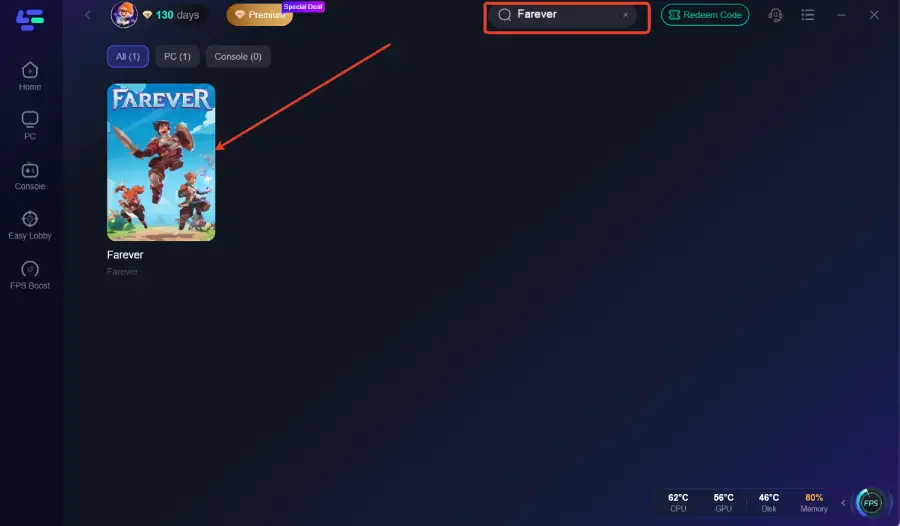
Search for Farever.
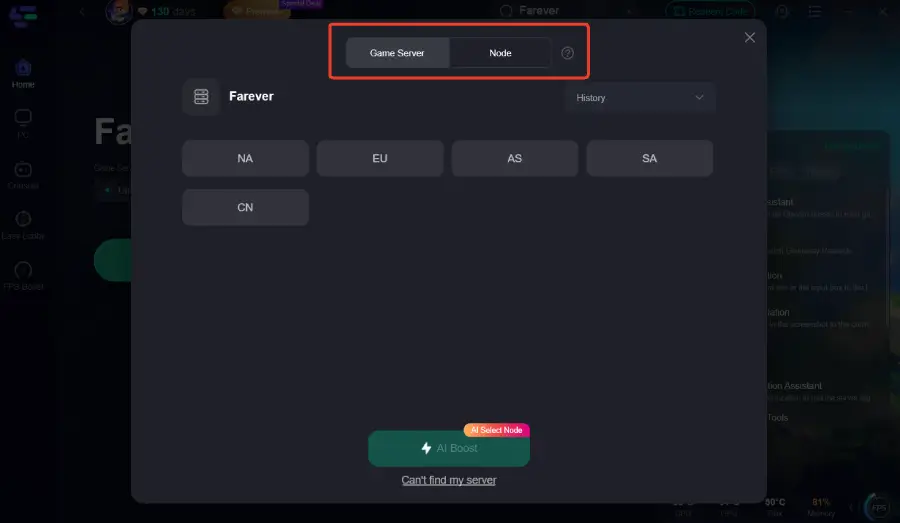
Choose a stable server route.
Click Boost.
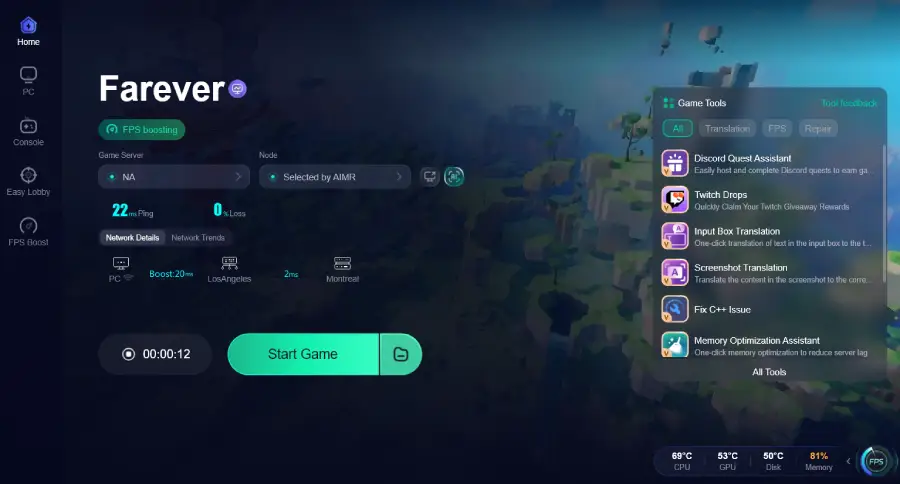
Launch Farever from LagoFast.
Try logging in again.
Use LagoFast if:
Farever says it cannot connect to server.
You get disconnected after entering the game.
Co-op does not load properly.
Login keeps failing.
Your ping is unstable.
The game works for other players but not for you.
What to do first if Farever won’t connect
Use this order. It saves the most time.
1. Fully restart Farever, Steam, and your PC
Close the game completely.
Exit Steam, then reboot your PC. This clears a lot of temporary connection problems and patch-state weirdness.
If Farever just updated, this should be your first real fix attempt.
2. Restart your router and modem
Turn them off for about 30 seconds, then power them back on.
This helps if the problem is a temporary routing issue, stale session, or unstable home connection.
3. Check that Steam finished the update
Open Steam and make sure Farever is fully updated.
If you see queued content, incomplete patching, or cloud syncing weirdness, let it finish, then relaunch.
4. Check whether your internet is fine outside Farever
Open a few normal sites, launch another online game, or test a streaming platform.
If lots of things are slow or failing, the problem is probably your connection, not Farever.
If everything else works and only Farever fails, that points back toward server-side trouble, a region issue, or a route problem.
5. Try another network or switch to wired
If you’re on Wi-Fi, use Ethernet if possible.
If you can, test a different connection entirely, like a mobile hotspot for one login attempt. If Farever suddenly works on another network, your original network path is the problem.
6. Flush DNS
On Windows, open Command Prompt as admin and run:
ipconfig /flushdns
On macOS, run:
sudo dscacheutil -flushcache
Then restart the game and try again.
7. Close background downloads and check security apps
Pause big Steam downloads, cloud sync tools, browser uploads, or anything else hammering your connection.
Then check Windows Firewall, antivirus, or any network filtering software that might be interfering.
You do not need to jump into risky advanced fixes like registry edits for a normal game connection error. That advice is overkill here.
Can you switch server regions in Farever?
The only region choices are NA and Europe.
If NA fails and Europe works, or the reverse, you’re probably looking at a region-specific issue. If both fail while status pages also show a spike in complaints, it’s more likely on the game side.
How to tell if it’s your problem or Farever’s
Here’s the simple split:
It’s probably on Farever’s side if:
Status pages show a spike in reports
Steam discussions suddenly fill with the same error
You were playing normally and got kicked out
Both NA and Europe fail for lots of players at the same time
It’s probably on your side if:
Status pages show the game operational
Other players are logging in normally
Steam needed an update or restart
Your internet is unstable in other apps too
Farever works on another network but not yours
This is the main reason to check status first. It tells you whether to wait or troubleshoot.
Where to report a Farever connection problem
If it keeps happening after the basic fixes, report it with useful details instead of just posting “servers down.”
Include:
Exact time of the issue
Your selected region, if shown
The exact error text
Whether Steam had just updated
Whether other websites or games were working
Whether you tested another network
The best places to check and report are the live monitor pages that allow reports, plus the Steam community discussions for Farever.
Where to check Farever server status fast
If you just want the fastest answer, use these in order:
That combo usually tells you whether the issue is widespread, fading, or mostly local.
Boost Your Game with LagoFast for Epic Speed
Play harder, faster. LagoFast game booster eliminates stutter and lags on PC, mobile, or Mac—win every match!
Quickly Reduce Game Lag and Ping!
Boost FPS for Smoother Gameplay!