
If you are seeing error code Currant in Destiny 2, you are dealing with a network-related issue that typically points to a disruption between your system and Bungie’s servers. Unlike hardware or installation errors, Currant is usually tied to packet loss, unstable routing, ISP-level filtering, or temporary server instability. The good news is that in most cases this error is fixable without reinstalling the game. Here is exactly what it means and how to resolve it efficiently.

- ✅ Reduce Lag and High Ping.
- ✅ Boost FPS at the Same Time.
✅ Support 2000+ Popular Online Games.
✅ Change Server without Latency.
✅ Boost Game Loading Speed.
Part 1: What Is Error Code Currant in Destiny 2?
Part 2: Why Does Error Code Currant Happen?
Part 3: Check Bungie Server Status First
Part 4: Restart Your Network Equipment
Part 5: Use a Wired Connection
Part 7: Disable VPN or Proxy Services
Part 8: Flush DNS Cache (Windows)
Part 9: Update Router Firmware
Part 10: When the Issue Is ISP-Related
Part 11: How Long Does Error Code Currant Last?
Part 12: Reduce Error Code Currant in Destiny 2 with LagoFast
Part 1: What Is Error Code Currant in Destiny 2?
Error code Currant in Destiny 2 indicates that the game client lost connection to Bungie’s servers due to network instability. It commonly appears during matchmaking, activity loading screens, transitions between zones, or login authentication processes. Unlike account-related errors, Currant is almost always network-layer related.
Part 2: Why Does Error Code Currant Happen?
The most common causes include packet loss between your ISP and Bungie servers, strict NAT configuration, ISP traffic filtering or throttling, router instability, and temporary Bungie server outages. Because Destiny 2 relies on persistent server communication, even small routing interruptions can trigger this error.
Part 3: Check Bungie Server Status First
Before changing your setup, verify whether the issue is on Bungie’s side.
Check:
- The official channels of Bungie
- The official account on X
- Community forums
If multiple players are reporting the same issue simultaneously, the problem is likely server-side and will resolve once maintenance or backend fixes are complete.
Part 4: Restart Your Network Equipment
This is often the most effective local fix.
- Turn off your modem and router.
- Wait at least three minutes.
- Power them back on and allow a full reconnection cycle.
This resets IP assignment, clears routing conflicts, and refreshes NAT tables.
Part 5: Use a Wired Connection
Wi-Fi instability is one of the biggest triggers for Currant. Switching to a wired Ethernet connection reduces packet loss, eliminates wireless interference, and stabilizes latency. Even strong Wi-Fi signals can experience micro-disconnections that Destiny 2 detects immediately.
Part 6: Check NAT Type
Strict or Moderate NAT types can increase connection errors.
Ensure your NAT type is Open. If not:
- Enable UPnP in router settings
- Forward the required Destiny 2 ports
- Avoid double NAT configurations
Improper NAT configuration often leads to intermittent server disconnects.
Part 7: Disable VPN or Proxy Services
VPNs frequently reroute traffic through distant servers, increasing latency and packet loss.
Turn off VPN software, proxy connections, and network filtering tools, then relaunch the game to test stability.
Part 8: Flush DNS Cache (Windows)
Corrupted DNS entries can cause server resolution problems.
Open Command Prompt as administrator and run:
ipconfig /flushdns
This forces fresh DNS resolution for Bungie’s servers.
Part 9: Update Router Firmware
Outdated router firmware can cause random disconnects, memory leaks, and NAT instability. Check your router manufacturer’s website and update to the latest firmware version if available.
Part 10: When the Issue Is ISP-Related
If error code Currant continues despite local fixes, the issue may involve ISP traffic shaping, regional routing congestion, or packet filtering. Contacting your ISP to report unstable routing to Bungie servers may help. Some players also improve stability by switching to alternative DNS providers such as Google DNS or Cloudflare DNS.
Part 11: How Long Does Error Code Currant Last?
If server-related, it typically resolves within a few hours. If network-related, it will persist until routing or stability improves. Errors lasting multiple days usually indicate ISP routing problems, misconfigured router settings, or hardware instability.
Part 12: Reduce Error Code Currant in Destiny 2 with LagoFast
If error code Currant in Destiny 2 keeps appearing even after restarting your router and checking NAT settings, unstable routing between your ISP and Bungie’s servers may be the underlying issue. In these cases, optimizing your connection path before launching the game can significantly reduce packet loss and login interruptions. LagoFast is designed to stabilize network routing and minimize latency spikes that often trigger Currant errors.
How to Use LagoFast for a More Stable Connection
1. Install LagoFast through the Free Trial option and open the application.
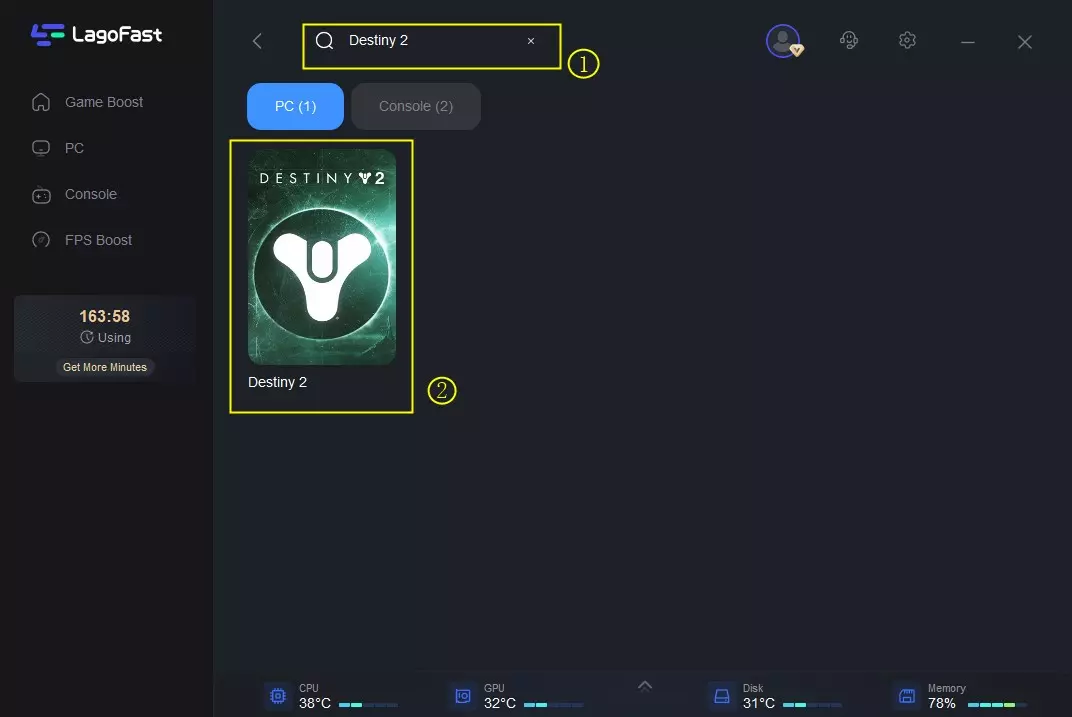
2. Search for Destiny 2 inside LagoFast before launching the game.
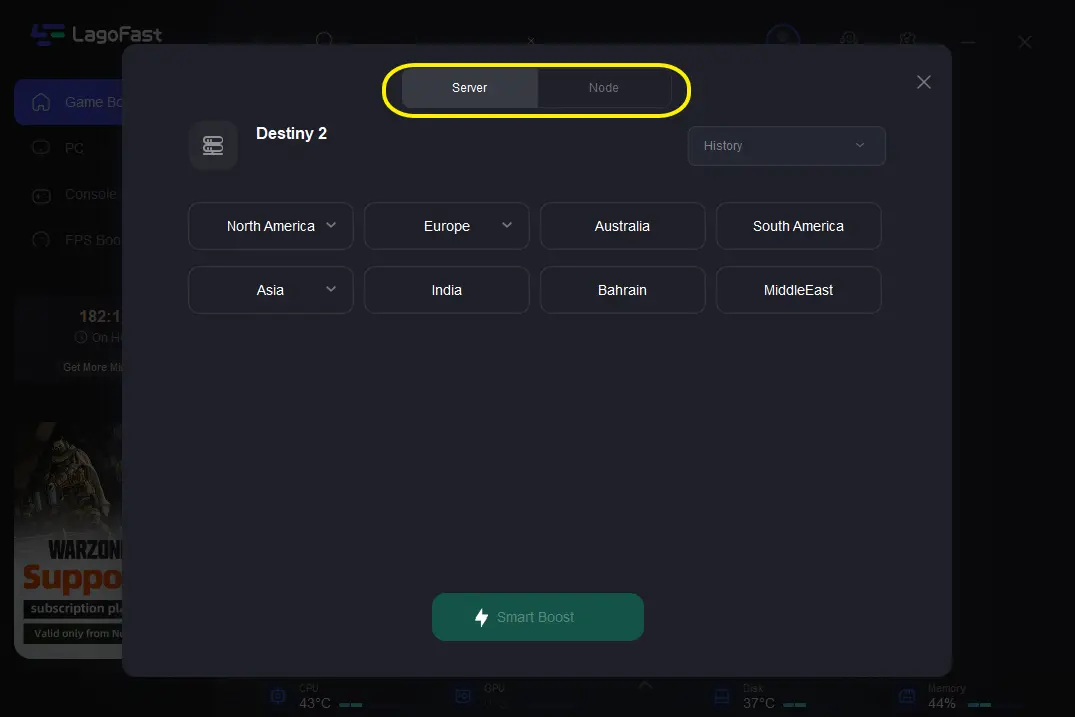
3. Choose the recommended server region, then manually select the lowest-latency node available.
4. Activate Smart Boost and monitor the real-time ping, packet loss, and connection type displayed on the dashboard.
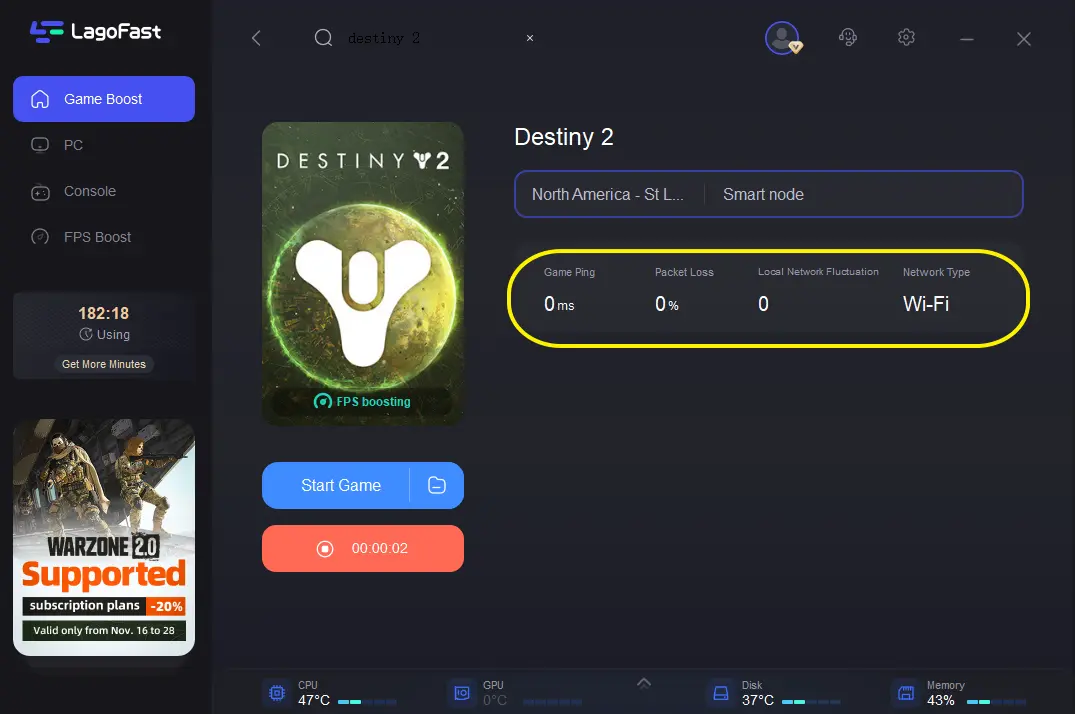
Once enabled, LagoFast reroutes your traffic through optimized network nodes, helping reduce unstable handshakes and sudden disconnections.
Benefits of Using LagoFast
- Lowers ping fluctuations during matchmaking
- Reduces packet loss that triggers Currant
- Optimizes routing between you and Bungie servers
- Provides real-time network diagnostics
- One-click activation before game launch
While LagoFast cannot resolve official server outages, it can significantly improve local routing stability. If your error code Currant appears intermittently rather than during confirmed maintenance windows, stabilizing your network path before launching Destiny 2 may reduce repeated disconnects and improve overall gameplay consistency.
Conclusion
Error code Currant in Destiny 2 is a network instability warning rather than a corrupted file or account issue. Start by checking Bungie’s server status, then reset your network, switch to wired Ethernet, verify NAT settings, disable VPNs, and flush DNS in a structured order. Most cases resolve once packet loss or routing instability is eliminated, allowing you to return to stable gameplay without unnecessary reinstallation.

Boost Your Game with LagoFast for Epic Speed
Play harder, faster. LagoFast game booster eliminates stutter and lags on PC, mobile, or Mac—win every match!
Quickly Reduce Game Lag and Ping!
Boost FPS for Smoother Gameplay!