
Quick Answer
The most practical way to translate Eclipse: The Awakening on PC is to use an overlay or OCR-based game translator that can read menus, quests, subtitles, chat, and screenshots without forcing you to leave the game. LagoFast Game Translator adds real-time screen translation, chat and input translation, voice-to-text translation, screenshot translation, and support for more than 100 languages.

- ✅ Reduce Lag and High Ping.
- ✅ Boost FPS at the Same Time.
- ✅ Support 8000+ Popular Online Games.
- ✅ Stable Server Connection
Part 1: Why Eclipse: The Awakening Needs a Translation Tool
Part 2: What Should an Eclipse: The Awakening Translation Tool Translate?
Part 3: How to Translate Eclipse: The Awakening on PC
Part 4: How to Use LagoFast for Eclipse: The Awakening Translation
Part 5: Translation Problems, Accuracy and Performance Tips
Part 1: Why Eclipse: The Awakening Needs a Translation Tool
Eclipse: The Awakening is an MMORPG built around progression, combat builds, guild activity, and a large amount of interface text. Players may understand the main combat loop but still lose time when a quest objective, skill description, event rule, or system notice appears in Korean.
The problem is not limited to story dialogue. MMORPG text often carries mechanical information that cannot be safely guessed. A single mistranslated word can change a cooldown requirement, target condition, reward rule, or upgrade cost. Social content creates another layer because guild chat and party instructions move faster than manual copy-and-paste workflows.
A useful translator should reduce context switching and keep important information readable during combat, inventory management, and group communication.
Where translation matters most
|
Game situation |
Why fast translation helps |
|
Quest and tutorial screens |
Clarifies objectives and access conditions |
|
Skill and weapon menus |
Helps compare effects, costs, and cooldowns |
|
Guild or party chat |
Supports quick replies and coordination |
|
Event pop-ups |
Reduces the risk of missing dates or rewards |
|
Voice dialogue |
Makes spoken instructions readable during combat |
|
Screenshots |
Preserves useful text for builds and troubleshooting |
Part 2: What Should an Eclipse: The Awakening Translation Tool Translate?
Not every tool provides the same type of translation. Basic OCR apps usually handle a still image, while a game-focused tool needs to work across changing interfaces, stylized fonts, text boxes, and fast social conversations.
Core features worth checking
Live scene and interface translation should cover menus, dialogue boxes, quest objectives, subtitles, item descriptions, and system messages. The best workflow places translated text close to the original screen instead of making the player retype every line into a browser.
Chat and input translation is important for guilds. A tool that automatically translates chat history into the target language helps players understand earlier messages. Input translation lets a player write a response in their own language and convert it before sending.
Voice and dialogue conversion should turn spoken audio into translated text and, where supported, translated speech. This is helpful during cutscenes, voiced missions, and party instructions when reading a small subtitle window is difficult.
Screenshot translation handles dense panels. Capture an equipment screen, event notice, or build comparison, then translate it in seconds.
LagoFast advertises more than 100 languages, including English, Korean, Japanese, Chinese, French, German, Spanish, Italian, Portuguese, Russian, Turkish, Arabic, Thai, and Vietnamese. Language quality can vary by sentence structure and game terminology, so important upgrade or payment details should still be checked against the original text.
Part 3: How to Translate Eclipse: The Awakening on PC
A practical PC translation workflow
1.Launch the game in windowed or borderless mode if the translation overlay does not appear correctly in exclusive fullscreen.
2.Set the translator’s source language to Korean or automatic detection, then choose a target language such as English, Spanish, French, German, Turkish, Arabic, Thai, Vietnamese, Japanese, or Portuguese.
3.Use live translation for quests and menus, input translation for guild chat, and screenshot mode for long configuration panels.
4.Keep the original text visible when testing a new term, especially for weapon effects, enhancement materials, and event deadlines.
5.Save translated screenshots or notes for recurring systems instead of translating the same menu every session.
Avoid installing unofficial language patches from unknown file hosts. MMORPG clients update frequently, and modified resources can break after a patch or create account and security risks. An overlay or screen-reading workflow is usually easier to remove and less invasive than replacing game files.
Part 4: How to Use LagoFast for Eclipse: The Awakening Translation
LagoFast combines its translation features with game network optimization and is designed to keep the workflow inside one gaming application. Its translation tools are used by players and content creators who need to understand overseas games while recording, streaming, or coordinating with an international group.
Step-by-step tutorial for translating Eclipse: The Awakening on PC
Step 1. Click the Free Trial button to download and install LagoFast Free Trial.
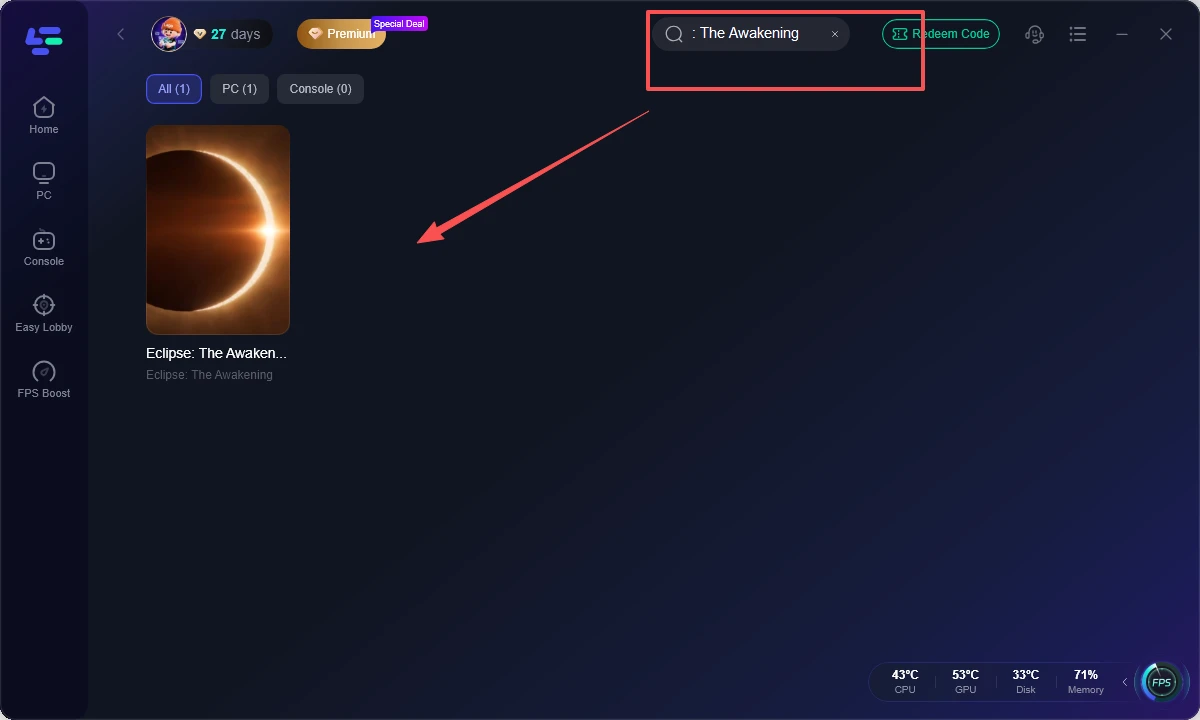
Step 2. Search for Eclipse: The Awakening or open the translation tool. Select the matching game profile when available. If the title is not listed, use the general translation entry rather than selecting an unrelated game.
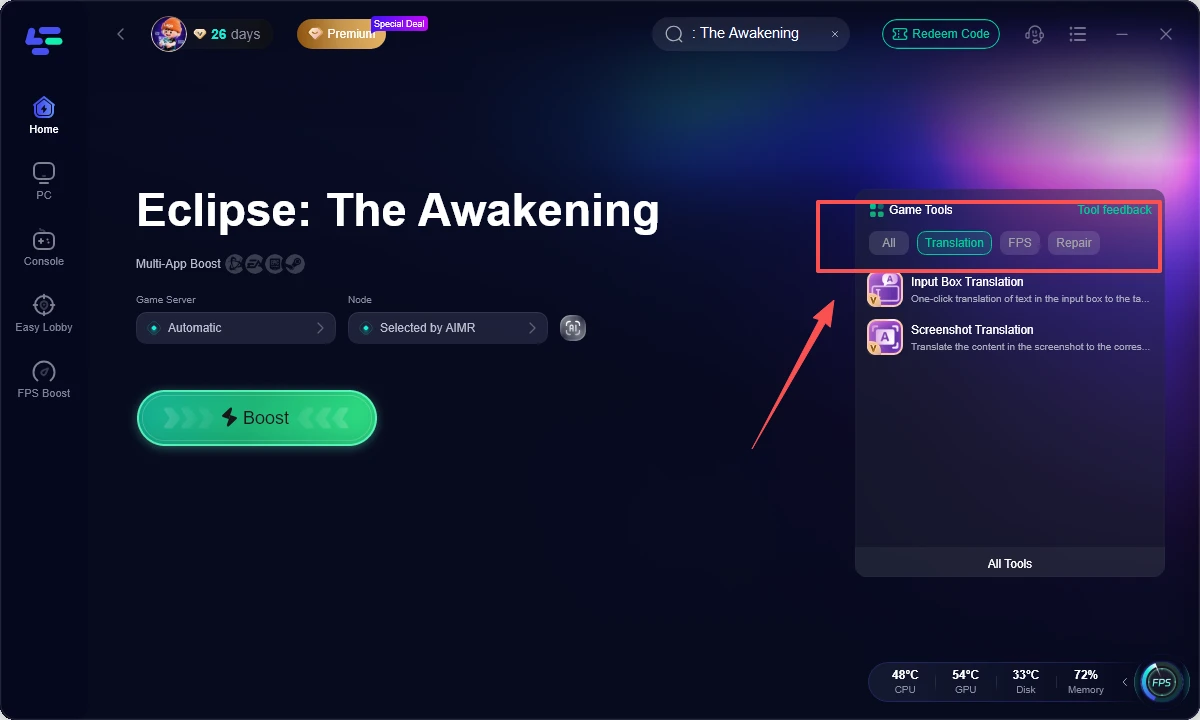
Step 3. Select the right translation mode for the situation. Use real-time screen translation for quests, interfaces, and subtitles; use chat and input translation for guild messages; use voice translation for spoken dialogue; and use screenshot translation for dense panels or saved references.
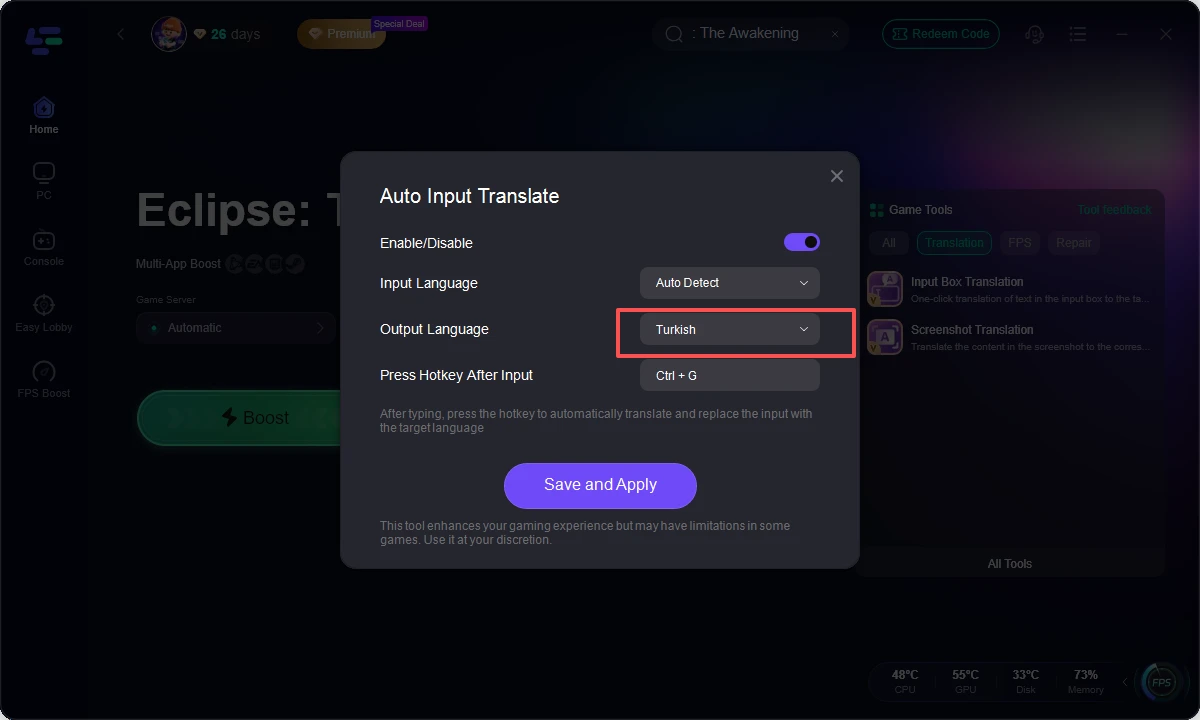
Step 4. Choose the source and target languages. Set Korean as the source when the client displays Korean, then choose English or another supported target language. Confirm the language pair before entering a crowded menu.
Step 5. Launch the game and test one complete workflow. Translate a tutorial screen, send a short chat message, and capture one screenshot. If online play feels unstable, use
LagoFast’s network optimization option and compare ping consistency without changing several network settings at once.
Part 5: Translation Problems, Accuracy and Performance Tips
Automatic translation is a support layer, not a replacement for game knowledge. Fantasy names, abbreviations, item grades, and skill terminology may be rendered differently from one screen to another. Build a small glossary for repeated terms and compare important numbers with the original interface.
Fix common translation issues
|
Problem |
Practical fix |
|
Text is cut off |
Use borderless mode or reduce UI scale |
|
OCR reads symbols incorrectly |
Capture a tighter screenshot with higher contrast |
|
Translation appears late |
Lower background load and use a stable route |
|
Chat result sounds unnatural |
Shorten the sentence before translating |
|
Voice text is incomplete |
Move closer to clear audio or replay the line |
|
Overlay covers a button |
Reposition or temporarily hide the translation layer |
Keep the game and translator updated. Close unnecessary recording, browser, and cloud-sync applications if OCR response slows down. A stable frame rate and stable network route both matter because translation is being processed while the game is running.
For streamers and guide creators, screenshot translation helps document early-game systems. Preserve the original and translated images so terminology can be corrected after an update.
Part 6: FAQs
Does Eclipse: The Awakening have an official English translation?
Official language availability can vary by service region and launch version. Check the in-game settings and publisher announcements first. If the preferred language is missing, an OCR or overlay translator can provide an additional reading layer.
What is the best way to translate Korean quests in Eclipse: The Awakening?
Use real-time screen translation for active quest text and screenshot translation for long quest panels. Keep the original Korean visible when the objective includes a number, location, item name, or time limit.
Can a game translator translate Eclipse: The Awakening chat?
A tool with chat-history and input translation can translate incoming guild messages and convert your reply into the selected target language. This is more efficient than copying each message into a separate app.
Can voice dialogue be translated while playing?
Voice-capable tools can convert audio into translated text and, where supported, translated speech. Results depend on audio clarity, speaker speed, background effects, and the language pair.
Can screenshots from Eclipse: The Awakening be translated?
Yes. Screenshot translation is useful for inventory panels, event notices, skill descriptions, and system prompts. A tight crop with readable text usually produces better OCR results than a full desktop screenshot.
Will translation slow down PC gameplay?
It can add some overhead, especially when continuous OCR, voice processing, and recording run together. Use a stable frame cap, close unnecessary apps, and switch to screenshot mode for menus that do not need constant translation.
Which languages can LagoFast Game Translator handle?
LagoFast advertises support for more than 100 languages, including English, Korean, Japanese, Chinese, Spanish, French, German, Italian, Portuguese, Russian, Turkish, Arabic, Thai, and Vietnamese. Actual results depend on the text and context.
Key takeaway
The right Eclipse: The Awakening game translation tool should cover more than dialogue. It should help with quests, interfaces, subtitles, guild chat, voice content, and screenshots without pulling the player away from the game. LagoFast Game Translator offers those translation modes alongside PC network optimization, making it a practical option for players and content creators handling a Korean-first MMORPG experience.
Boost Your Game with LagoFast for Epic Speed
Play harder, faster. LagoFast game booster eliminates stutter and lags on PC, mobile, or Mac—win every match!
Quickly Reduce Game Lag and Ping!
Boost FPS for Smoother Gameplay!