

If you've already purchased the Deluxe or Ultimate Edition of Dune: Awakening, you're likely diving into its Early Access right now. How's it going? Is the planet Arrakis as grand and majestic as you imagined? However, since Dune: Awakening's servers are experiencing such a high volume of players for the first time since its testing phase, some instability is inevitable.
Indeed, some players have encountered the frustrating "no servers found" error in Dune: Awakening. This article will focus on this vexing issue, exploring its causes and solutions, and also recommend the best ways to enhance your Dune: Awakening gaming experience!

- ✅ Change Server without Latency.
- ✅ Boost FPS at the Same Time.
- ✅ Support 2000+ Popular Online Games.
- ✅ Fix Dune: Awakening Won't Launch.
- ✅ Crossplay: PC, Mobile and Console.
Part 1: Why Dune: Awakening No Servers Found
Part 2: How to Fix Dune: Awakening No Servers Found
Part 3: Best Way to Stable Server Connection of Dune: Awakening
Part 1: Why Dune: Awakening No Servers Found
If you've also encountered the Dune: Awakening no servers found error, don't worry. Exploring the reasons behind this error can help you get back into the game world more smoothly.
- Missing Patches: At the start of Dune: Awakening's Early Access, the development team was already aware of this issue and released a patch. If you haven't downloaded the patch, you'll keep seeing this error.
- Logging into the Beta Version Without Changing Regions: If players participated in Dune: Awakening's beta test and log in to the Beta version again without changing regions, they may encounter the issue of no available servers.
- Corrupted Game Launcher: If the Dune: Awakening launcher downloaded on Steam is corrupted, players may face various unknown errors, with the "no servers found" error being one of them.
Part 2: How to Fix Dune: Awakening No Servers Found
Although the gameplay mechanics of Dune: Awakening might still be full of unknowns for many players, and encountering this issue for the first time can certainly cause panic, the following methods can help you fix this not-so-special error:
- Restart or Update Steam: By restarting the Steam client or updating it to the latest version, players will be able to see the officially released D1 patch. Downloading this patch in a timely manner can resolve the "no servers found" error.
- Change the Region for the Beta Version: After logging into the Beta version, click the "Change Region" button on the main screen and select the appropriate region based on your actual situation. This should allow you to successfully find and connect to a server.
- Check the Integrity of Game Files: If the above two methods don't work, there might be an issue with corrupted game files. Go to Steam, locate Dune: Awakening, click on the "Local File" option, and then select "Verify Integrity of Game Files." If any game files are indeed corrupted, simply redownload the complete game files to fix the issue.
Part 3: Best Way to Stable Server Connection of Dune: Awakening
Of course, as a grand game with a strong player base, Dune: Awakening has undoubtedly received a tremendous amount of welcome, especially since its full official release on June 10th, sparking a new wave of Spice Wars! Issues like latency, lag, high ping, and low FPS are bound to crop up. We recommend using LagoFast to ensure a smooth journey to Arrakis for players!
Key Features of LagoFast
- Global Servers: Players can freely choose and switch server nodes worldwide to guarantee the best gaming experience.
- Reduce Latency: By intelligently bypassing congested networks, LagoFast lowers the latency in game data transmission.
- Boost FPS: It circumvents ping spikes to enhance the game's frame rate (FPS) for players.
- Real-time Optimization: Manual optimization during gameplay is unnecessary. LagoFast conducts real-time detection and automatic optimization throughout the gaming session.
Steps to play Dune: Awakening using LagoFast
Click the "Free Trial" button to obtain LagoFast and complete the installation.
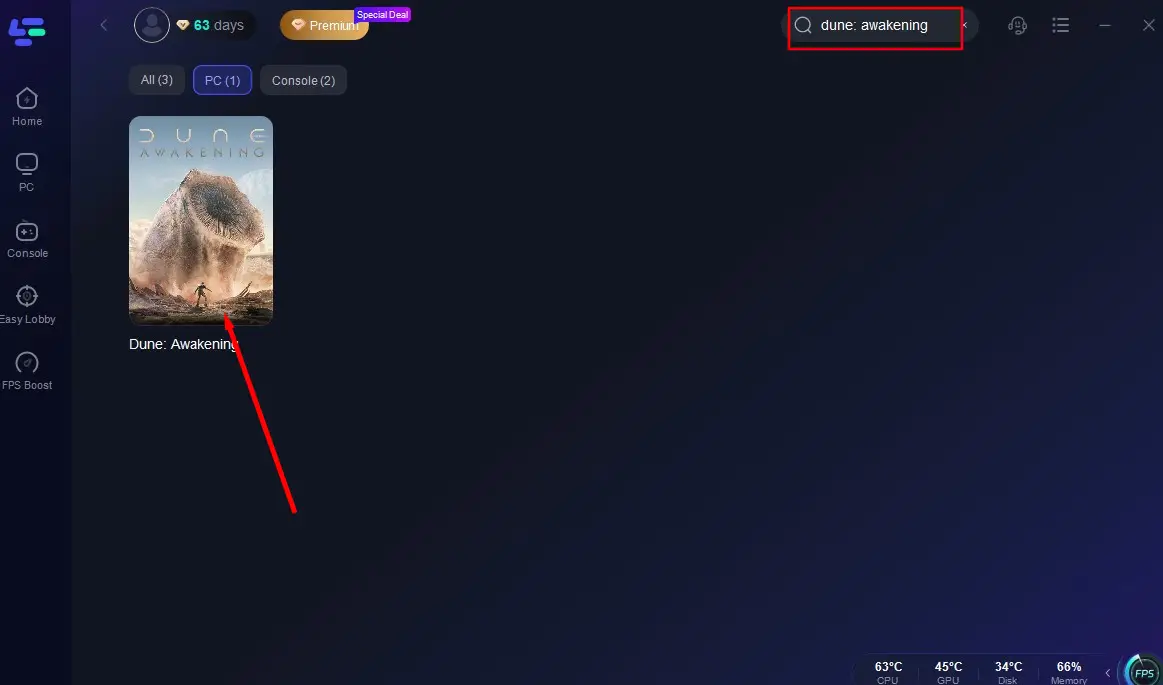
After successful installation, enter "Dune: Awakening" in the search box and click to search.
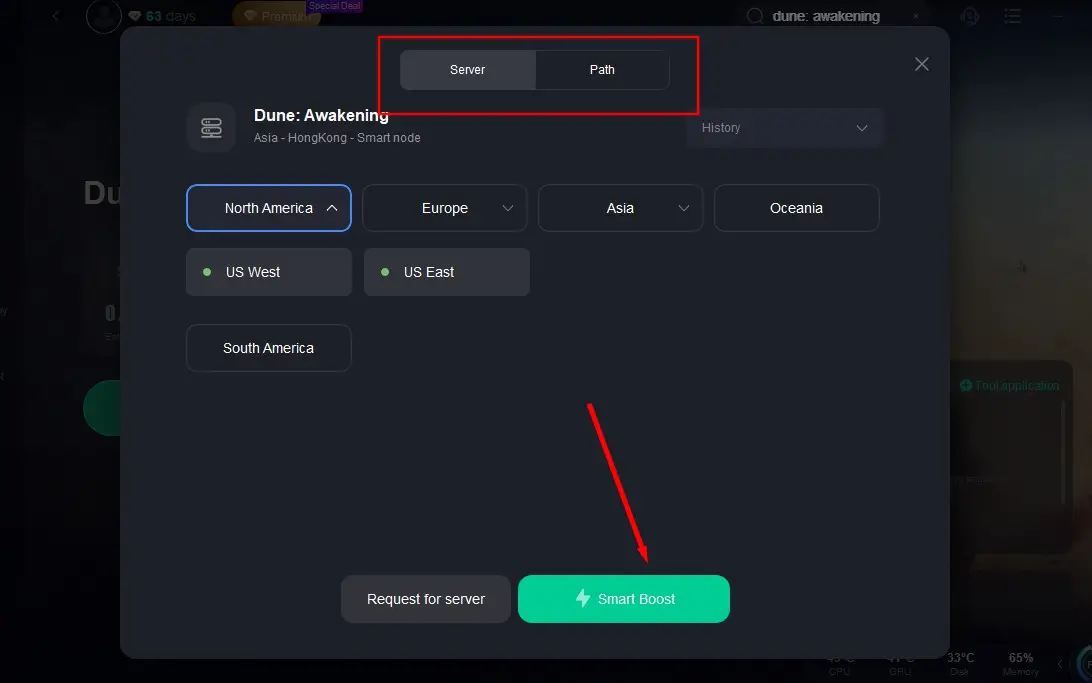
Click "Select Server" to choose an optimal server node, then press "Smart Boost" to initiate the optimization process.
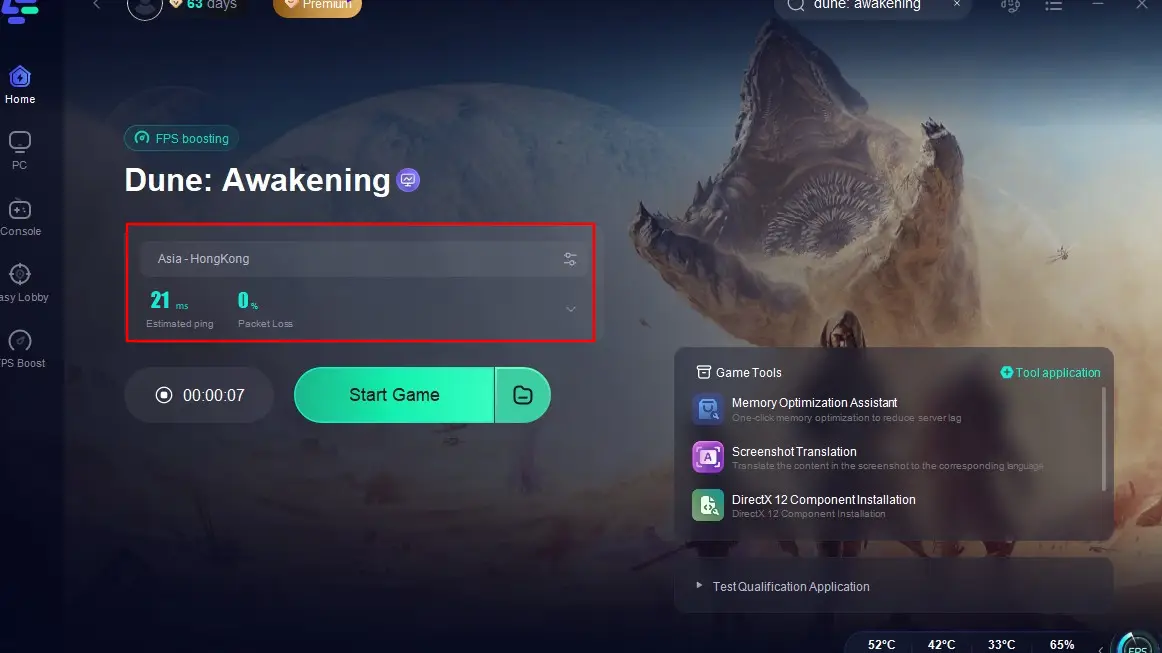
Once you've confirmed that the game's real-time data has been optimized, click "Start Game" and return to the planet Arrakis to showcase your skills!
Hot Related: Dune: Awakening Trial Locations - Walkthrough Guide
Hot Related: Albion Online is not Working in Russia: How to Fix
Conclusion
Encountering the "Dune: Awakening no servers found" issue can indeed be frustrating, but understanding its causes and applying the right fixes will allow players to return to the planet Arrakis and engage in an intense Spice War! Of course, don't forget to use LagoFast to enhance your gaming experience in Dune: Awakening and reduce latency and lag!
Boost Your Game with LagoFast for Epic Speed
Play harder, faster. LagoFast game booster eliminates stutter and lags on PC, mobile, or Mac—win every match!
Quickly Reduce Game Lag and Ping!
Boost FPS for Smoother Gameplay!