
As the excitement builds for the upcoming release of Rust Mobile, gamers worldwide are eagerly anticipating the chance to experience the beloved survival game on their mobile devices. Developed by Facepunch Studios, this mobile adaptation promises to bring the same intense gameplay and immersive world that has captivated millions on PC and console. While the official release date remains unconfirmed, the upcoming Alpha test scheduled for early February 2025 offers a glimpse into what players can expect. This article provides essential information on how to download and play Rust Mobile on both Android and iOS, outlines the system requirements, and shares tips for ensuring a smooth gaming experience.

- ✅ Reduce Lag and High Ping.
✅ Boost FPS at the Same Time.
✅ Support 2000+ Online Games
✅ Change Server Without Latency.
✅ Multiplatform: PC, Console, Mobile.
✅ End Stuck, Connection & Crashing Issues
Part 1. Rust Mobile Release Date & 1st Closed Beta
Part 2. How to Download and Play Rust Mobile on Android & iOS
Part 3. Rust Mobile System Requirements
Part 4. How to Ensure Smooth Gaming in Rust Mobile
Part 1. Rust Mobile Release Date & 1st Closed Beta
As of now, Rust Mobile does not have a confirmed global release date. However, the Rust Mobile Release Date has reached an important milestone with the announcement of the 1st Closed Beta.
The closed beta will begin on December 11, 2025 (PST). Large-scale testing was originally planned for November, but it was postponed to December to improve server stability, device compatibility, and localization quality.
This test will run for around two weeks and is available on both Android and iOS. The beta is limited to select regions, including North America, Europe, and Asia, with restricted access due to server capacity.
Supported languages in this phase include English, Japanese, Thai, and Traditional Chinese.
The closed beta focuses on performance testing and gameplay balance. It will feature at least two game modes, allow up to four-player teams, and include no paid content. All progress will be wiped once the test ends.
Players are allowed to record, stream, and create content during the test.
Part 2: How to Download and Play Rust Mobile on Android & iOS
Before following the standard download steps, there’s one extra option worth knowing—especially for players facing regional restrictions or store availability issues.
Bonus Tip: Use LagoFast Mobile to Download Rust Mobile Without Region Limits
If Rust Mobile is not available in your local App Store or Google Play region, LagoFast Mobile offers an alternative way to access the game files.
By using LagoFast Mobile, players can bypass regional limitations and download the Rust Mobile game package directly, no matter where they are located. This is especially helpful for players in regions where the closed beta or future releases are not officially listed yet.
How it works:
Step 1: Search “LagoFast Mobile booster” in the App Store or Google Play, as it is globally available. Or scan the QR code below to start a free trial.

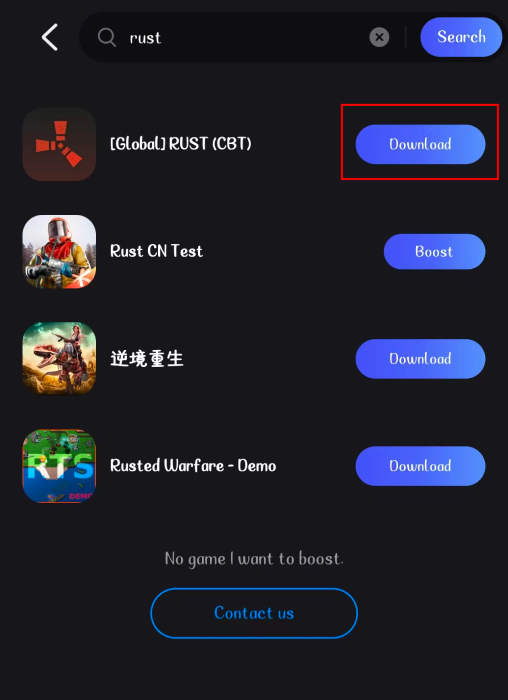
Step 2. Please search for Rust and select [Global] RUST (CBT). Click Download.
In addition to helping with downloads, LagoFast Mobile can also optimize network routing, which is useful during testing phases when servers may be unstable.
Common Method to Download Rust Mobile
To download and play Rust Mobile normally, follow these steps:
Step 1: Check Device Compatibility
Ensure your mobile device meets the minimum requirements for Rust Mobile.
Step 2: Download the Game
For Android:
- Open the Google Play Store.
- Search for Rust Mobile.
- Tap on Install to download the game.
For iOS:
- Open the App Store.
- Search for "Rust Mobile."
- Tap on Get to download the game.
Step 3: Create an Account
- Launch the game after installation.
- Follow the prompts to create a new account or log in if you already have one.
Part 3: Rust Mobile System Requirements
Rust Mobile System Requirements: Android
Minimum Requirements:
- OS: Android 7.0 and above
- Processor: Qualcomm Snapdragon 660 / MediaTek Helio P60 or similar
- RAM: 3 GB Disk space: 3-4 GB of available space
- Graphics: Adreno 512 / Mali-G72 or similar
- Internet connection: Stable internet connection
Recommended requirements for Rust Mobile:
- OS: Android 10.0 and above
- Processor: Qualcomm Snapdragon 845 / MediaTek Dimensity 700 or higher
- RAM: 6 GB or more Disk space: 5-6 GB of available space
- Graphics: Adreno 630 / Mali-G76 or higher
- Internet connection: High-speed internet connection (Wi-Fi 5 GHz or LTE/5G)
Rust Mobile System Requirements: iOS
Minimum Requirements:
- OS:iOS 12 or later
- Device: iPhone 6s or later, iPad (5th generation) or later, iPod touch (7th generation)
- RAM: 2 GB or more
Recommended Requirements:
- OS: iOS 14 or later
- Device: iPhone 8 or later, iPad Pro, iPad Air (3rd generation) or later
- RAM: 4 GB or more
Part 4. How to Ensure Smooth Gaming in Rust Mobile
Rust Mobile is coming soon, and I'm sure you're very excited, but performance issues like lag and high latency can disrupt the experience. To enhance your gameplay, using LagoFast can make a significant difference.
LagoFast is a dedicated game optimization tool designed to improve gaming performance on mobile devices. It optimizes network connections, reduces ping, and allocates system resources more effectively, ensuring a seamless gaming experience.
Key Features of LagoFast
- Low Latency: LagoFast minimizes latency by optimizing the data route to the game server. This results in quicker response times, which is crucial for competitive gameplay in Rust Mobile.
- Connection Stability: By stabilizing your connection, LagoFast reduces packet loss, which is vital for maintaining a smooth gameplay experience, especially during intense battles where every millisecond counts.
How to Use LagoFast to Boost FPS and Reduce High Ping in Rust on Mobile:
Step 1: Search “LagoFast Mobile booster” in the App Store or Google Play, as it is globally available. Or scan the QR code below to start a free trial.
Step 2. Search for your game and select it.
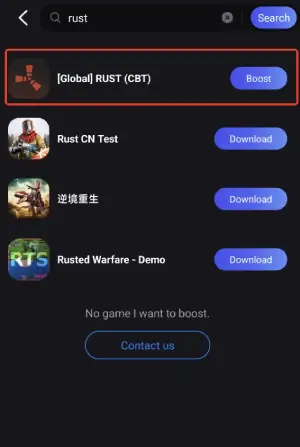
Step 3. Pick the server that suits you best.
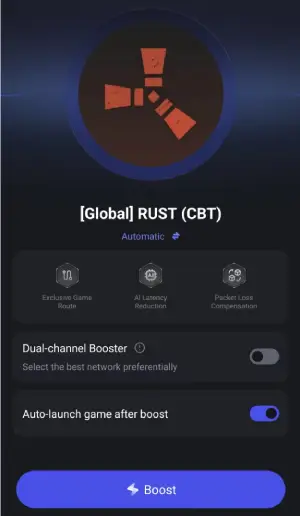
Step 4. Tap Boost, and LagoFast will display real-time ping and packet loss stats.
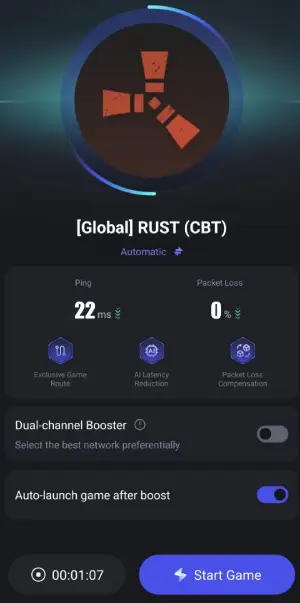
So if you want to elevate your gaming experience in Rust Mobile, consider using LagoFast Game Booster. With its ability to lower latency, stabilize connections, and manage resources effectively, LagoFast is an essential tool for any serious gamer looking to excel in the world of Rust. Enjoy smoother gameplay and focus on what truly matters—surviving and thriving in the game!
Conclusion
With the Alpha test for Rust Mobile just around the corner, players have a unique opportunity to be among the first to experience this thrilling game on mobile devices. By following the steps outlined in this guide, you can ensure that you are well-prepared to download, install, and play Rust Mobile seamlessly on your Android or iOS device. Additionally, understanding the system requirements will help you avoid any performance issues, allowing you to fully immerse yourself in the game. To further enhance your gaming experience, consider using tools like LagoFast to optimize your connection and reduce latency.
Boost Your Game with LagoFast for Epic Speed
Play harder, faster. LagoFast game booster eliminates stutter and lags on PC, mobile, or Mac—win every match!
Quickly Reduce Game Lag and Ping!
Boost FPS for Smoother Gameplay!