

Are you looking for a vibrant MMORPG that seamlessly blends Eastern fantasy with engaging online gameplay? World of Jade Dynasty could be your ticket to endless adventure. In this guide, we’ll show you exactly how to download the game from the official website, register with real-name verification, and continue past level 24 by taking advantage of in-game purchases. Plus, we’ll explain how to use LagoFast to keep your ping low for a smooth, lag-free journey.

- ✅ Reduce Lag and High Ping.
✅ Boost FPS at the Same Time.
✅ Support 2000+ Online Games
✅ Change Server Without Latency.
✅ Multiplatform: PC, Console, Mobile.
✅ End Stuck, Connection & Crashing Issues
Part 1: How to Download World of Jade Dynasty
Part 2: How to Download World of Jade Dynasty SEA/Taiwan
Part 3: How to Play World of Jade Dynasty
Part 4: Use LagoFast for Low-Ping Gameplay
Part 1: How to Download World of Jade Dynasty
The first step in your adventure is to locate the official website for World of Jade Dynasty. Here’s how:
Search for the Official Website:
Use your preferred browser, navigate to World of Jade Dynasty official site, which is currently only available in China.
Download the Game Client:
- Once on the official site, look for a prominent “立即下载”(Download Now) button.
- Click it to start downloading the installer. Depending on your internet speed, the process may take a few minutes.
Install the Game:
- After downloading the installer, launch it on your computer.
- Follow the on-screen instructions to finalize the installation process.
- Keep in mind that MMORPGs can be sizable, so ensure you have enough storage space before proceeding.
Downloading the client directly from the official website guarantees that your copy is both genuine and up-to-date.
Part 2: How to Download World of Jade Dynasty SEA/Taiwan
As the game's popularity continues to soar, World of Jade Dynasty SEA/Taiwan will kick off its first open beta test on June 5th. Since there will be no character data wipes after this test, the test version is essentially the future official release. The test servers will cover Taiwan, Hong Kong, Macau, Singapore, and Malaysia, and there will be no server login restrictions for players. All players with accounts can enjoy the game freely. Additionally, the launch of World of Jade Dynasty SEA/Taiwan comes with various exclusive perks. Here are steps to downlod World of Jade Dynasty SEA/Taiwan:
Step 1: Visit World of Jade Dynasty Taiwan's official website to download the game launcher and complete the installation process.
Step 2: After installation of the launcher, click the launcher's desktop shortcut and log in using your mobile phone account (Note: Players who participated in the previous Nine Skies test need to use the same phone number to claim relevant rewards).
Step 3: Once logged in, install the World of Jade Dynasty client. Ensure your internet connection is stable during the download. If the download is interrupted due to a network outage, players will need to restart the download after the network is restored.
Step 4: After the game client is installed, players can enter the game, patiently wait for the game resources to load completely, and then embark on their martial arts adventure!
Part 3: How to Play World of Jade Dynasty
Once you’ve installed the game, you’ll need to set up an account and complete a simple verification process before you can begin your journey in World of Jade Dynasty.
A) Register and Real-Name Verification
- Account Creation: Open the game client and select “Register.” Provide the requested details, including your username and password.
- Real-Name Verification: In adherence to local regulations, you may be prompted to complete a “real-name verification.” This requirement helps maintain a safe and fair gaming environment. Follow the instructions to confirm your information.
With a verified account, you’ll have immediate access to the initial sections of World of Jade Dynasty.
B) How to Continue Playing After Level 24 [Updated]
[Updated] From December 25th to January 1st, all players can play World of Jade Dynasty for free! After January 1st, all accounts that have not topped up or subscribed will be given 10 hours of free trial time.
Reaching Level 24 is a significant turning point in World of Jade Dynasty. At this level, you might encounter a prompt to purchase in-game items or subscribe in order to continue leveling and unlocking advanced features. Here are the essentials:
- Payment Methods: The official website usually lists available payment methods, which may include credit cards, popular digital wallets, or prepaid game cards.
- Subscription Perks: By subscribing or buying premium currency, you’ll gain access to additional dungeons, quests, and specialized gear.
- Budget Management: If you prefer to limit your expenses, plan your purchases to make the most of in-game offers or promotional deals.
Part 4: Use LagoFast for Low-Ping Gameplay
Are you tired of frustrating lag and high ping in your favorite games? LagoFast provides an easy, efficient way to stabilize your network, reduce latency, and keep you in the action without interruption.
Benefits of LagoFast
A seamless online experience is crucial for MMORPGs like World of Jade Dynasty. High latency can cause lag, delays in combat, or even server disconnections. Here’s why LagoFast is a top solution:
- Optimized Connection Routes: LagoFast streamlines your game data path, significantly reducing ping and minimizing lag spikes.
- Global Server Network: Whether you’re in North America, Europe, or Asia, LagoFast provides localized server options for a stable gaming experience.
- Simple Setup: After installing LagoFast, just pick World of Jade Dynasty from its supported games list, choose the best server location based on your region, and enjoy smoother, more responsive gameplay.
How to use LagoFast on PC
Step 1: Click the Free Trial button to download and install LagoFast Free Trial.
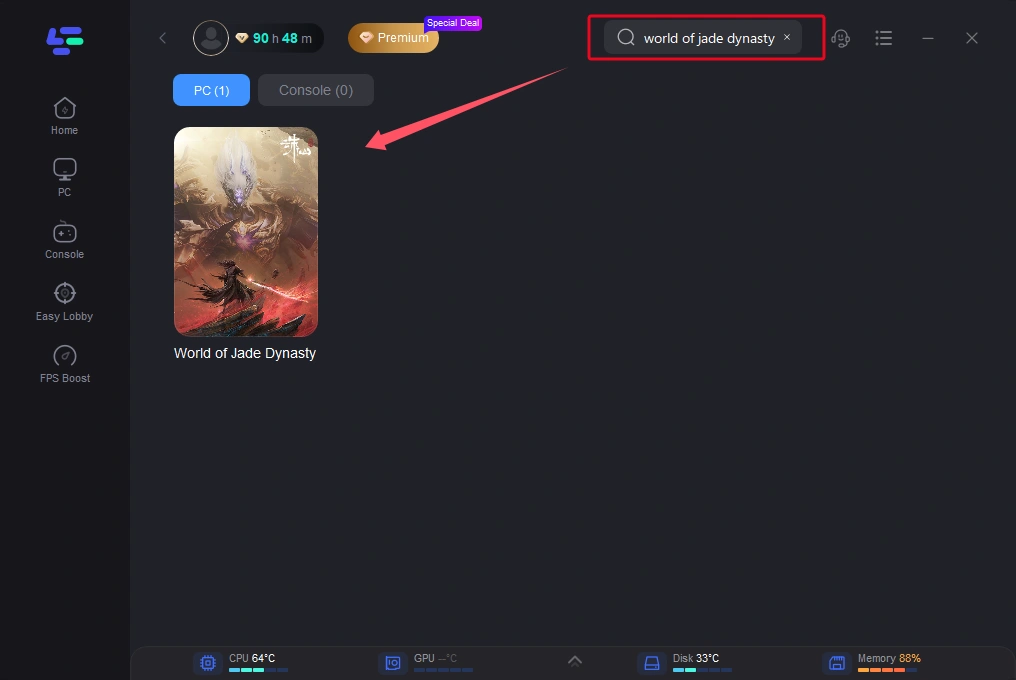
Step 2: Launch LagoFast, then click on the PC button on the left side. Search for World of Jade Dynasty in the search bar and select it once it appears.
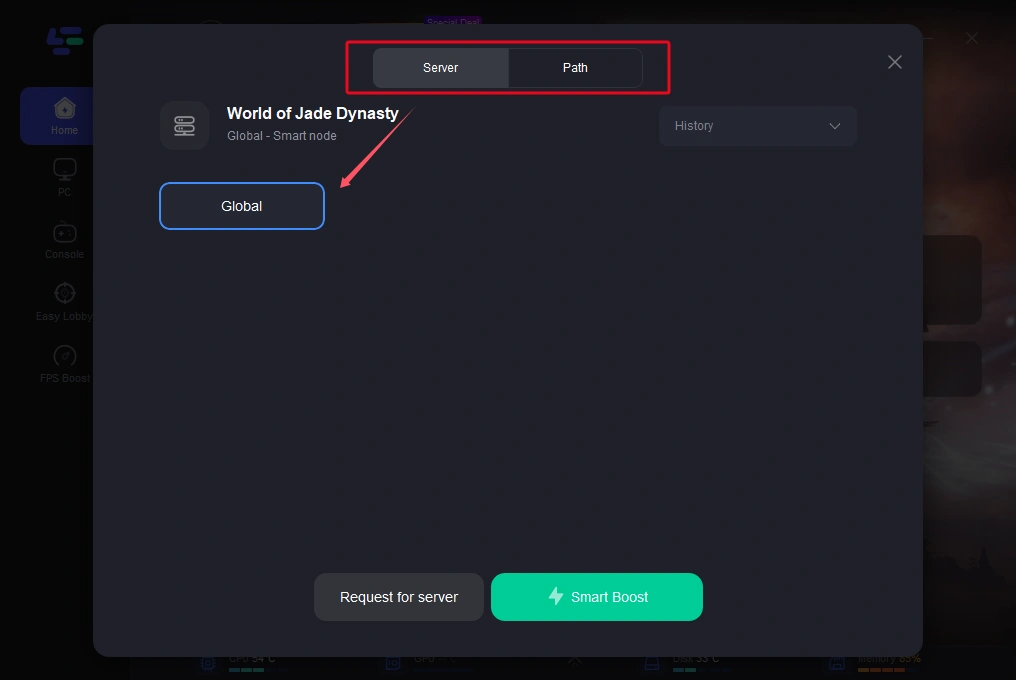
Step 3: Select a server that is closer to you or offers lower latency.
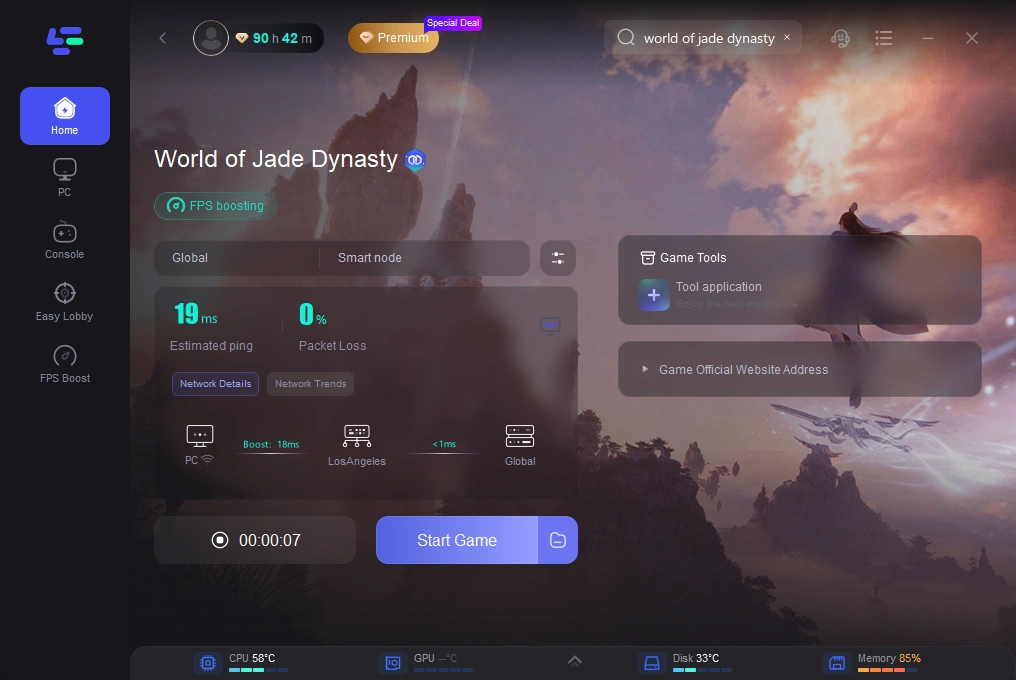
Step 4: After the network optimization is complete, return to the game and enjoy your enhanced experience.
How to Use LagoFast to Enhance Your Gaming Experience in World of Jade Dynasty Mobile:
Step 1: Search “LagoFast Mobile booster” in the App Store or Google Play., or scan the following QR codes.

Step 2: Click the “Download” button, then install and launch “LagoFast Mobile Booster”.
Step 3: Start World of Jade Dynasty then switch to LagoFast Mobile and search it.
Step 4. Select and click the World of Jade Dynasty icon in the interface.
Step 4: Enter the Severs selection interface where you can change to a stable server, then click the “Boost” button to enhance the gaming experience
Step 5: Finally, go back to World of Jade Dynasty and start playing it without any lag.
Pairing LagoFast with your World of Jade Dynasty client makes an enormous difference—especially during PvP encounters or large-scale raids.
Conclusion
When it comes to download and play World of Jade Dynasty, making sure you get the official game client, completing real-name verification, and establishing a reliable connection are vital first steps. Remember, you’ll need to purchase in-game items or subscribe at Level 24 to continue advancing beyond that point—so budget accordingly if you’re aiming to explore higher-level content.

Boost Your Game with LagoFast for Epic Speed
Play harder, faster. LagoFast game booster eliminates stutter and lags on PC, mobile, or Mac—win every match!
Quickly Reduce Game Lag and Ping!
Boost FPS for Smoother Gameplay!