

Sea of Remnants is an adventure RPG that blends open-world exploration, ocean travel, and crew-based adventures into a unique seafaring experience. Players can explore a mysterious sea world, build their crew, discover new locations, and experience unique adventures across the ocean. Currently, the CN version is the main way for players to access the game, but overseas players may face challenges such as account registration, language differences, and connection issues. This guide covers how to download and play Sea of Remnants CN on PC and mobile, along with tips to enjoy a smoother gameplay experience overseas.

- ✅ Reduce Lag and High Ping.
✅ Boost FPS at the Same Time.
✅ Support 8000+ Popular Online Games.
✅ Change Server without Latency.
✅ Boost Game Loading Speed.
Part 1: Sea of Remnants CN Launch Overview
Part 2: How to Download and Play Sea of Remnants CN on PC and Mobile
Part 3: Can You Play Sea of Remnants CN Outside China?
Part 4: How to Improve Sea of Remnants CN Gameplay Experience Overseas
Part 5: Sea of Remnants CN FAQs
Part 1: Sea of Remnants CN Launch Overview
Sea of Remnants CN is now available on PC, while the mobile version is available for pre-download ahead of its official launch. The CN version is currently the main way for players to access the game, and pre-download is already available for players who want to prepare in advance.
Sea of Remnants CN release schedule:
- PC Version: Open beta launched on July 9, 2026
- Mobile Version (Android & iOS): Launches on July 23, 2026
- Platform Support: PC, Android, and iOS with cross-platform support

Part 2: How to Download and Play Sea of Remnants CN on PC and Mobile
Downloading Sea of Remnants CN is simple, although the steps differ slightly between PC and mobile. Since the game is currently distributed through CN channels, players need to use the correct platform to download the official version.
Download Sea of Remnants CN on PC
To play Sea of Remnants CN on PC, follow these steps:
1. Visit the official Sea of Remnants CN website.

2. Download the PC game client and install it on your device.
3. Launch the client and log in with your game account.
4. Complete any required updates before entering the game.
Before installation, make sure your PC has enough storage space and a stable internet connection for downloading game files and future updates.
Download Sea of Remnants CN on Mobile
Mobile players can download the game through the official Android channel or the China App Store for iOS.
Android:
- Access the official CN Android download page.
- Download and install the game package.
- Open the game and complete updates before logging in.
iOS:
- Open the China App Store.
- Search for Sea of Remnants CN.
- Download and install the game using a compatible Apple ID.
After installation, overseas players may need to complete additional account verification or adjust regional settings before they can enter the game.
Part 3: Can You Play Sea of Remnants CN Outside China?
Yes, overseas players can play Sea of Remnants CN, but they may face issues such as account access, regional restrictions, and unstable connections when accessing CN servers.
For mobile players, LagoFast provides a Game Download Tool that helps overseas users easily find and download Sea of Remnants CN. After downloading the game, players can also optimize their connection for a smoother gameplay experience.
Part 4: How to Improve Sea of Remnants CN Gameplay Experience Overseas
For overseas players, network stability is one of the key factors affecting the Sea of Remnants CN experience. High ping, packet loss, and unstable connections can lead to lag, delayed responses, and interruptions during gameplay. Using a game optimization tool like LagoFast can help improve connection quality by optimizing network routes between players and CN servers.
LagoFast helps reduce ping, fix packet loss, stabilize connections, and improve routing to reduce lag and disconnections. In addition to network optimization, it also provides useful features for overseas players, including the One-Click Translation Tool for PC and OCR Translation and Full-Screen Translation tools for mobile, helping players better understand in-game content. These features make it easier to enjoy Sea of Remnants CN with a smoother and more accessible gameplay experience.
How to Use LagoFast to Play Sea of Remnants CN on PC
Step 1: Download and install LagoFast on your PC.
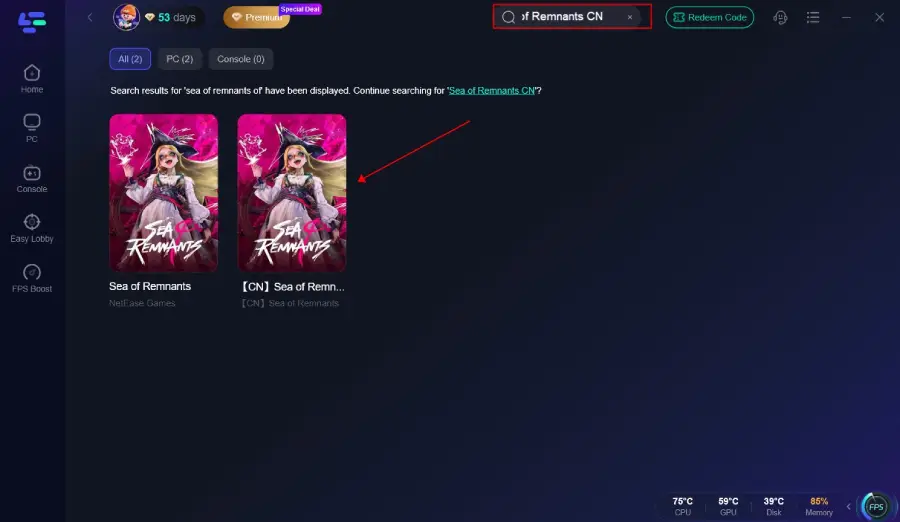
Step 2: Search for the Game: Type "Sea of Remnants CN" into the search bar.
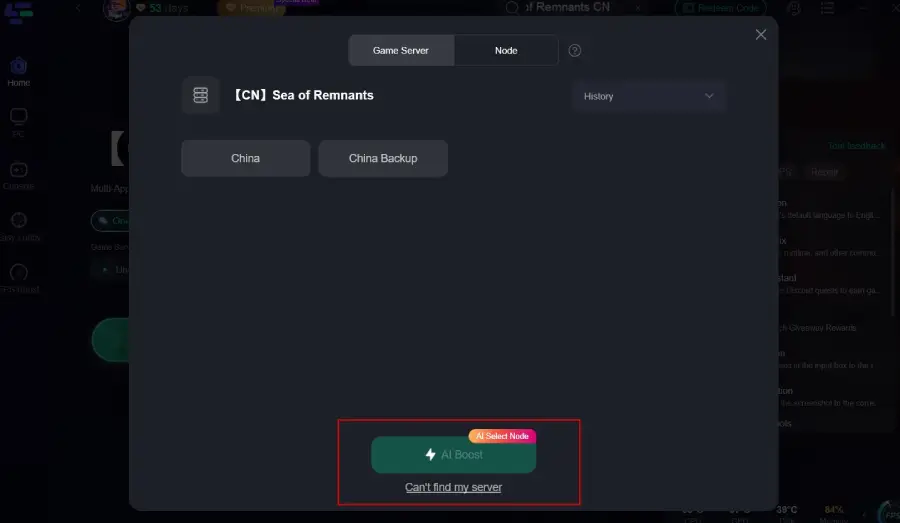
Step 3: Choose your preferred server node and click "Smart Boost" to start optimizing.
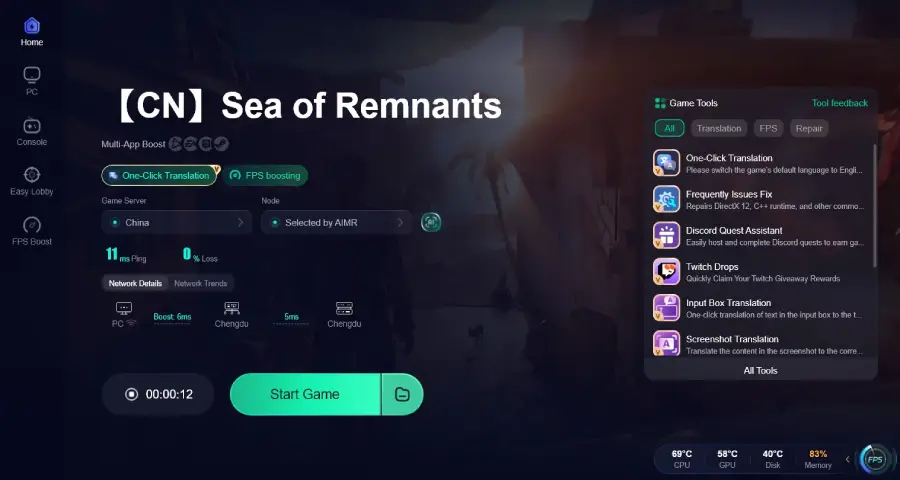
Step 4: Launch your game and enjoy smooth, optimized gameplay with lower ping and no stutter.
How to Use LagoFast to Play Sea of Remnants CN on Mobile
Step 1: Click Download and install LagoFast Mobile

Step 2: Launch LagoFast Mobile, use the search bar to find Sea of Remnants CN, and click the download button to begin.
Step 3: After downloading, tap “Install” to safely and quickly install Sea of Remnants CN.
Step 4: Select your preferred language, and you can enjoy the game instantly.
Step 5: Click Boost and select your corresponding server region to connect.
Part 5: Sea of Remnants CN FAQs
Is Sea of Remnants CN free to play?
Sea of Remnants CN is available as a free download. Check the official announcement for the latest details on in-game purchases.
Can I play Sea of Remnants CN on both PC and mobile?
Yes. Sea of Remnants CN is available on PC, Android, and iOS, with cross-platform progression supported.
Can I pre-download Sea of Remnants CN?
Yes. The mobile version is available for pre-download, while the PC version is already available through the official client.
Can I change the game language in Sea of Remnants CN?
The CN version primarily uses Chinese. If you're not familiar with the language, LagoFast's translation tools for PC and mobile can translate menus, quests, and other in-game text in real time.
Conclusion
Whether you're playing on PC or mobile, getting set up properly can make your Sea of Remnants CN experience much smoother. From downloading the game to improving your connection and understanding in-game content, a little preparation goes a long way. Once you're ready, you can focus on exploring the world of Sea of Remnants without unnecessary interruptions.

Boost Your Game with LagoFast for Epic Speed
Play harder, faster. LagoFast game booster eliminates stutter and lags on PC, mobile, or Mac—win every match!
Quickly Reduce Game Lag and Ping!
Boost FPS for Smoother Gameplay!