
Hecate Team has consistently been actively sharing the development progress of Project NET on social media. Players can learn detailed information about the game through trailers, character introductions, gameplay footage, and more. With the launch of its Core Breach Test in Indonesia, players have become quite interested in how to download and play Project NET. This article will provide information about Project NET's Core Breach Test and offer the best methods for downloading and playing Project NET in other regions!

- ✅ Reduce Lag and High Ping.
- ✅ Boost FPS at the Same Time.
- ✅ Support 2000+ Popular Online Games.
- ✅ Support Different Game Tools.
- ✅ Een Connection Issues.
Part 2: Project NET Core Breach Test Overview
Part 3: How to Download And Play Project NET
Part 4: How to Enhance Gaming Experience in Project NET
Part 1: What Is Project NET
Project NET is a spin-off of the well-known Girls' Frontline franchise, developed as a third-person shooter (TPS) using Unity 3D. Hecate Team aims to expand the Girls' Frontline universe beyond the tactical role-playing game genre through Project NET. Since the release of its trailer in late 2024, the game has garnered much anticipation and popularity among players.
The game is set in a simulated world within Nirvana, which is accessed by the "guardians of the space-time continuum" using "Transcendence Mode." In this world, Lunasia will recruit Griffin's elite tactical dolls to form a team capable of facing the ultimate crisis brought about by the rapid shifts in the world lines.
Part 2: Project NET Core Breach Test Overview
As development progresses, Project NET's Core Breach Test has also kicked off. Here's an overview of the Project NET Core Breach Test:
Test Period
From 18:00 (UTC+8) on June 12, 2025, to 18:00 (UTC+8) on June 20, 2025
Test Platform
Android mobile devices
Test Region
Open exclusively in Indonesia. Only players in this specified region can directly download and play Project NET.
Test Type
Limited-access; Non-monetized (Note: All save data during the test period will not be carried over to the official release version of the game.)
Test System Requirements
Android
- Processor: Snapdragon 680; Kirin 650 or higher
- RAM: 4GB or more
- Free storage space: 4GB or higher
- OS version: Android 5.0 or higher
Part 3: How to Download And Play Project NET
As an ambitious third-person shooter spin-off, featuring tactical gameplay, Roguelike elements, and an economical multiplayer mode, Project NET has piqued the interest of players from around the world. However, this test is only available to players in Indonesia, creating a barrier for those in other regions who wish to participate. To address this issue, LagoFast, with official permission, supports players in other regions in successfully downloading and playing Project NET. Here's a download tutorial:
Step 1: Visit the official website of LagoFast Mobile to download the latest APK file of LagoFast Mobile. (Note: The version of LagoFast Mobile downloaded through Google Play may not support downloading Project NET.)

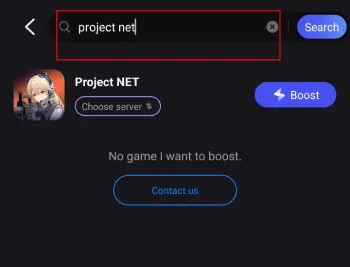
Step 2: After completing the installation, open the LagoFast Mobile APP. Enter "Project NET" in the search box, or you can find the game in its game library. Once located, click the "Download" button to initiate the download process.
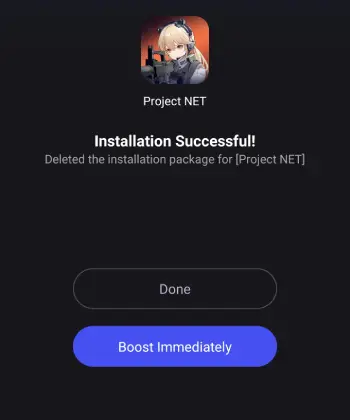
Step 3: After the Project NET installer package is downloaded, follow the system prompts to complete the installation process. Once done, you can successfully log in and start playing Project NET.
After successfully downloading and starting to play Project NET, you can also use LagoFast's translation tool to help you overcome language barriers. Currently, LagoFast Mobile supports translating Project NET into various languages, including Vietnamese, allowing players to easily play the game in their native language. Here are the steps:
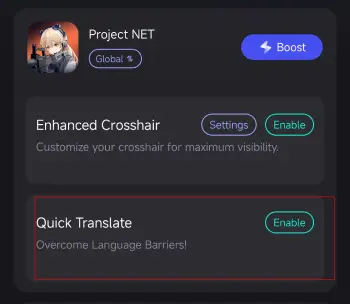
Step 1: In LagoFast Mobile APP, click on the Quick Translate tool located below Project NET. Then, click "Enable".
Complete the necessary settings:
- Set popup window permissions: Enable "Display over apps."
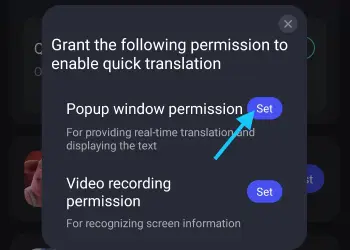
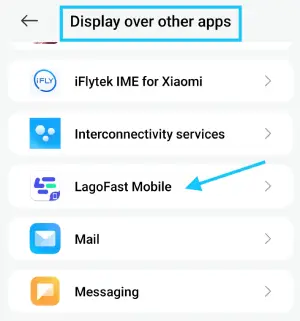
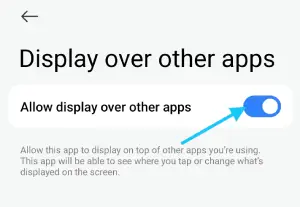
Then set video recording permissions: Tap the Set button, select Full Screen, then start the translation tool.
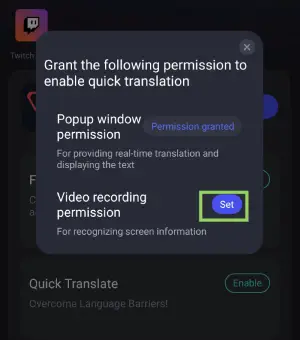
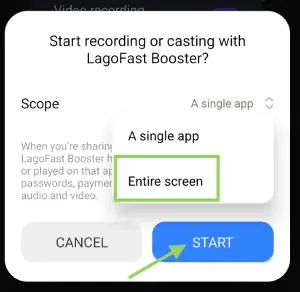
Step 4: Return to the game and use the floating translation ball provided by the tool to translate Chinese text in Valorant Mobile into your target language.
Part 4: How to Enhance Gaming Experience in Project NET
If you've successfully downloaded Project NET through LagoFast Mobile but are still experiencing unstable network connections, high latency, or even disconnections due to regional restrictions or other reasons, you can also enable LagoFast's acceleration feature simultaneously to create the best gaming experience for you in Project NET.
Key Advantages of LagoFast
- Reduced Lag: Minimizes latency issues, ensuring real-time responsiveness during combat.
- Stable Connection: Provides a consistent network connection, preventing disconnections during crucial moments.
- Optimized Game Performance: Enhances system performance, allowing for smoother graphics and faster load times.
- FPS Optimization: By minimizing ping fluctuations and stabilizing latency, LagoFast dynamically enhances frame rate consistency, elevating both visual clarity and responsiveness.
How to Use LagoFast Mobile to Play Project NET
Step 1: Open LagoFast and locate Project NET within the app.
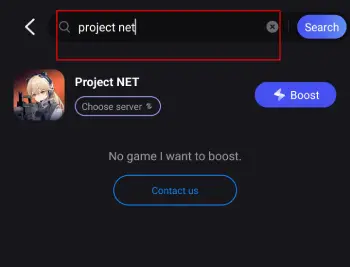
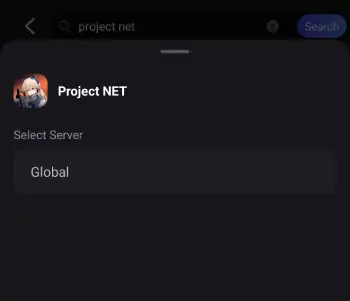
Step 2: Choose the best server based on your actual needs and initiate the acceleration process.
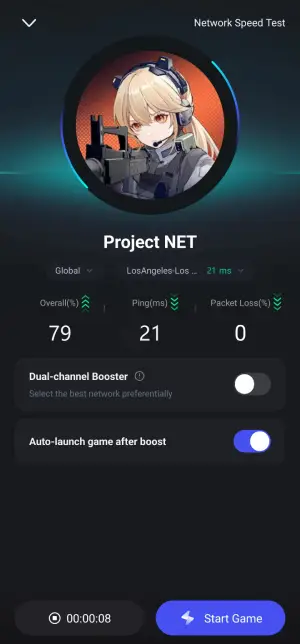
Step 3: After confirming that acceleration is enabled, click "Start Game" and return to Project NET to begin playing.
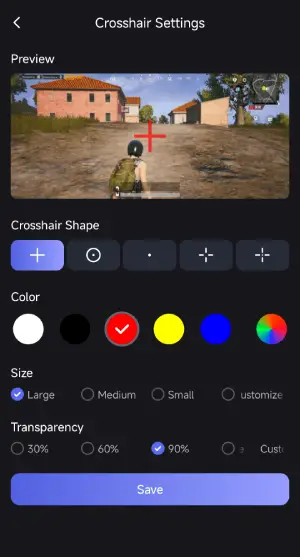
While enabling the acceleration feature, LagoFast also provides players with a custom crosshair tool. With just a simple click, players can change the color, size, style, and more of the crosshair, creating a more visible tool for aiming at enemies. Here are the steps to use the Custom Crosshair tool:
Open the LagoFast Mobile APP, locate Project NET under the Boost Tab, and click on the Custom Crosshair tool below it. Click "Enable."
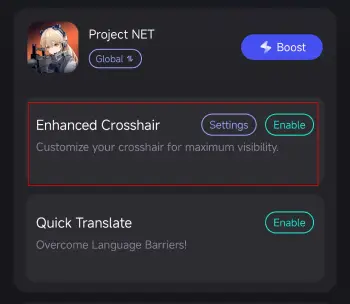
Click "Settings" to customize the crosshair according to your gaming preferences. Once you're done, return to the game, and you'll see your personalized crosshair tool!
Of course, although Project NET's current test is only available for Android mobile players, it will also be launched on the PC platform in the future. Here are the steps to use LagoFast on your PC to create the best gaming experience for Project NET:
Step 1: Click the free trial button to download LagoFast on your PC.
Step 2: After completing the installation, enter "Project NET" in the search box to start searching.
Step 3: Click "Select Server" to choose a stable server, and then click "Smart Boost" to initiate the acceleration process.
Step 4: After confirming that acceleration has started, click "Start Game" to begin playing.
Conclusion
With the official launch of Project NET's Core Breach Test in Indonesia, there has been new progress towards the release of its official version. Players can look forward to fully experiencing all the gameplay content of Project NET in the near future. However, if you want to seize this testing opportunity to get an early access of Project NET's content, using LagoFast Mobile to help download and play the game is definitely your best option!

Boost Your Game with LagoFast for Epic Speed
Play harder, faster. LagoFast game booster eliminates stutter and lags on PC, mobile, or Mac—win every match!
Quickly Reduce Game Lag and Ping!
Boost FPS for Smoother Gameplay!