
Whether you’re a veteran RPG player or just starting out, Dragon Sword offers an action-packed experience full of epic battles, dungeons, and powerful gear. If you’ve been waiting to dive into the game, this guide will show you exactly how to download and play Dragon Sword on both PC and mobile.
We’ll also share simple tips with LagoFast to boost performance, reduce lag, and make your gameplay smoother, so you can focus on dominating every battle.

Part 1: Dragon Sword Release Date and Gameplay Details
Part 2: How to Download and Play Dragon Sword (PC & Mobile)
Part 3: Enhance Your Download Process and Gaming Experience with LagoFast
Part 1: Dragon Sword Release Date and Gameplay Details
Dragon Sword officially launched on the Korean server (KR) on January 21, 2026, bringing players a modern action RPG with responsive combat, instanced dungeons, and upgradeable equipment systems.
The current version introduces new dungeon content, refined combat mechanics, and expanded gear progression. Dragon Sword supports PC and mobile platforms (iOS & Android), allowing players to switch between devices and play with flexibility.
Part 2: How to Download and Play Dragon Sword (PC & Mobile)
Downloading Dragon Sword KR requires meeting specific regional and account conditions. Official access typically requires a Korean IP and a verified Kakao account.
PC Download
- Visit Official Source: Go to the Dragon Sword KR website.
- Create/Login Account: Use a KakaoTalk white account. Real-name verification is required before playing.
- Download & Install: Click the download button and install the game client.
Mobile Download (iOS & Android)
- Check Official Store: Open the App Store or Google Play.
- Search & Install: Find the official “Dragon Sword” app and install it.
- Log In: Use a KakaoTalk white account and complete real-name verification.
How to Download Dragon Sword Outside South Korea
For players outside South Korea, downloading Dragon Sword from the official channels can be tricky due to regional restrictions, such as the need for a Korean IP. LagoFast is a great option for both PC and mobile, as it provides a Game Download tool that allows you to download Dragon Sword from anywhere and enjoy smoother, lag-free gameplay.
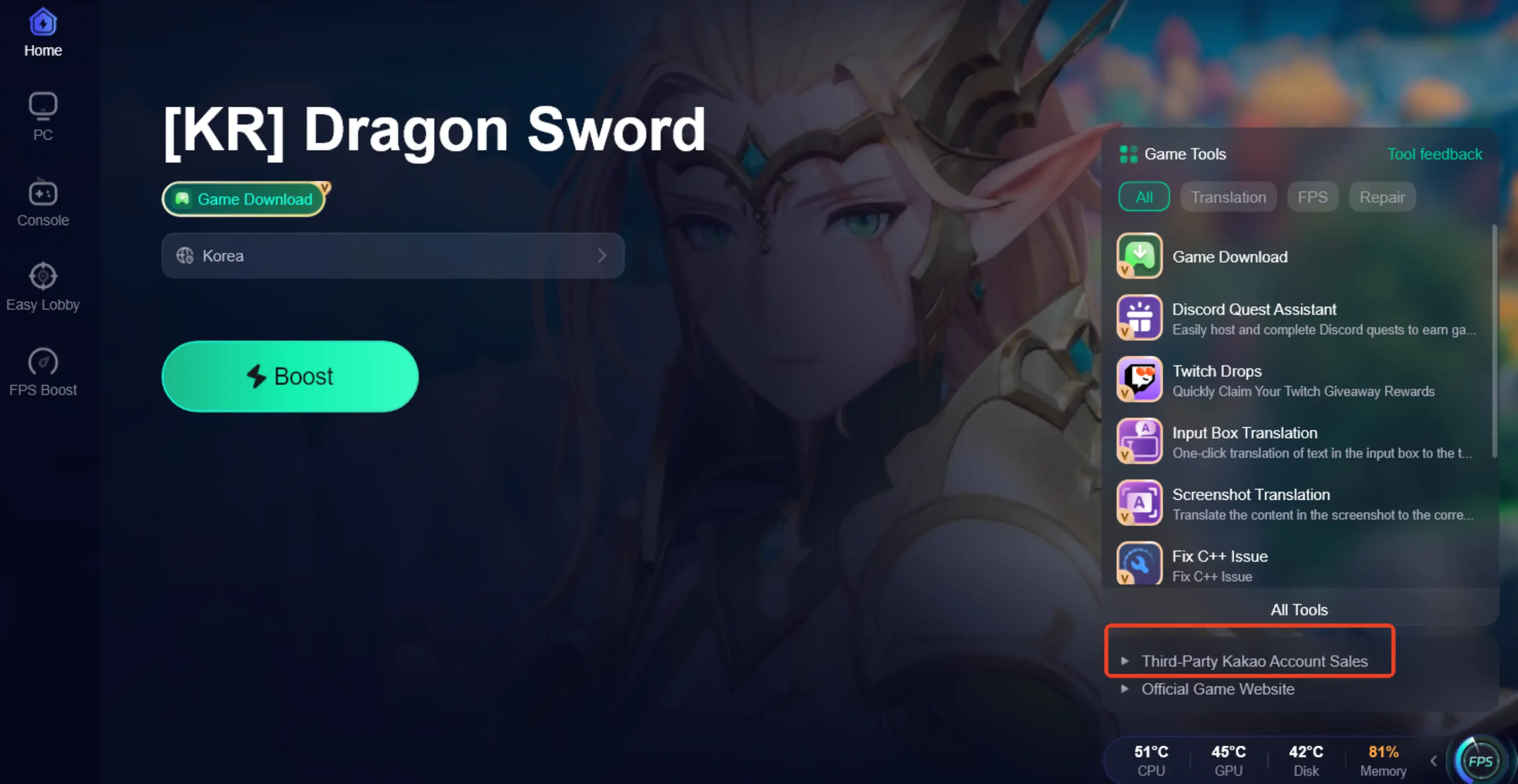
In addition, LagoFast also provides access to third-party account assistance services for players who lack a Kakao account through these links and log in to the game on either platform. Keep in mind that after logging in with a white account, you must complete real-name verification yourself before gaining full access to Dragon Sword.
How to Use LagoFast to Download Dragon Sword from Anywhere:
For PC Players:
Step 1: Click the button below to download LagoFast for free and install it.
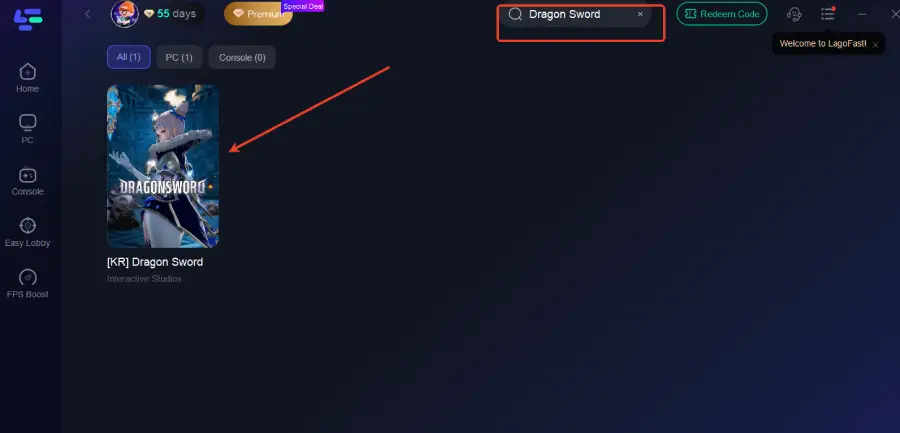
Step 2: Launch LagoFast, type "Dragon Sword" into the search bar, and select the game.
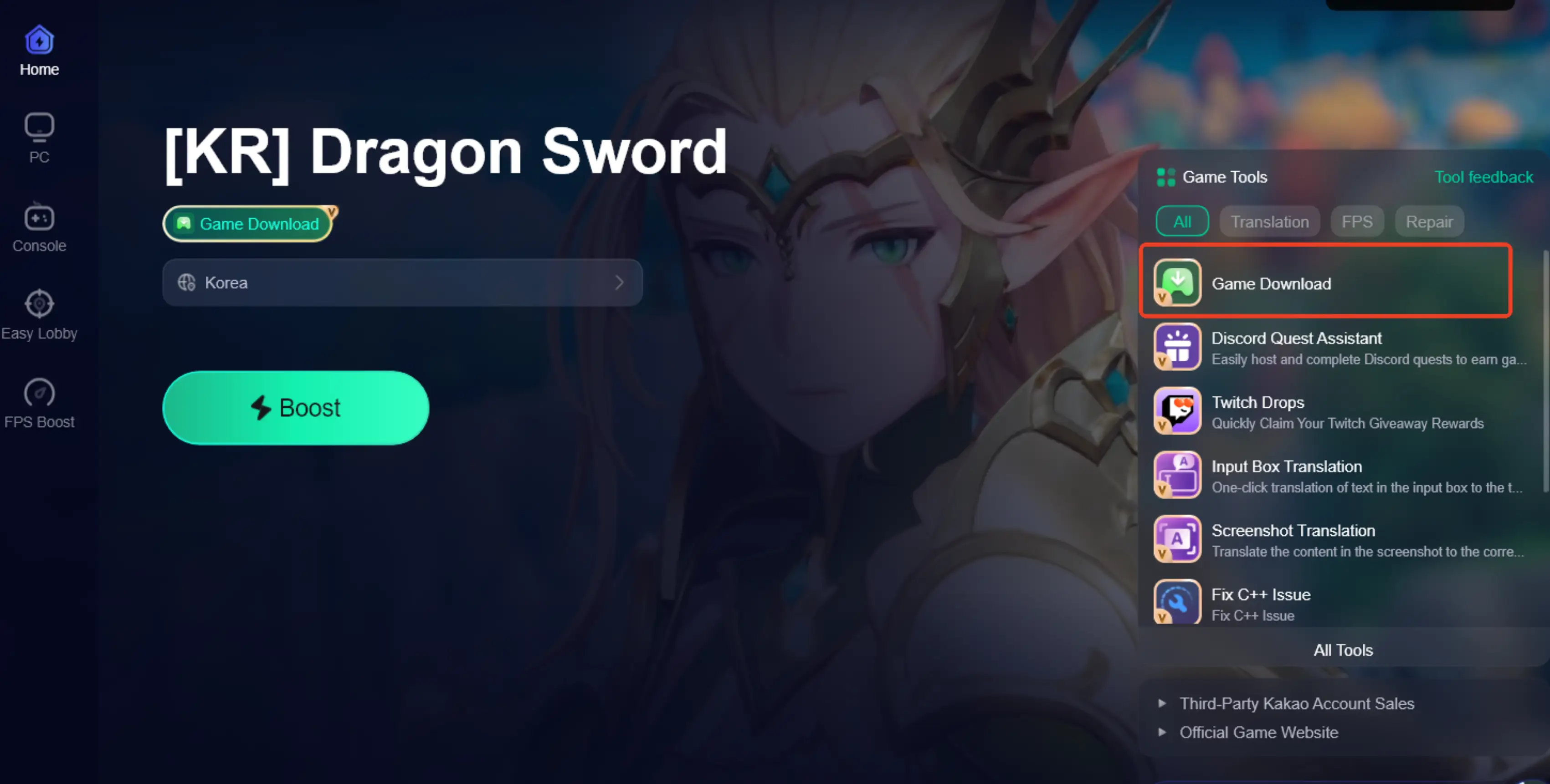
Step 3: Click the "Game Download" button in the bottom-right corner.
Step 4: Click the "Third-Party KaKao Account Sales" button in the bottom-right corner. After purchasing a white account, you can log in to the game.
For Mobile Players:
Step 1: Visit LagoFast’s official website to download LagoFast Mobile and install it.

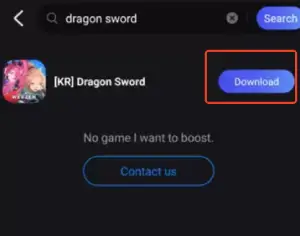
Step 2: Open LagoFast Mobile, search for "Dragon Sword," and tap the download button next to the search result.
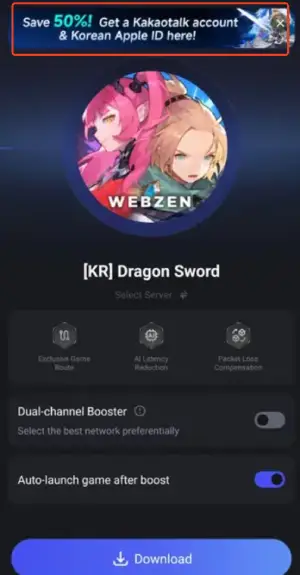
Step 3: Tap the "Get a Kakao Account & Korean Apple ID" button at the top of the screen. After purchasing, log in to the game using your White account.
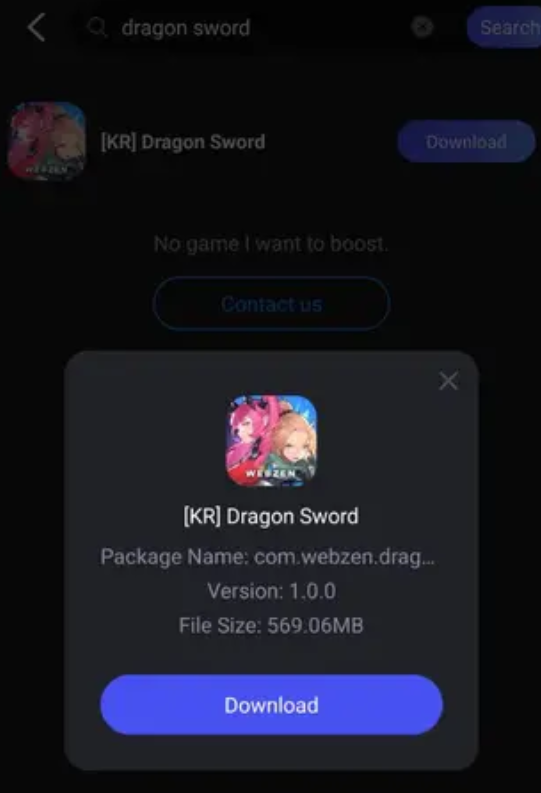
Step 4: After downloading, tap “Install” to safely and quickly install Dragon Sword.
Note: you must still complete real-name verification yourself before you can fully access the game.
Part 3: Enhance Your Download Process and Gaming Experience with LagoFast
Many players experience high ping, lag spikes, and connection drops when playing Dragon Sword, especially from outside South Korea. Loading times can be slow, network routes unstable, and in-game issues frustrating. This is where LagoFast comes in. Beyond its download feature, LagoFast helps lower ping, stabilize your network, and optimize routing to reduce lag and stuttering during gameplay. It also includes practical tools like in-game translation and repair features, making it easier to fix issues and enjoy a smoother, more consistent Dragon Sword experience overall.
How to Use LagoFast Boost Dragon Sword Faster on PC:
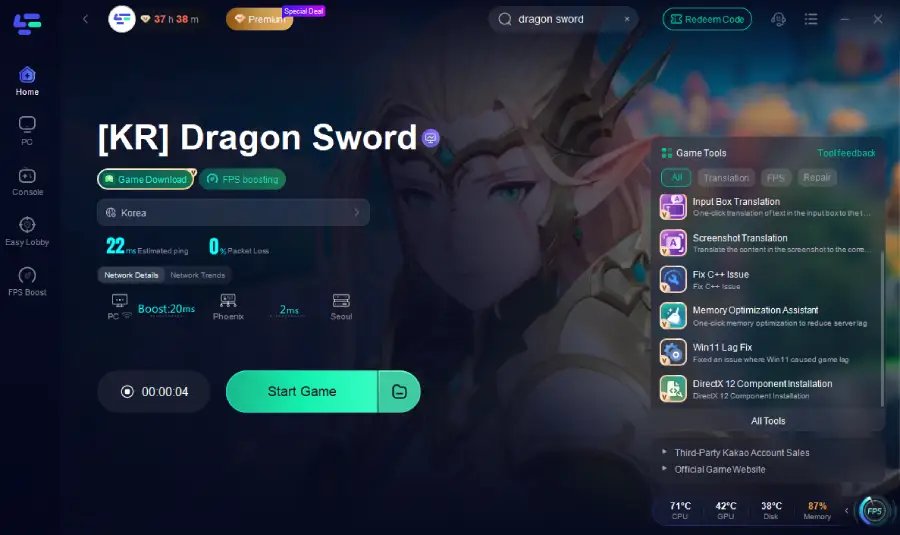
Step 1: Open LagoFast, Input “Dragon Sword” and click the result.
Step 2: Click on “Server” to change to a better server that ensures the gaming experience, then click on “Smart Boost.”
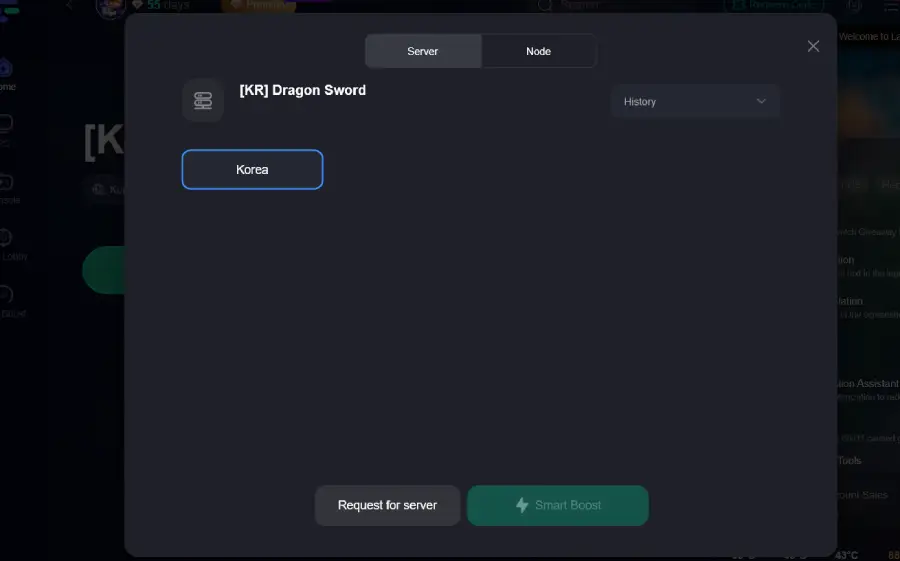
Step 3: Check the specific game ping, packet loss, and multiple path connection on the right side. Finally, click “Start Game” to play the game.
How to Use LagoFast Boost Dragon Sword Faster on Mobile:
Step 1: Open LagoFast, Search for “Dragon Sword” and select it.
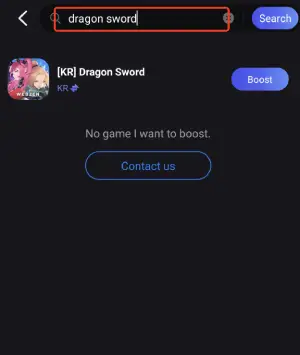
Step 2: Pick the server that suits you best.
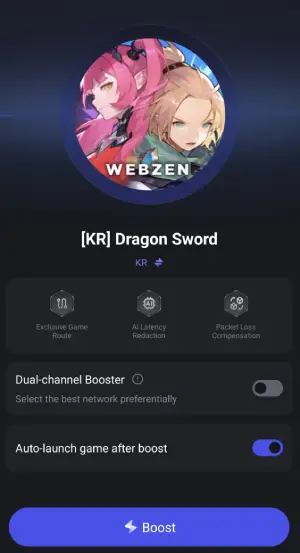
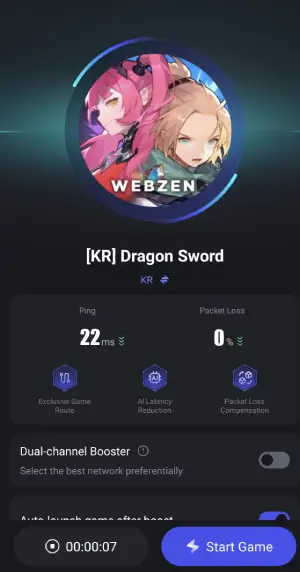
Step 3: Tap Boost, and LagoFast will display real-time ping and packet loss stats.
Part 4: FAQs
Q: Is Dragon Sword available outside South Korea?
A: Dragon Sword is currently released on the Korean server. Players outside South Korea may face regional restrictions when downloading or accessing the game, including IP and account requirements.
Q: Do I need a Korean account to play Dragon Sword KR?
A: Yes. To log in to Dragon Sword KR, a KakaoTalk account is required. Players outside Korea usually need a KakaoTalk white account and must complete real-name verification to access the game.
Q: Can Dragon Sword be played on both PC and mobile?
A: Yes. Dragon Sword supports both PC and mobile platforms, allowing players to choose how they want to experience the game.
Q: Why do some players experience lag or connection issues in Dragon Sword?
A: Because Dragon Sword KR servers are located in South Korea, players from other regions may encounter high ping, unstable connections, or lag during gameplay.
Q: Is real-name verification mandatory for Dragon Sword KR?
A: Yes. Real-name verification is required to fully access Dragon Sword KR, even if you are using a KakaoTalk white account.
Conclusion
Dragon Sword delivers a fast-paced action RPG experience on both PC and mobile, but accessing the KR server can come with regional and network challenges. By understanding the download requirements and using the right tools, players can get into the game faster and play more smoothly. With proper setup and optimization, you can focus less on connection issues and more on exploring dungeons, upgrading gear, and enjoying everything Dragon Sword has to offer.

Boost Your Game with LagoFast for Epic Speed
Play harder, faster. LagoFast game booster eliminates stutter and lags on PC, mobile, or Mac—win every match!
Quickly Reduce Game Lag and Ping!
Boost FPS for Smoother Gameplay!