

Architect: Land of Exiles is an Unreal Engine 5 MMORPG that has recently entered the Taiwan, Hong Kong, and Macau market. With its large open world, detailed character progression, and immersive fantasy setting, the game has quickly caught the attention of MMORPG fans. However, not every player can fully enjoy it because of language barriers in gameplay. This guide breaks down the release details, key features, and how a game translation tool can help you understand the game more easily.

- ✅ Reduce Lag and High Ping.
✅ Boost FPS at the Same Time.
✅ Support 2000+ Popular Online Games.
✅ Change Server without Latency.
✅ Boost Game Loading Speed.
Part 1: Architect: Land of Exiles Release Date and Game Features
Part 2: What Languages Does Architect: Land of Exiles Support
Part 3: How to Play Architect: Land of Exiles in Any Language — Best Game Translation LagoFast
Part 1: Architect: Land of Exiles Release Date and Game Features
Architect: Land of Exiles is a fantasy MMORPG built with Unreal Engine 5, focusing on open-world exploration, character growth, and large-scale multiplayer battles.
For Taiwan, Hong Kong, and Macau players, the game entered Closed Beta Testing (CBT) on June 18, 2026. The full release date has not been confirmed yet, but the game has already gained strong attention from MMORPG fans in the region.
Key Features of Architect: Land of Exiles:
- Seamless open-world exploration with large-scale zones
- Unreal Engine 5-powered next-gen visuals and lighting effects
- Flexible class system with deep character customization
- Skill-based combat with both PvE and PvP focus
- Massive multiplayer battles and faction-style warfare
- Rich storyline with lore-driven quests and world events
- Dungeon raids and cooperative boss fights
- Crafting, gear progression, and item enhancement systems
- Cross-platform support for PC and mobile players
The game includes a large amount of text-based content, including quests, item descriptions, skill systems, and world lore. This means understanding the game properly is key to progressing efficiently.
Part 2: What Languages Does Architect: Land of Exiles Support
The Taiwan, Hong Kong, and Macau version of Architect: Land of Exiles currently supports Traditional Chinese for all in-game text, with Japanese voice acting set as the default, and Korean voice available as an additional option.
While this setup works well for regional players, it doesn’t completely remove language barriers for everyone.
For non-supported language players, this gap usually shows up in everyday gameplay:
- Quest instructions and system explanations can be difficult to fully understand
- Skill descriptions and gear effects often require guessing or extra checking
- Menu navigation may take longer due to unfamiliar terminology
- Event details and updates are harder to follow without translation support
- MMO systems and mechanics become confusing without proper context
In a text-heavy MMORPG like Architect: Land of Exiles, this doesn’t just slow progression—it can also affect how you make decisions in-game.
That’s why many players using Thai, Vietnamese, or other non-supported languages look for extra tools to understand the game more clearly.
Part 3: How to Play Architect: Land of Exiles in Any Language — Best Game Translation LagoFast
If you want to play Architect: Land of Exiles in a language not officially supported in the Taiwan, Hong Kong, and Macau version, LagoFast Game Translation is a simple way to reduce the language barrier.
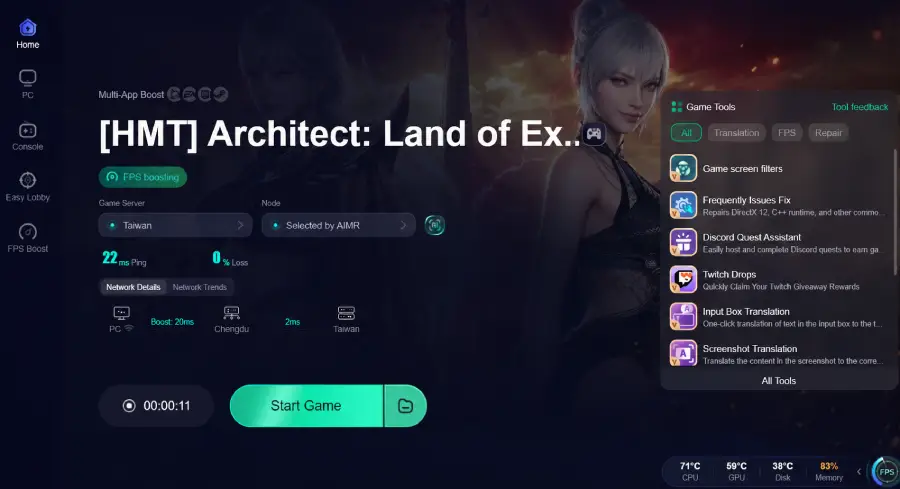
LagoFast Game Translation provides real-time in-game translation, letting players instantly read quests, menus, and system text. It also includes a Screenshot Translation feature, allowing you to capture any on-screen content and translate it into your preferred language. In addition, the upcoming One-Click Translation feature will make the process even faster by translating in-game text instantly with a single click, supporting multiple languages.
Beyond translation, LagoFast also improves overall gameplay stability. It helps reduce ping, fix packet loss, and optimize routing to game servers,resulting in fewer lag spikes, smoother combat, and more stable gameplay. With upcoming tools like a Game Download feature, players will also be able to access and load the game more efficiently for a smoother overall experience.
How to Use LagoFast for Architect: Land of Exiles Translation
Step 1: Click the Free Trial button to download and install LagoFast.
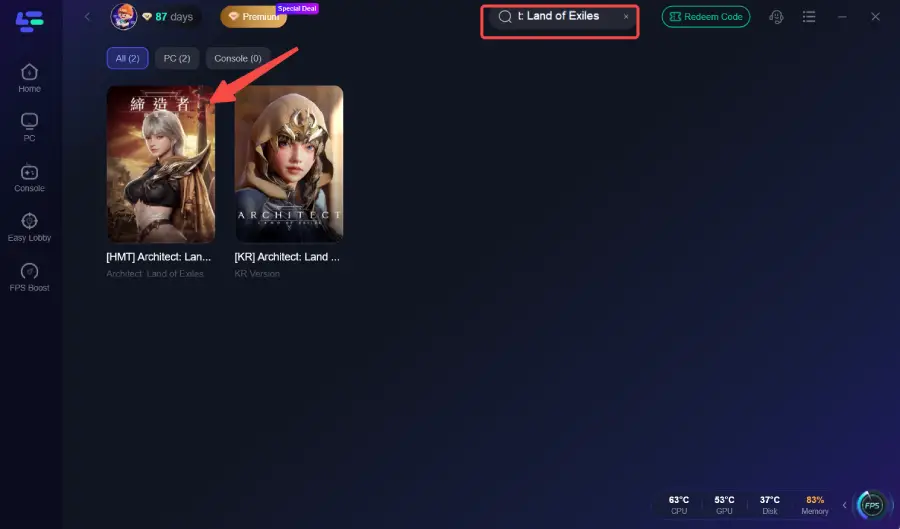
Step 2: After installation, search "Architect: Land of Exiles" in the search bar and select the game.
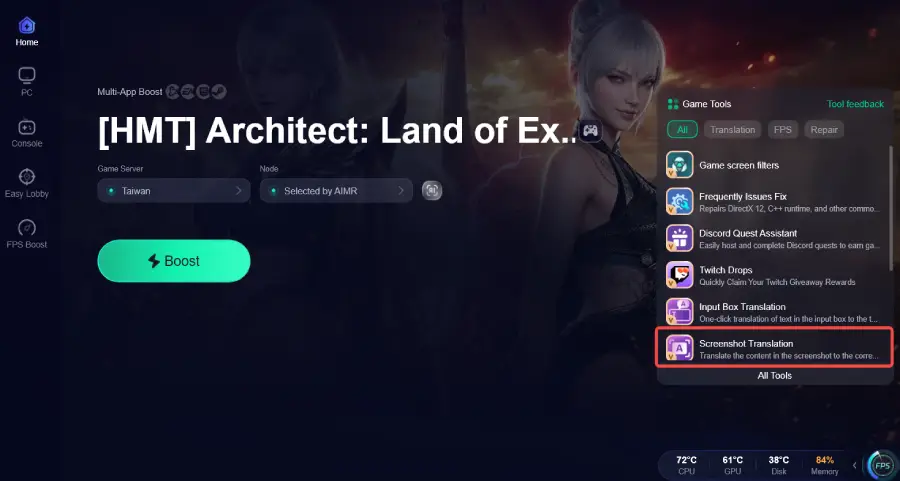
Step 3: Click the Screenshot Translation Tool on the right side of the screen.
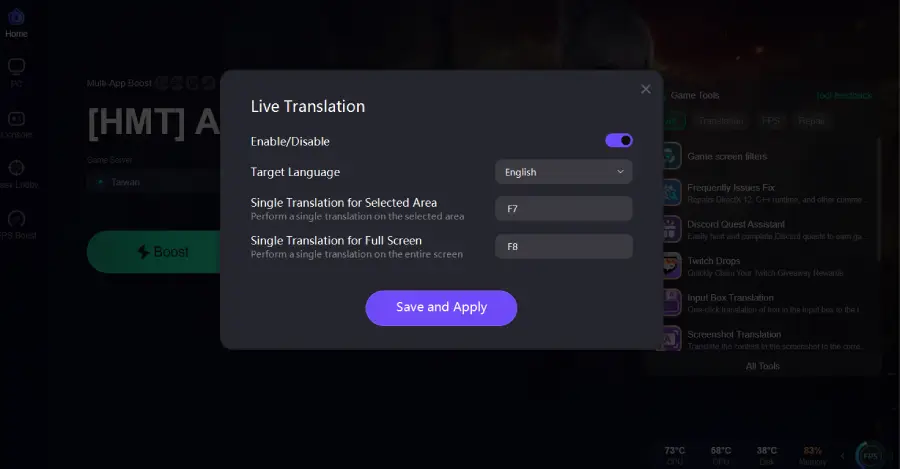
Step 4: Choose your target language and set up your hotkeys for instant translation.
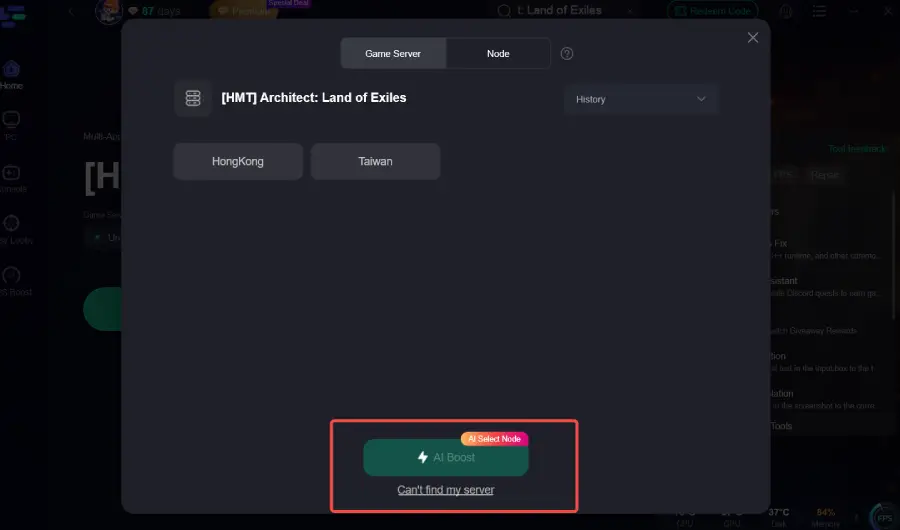
Step 5: Choose your preferred server node and click "Smart Boost" to start optimizing.
Step 6: Launch your game and enjoy smooth, optimized gameplay with lower ping and packet loss.
Final Thoughts
Architect: Land of Exiles is a deep MMORPG with a lot of text-based systems that can be challenging for players using non-supported languages. Using a tool like LagoFast helps reduce language barriers and improves connection stability for a smoother overall experience.

Boost Your Game with LagoFast for Epic Speed
Play harder, faster. LagoFast game booster eliminates stutter and lags on PC, mobile, or Mac—win every match!
Quickly Reduce Game Lag and Ping!
Boost FPS for Smoother Gameplay!