
If you’ve been using Discord recently, you’ve probably noticed something new quietly appearing in the interface: Discord Quests. These quests look simple on the surface: play a game, stay online for a while, and claim rewards. But in reality, many users quickly run into problems. Quests don’t show up, progress doesn’t count, or the required game download is outrageously large. This guide walks through how Discord Quests actually work, where to find them on PC and mobile, common issues, and the fastest way to complete them without installing massive games.
Part 1: What Rewards Can You Get from Discord Quests?
Part 2: Discord Quest Completer – Access Quest in Discord Quickly
Part 3: How to Complete Discord Quest Manually?
Part 1: What Rewards Can You Get from Discord Quests?
Discord Quests are interactive challenges launched by Discord in partnership with major game developers like Blizzard, Riot, and Ubisoft. By completing specific in-game tasks, usually playing a game or streaming it to a friend for 15–30 minutes, you earn digital loot.
While older quests focused purely on in-game items (like a DBD Discord quest charm or an Overwatch Discord quest skin), 2026 has seen the rise of Discord Orbs. These are a platform-wide currency used to purchase permanent items from the Discord Shop.
Common Discord Quest Rewards:
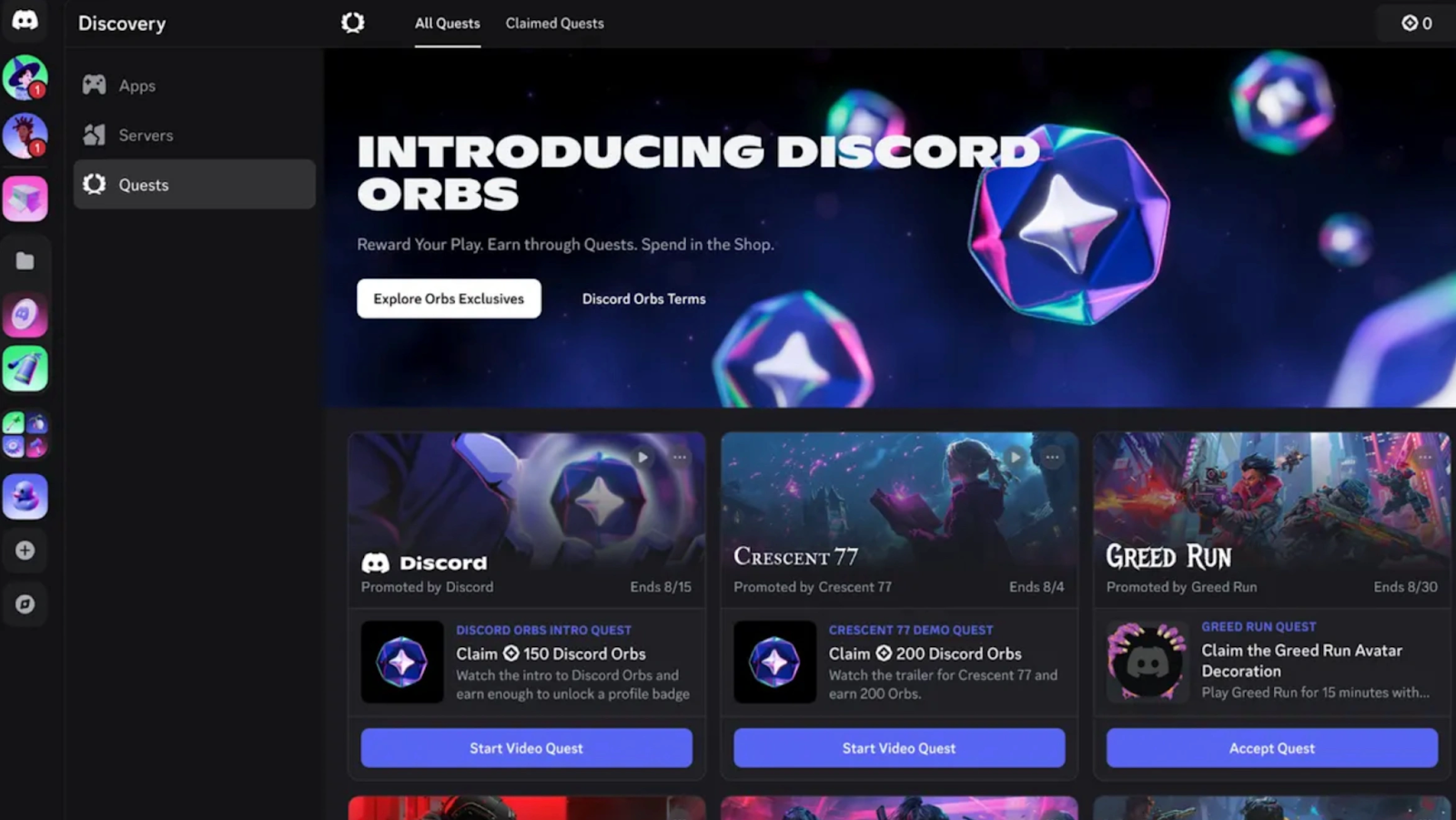
- Discord Orbs: Used to buy Nitro credits, badges, and shop items.
- Avatar Decorations: Animated frames for your profile picture.
- Profile Effects: Unique animations that play when someone views your profile.
- In-game Loot: Exclusive skins, currency, or XP boosters for titles like PUBG, Black Desert, and Aion 2.
Part 2: Discord Quest Completer – Access Quest in Discord Quickly
For many users, the real challenge isn’t understanding Discord quests; it’s actually finishing them. Modern games easily exceed 40–80 GB, making it unrealistic to download them just to complete a short Discord quest. On top of that, many players report issues like:
- Discord quest not showing up
- Discord quest not progressing
- Discord quest not working on mobile
- Progress stuck at 0%
This is where a Discord Quest Completer becomes essential.
Discord Quest Completer LagoFast: One-Click Completion
LagoFast has revolutionized the way players interact with Discord. Their built-in "Discord Quest Assistant" allows you to trick the Discord client into thinking the game is running, even if you don't have it installed. It is currently the most reliable Discord Quest Completer on the market.
Key Features of LagoFast Discord Quest Assistant:
- Zero Install Requirement: Complete quests for Aion 2, PUBG, or Overwatch without downloading a single gigabyte of game files.
- One-Click Activation: Simply select the Discord Quest Assistant in LagoFast, and it starts the “completion" immediately.
- Multi-Language Support: The tool is fully optimized for all languages supported by the LagoFast client.
- Universal Compatibility: Works for any "Play" or "Stream" quest currently active on the Discord platform.
- Integrated Lag Reduction: Powered by LagoFast Game Booster, the tool optimizes routing in real time to reduce ping, packet loss, and connection instability while quests are running.
This makes LagoFast one of the most efficient ways to access Discord quests quickly, especially when dealing with large or region-locked games.
How to complete a Discord quest using LagoFast:
Step 1. Download LagoFast
Step 2. Open the Discord desktop client
Step 3. Go to Quests and accept the game quest you want
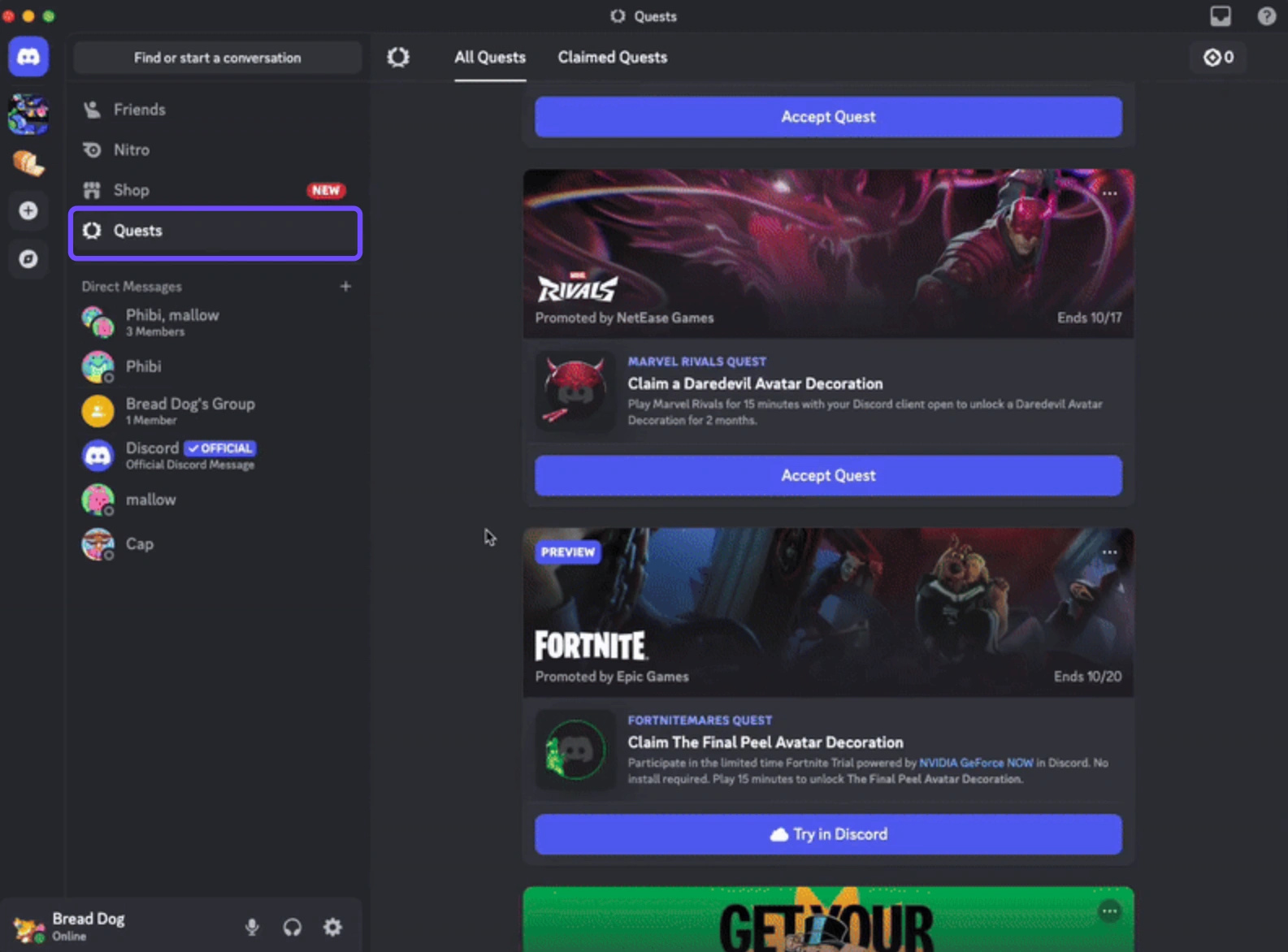
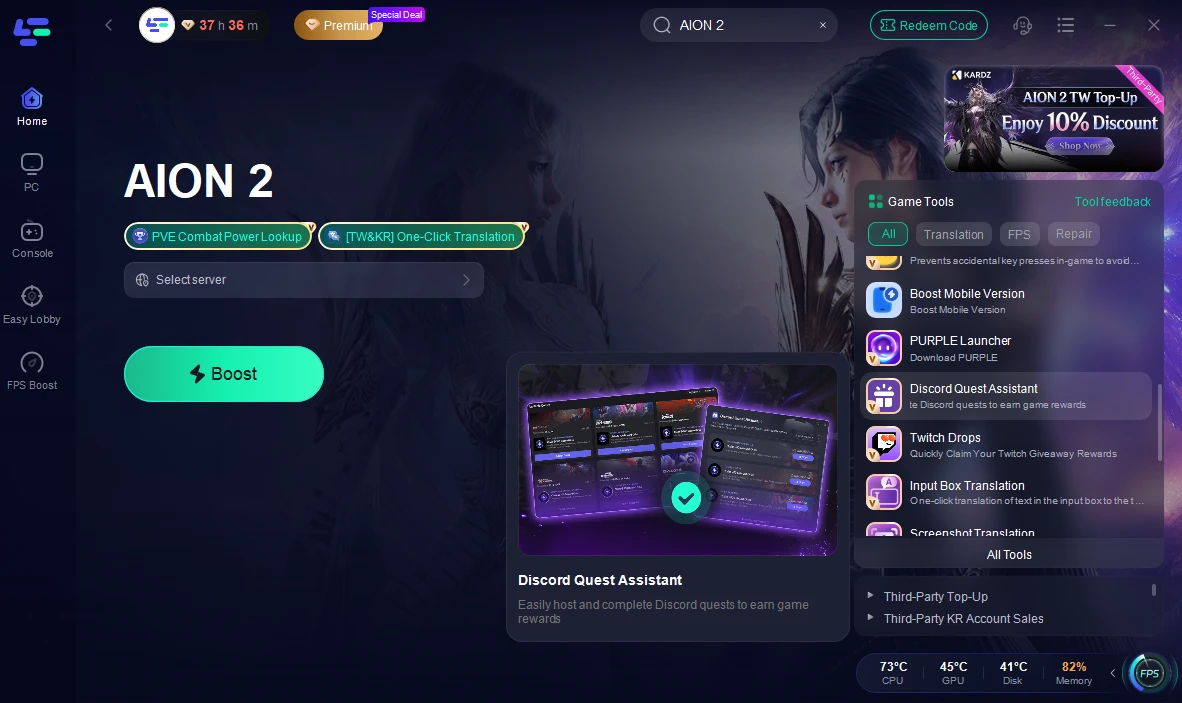
Step 4. Launch LagoFast and search your game.
Step 5. Click Discord Quest Assistant
Step 6. Select the corresponding quest and start.
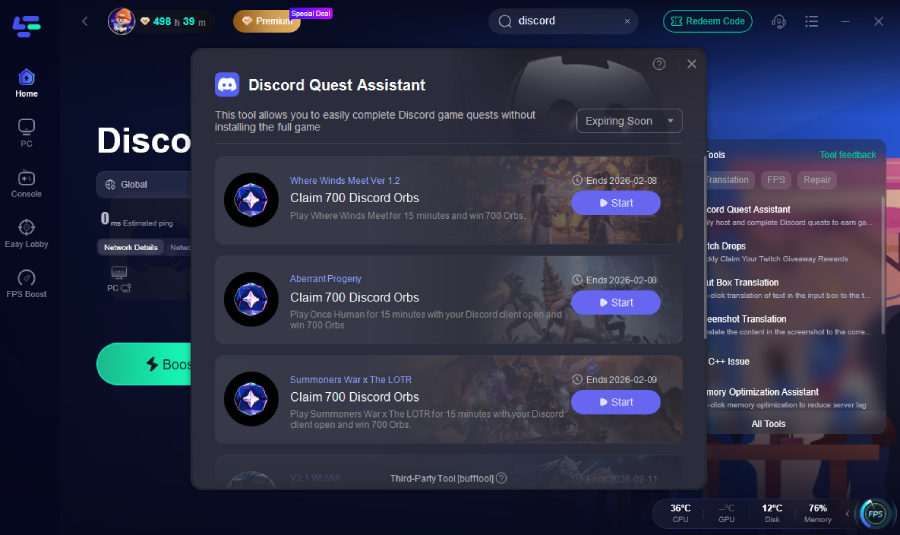
That’s it. No massive downloads, no waiting hours just to unlock a cosmetic.
Note:
- Only supports game quests (video-watching quests are not supported)
- Requires Discord desktop client (not web version)
Part 3: How to Complete Discord Quest Manually?
If you prefer not to use a quest completer, it’s still possible to finish Discord quests manually, but it’s much slower and less convenient. Let’s take Aion 2 as an example.
Manual Discord Quest Completion Steps on PC:
Step 1. Find the quest in Discord and click Quests
Step 2. Download the full game (often 50GB+)
Step 3. Install required launchers or accounts
Step 4. Log into the game while Discord is running
Step 5. Stay online for the required playtime
Step 6. Hope Discord properly tracks progress
How to Access Quest in Discord Mobile:
Mobile questing is perfect for Discord Orbs, but can be tricky to find.
- iOS/Android: Tap your profile icon (bottom right), then scroll down to Settings, tap Quests.
- Orbs Balance: You can also tap your Orbs Balance in your profile to jump directly to the "Earn" section.
Weaknesses of manual completion:
- Extremely large downloads
- Time-consuming installations
- Progress sometimes doesn’t register
- High system requirements
- Not practical for limited storage or bandwidth
This is exactly why many users search for terms like:
- discord quest not progressing
- discord quest not working
- discord quest not showing up
Manual completion works, but it’s inefficient compared to using LagoFast.
Conclusion
Discord Quests add fun rewards and community interaction directly into Discord, but the traditional completion method is often slow and frustrating. From quests not showing up to progress refusing to count, many players give up before claiming rewards. With LagoFast’s Discord Quest Completer, users can access quests quickly, avoid huge downloads, and complete tasks reliably through the Discord desktop client. If you want to enjoy Discord quests without the hassle, LagoFast offers the most efficient solution available today.

Boost Your Game with LagoFast for Epic Speed
Play harder, faster. LagoFast game booster eliminates stutter and lags on PC, mobile, or Mac—win every match!
Quickly Reduce Game Lag and Ping!
Boost FPS for Smoother Gameplay!