
Quick Answer: The official Delta Force server list includes Virginia and Silicon Valley in North America; São Paulo in South America; Frankfurt and Finland in Europe; Sydney in Oceania; and Saudi Arabia, Singapore, Japan, and Indonesia in Asia. Start with the closest realistic region, then compare actual in-game ping, jitter, packet loss, queue time, and final match-server behavior. Delta Force may select a different server when matchmaking needs more players.

- ✅ Reduce Lag and High Ping.
- ✅ Boost FPS at the Same Time.
- ✅ Support 8000+ Popular Online Games.
- ✅ Stable Server Connection
Part 1: Where Are Delta Force Servers Located?
Part 2: Delta Force Server Locations and Expected Ping
Part 3: How to Choose the Best Delta Force Server
Part 4: How to Change Server Region in Delta Force Quickly
Part 5: Why Delta Force Connects You to a Distant Server
Part 6: How to Change Server Route with LagoFast Game Booster
Part 7: Delta Force Server Location FAQ and Key Takeaways
Part 1: Where Are Delta Force Servers Located?
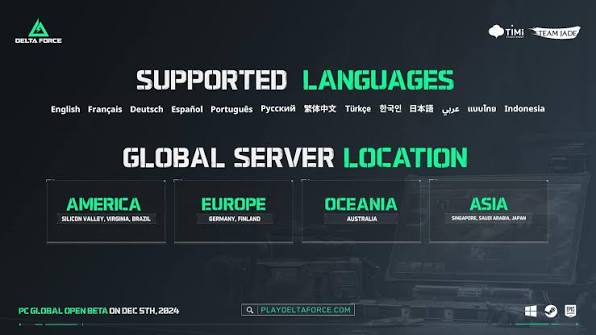
The official Delta Force server announcement groups its published locations by broad region. These locations provide a useful starting point for connection planning, but they should not be read as a promise that every player can manually select every location or that every match will run on the nearest site.
North America Servers
The published North American locations are Virginia and Silicon Valley. Virginia is the usual reference point for players in the eastern United States and nearby areas, while Silicon Valley is the more natural starting point for western North America. The better choice depends on your city, ISP peering, and the final route to the game server.
A player in central North America should test both when the game or route tool makes them available. Physical distance is important, but an apparently nearby server can perform worse if the ISP path is congested or takes an inefficient detour.
South America Servers
The official list names São Paulo for South America. Players in Brazil and nearby countries should normally begin with this region because a local path generally produces better latency and fewer routing complications than North American alternatives.
A smaller regional player pool can still affect queue time in a specific mode. If the local queue is quiet, compare the wait against a North American search, but check the final ping before keeping the change.
Europe Servers
The published European locations are Frankfurt and Finland. A player in western or central Europe will often begin with Frankfurt, while northern players may find Finland competitive. The fastest option depends on the ISP and city rather than the country label alone.
The Delta Force EU server choice is particularly important for players who want a balance between low latency and a healthy queue. An alternative region may find a lobby faster but introduce enough delay to affect aim, movement, hit registration, or extraction timing.
Asia and Southeast Asia Servers
The published Asian locations are Saudi Arabia, Singapore, Japan, and Indonesia. Singapore is a common starting point for Southeast Asian players, Japan may suit parts of East Asia, and Saudi Arabia can be a more appropriate option for players near the Middle East. Indonesia can provide a better route for nearby players when the network path is stable.
The term “Asia” covers a large geographic area. A Delta Force Asia server is not automatically low-ping for every Asian player. Compare the actual path from your ISP and the final in-game result.
Oceania Servers
The official Oceania location is Sydney. It is the natural baseline for Australia and nearby players. The smaller local population may make some narrow playlists slower outside peak hours, so players may occasionally compare Asia or North America. That trade-off should be made only after checking latency and packet loss.
Middle East Servers
The official list places Saudi Arabia under Asia rather than creating a separate Middle East heading. Players in the Gulf region and neighboring areas should test this location first, then compare Europe if the queue or route is poor.
A nearby Middle East route can be better than a farther European connection, but the result depends on ISP routing and current server health. Region labels are a guide, not a substitute for a real connection test.
|
Published region |
Officially listed locations |
|
North America |
Virginia, Silicon Valley |
|
South America |
São Paulo |
|
Europe |
Frankfurt, Finland |
|
Oceania |
Sydney |
|
Asia |
Saudi Arabia, Singapore, Japan, Indonesia |
Part 2: Delta Force Server Locations and Expected Ping
Ping is the round-trip time between your device and the game server, usually measured in milliseconds. Lower ping generally means less delay, but the number alone does not describe the entire connection. A stable 55 ms route can feel better than an unstable 35 ms route that jumps to 150 ms or loses packets.
Practical Ping Quality Bands
These bands are guidelines rather than official Delta Force thresholds. Different modes, network conditions, and player expectations can change the result.
|
Approximate in-game ping |
Practical interpretation |
|
Under 40 ms |
Excellent starting point for competitive play if stable |
|
40–70 ms |
Usually comfortable for most players |
|
70–100 ms |
Playable, but delay may be noticeable in fast fights |
|
100–140 ms |
Acceptable for some casual sessions; test for jitter and packet loss |
|
Above 140 ms |
Higher risk of delayed actions, hit-registration issues, and rubberbanding |
These values should not be used to promise a fixed experience. Your city, router, Wi-Fi conditions, ISP, time of day, and final match server all matter. A speed test to a generic website is not the same as a ping test to Delta Force infrastructure.
What Changes Expected Ping?
The largest factor is usually distance, followed by the quality of the route. Wi-Fi interference, bufferbloat, overloaded home networks, poor ISP peering, packet loss, and a distant matchmaking server can all increase the practical delay.
A Delta Force NA server may be a good choice for a player in the United States but a poor choice for someone in Europe or Asia. The same logic applies to EU, Asia, Oceania, and South America. Always compare the result from your own connection.
Ping Is Not the Same as Queue Time
A queue can be short because a region has many active players, yet the resulting match may have high ping. A nearby region can have excellent latency but a smaller queue for a particular map or mode. The best Delta Force server is the one that balances both factors.
When recording results, note the region, map, mode, difficulty, squad size, queue duration, lobby ping, packet loss, and time of day. That produces a useful personal baseline instead of relying on a single reading.
Part 3: How to Choose the Best Delta Force Server
Best Server for North America
Players on the east coast and in central areas should begin with Virginia. Players on the west coast should begin with Silicon Valley. People in Mexico, Canada, and the Caribbean should test both because the better route depends on their ISP and location.
If the local queue is inactive, compare the other North American site before jumping to Europe or Asia. A second domestic location may provide a better combination of wait time and ping without the major latency cost of an overseas server.
Best Server for Europe
Frankfurt is a sensible starting point for western and central Europe. Finland may be more suitable for northern Europe and can occasionally provide a better route for nearby players. Test both during your normal playing hours.
Players reporting inconsistent Delta Force EU server performance should check whether the issue is the final server, home Wi-Fi, or ISP path. Stable Ethernet and lower bufferbloat can improve the result without changing regions.
Best Server for Asia and SEA
Singapore is a common starting point for Southeast Asia, while Japan may be better for parts of East Asia. Indonesia can be strong for nearby players, and Saudi Arabia is the logical first test for Middle Eastern connections.
Do not treat the largest apparent population as the only factor. If Singapore finds a match quickly but produces high ping for your location, Japan or Indonesia may provide a better playing experience even with a slightly longer search.
Best Server for Australia and Oceania
Sydney is the natural first choice for Australia and nearby Oceania players. Test it during local evening hours before comparing Asia. If a local queue is empty, a broader mode or a squad may improve the search more safely than changing to a distant continent.
Best Server for Middle East Players
Saudi Arabia should be the first baseline for players near the Gulf and surrounding countries. Europe can be a backup when the local queue is thin or the route is unstable. Compare the final in-game ping rather than assuming that the continent label guarantees quality.
Regional Comparison Table
|
Player location |
First region to test |
Secondary test |
Main trade-off |
|
Eastern or central North America |
Virginia |
Silicon Valley |
Queue activity versus domestic latency |
|
Western North America |
Silicon Valley |
Virginia |
West-coast route versus central/eastern population |
|
Western or central Europe |
Frankfurt |
Finland |
Population versus northern route quality |
|
Northern Europe |
Finland |
Frankfurt |
Distance versus broader queue activity |
|
Southeast Asia |
Singapore |
Indonesia or Japan |
Population versus local route stability |
|
East Asia |
Japan |
Singapore |
Lower distance versus queue size |
|
Australia and Oceania |
Sydney |
Singapore |
Low local ping versus playlist population |
|
Middle East |
Saudi Arabia |
Frankfurt |
Local latency versus European queue activity |
|
South America |
São Paulo |
North America |
Local route versus broader population |
Part 4: How to Change Server Region in Delta Force Quickly
How Delta Force Selects Your Server
Players often expect a permanent server selector, but matchmaking may choose the final game server automatically. It can consider player availability, mode, map, skill grouping, party composition, queue time, and network conditions. That is why a player can prefer EU and still enter a match hosted farther away.
A Delta Force change region action may affect the route or matchmaking preference without forcing every match to a specific physical location. The final lobby should always be checked for actual ping.
In-Game and Platform Checks
First, inspect the game’s current network, matchmaking, and crossplay settings. If a region selector is available in your current build, choose the nearest legitimate region, save the setting, restart the game if requested, and test one playlist. Some versions may not expose a complete manual server selector, so do not rely on old menu instructions that no longer match the client.
If the game automatically selects the region, use the following practical sequence:
- Close the current queue and return to the main menu.
- Confirm the party leader’s region and crossplay settings.
- Restart Delta Force so stale matchmaking state is cleared.
- Test the nearest published region during peak local hours.
- Record the lobby’s actual ping after the match begins.
- Compare one alternative region only if the local queue or route is clearly poor.
This is the safe interpretation of a Delta Force change server request: change the available matchmaking or route conditions where the current client permits it, then verify the final result instead of assuming the menu name controls the entire session.
Part 5: Why Delta Force Connects You to a Distant Server
A distant server does not always mean the game has ignored your location. If the selected map or mode has too few compatible players nearby, matchmaking may expand its search. Party members from different regions can also influence the result, as can current queue activity and platform conditions.
Queue Availability Versus Connection Quality
A narrow Operations queue may have fewer players than a broad Warfare playlist. Brakkesh, Space City, AZ3, and hard modes can produce a different regional result from a popular queue. The system may prioritize completing a valid match over using the lowest possible ping.
This creates a common trade-off: the queue completes quickly, but the player enters a high-latency lobby. A shorter wait is not automatically a better result.
How to Confirm the Cause
Run controlled comparisons. Keep the map, mode, party, and time of day unchanged while testing a second region. If the wait changes but ping remains stable, population is likely the main factor. If ping changes sharply, the route or final server is more important.
If a mobile hotspot produces a different region or more stable connection than home internet, investigate the router, ISP path, DNS, and packet loss. Do not blame the server list before checking the local network.
Recommended Related Reading
For a deeper explanation of unexpected region selection, see “Why Delta Force Connects You to a Distant Server.” That topic focuses on matchmaking expansion, party-region conflicts, queue availability, and the difference between selecting a preferred region and controlling the final server.
Part 6: How to Change Server Route with LagoFast Game Booster
LagoFast Game Booster can be useful for comparing network routes to a legitimate Delta Force region. It is most relevant when the normal ISP path has congestion, packet loss, unstable latency, or inefficient peering. It cannot create a larger player pool, force a game server that the client does not offer, or bypass regional restrictions.
Step-by-Step Tutorial for Changing and Testing a Delta Force Route
1. Click the Free Trial button to download and install LagoFast Free Trial.
2. Open LagoFast and select the PC, console, or mobile workflow that matches your platform. Keep the platform information consistent during the comparison.
3. Search for Delta Force. Select the correct game profile instead of using a generic accelerator profile.
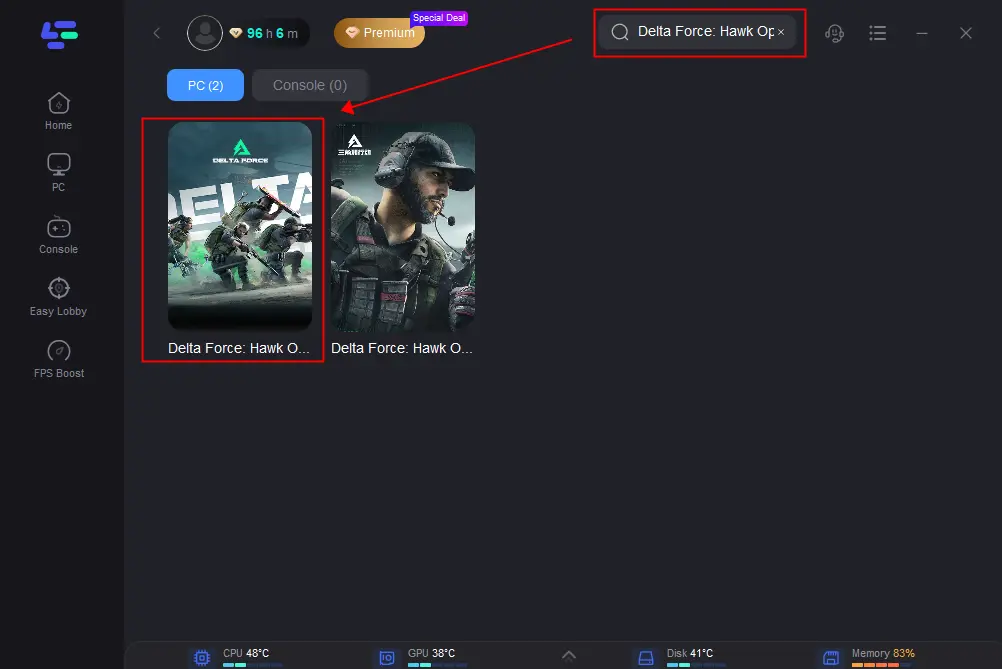
4. Choose your normal region first. Start with the nearest suitable region. Review the available nodes and select a route with stable ping and low packet loss.
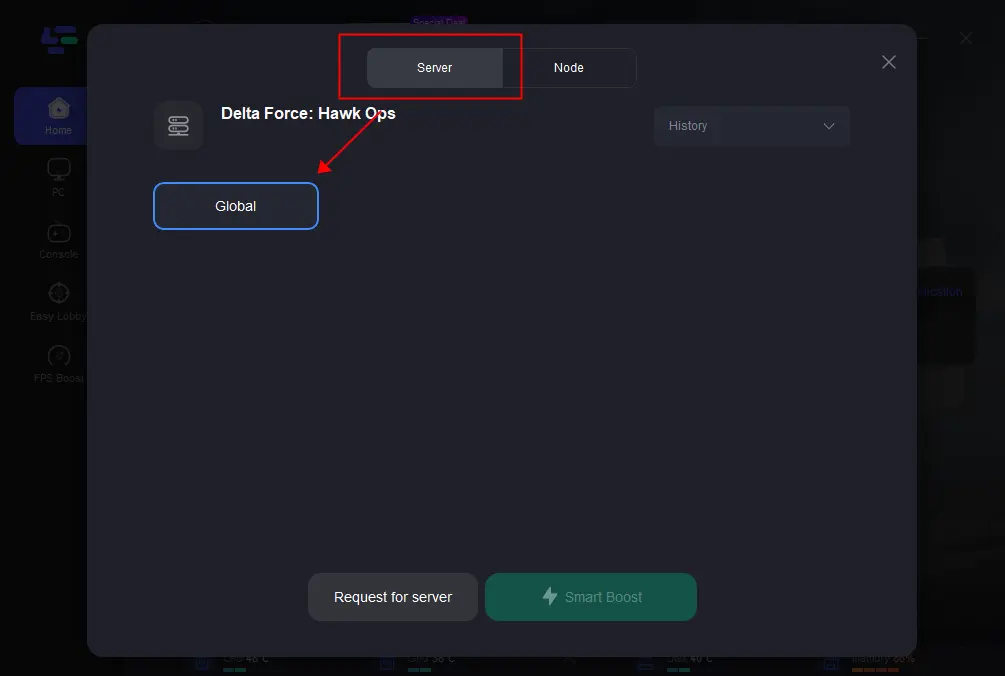
5. Start Smart Boost or the equivalent boost function. Allow the route to become active before launching Delta Force.
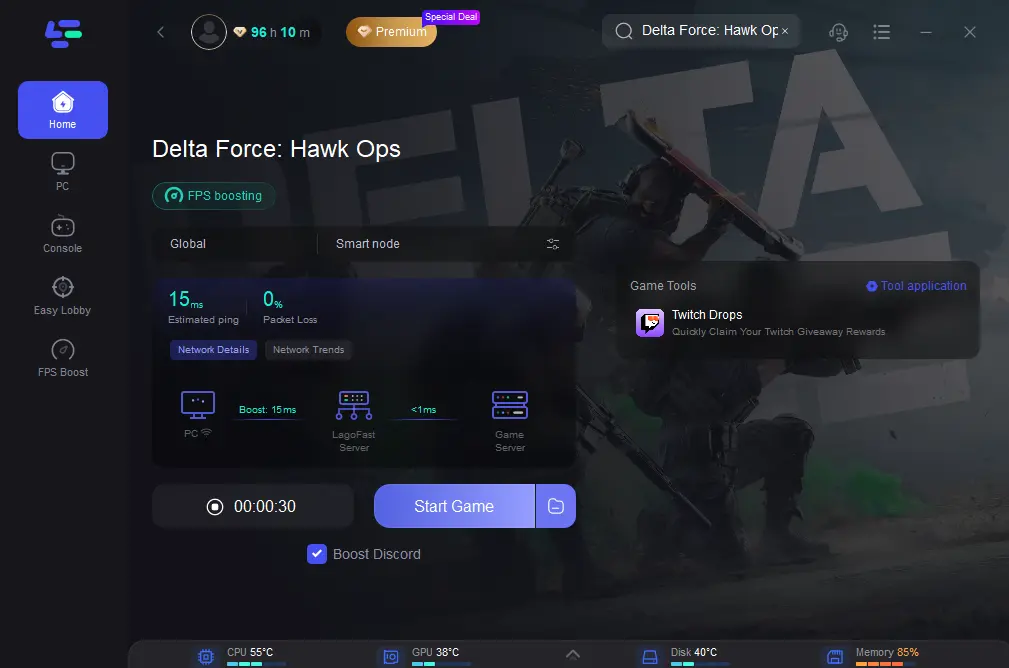
6. Record a baseline without the boost. Note queue time, lobby ping, jitter, packet loss, and whether the game puts you on a distant server.
7. Launch Delta Force through the active route. Use the same mode, map, party, crossplay setting, and time period as the baseline test.
8. Check the final in-game connection. Compare the actual ping and stability after the lobby forms; do not rely only on the route preview.
9. Test one nearby alternative route if needed. Compare the results over more than one match before keeping the setting.
Compare another region only when the local queue is clearly inactive. If you test NA, EU, or Asia from a distant location, confirm that the latency remains acceptable.
Keep the route that gives the best overall balance. The correct result is a reasonable queue with stable ping and low packet loss, not simply the fastest lobby entry.
Stop the boost if the connection worsens. Return to the nearest stable route and troubleshoot the local network, game settings, or player pool.
Part 7: Delta Force Server Location FAQs
1. Where are the official Delta Force server locations?
The published list includes Virginia and Silicon Valley in North America; São Paulo in South America; Frankfurt and Finland in Europe; Sydney in Oceania; and Saudi Arabia, Singapore, Japan, and Indonesia in Asia.
2. What is the best Delta Force server for low ping?
The best choice is normally the closest stable region that gives acceptable in-game ping, low packet loss, and consistent routing. The physically closest location is a starting point, not a guaranteed result.
3. Can I manually choose a Delta Force server?
The available controls can vary by game build and platform, and matchmaking may still select the final server automatically. Check current in-game settings, then verify the actual lobby location and ping.
4. Why does Delta Force connect me to a distant server?
The selected mode may have too few compatible nearby players, your party may contain players from different regions, or matchmaking may expand its search to complete a valid lobby. Queue availability can take priority over the lowest possible ping.
5. Is Frankfurt or Finland better for European players?
Neither is always better. Frankfurt is a strong baseline for western and central Europe, while Finland may suit northern players. Test both with the same mode and time of day.
6. Is Singapore always the best Delta Force Asia server?
No. Singapore is a useful Southeast Asian baseline, but Japan, Indonesia, or Saudi Arabia may produce a better route depending on your location and ISP. Compare actual ping and packet loss.
7. Should I change region to get a faster queue?
Only if the shorter wait is worth the possible increase in latency. Choose the fastest region that still provides stable, acceptable gameplay rather than the shortest queue alone.
8. Does LagoFast force Delta Force to use a specific server?
It can help test and optimize a route to an available region, but it cannot guarantee the final physical server, create players, merge queues, or bypass regional restrictions.
9. How can I test whether my ISP is causing high ping?
Compare Ethernet with Wi-Fi, test during another time of day, use a trusted alternate connection briefly, and compare a LagoFast route while keeping the game settings unchanged. Look for consistent differences in ping, jitter, and packet loss.
10. What should I prioritize: ping or queue time?
Prioritize stable, acceptable ping after confirming that the queue is reasonably active. A lobby found quickly is not useful if high latency causes delayed actions, packet loss, or rubberbanding.
Key Takeaways
- Delta Force Server Locations & How to Change Server begins with the official list: Virginia, Silicon Valley, São Paulo, Frankfurt, Finland, Sydney, Saudi Arabia, Singapore, Japan, and Indonesia.
- Delta Force server regions are broad connection areas, not a guarantee that every match will use the nearest published location.
- The Delta Force EU server choice usually starts with Frankfurt or Finland, depending on your location, ISP route, and queue activity.
- The Delta Force NA server baseline is Virginia for eastern and central players and Silicon Valley for western players.
- A Delta Force Asia server can mean very different latency depending on whether the route ends in Singapore, Japan, Indonesia, or Saudi Arabia.
- The best Delta Force server balances stable ping, low packet loss, acceptable jitter, and a healthy queue.
- A Delta Force change server or Delta Force change region request may affect matchmaking conditions or routing, but the final game server can still be selected automatically.
- The nearest region is not always the fastest queue, and the shortest queue is not always the best connection.
Boost Your Game with LagoFast for Epic Speed
Play harder, faster. LagoFast game booster eliminates stutter and lags on PC, mobile, or Mac—win every match!
Quickly Reduce Game Lag and Ping!
Boost FPS for Smoother Gameplay!