
If you're seeing messages like “Dead by Daylight no connection”, “Dead by Daylight not responding”, or “No network connection Dead by Daylight”, you're not alone. On and after June 9, 2025, thousands of players—especially in Russia—started reporting problems across both PC and Dead by Daylight Mobile. This guide will walk you through the causes and fixes to help you fix it quickly.
- What Happened to Dead by Daylight? (June 9 Outage Recap)
- Why Dead by Daylight Doesn’t Work in Russia
- Dead by Daylight Mobile – Why Doesn’t It Work?
- How to Fix Dead by Daylight Not Working (PC & Mobile)
What Happened to Dead by Daylight? (June 9 Outage Recap)
On June 9, players began to encounter the following errors:
- “Dead by Daylight no connection to servers”
- “Dead by Daylight not responding on startup”
- “No network connection Dead by Daylight”
- “DBD mobile not working on iOS/Android”
These issues affected both PC and console versions, but the mobile version was hit especially hard. In some cases, players couldn’t even log in; in others, the game froze at the loading screen or crashed after matchmaking.
As of now, the issues are still ongoing for many players, especially in Russia regions with unstable routing to game servers.
Why Dead by Daylight Doesn’t Work in Russia
For Russian players, the situation is more complex due to ongoing network instability and connection routing issues affecting access to Dead by Daylight servers.
1. ISP-Level Routing Failures and Packet Loss
Several major ISPs in the region are currently experiencing unstable routes to DBD’s servers—particularly those hosted on Amazon AWS and Cloudflare. This can result in:
- High ping or spikes during gameplay
- Failed matchmaking attempts
- Sudden disconnections or infinite loading screens
2. Limited Access to Multiplayer Infrastructure
Players have also reported interrupted connections to third-party multiplayer services, which may include:
- Timeout errors during matchmaking
- Inability to log in or verify account credentials
- Frequent lag and dropped sessions even after joining matches
These issues appear to be tied to regional network limitations and international routing inefficiencies, which fluctuate depending on ISP and server load
Dead by Daylight Mobile – Why Doesn’t It Work?
DBD Mobile users are also encountering:
- “Server connection failed”
- “Network unavailable”
- "Matchmaking stuck at 0%"
Reasons include:
- Overloaded servers after a patch/update
- Weak mobile signal or NAT issues
- App not updated to the latest build
- Cloudflare routing errors specific to mobile app backends
How to Fix Dead by Daylight Not Working (PC & Mobile)
If you're stuck, here are proven fixes, especially for users in Russia and other high-ping regions.
Fix 1: Use LagoFast to Stabilize Your Connection
LagoFast is a smart game booster and route optimizer that helps:
- Reduce ping & packet loss
- Avoid blocked or throttled servers
- Improve matchmaking and stability
How to use it:
Download LagoFast and start your free trial.
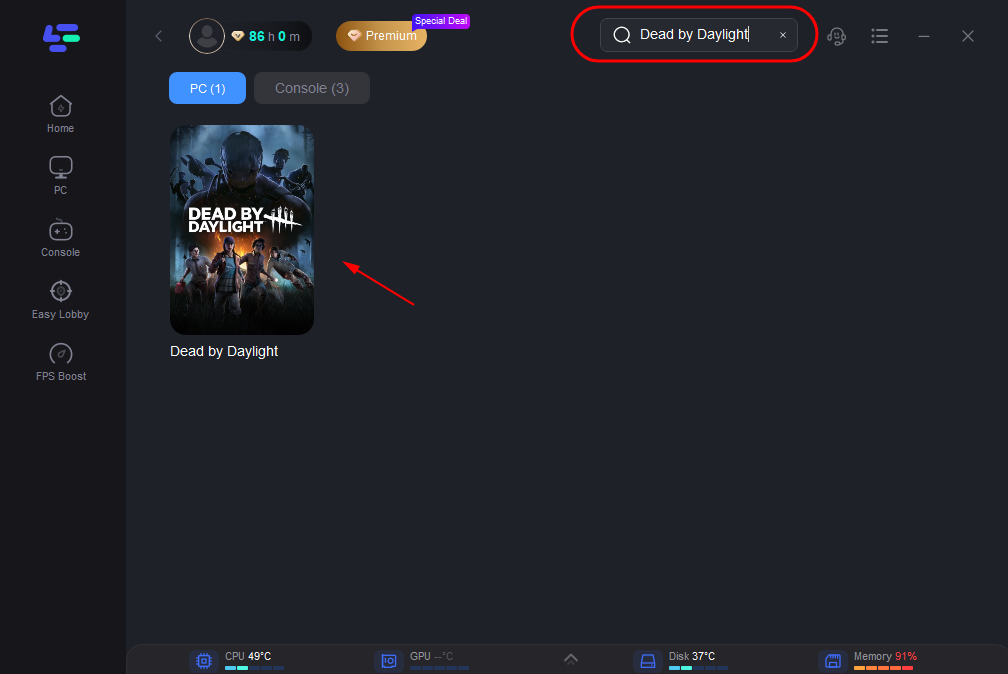
Search for your game in the dashboard.
Select the most stable server and choose a nearby or unrestricted node.
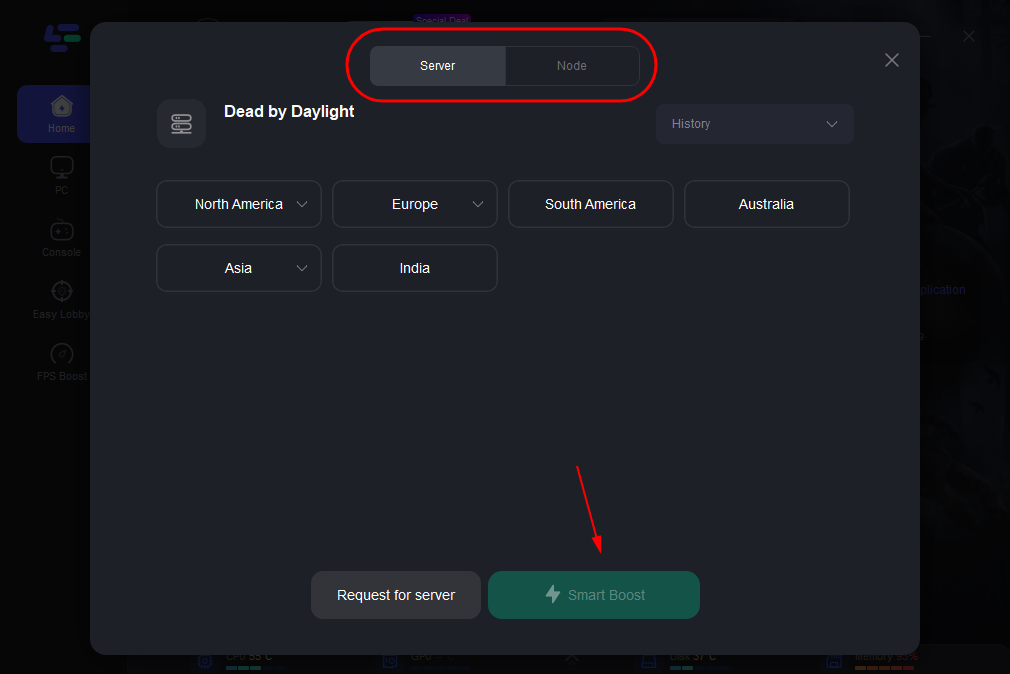
Click “Smart Boost” to activate real-time acceleration and monitor your ping, packet loss, and network route.
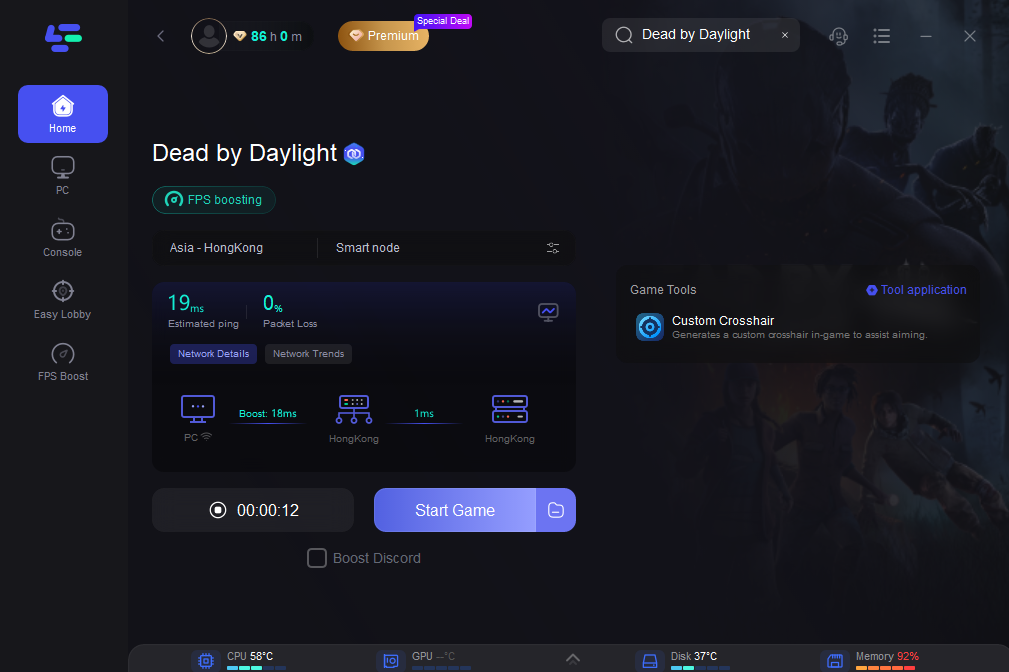
Bonus: Works great even for mobile users via desktop internet sharing or gaming routers.
Fix 2: Restart Network and Clear DNS Cache
On PC:
Open CMD as Administrator and type:
ipconfig /flushdns
On Mobile:
- Toggle Airplane mode on/off
- Reset your network settings in Settings > General > Reset > Reset Network Settings
Fix 3: Disable VPN or Use a Gaming Proxy
If you're using a regular VPN, switch to a gaming booster like LagoFast instead. VPNs often add latency or get blocked by anti-cheat systems.
Fix 4: Update Game and Drivers
- Verify game files via Steam or Google Play/App Store.
- Make sure your GPU/network drivers are up to date.
- On mobile, reinstall the game if you see repeated "no connection" errors.
Final Thoughts: When Will Dead by Daylight Be Fixed?
Behavior Interactive hasn’t issued a full official statement about the June 9 server issues, especially not for the Russian region. However, player reports show ongoing problems in Eastern Europe, parts of Asia, and South America, meaning it’s likely a combination of network routing and regional restrictions.
Until an official patch or workaround is released, tools like LagoFast remain the most reliable fix, especially for high-latency areas.
Boost Your Game with LagoFast for Epic Speed
Play harder, faster. LagoFast game booster eliminates stutter and lags on PC, mobile, or Mac—win every match!
Quickly Reduce Game Lag and Ping!
Boost FPS for Smoother Gameplay!