
If you are searching for Crimson Desert server connection issues, the first thing to understand is that Crimson Desert is primarily a single-player game. That means it does not rely on persistent multiplayer servers in the same way as online-only titles. However, that does not mean connection-related messages cannot appear.

- ✅ Reduce Lag and High Ping.
✅ Boost FPS at the Same Time.
✅ Support 2000+ Popular Online Games.
✅ Change Server without Latency.
✅ Boost Game Loading Speed.
Part 1: Is Crimson Desert an Online Game?
Part 2: Why Are Players Seeing Server Connection Errors?
Part 3: Platform Authentication Problems
Part 4: Patch or Update-Related Issues
Part 5: DRM or Online Verification Checks
Part 6: Cloud Save Sync Conflicts
Part 7: When It Is Not a Real Server Issue
Part 8: How to Fix Crimson Desert “Server Connection” Messages
Part 9: Can You Play Crimson Desert Offline?
Part 10: Reduce Platform Connection Errors with LagoFast
Part 1: Is Crimson Desert an Online Game?
Crimson Desert is developed by Pearl Abyss and is designed primarily as a single-player open-world action RPG.
Unlike MMORPGs, it does not require constant online connectivity for core gameplay. However, modern single-player games often include:
- Online authentication checks
- Patch delivery systems
- DRM validation
- Cloud saves
- Optional online integrations
These systems can still generate connection-related warnings.
Part 2: Why Are Players Seeing Server Connection Errors?
Even in a single-player title, connection issues may appear due to:
- Launch platform authentication failure
- DRM verification errors
- Incomplete patch downloads
- Corrupted update files
- Cloud sync conflicts
- Temporary platform outages
In most cases, these issues are not gameplay server failures but platform-level communication interruptions.
Part 3: Platform Authentication Problems
If you launch Crimson Desert through a digital platform such as Steam, the game may perform a license verification check before starting.
If the platform is experiencing downtime or your internet connection is unstable, you may see a server connection error even though the game itself is single-player.
Recommended actions:
- Restart the launcher
- Log out and log back in
- Check your internet stability
- Confirm platform service status
Part 4: Patch or Update-Related Issues
After major updates, players may encounter connection warnings caused by:
- Interrupted downloads
- Partially installed patches
- Corrupted files
To resolve:
- Verify game files via your launcher
- Confirm that updates completed successfully
- Restart your PC after installation
Many “server connection” messages are actually update integrity problems.
Part 5: DRM or Online Verification Checks
Even offline-capable games may include DRM validation that briefly connects to authentication servers. If that service is temporarily unavailable, an error message may appear.
Possible solutions:
- Wait and retry
- Ensure firewall permissions are granted
- Disable VPN if active
VPN routing can sometimes interfere with authentication servers.
Part 6: Cloud Save Sync Conflicts
If Crimson Desert supports cloud saves, connection interruptions during sync may trigger warnings.
Common triggers include:
- Switching devices
- Force-closing the game during save upload
- Network drops during shutdown
Fixes:
- Restart the launcher
- Allow cloud sync to complete
- Avoid closing the game during saving
Part 7: When It Is Not a Real Server Issue
Because Crimson Desert is not designed as a live-service multiplayer title, genuine gameplay server outages should not block the campaign.
If offline mode works, the issue is likely:
- Authentication-related
- Update-related
- Platform-related
It is not a persistent online server failure.
Part 8: How to Fix Crimson Desert “Server Connection” Messages
Follow this troubleshooting order:
- Restart your internet connection
- Restart the launcher
- Verify game files
- Disable VPN or proxy
- Check platform server status
- Reboot your PC
Reinstalling the entire game should be a last resort.
Part 9: Can You Play Crimson Desert Offline?
As a primarily single-player experience, Crimson Desert is expected to allow offline gameplay once initial authentication is completed. However, depending on platform policies, the first launch may require an online check.
After validation, ongoing server communication should not be required for core gameplay.
Part 10: Reduce Platform Connection Errors with LagoFast
Even though Crimson Desert is primarily a single-player game, launch authentication, DRM verification, and patch downloads still require stable internet communication. If you are seeing repeated connection warnings during startup, unstable routing or packet loss may be interrupting those checks. Optimizing your network path before launching the game can help minimize these interruptions. LagoFast is designed to stabilize routing and reduce latency fluctuations that can trigger platform-level connection errors.
Benefits of Using LagoFast
- Reduces latency spikes during login verification
- Minimizes packet loss during DRM checks
- Optimizes routing paths automatically
- Displays real-time network diagnostics
- One-click activation before launch
How to Use LagoFast Before Launching the Game
1. Install LagoFast using the Free Trial option and open the application.
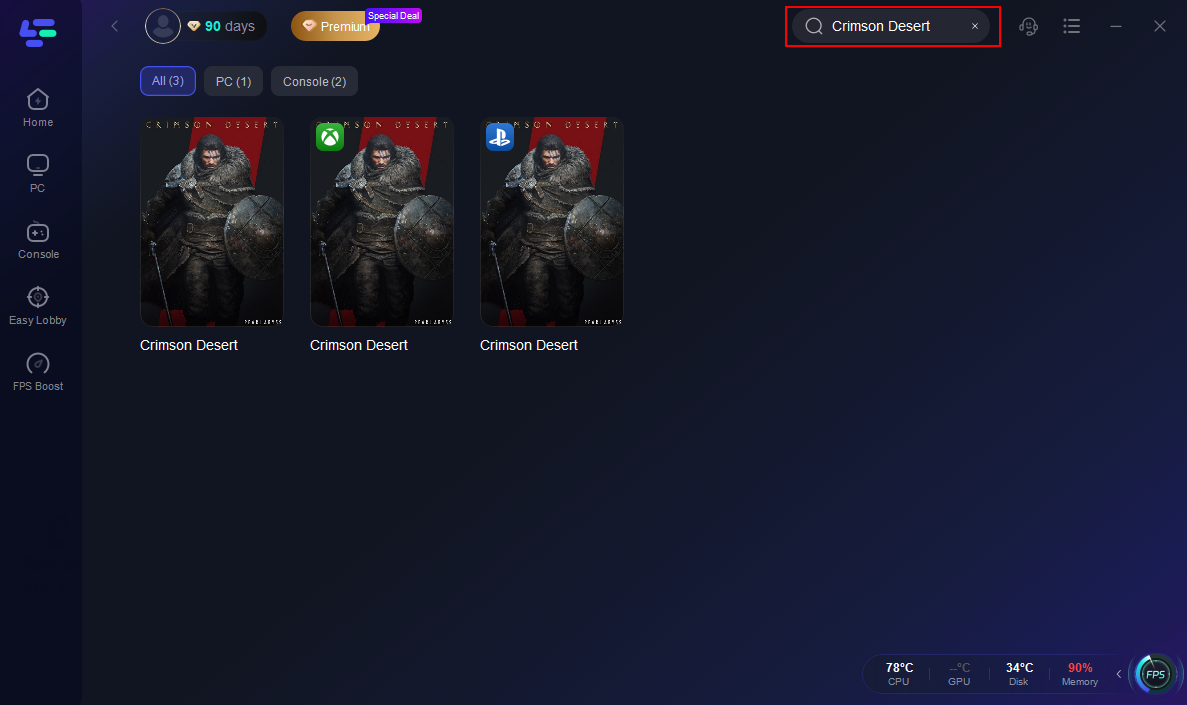
2. Search for Crimson Desert inside LagoFast before starting the game.
3. Select the recommended server region, then manually choose the node with the lowest latency.

4. Enable Smart Boost and confirm that ping and packet loss indicators remain stable in the dashboard.
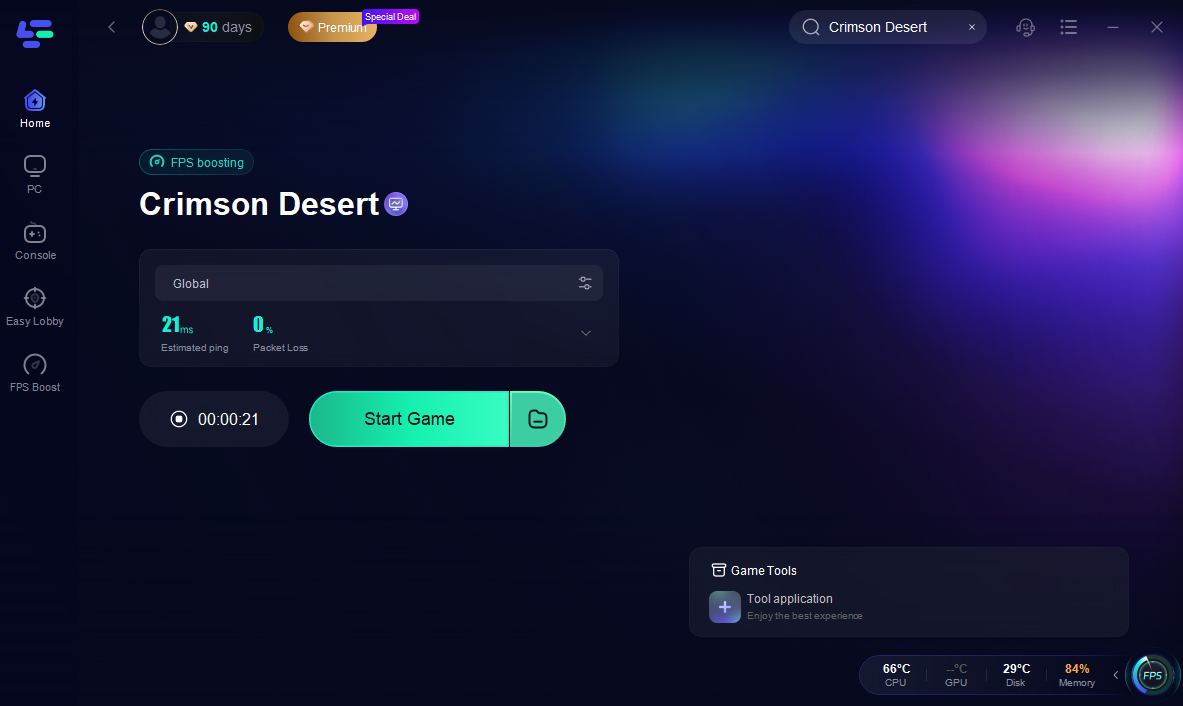
Once activated, LagoFast automatically reroutes your traffic through optimized nodes to improve communication between your device and platform authentication servers.
While LagoFast cannot fix official platform outages, it can significantly improve local network stability. If your connection errors are intermittent rather than caused by confirmed downtime, stabilizing your routing before launching Crimson Desert can help reduce authentication failures and create a smoother startup experience.
Conclusion
Crimson Desert server connection issues are typically related to authentication, DRM validation, patch integrity, or cloud synchronization rather than gameplay servers. Since the game is primarily single-player, most connection errors stem from launcher or internet instability rather than true server outages. By verifying files, checking platform status, and ensuring stable connectivity during launch, you can resolve most connection-related messages quickly without unnecessary reinstallation.

Boost Your Game with LagoFast for Epic Speed
Play harder, faster. LagoFast game booster eliminates stutter and lags on PC, mobile, or Mac—win every match!
Quickly Reduce Game Lag and Ping!
Boost FPS for Smoother Gameplay!