

If Crimson Desert is not opening on your PC, PlayStation 5, or Xbox Series X/S, it can be one of the most frustrating experiences before you’ve even stepped foot in the world of Pywel. As a single-player action-RPG scheduled to launch on March 19, 2026 after multiple delays, Crimson Desert demands a smooth local experience—and launch errors are usually tied to system configuration or platform quirks rather than online connectivity. This article is written for gamers who want practical, platform-specific guidance to diagnose and fix launch issues. By understanding common causes and testing proven solutions, you’ll be better prepared to ensure the game opens successfully.

- ✅ Reduce Lag and High Ping.
✅ Boost FPS at the Same Time.
✅ Support 2000+ Popular Online Games.
✅ Change Server without Latency.
✅ Boost Game Loading Speed.
Part 1. Why Crimson Desert Not Opening Happens on PC
Part 2. Platform Differences: Crimson Desert Not Opening on Consoles
Part 3. Step-By-Step Troubleshooting for Crimson Desert Not Opening on PC
Part 4. How Graphics and Hardware Requirements Relate to Launch Failures
Part 5. How to Enhance Your Game Experience with LagoFast Game Booster
Part 1. Why Crimson Desert Not Opening Happens on PC
When Crimson Desert not opening on PC—meaning nothing launches after clicking Play, or it crashes immediately—this typically reflects local system issues. Since Crimson Desert is a single-player title with a custom engine built for high-resolution visuals and complex mechanics, the PC launch process can be sensitive to system software and drivers.
Outdated Drivers and System Software
One frequent cause of games refusing to open is outdated graphics drivers or missing system components such as DirectX runtime or Visual C++ redistributables. New AAA games often depend on the latest GPU features, so if your drivers are behind the curve, the game might fail silently.
Game Files and Corruption
Sometimes, a corrupt or incomplete installation prevents the game from responding to the launch command. Verifying integrity through launchers like Steam or reinstalling can address this.
Background Applications and Interference
Security software, overlays (Discord, GPU control panels), and other background utilities can interfere with the startup thread, especially for high-priority processes like Crimson Desert. Disabling these and trying again often reveals whether they’re the cause. Combined with optimized local performance — including updated drivers and clean installations — most PC launch failures can be resolved before deeper investigation is necessary.
Part 2. Platform Differences: Crimson Desert Not Opening on Consoles
Console platforms such as PlayStation 5 and Xbox Series X/S are more standardized than PCs, but Crimson Desert not opening issues still arise due to platform-specific factors.
Firmware and System Software Updates
Just like on PC, consoles require their latest system updates. If you boot a game and it refuses to open, first check that your PS5 or Xbox Series X/S software is fully updated. Patch requirements for console titles often include prerequisites for newer launch features.
Corrupted Install Data
Games on consoles can fail to open if an installation has become corrupted during download or update. Deleting the game data and reinstalling freshly from the store or disc frequently resolves silent launch failures.
Storage and License Conflicts
Installing the game on external or extended storage devices can create read errors or slow start-ups. Moving the title to internal storage often helps. On PlayStation, mismatched account licenses can also block startup, requiring a sign-out and sign-in process to re-verify ownership.
These console-specific performances underscore that launch problems can stem from platform pipeline issues rather than inherent game bugs.
Part 3. Step-By-Step Troubleshooting for Crimson Desert Not Opening on PC
If Crimson Desert not opening on your PC, here’s a structured set of steps to isolate and resolve common issues:
- Update Graphics Drivers: Install the most recent drivers for NVIDIA, AMD, or Intel GPUs.
- Install Required Runtimes: Ensure DirectX and Visual C++ packages are present and up to date.
- Verify Game Files: Use Steam or your launcher to check for corrupt or missing files.
- Disable Background Apps: Turn off overlays and security software temporarily to test startup integrity.
- Run as Administrator: Right-click the executable and grant administrative privileges.
- Check for System Updates: Install pending Windows updates and reboot.
- Reinstall the Game: If all else fails, remove and reinstall the game cleanly.
This methodical sequence helps you narrow down whether the issue is software, system, or configuration related.
Part 4. How Graphics and Hardware Requirements Relate to Launch Failures
Understanding how hardware interacts with Crimson Desert’s engine helps explain some launch failures. Reports suggest the game supports technologies like DLSS 4 and FSR Redstone to aid performance, with the developers focusing on strong native performance across platform hardware. Early builds demonstrated reasonable performance even at high resolutions, which bodes well for optimized launch behavior across a range of systems.
Even with solid optimization, Crimson Desert not opening can happen if hardware doesn’t meet minimum requirements or if certain GPU features aren’t supported by outdated drivers. Checking against published specifications for CPU, RAM, GPU, and storage helps rule out hardware bottlenecks before digging deeper into software issues.
Part 5. How to Enhance Your Game Experience with LagoFast Game Booster
Even though Crimson Desert is a single-player game, players on PC and consoles can still face launch stability issues or patch download interruptions due to unstable network paths or delayed server responses. A smoother network connection won’t fix every startup error, but it can help ensure that game assets, launcher updates, and system verification checks complete reliably—especially when Crimson Desert not opening might be tied to incomplete downloads or launcher connectivity issues.
LagoFast (LagoFast Game Booster - Get No Lag and Lower Ping) Game Booster is designed to improve your gaming network performance by selecting efficient traffic routing paths, minimizing lag, and avoiding delays caused by congested routes.
How to Use LagoFast Game Booster
Step 1: Click the Free Trial button to download and install LagoFast Free Trial.
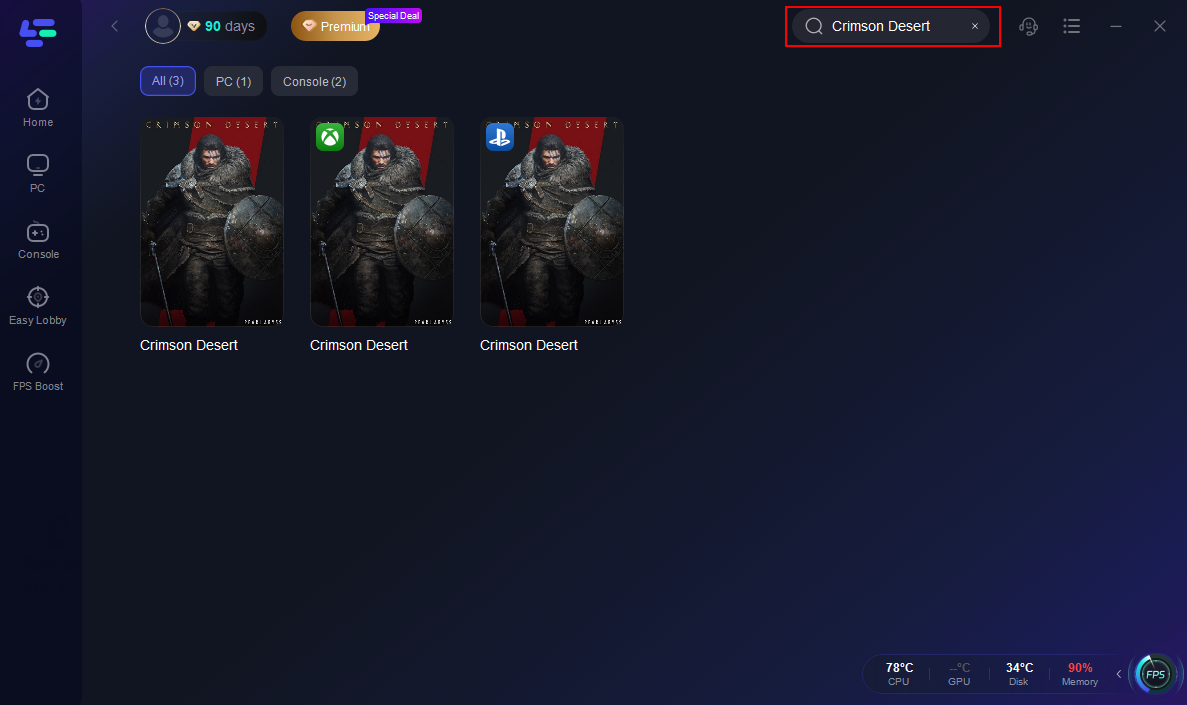
Step 2: Open the application and select Crimson Desert from the list of supported games.
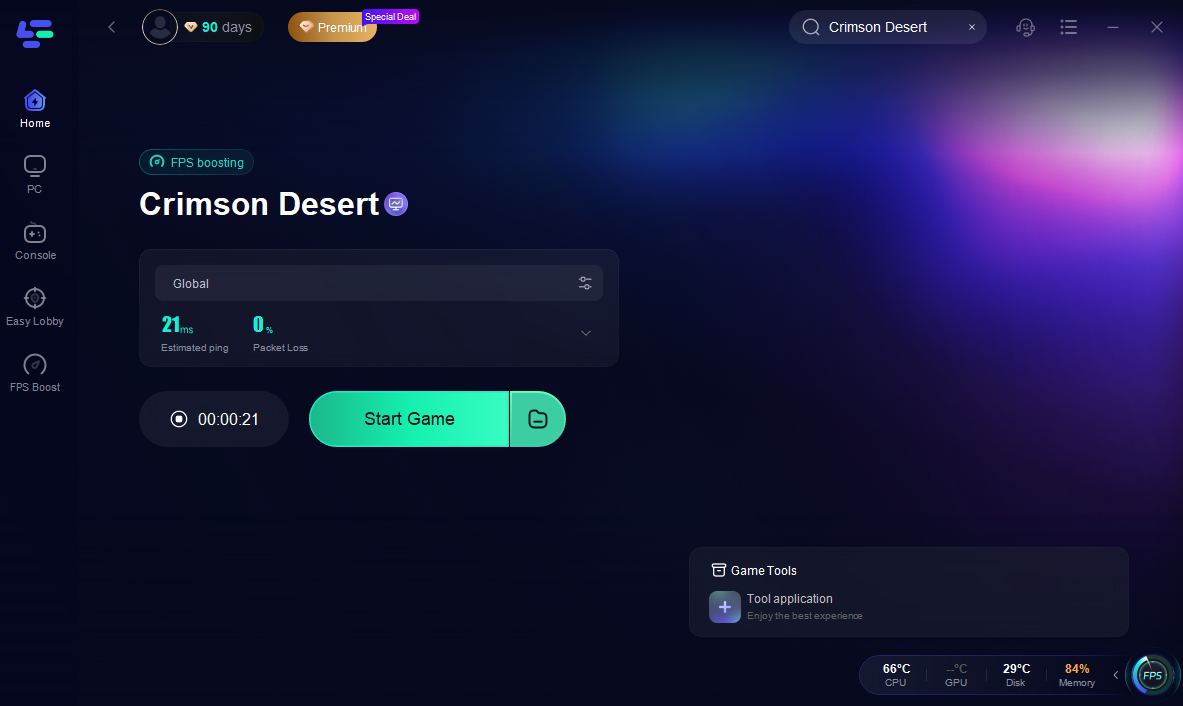
Step 3: Click the connect or start button to route traffic through optimized nodes.

Step 4: Open Crimson Desert or its launcher once LagoFast shows a successful optimized connection.
While this won’t fix local system launch failures, it can reduce delays or timeouts tied to patching or launcher verifications that occasionally cause games to “freeze” before opening — indirectly improving the overall launch experience.
Part 6. FAQs
Q: Crimson Desert not opening — why does nothing happen when I click Play on PC?
Often this means system drivers or runtime libraries are missing or incompatible with the game’s engine requirements. Updating these is usually the first step in troubleshooting.
Q: On console, the game won’t start after installing. What should I try?
Check for system firmware updates, reinstall the game data, and ensure it’s installed on internal storage rather than external drives.
Q: Does the fact that Crimson Desert is single-player affect why it doesn’t open?
Yes — many launch failures are related to local system issues rather than online service problems that plague online games.
Q: Could internet be required for launch?
There’s no official indication yet that Crimson Desert demands a persistent online connection for startup, but network-related checks during patches or license verification can still affect launch workflows.
Q: Can a network booster like LagoFast help if the game won’t open?
While it won’t fix corrupted files or driver conflicts, it can improve the reliability of launcher updates, patch downloads, or network checks that sometimes precede game startup.
Conclusion
When Crimson Desert not opening on your PC or console, the cause usually lies in platform-specific software or hardware interplay rather than a flaw in the game itself. On PC, it’s critical to update drivers, verify game files, and ensure system dependencies are in place; on consoles, system updates and storage integrity often make the difference. Adding tools like LagoFast Game Booster to improve network reliability around launcher and update activities can make day-one startup smoother. By following these structured diagnostic steps, players can resolve most startup blockers and step into the expansive world of Crimson Desert with minimal interruption once it launches.

Boost Your Game with LagoFast for Epic Speed
Play harder, faster. LagoFast game booster eliminates stutter and lags on PC, mobile, or Mac—win every match!
Quickly Reduce Game Lag and Ping!
Boost FPS for Smoother Gameplay!