

black screen issue — especially right after launch — where the game fails to display anything beyond a blank or black screen even though the process appears to be running. Since Crimson Desert is a single-player title built on the BlackSpace engine and launching simultaneously on PC, PlayStation 5 and Xbox Series X/S, these blackout issues can stem from platform-specific causes. This guide is aimed at players experiencing a black screen on start-up and provides clear, practical steps for diagnosing and fixing Crimson Desert black screen on launch on each platform, while also offering tips for improving related network stability with LagoFast Game Booster.

- ✅ Reduce Lag and High Ping.
✅ Boost FPS at the Same Time.
✅ Support 2000+ Popular Online Games.
✅ Change Server without Latency.
✅ Boost Game Loading Speed.
Part 1: Common Causes of Crimson Desert Black Screen on Launch on PC
Part 2: How to Fix Crimson Desert Black Screen on PC
Part 3: Why Crimson Desert Black Screen Occurs on Consoles
Part 4: Step-by-Step Fixes When Crimson Desert Black Screen on PS5 or Xbox
Part 5: How to Enhance Your Game Experience with LagoFast Game Booster
Part 1: Common Causes of Crimson Desert Black Screen on Launch on PC
When Crimson Desert black screen problems occur on PC, the cause often lies in local hardware, software, and system configuration rather than in online servers or multiplayer issues. Some of the most frequent triggers include:
Outdated or Incompatible Drivers
Graphics drivers — especially for NVIDIA, AMD, or integrated Intel graphics — are fundamental to rendering the game’s visuals. If these drivers are outdated or unsupported, the game may load into a black screen immediately after the engine initializes.
Corrupted or Damaged Files
Broken or missing game files can also cause a Crimson Desert black screen on launch. Verifying the integrity of game files through Steam or the game’s installer can often detect and repair corrupted assets.
Fullscreen Mode and Display Conflicts
Sometimes the game launches but fails to switch smoothly to full-screen mode, leaving a black display while audio and processing continue in the background. Adjusting display mode settings or disabling certain display features can help resolve this.
System and Runtime Dependencies
Missing or corrupted runtime components — such as updated DirectX versions or Visual C++ libraries — can prevent the graphics engine from starting, resulting in a blank screen after the splash logo.
Correcting these issues involves driver updates, system checks, and sometimes adjusting Windows configuration options that affect how the game’s rendering pipeline is initialized.
Part 2: How to Fix Crimson Desert Black Screen on PC
Here’s a step-by-step approach to fixing the Crimson Desert black screen problem on a Windows PC:
- Update Graphics Drivers: Visit NVIDIA, AMD, or Intel’s official websites and install the most recent stable drivers before launching the game.
- Verify Game Files: Use the launcher’s “verify integrity” feature to detect and repair corrupted or missing data.
- Install System Runtimes: Ensure DirectX, .NET Framework, and Visual C++ redistributables are correctly installed.
- Disable Full-Screen Optimizations: Right-click the game executable, go to the Compatibility tab, and disable full-screen optimizations.
- Check Display Modes: Try switching between windowed and full-screen mode (e.g., using Alt+Enter) if the game runs but the screen stays black.
- Rollback Recent Drivers: If the black screen began after a GPU driver update, rolling back to a previous stable version can resolve compatibility problems.
These methods address local system conditions that commonly cause black screen failure at launch in PC titles of this scale.
Part 3: Why Crimson Desert Black Screen Occurs on Consoles
Console platforms are more standardized than PC, but Crimson Desert black screen on launch can still happen on PlayStation 5 and Xbox Series X/S for reasons tied to platform behavior rather than hardware driver issues.
Outdated System Software
Console operating systems receive periodic updates that include crucial support for new games. If your PS5 or Xbox Series console firmware is outdated, it can cause a black screen as the game attempts to access features not present in the system software.
Corrupted Game Data
Downloads or installations can sometimes go awry, especially with large AAA titles. A corrupted game file on console storage can result in the system loading but not rendering game content correctly.
Storage Location Conflicts
Games installed on external or extended storage devices may encounter read errors or slower load times, leading to Crimson Desert black screen delays or launch failures. Moving the game to internal storage often remedies this.
For consoles, these problems require platform-specific actions like system updates or reinstalling the game.
Part 4: Step-by-Step Fixes When Crimson Desert Black Screen on PS5 or Xbox
For PlayStation 5:
- Update System Software: Go to system settings and install the latest console update.
- Reinstall the Game: Delete and redownload Crimson Desert to ensure no corrupt files remain.
- Check Storage: Try moving the game to internal storage and launch it again.
For Xbox Series X|S:
- Update the Console: Confirm that the latest Xbox OS is installed.
- Reinstall Game Files: Delete and reinstall Crimson Desert from your library.
- Use Internal Storage: If the game is on an external drive, move it to the console’s internal SSD.
These platform-specific steps account for typical launch pipeline issues that lead to a black screen after hitting “Play.”
Part 5: How to Enhance Your Game Experience with LagoFast Game Booster
While Crimson Desert is single-player and doesn’t suffer from server-side connectivity issues during gameplay, LagoFast (LagoFast Game Booster—Get No Lag and Lower Ping) Game Booster can help with network-related tasks that support launch stability—such as downloading large patches before launch or managing patch delivery without interruptions.
How to Use LagoFast Game Booster
Step 1: Click the Free Trial button to download and install LagoFast Free Trial.
Step 2: Open the application and select Crimson Desert from the list of supported games.
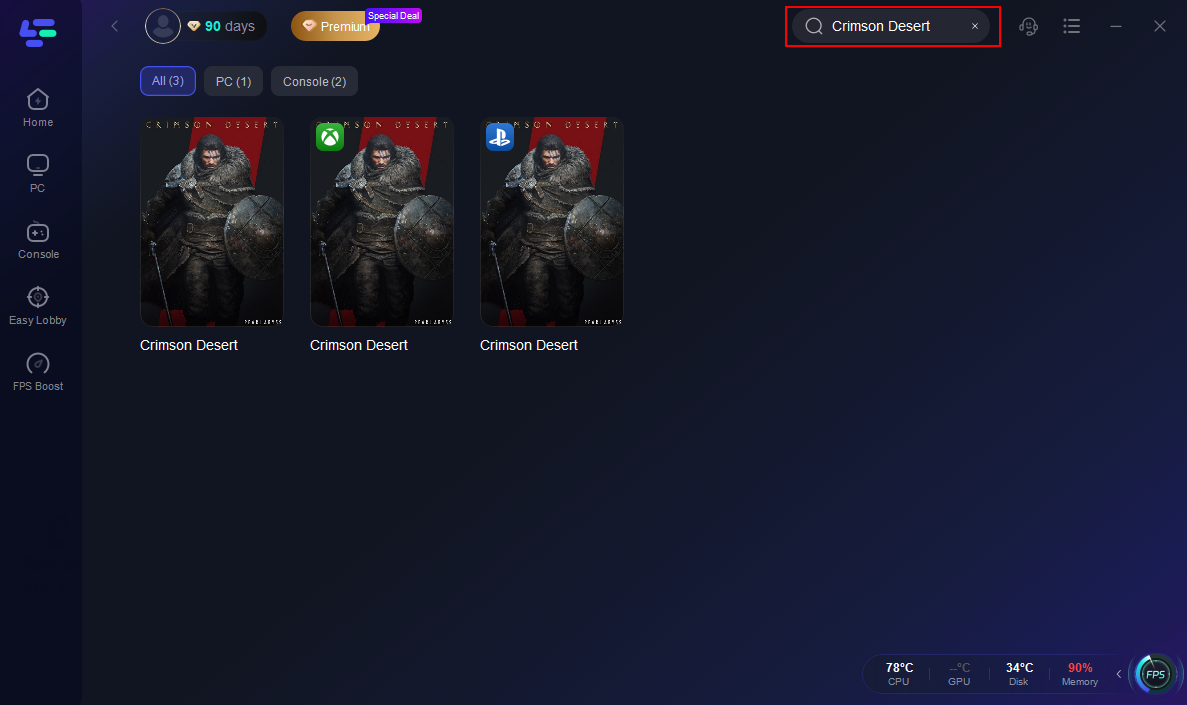
Step 3: Choose automatic or lowest ping routing to regional matchmaking servers.

Step 4: Press the boost button to route traffic through LagoFast’s optimized network paths.
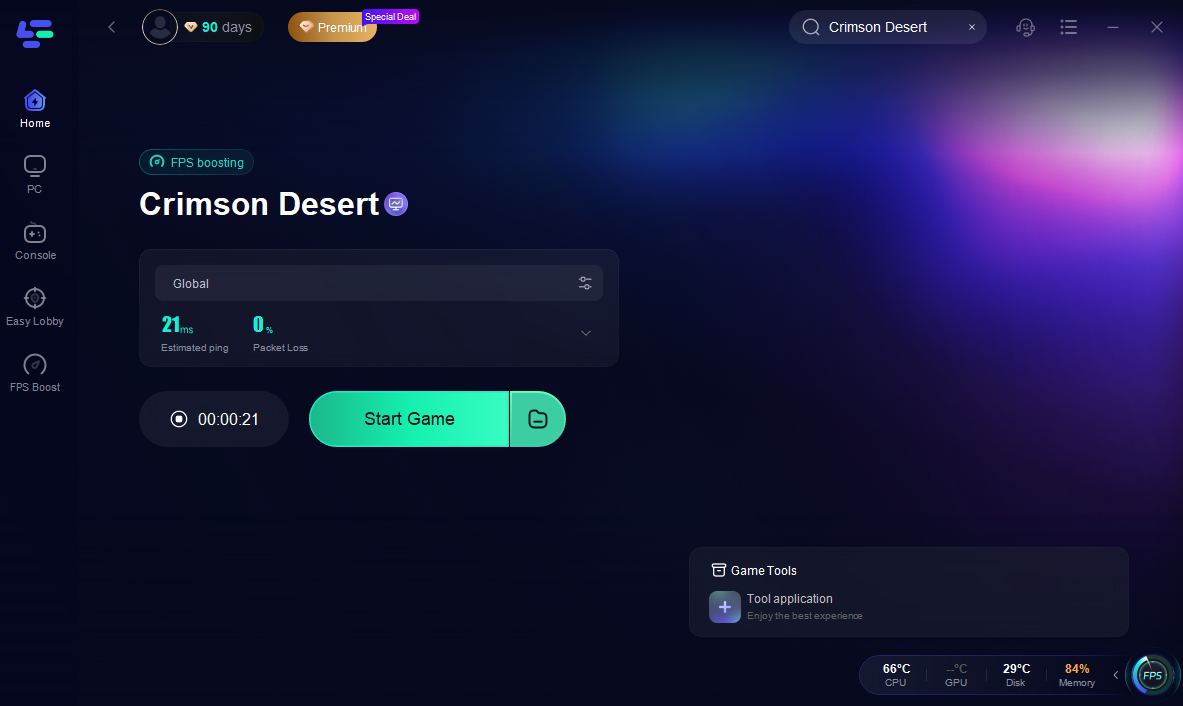
Although network optimization doesn’t directly fix graphics rendering issues, it can reduce timeouts, download stalls, or launcher verification hang-ups that Crimson Desert black screen on launch symptoms sometimes mask.
Part 6: FAQ
Q: What does Crimson Desert black screen on launch mean?
A black screen on launch usually indicates that the game has started its process but failed to render any visual output, often due to driver, file, or platform issues.
Q: Why does the PC show black screen but audio still plays?
This can happen when the engine has loaded audio but the graphics pipeline failed — typically due to outdated drivers or missing rendering components.
Q: Can console system settings prevent the game from opening visuals?
Yes—outdated system firmware or corrupted install data on console storage can trigger black screen states.
Q: Will checking game file integrity help?
Absolutely — verifying or repairing game files with your PC’s launcher often fixes corrupted assets that cause black screens.
Q: Is LagoFast helpful for single-player launch issues?
While it doesn’t fix rendering problems, it can stabilize network activity related to launcher and patch checks, smoothing parts of the launch experience.
Conclusion
Encountering a Crimson Desert black screen at launch can stem from a range of platform-specific causes, from graphics driver incompatibilities on PC to outdated system firmware or corrupted installation data on consoles. By following systematic troubleshooting — updating drivers, repairing game files, adjusting display modes, performing system updates, and ensuring stable network paths with tools like LagoFast Game Booster — most launch failures can be resolved before they prevent players from experiencing this highly anticipated single-player adventure. With the game confirmed for release on March 19, 2026 across PC, PlayStation 5, and Xbox Series X/S, preparing your system ahead of time improves your odds of a smooth and immersive start when Pywel finally opens its doors.

Boost Your Game with LagoFast for Epic Speed
Play harder, faster. LagoFast game booster eliminates stutter and lags on PC, mobile, or Mac—win every match!
Quickly Reduce Game Lag and Ping!
Boost FPS for Smoother Gameplay!