

The vast, breathtaking open world of Crimson Desert offers a visual spectacle rarely seen in modern gaming, but traversing the continent of Pywel requires more than just a sharp blade. It requires a finely tuned PC. While Pearl Abyss has delivered a remarkably well-optimized engine, the sheer scale of the environmental effects and advanced ray-tracing techniques can tax even high-end rigs. Whether you are looking to maintain a locked 60 FPS for fluid combat or trying to squeeze every frame out of an older GPU, finding the right balance of fidelity and performance is essential. In this guide, we will break down the optimized configurations that bridge the gap between cinematic beauty and competitive responsiveness.

- ✅ Reduce Lag and High Ping.
✅ Boost FPS at the Same Time.
✅ Support 2000+ Popular Online Games.
✅ Change Server without Latency.
✅ Boost Game Loading Speed.
Part 1: Crimson Desert’s Best Settings for PC – HUB Optimized
Part 2: Best Crimson Desert Graphics Settings for FPS
Part 3: Best Graphics Settings for Low-End PCs
Part 4: Eliminate Lag and Stuttering with LagoFast
Part 1: Crimson Desert’s Best Settings for PC – HUB Optimized
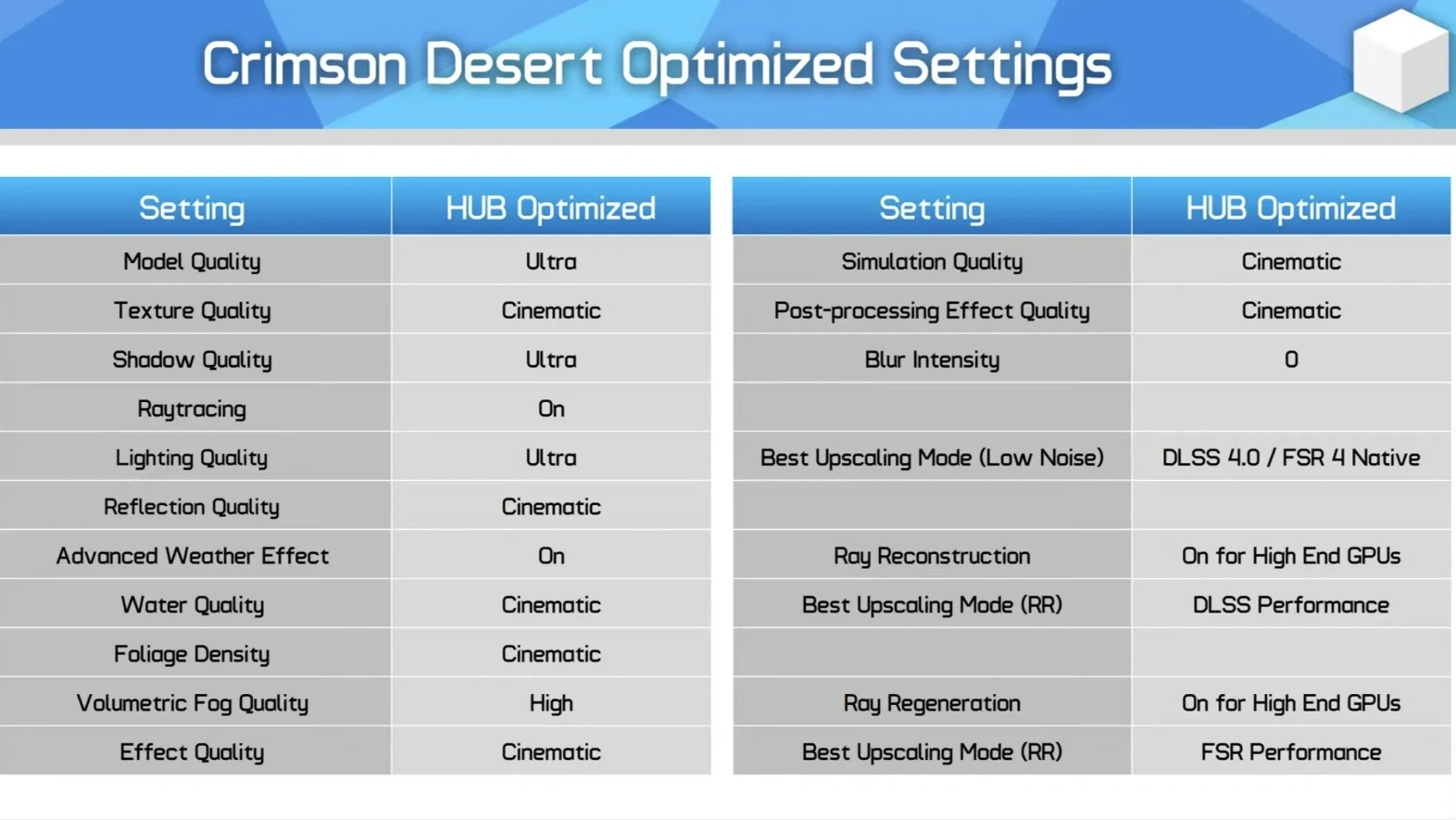
For most players, the "Cinematic" preset is the starting point, but it isn't necessarily the most efficient. Following extensive testing by technical experts like Hardware Unboxed, it has been discovered that a few surgical adjustments can yield a good performance increase with almost zero perceptible loss in visual quality. The goal here is to maintain the "Ultra" feel while removing the heavy lifting caused by inefficient volumetric calculations.
|
Setting |
Recommended Value |
Why It Matters |
|
Model Quality |
Ultra |
Keeps character and object detail sharp at distances. |
|
Texture Quality |
Cinematic |
Essential for the game's gritty, realistic aesthetic. |
|
Shadow Quality |
Ultra |
Balances depth without the massive hit of Cinematic shadows. |
|
Raytracing |
On |
The engine is designed around RT; disabling it often causes artifacts. |
|
Lighting Quality |
Ultra |
Prevents shadow noise and flickering in interior scenes. |
|
Reflection Quality |
Cinematic |
High-quality reflections are key to the game's water and ice effects. |
|
Volumetric Fog Quality |
High |
The "Performance Saver." Dropping from Cinematic saves huge frames. |
|
Blur Intensity |
0 |
Removes smeary motion for much cleaner visual clarity. |
|
Upscaling Mode |
DLSS 4.0 / FSR 4 Native |
DLSS 4.0 is preferred over 4.5 for better stability in this build. |
|
Ray Reconstruction |
On |
Improves shadow denoising significantly on supported hardware. |
Part 2: Best Crimson Desert Graphics Settings for FPS
If you are playing on a high-refresh-rate monitor and prioritize the "feel" of combat, especially during the game’s intense, fast-paced Mercenary encounters, you need to prioritize frame timing. These settings focus on reducing the load on the GPU's compute units to ensure that during heavy particle-effect sequences (like magic or explosions), your frame rate remains stable.
|
Feature |
Competitive/FPS Setting |
Impact |
|
Effect Quality |
High |
Reduces frame drops during intense combat spells. |
|
Simulation Quality |
High |
Lightens the load on the CPU for cloth and hair physics. |
|
Foliage Density |
Ultra |
Maintains immersion while slightly improving visibility in forests. |
|
Post-processing |
High |
Sharpens the image by reducing heavy bloom and depth of field. |
|
Water Quality |
High |
Saves performance during coastal or rainy exploration. |
|
Anti-Aliasing |
TAA / DLSS |
Necessary to prevent shimmering on fine details. |
|
Advanced Weather |
On |
Keep this on for the atmosphere, as the hit is minimal. |
Part 3: Best Graphics Settings for Low-End PCs
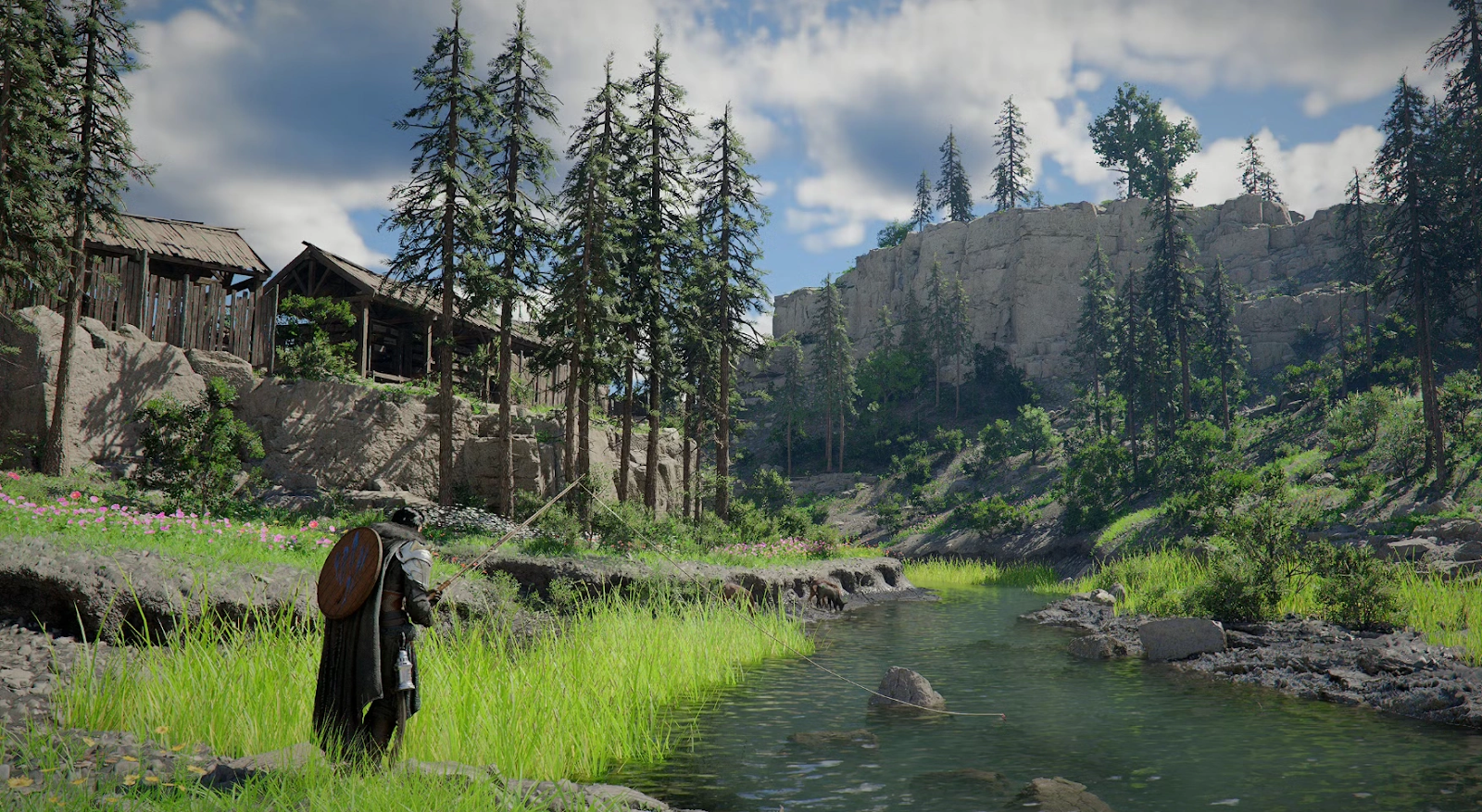
You don't need a 40-series card to enjoy Crimson Desert. If you are running older hardware, such as a GTX 1660 or an RTX 2060, the strategy shifts toward aggressive upscaling and lowering the resolution scale of non-essential environmental details. These settings are designed to keep the game playable and responsive even when hardware resources are limited.
|
Setting |
Low-End/Budget Value |
Optimization Tip |
|
Texture Quality |
Medium / High |
Depends on your VRAM (4GB use Medium, 6GB+ use High). |
|
Shadow Quality |
Low |
Shadows are the biggest resource hog on older cards. |
|
Volumetric Fog |
Medium |
Drastically improves stability in misty areas. |
|
Upscaling Mode |
FSR Performance |
Use FSR to "cheat" a higher resolution from a lower base. |
|
Simulation Quality |
Medium |
Reduces CPU bottlenecks in crowded towns. |
|
Model Quality |
Medium |
Keeps the framerate steady in busy environments. |
|
Raytracing |
Off |
For low-end cards, RT is usually the first thing to disable. |
Part 4: Eliminate Lag and Stuttering with LagoFast
Even with the most optimized graphics settings, your experience in Crimson Desert can still be ruined by external factors like high ping, server jitter, and unexpected game crashes. This is where LagoFast becomes an essential part of your gaming toolkit. As the premier game booster designed for high-fidelity titles, LagoFast optimizes your internet route to the game servers, effectively slashing ping and eliminating the micro-stuttering that often occurs in massive open-world environments. It doesn't just fix your connection; it addresses common Crimson Desert errors, such as "failed to connect" or "stuck on loading screen," by ensuring a stable, dedicated pathway for your data.
Beyond its industry-leading performance fixes, LagoFast is evolving alongside the needs of the Crimson Desert community. To help new players navigate the complexities of Pywel, LagoFast is rolling out game-changing exclusive features:
- Real-Time Translation: Break down language barriers and communicate with players globally without leaving the game.
- Map Teleportation (Fast Travel): Save hours of manual travel time with an integrated fast-travel assistant that helps you move across the massive map efficiently.
- One-Click Spell Casting (Auto Skill Combo): Master the game’s intricate combat system instantly. Use Quick Cast and Auto-Combo features to execute complex abilities with perfect timing.
- Global Node Network: Connect to the best possible server location to ensure 0% packet loss.
- FPS Boost Toggle: A single click to shut down background processes and free up RAM for maximum performance.
How to Use LagoFast Enhance with your Crimson Desert Experience
Step 1: Click the Free Trial button to download and install LagoFast.
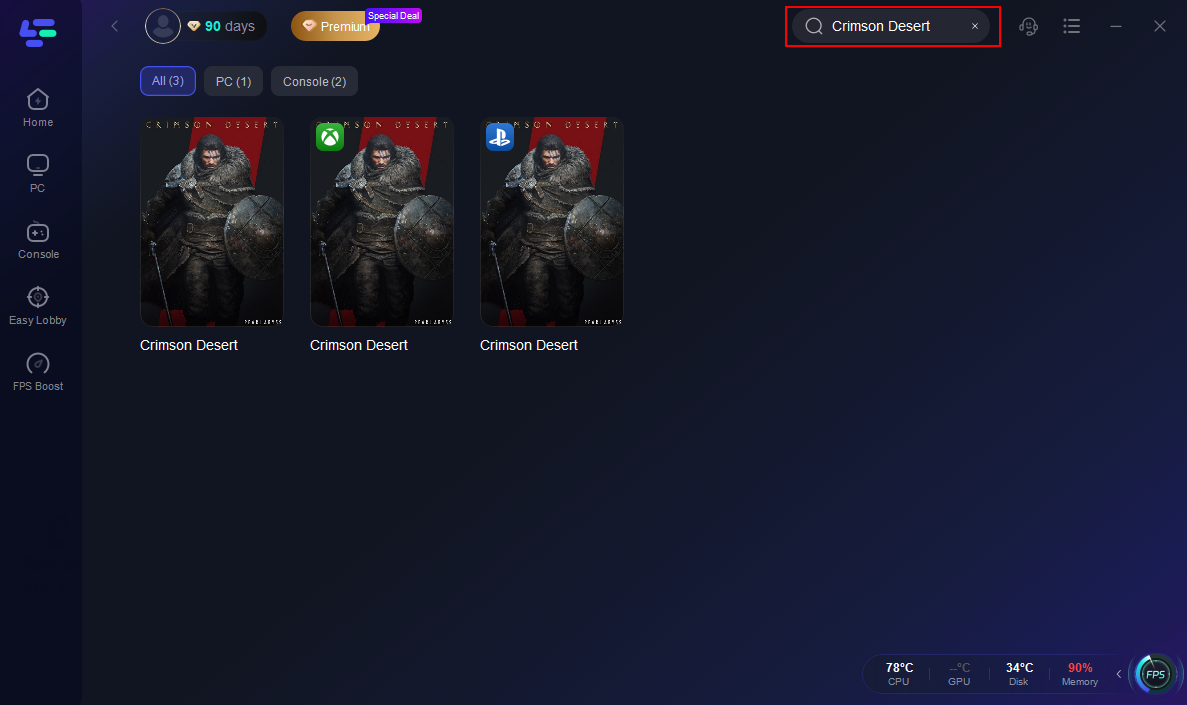
Step 2: After installation, search "Crimson Desert" in the search bar and select the game.
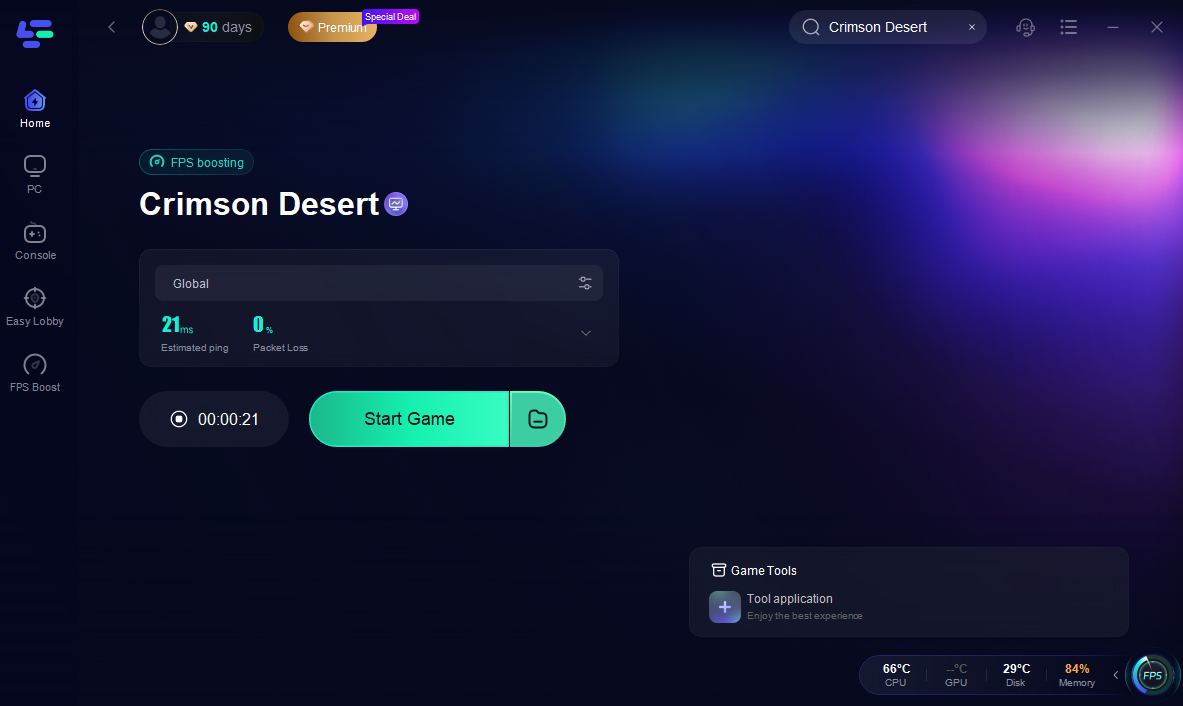
Step 3: Choose your preferred server node and click "Smart Boost" to start optimizing.

Step 4: Launch your game and enjoy smooth, optimized gameplay with lower ping and packet loss.
Conclusion
Optimizing Crimson Desert is a two-front battle: balancing internal graphics settings and ensuring external network stability. By applying the Hardware Unboxed optimized profile, you can enjoy a nearly 20% boost in speed without losing the stunning visual fidelity Pearl Abyss intended. However, to truly master the lands of Pywel, software optimization is only half the story. Utilizing a tool like LagoFast ensures that your hardware's performance isn't wasted on a poor connection. With its upcoming features like fast travel and auto-skill combos, you’ll not only be playing the game more smoothly, but you’ll be playing it more intelligently. Adjust your settings, fire up your booster, and prepare for the journey of a lifetime.
Boost Your Game with LagoFast for Epic Speed
Play harder, faster. LagoFast game booster eliminates stutter and lags on PC, mobile, or Mac—win every match!
Quickly Reduce Game Lag and Ping!
Boost FPS for Smoother Gameplay!