

Chrono Odyssey, the ambitious time-manipulating MMORPG from Chrono Studio and Kakao Games, is one of the most anticipated online titles of the year. With its massive open world, real-time combat, and stunning Unreal Engine 5 visuals, it promises an epic gaming experience. However, as many players have found during the closed beta and pre-release phases, the reality can be choppy when lag spikes and high ping strike.
From inconsistent frame pacing to sudden latency drops in the middle of boss fights, lag in Chrono Odyssey is more than a nuisance; it can make the difference between victory and an untimely respawn. In this guide, we’ll explore the most common reasons for lag and, more importantly, we’ll walk you through tested solutions to reduce lag in Chrono Odyssey effectively.

- ✅ Reduce Lag and High Ping.
- ✅ Boost FPS at the Same Time.
- ✅ Support 2000+ Popular Online Games.
- ✅ Change Server all over the World.
- ✅ Explore Chrono Odyssey System Requirements.
Part 1: Why Chrono Odyssey Experiences Lag
Part 2: How to Fix Chrono Odyssey Lag Issues - Best Solutions
Part 1: Why Chrono Odyssey Experiences Lag
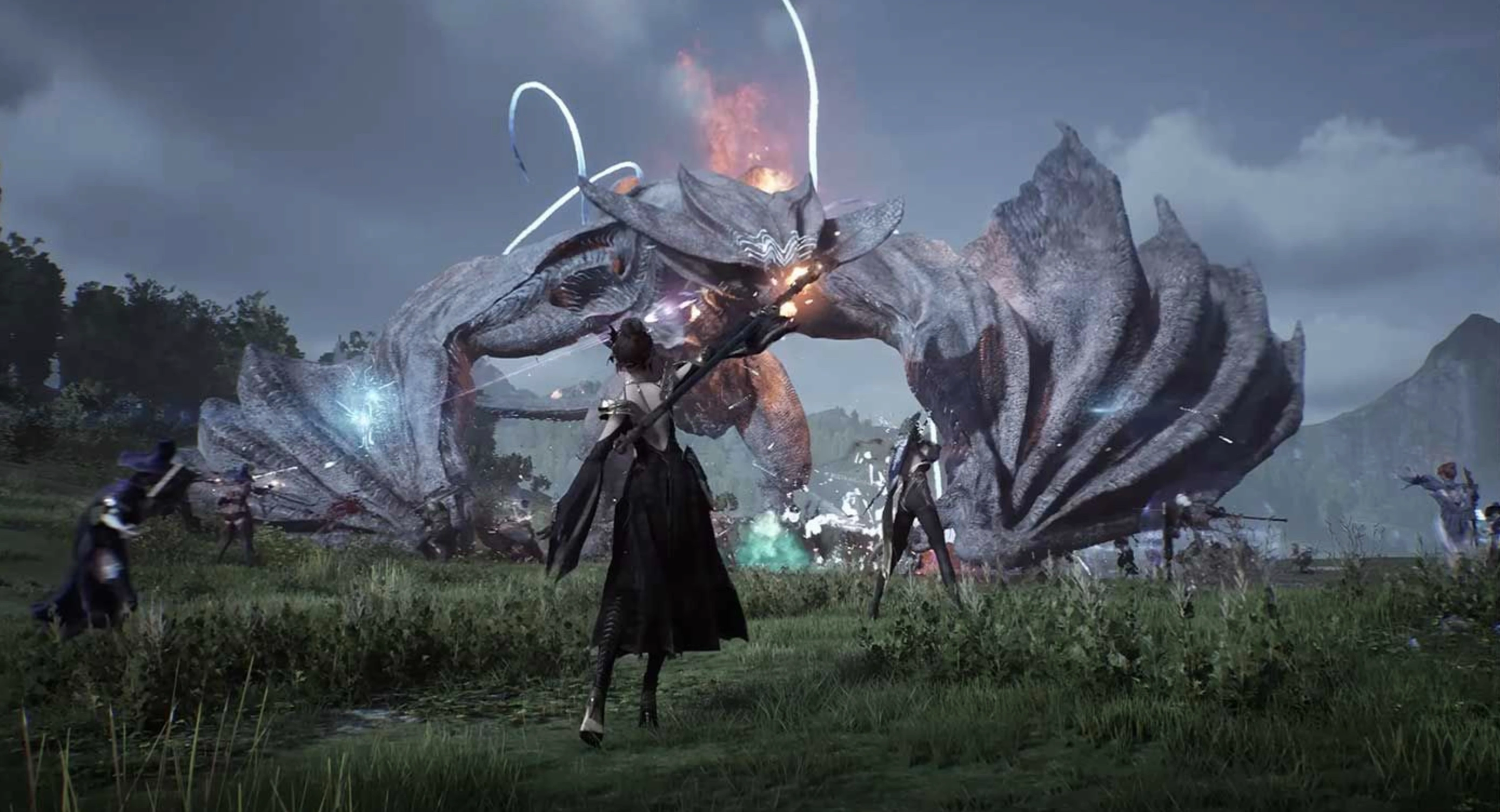
Before diving into the fixes, it's crucial to understand why Chrono Odyssey struggles with performance and network stability for some players.
- Server Load Issues: With limited server regions (NA, EU, and Asia) and players funneled into only six sub-servers per region, overcrowding during peak hours causes congestion and latency.
- Poor Network Optimization: The game, still in its beta stage, hasn’t reached full optimization. Many animations and combat abilities are resource-heavy, affecting both graphics and bandwidth.
- Unstable Regional Routing: Players outside the server regions (e.g., South America, Middle East) report excessive ping due to poor routing paths.
- Background Applications: Discord, Steam overlay, Windows updates, or Chrome running in the background can consume valuable bandwidth and system memory.
- ISP Limitations: Throttling by internet service providers, outdated routers, or high jitter can impact your connection to the game servers.
- Outdated Game Files or Drivers: Corrupted game installations or outdated GPU/network drivers may not communicate efficiently with Unreal Engine 5 features.
Part 2: How to Fix Chrono Odyssey Lag Issues - Best Solutions
Let’s look at the most effective ways to reduce lag and enhance your experience in Chrono Odyssey. We’ll start with the top-rated lag reducer, LagoFast, followed by other detailed solutions.
LagoFast: The Best Chrono Odyssey Lag Reducer
When it comes to real-time lag reduction, LagoFast stands out as the most efficient solution tailored for Chrono Odyssey and other high-load MMOs.
- LagoFast is a specialized game booster and ping reducer that offers:
- Precise multi-route smart routing to the nearest Chrono Odyssey server.
- Real-time ping acceleration that targets high-latency spikes.
- Custom FPS boosting features that free up system memory.
- Support for over 2000+ games, including newly launched titles.
- No-risk 1-click optimization.
- Daily performance reports to track network and FPS changes.
Tutorial to use LagoFast to Fix Chrono Odyssey Lag on PC:
Step 1: Click the Free Trial button to download and install LagoFast.
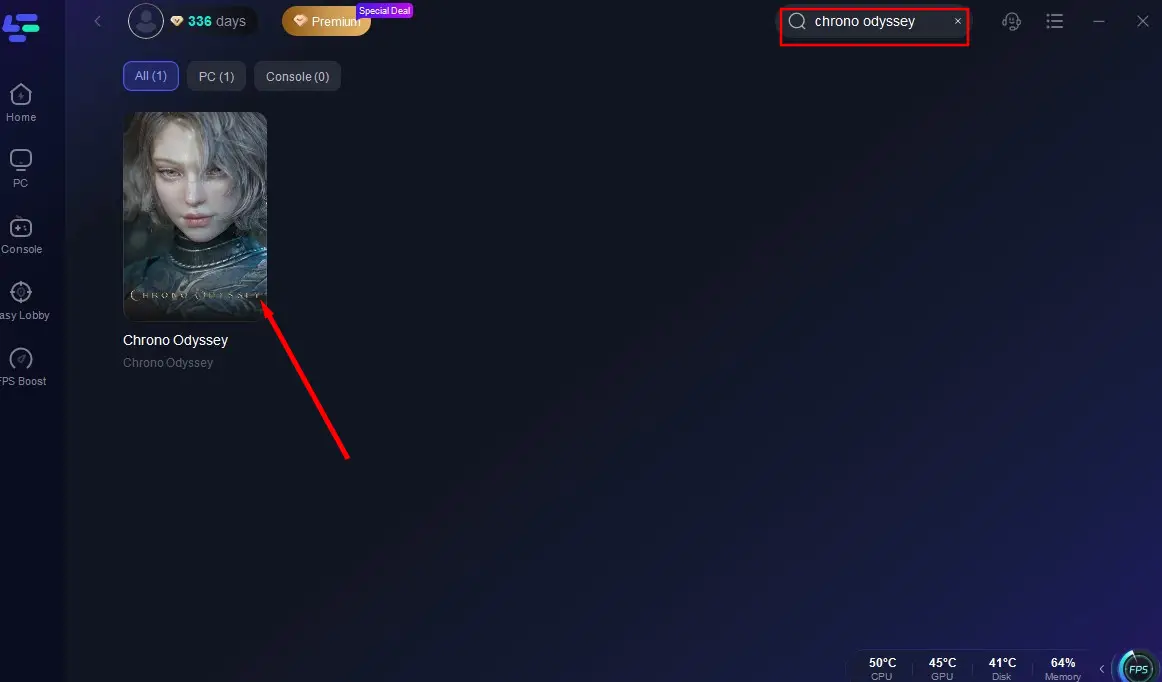
Step 2: Open LagoFast, then click the PC button on the left and search Chrono Odyssey in the search bar, click it after it appears.
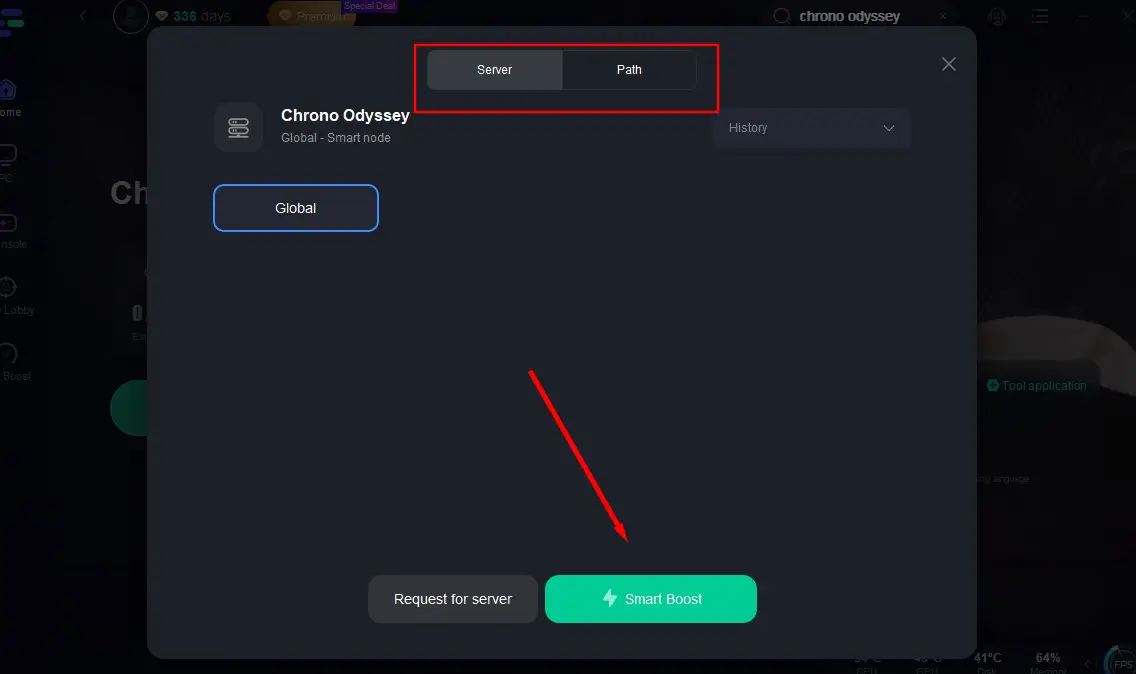
Step 3: Click on “Server” to change to a better server that fixes “Chrono Odyssey Lag” and ensures the gaming experience, then click on “Smart Boost”.
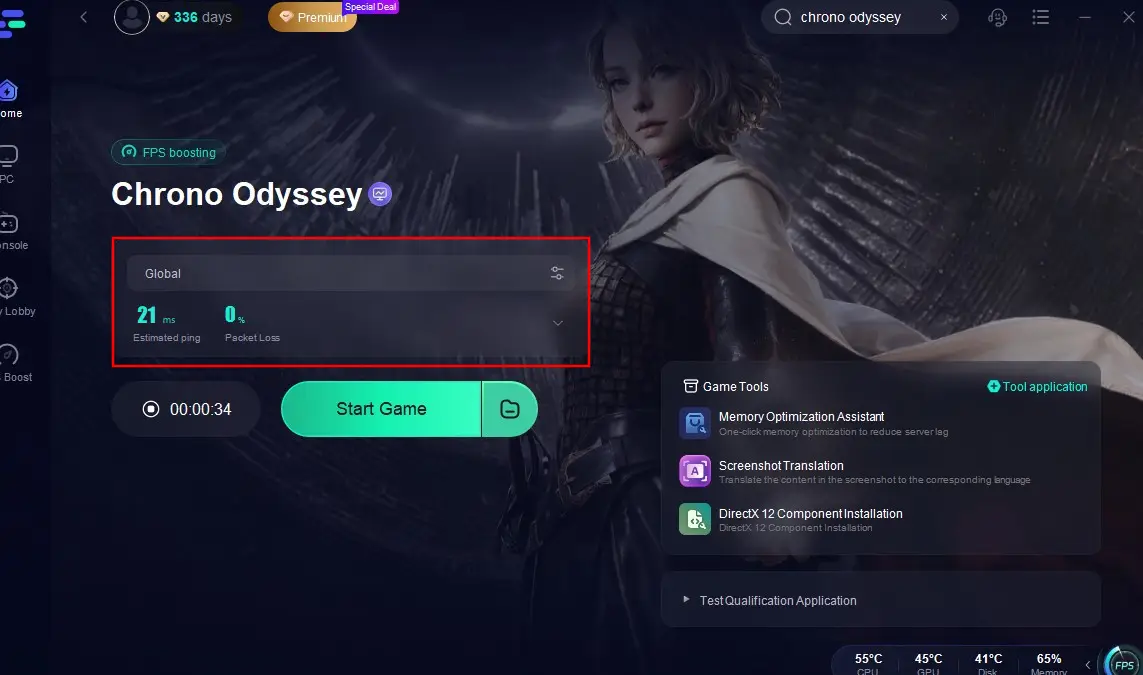
Step 4: Check the specific game ping, packet loss, and multiple path connection on the right side. Finally, click the “Start Game” to play the game.
Change Your DNS Settings
Using a faster, more stable DNS server helps reduce delays in resolving server IPs.
Steps:
Step 1: Open Control Panel and select Network and Sharing Center.
Step 2: Click "Change adapter settings."
Step 3: Right-click your connection and select Properties.
Step 4: Select "Internet Protocol Version 4 (TCP/IPv4)" and click Properties.
Step 5: Set Preferred DNS to 1.1.1.1 and Alternate DNS to 8.8.8.8.
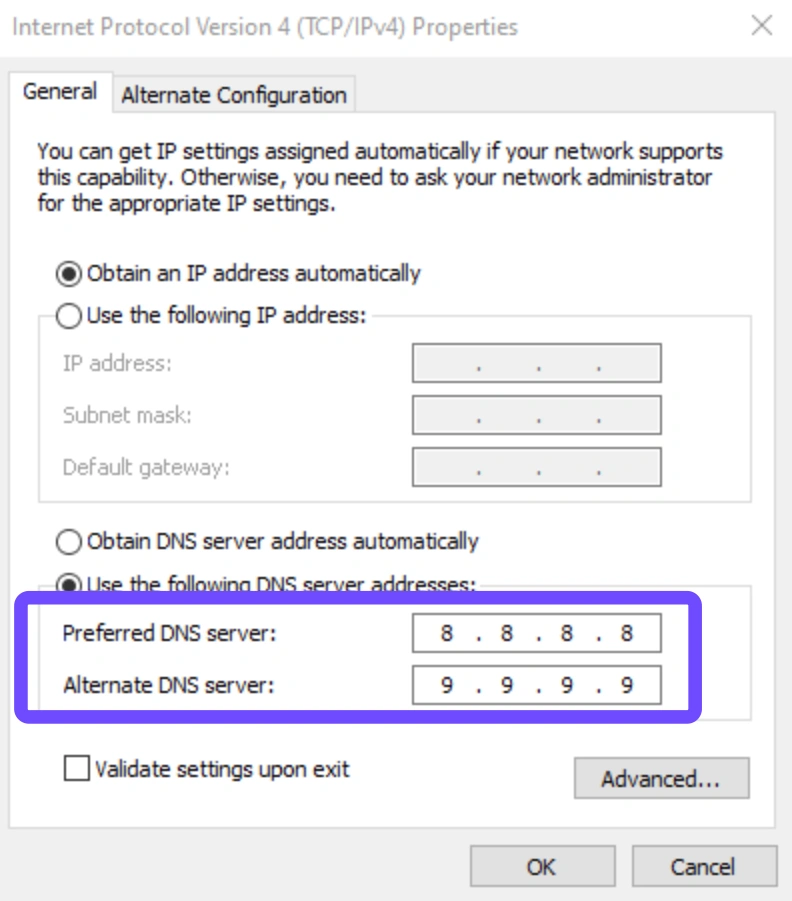
Step 6: Click OK, restart your PC, and relaunch the game.
Set Chrono Odyssey to High Priority
Letting your system know that Chrono Odyssey is the top priority ensures more CPU/GPU resources are allocated to it.
Steps:
Step 1: Launch Chrono Odyssey.
Step 2: Press Ctrl + Shift + Esc to open Task Manager.
Step 3: Go to the "Details" tab.
Step 4: Right-click ChronoOdyssey.exe, go to Set Priority, and select High.
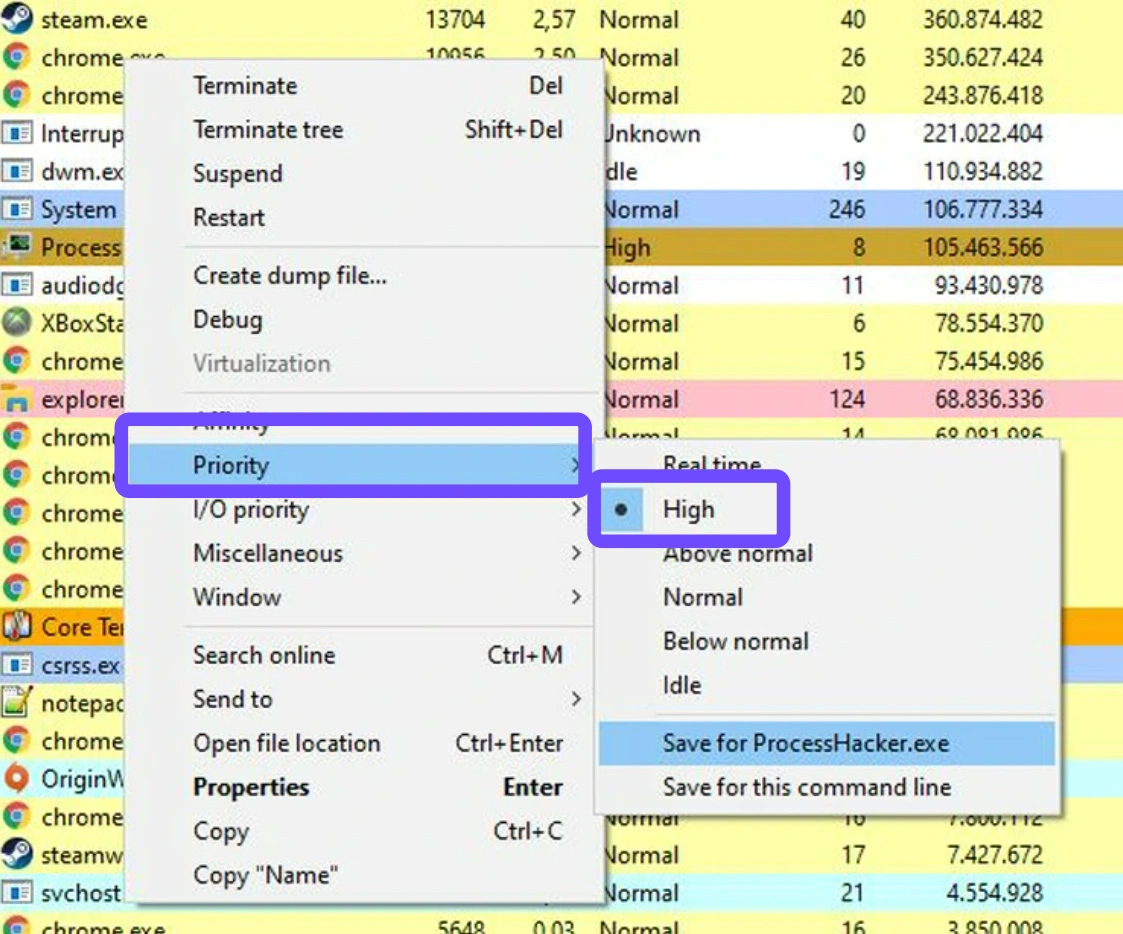
Step 5: Confirm changes.
Step 6: Keep Task Manager open while testing gameplay.
Optimize In-Game Graphics Settings
High-quality visuals look great but may lead to stuttering and latency, especially on mid-tier PCs.
Steps:
Step 1: Launch the game and go to Settings, and select Graphics.
Step 2: Set Texture and Shadow Quality to Medium or Low.
Step 3: Turn off Motion Blur, Depth of Field, and Bloom.
Step 4: Set Frame Rate Limit to 60 (or monitor refresh rate).
Step 5: Enable Dynamic Resolution Scaling.
Step 6: Restart the game and test improvements.
Switch to a Wired Ethernet Connection
Wi-Fi is prone to interference and latency, especially in large homes or apartments.
Steps:
Step 1: Plug an Ethernet cable into your PC/laptop.
Step 2: Connect the other end to your router/modem.
Step 3: Disable Wi-Fi manually in settings.
Step 4: Restart your PC.
Step 5: Launch Chrono Odyssey and test the connection.
Step 6: Avoid using streaming apps on other devices while gaming.
Update Your Network and GPU Drivers
New updates often include stability patches and game-specific optimizations.
Steps:
Step 1: Open Device Manager.
Step 2: Expand "Network Adapters" and right-click your adapter, and select Update Driver.
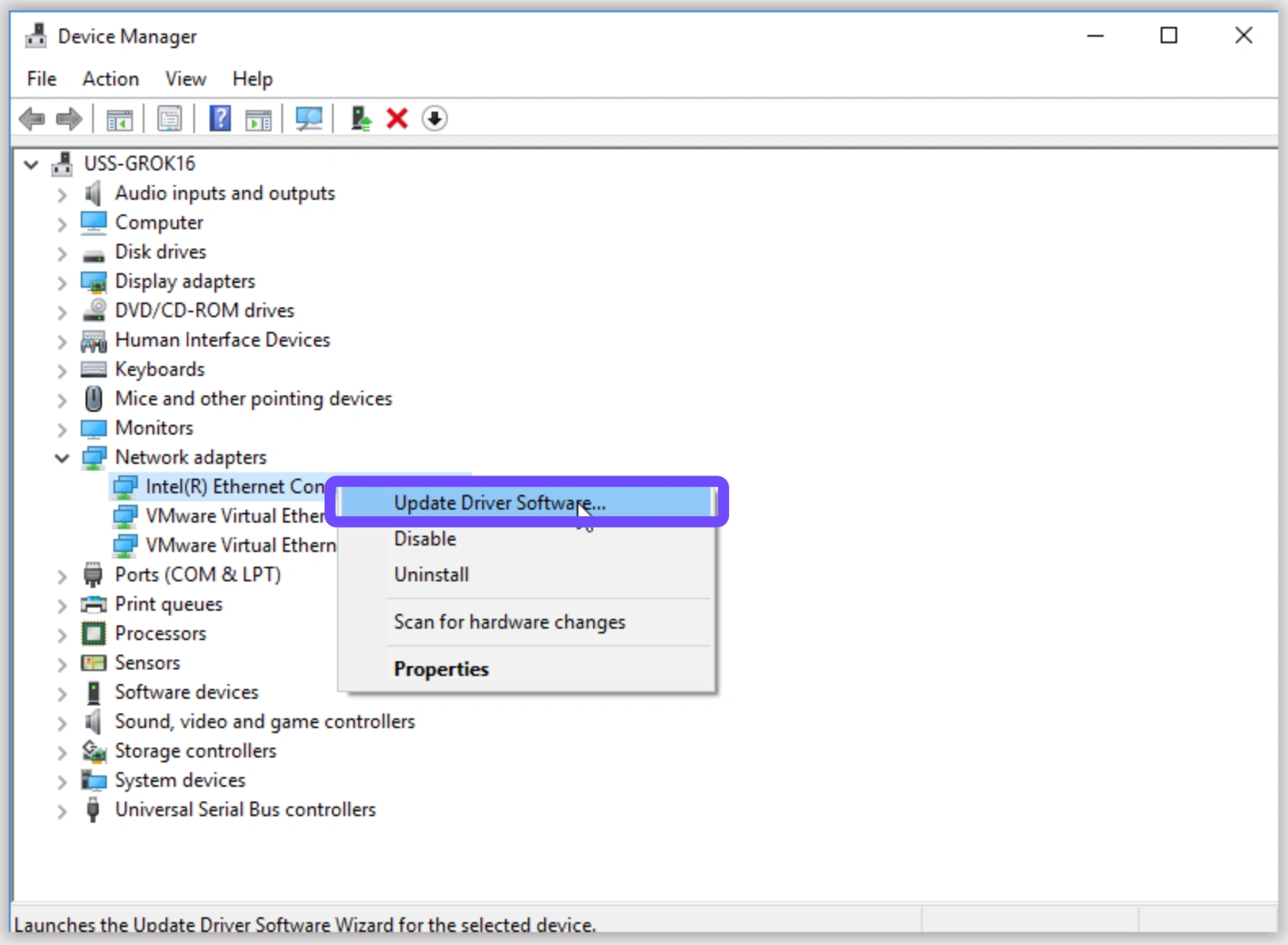
Step 3: Repeat the same for "Display Adapters."
Step 4: Visit the Nvidia or AMD official websites for the latest GPU drivers.
Step 5: Install updates and reboot.
Step 6: Relaunch the game.
Clean Boot Windows for a Lag-Free Environment
A clean boot disables all unnecessary background apps that may be hogging bandwidth.
Steps:
Step 1: Press Win + R and type msconfig.
Step 2: Go to the Services tab and check "Hide all Microsoft services."
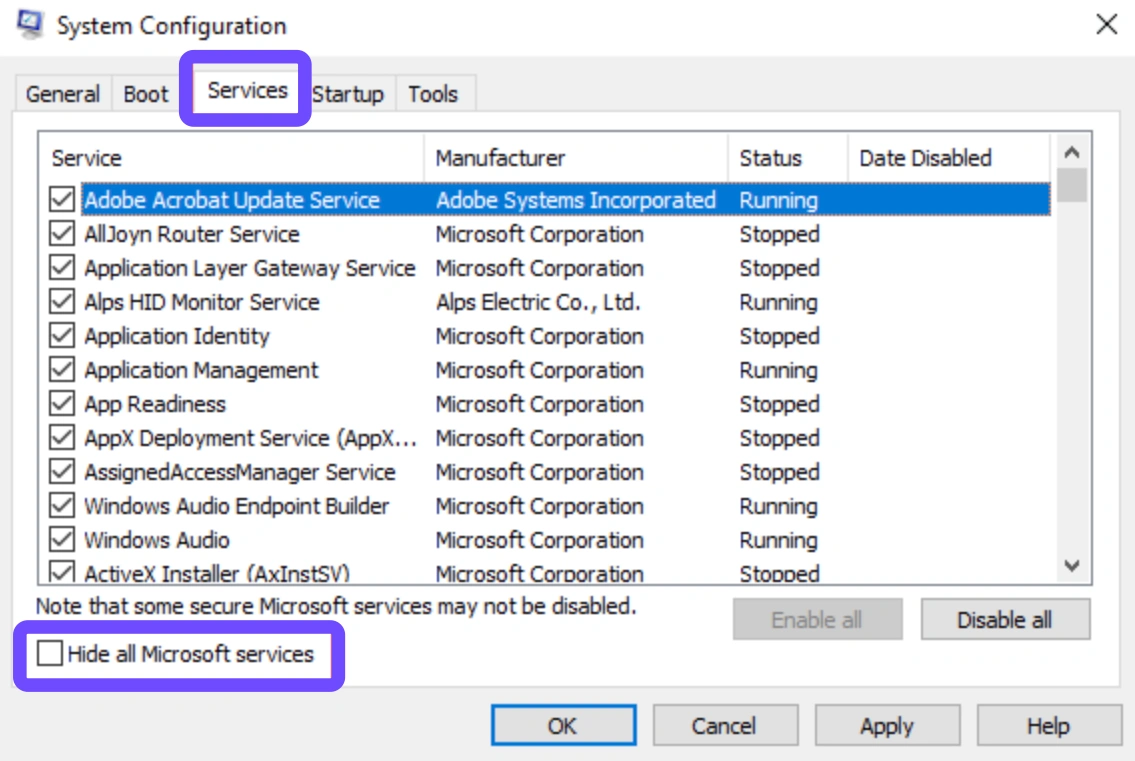
Step 3: Click "Disable all."
Step 4: Go to the Startup tab and Open Task Manager.
Step 5: Disable all non-essential startup apps.
Step 6: Reboot your system and launch the game.
Part 3: Chrono Odyssey FAQs
Q1: Why does Chrono Odyssey lag more than other MMOs
A1: The game is in closed beta with limited optimization. Additionally, its heavy use of Unreal Engine 5 features and regional server limits creates more pressure on client and network performance.
Q2: Will the lag get better after the official release
A2: Yes. Developers typically optimize performance and expand server infrastructure post-launch. Expect improvements in frame rates, hit registration, and latency.
Q3: Can I play Chrono Odyssey from South America or the Middle East
A3: Yes, but you may experience high ping unless you use a lag reducer like LagoFast. Consider connecting to the EU or NA servers for better performance.
Q4: Does class choice affect lag
A4: Indirectly. Some classes (like Ranger with longbow and rapier) use more particle-heavy or animation-intensive skills, which may feel laggier on older hardware.
Q5: How much bandwidth does Chrono Odyssey use
A5: On average, it consumes 30-60MB per hour. However, lag depends more on stability and routing than bandwidth volume.
Q6: Is there a mobile version of LagoFast for console players
A6: Yes. LagoFast offers cross-platform optimization tools, including for PlayStation and Xbox, via mobile device management or router-based acceleration.
Conclusion
Chrono Odyssey has the potential to become a standout MMORPG, but only if players can enjoy it without the constant drag of lag and performance issues. Whether you’re struggling with high ping during boss fights or just want smoother open-world exploration, taking the right steps can vastly improve your experience. Start with LagoFast for instant results, then implement the six manual solutions for long-term stability.
Boost Your Game with LagoFast for Epic Speed
Play harder, faster. LagoFast game booster eliminates stutter and lags on PC, mobile, or Mac—win every match!
Quickly Reduce Game Lag and Ping!
Boost FPS for Smoother Gameplay!