
Chrono Odyssey promises an epic, time-bending MMORPG experience built on Unreal Engine 5. While anticipation is sky-high, the reality of online gaming means connection issues are inevitable, especially at launch.
After the game was launched, many players encountered server problems, such as Chrono Odyssey failed to connect, server queues, disconnections, and black screens. This comprehensive will guide you through exploring the potential causes of Chrono Odyssey connection issues and provide actionable fixes to help you troubleshoot, successfully enter the fantasy world of Setera, and embark on an epic journey.

- ✅ Reduce Lag and High Ping.
- ✅ Boost FPS at the Same Time.
- ✅ Support 2000+ Popular Online Games.
- ✅ Stable Server Connections.
- ✅ Explore Chrono Odyssey Weapons.
Part 1: Introduction to Chrono Odyssey
Part 2: Common Chrono Odyssey Connection Issues & Causes
Part 3: Best Way to Fix Chrono Odyssey Connection Issues
Part 4: Other Methods to Fix Chrono Odyssey Connection Issues
Part 1: Introduction to Chrono Odyssey
Developed by NPIXEL (creators of Gran Saga) and published by Kakao Games in the West, Chrono Odyssey aims to be a visually stunning, large-scale MMORPG. Set in the fantasy world of Setera, players embark on an epic journey as "Chrono Wardens," wielding extraordinary powers to battle mythical creatures and unravel cosmic mysteries. The game's closed beta test (CBT), launched on June 20, 2025, offers a taste of its ambitious features, including:
- Dynamic Time Control System: Freeze, rewind, or accelerate time during combat for strategic advantages.
- Cross-Platform Gameplay: Seamless transitions between PC, consoles, and mobile devices.
- 12-Player Raids: Challenge colossal bosses in team-based combat.
Part 2: Common Chrono Odyssey Connection Issues & Causes
Several common Chrono Odyssey connection issuses:
1. Server Connection Failed
Symptoms: Inability to log in, with the client immediately disconnecting.
Cause: Network instability or firewall interference.
2. High Ping
Symptoms: Laggy movements, delayed skill activations, and rubber-banding.
Cause: Geographic distance from servers or ISP throttling.
3. Stuck on "Loading" Screen or Black Screen
Symptoms: Infinite loading loop at the login phase.
Cause: DNS resolution failures or corrupted game cache.
4. Disconnections During Raids
Symptoms: Sudden ejection from instances mid-combat.
Cause: Unstable server nodes or packet loss.
5. Post-Update Crashes
Symptoms: Game closes abruptly after patch installations.
Cause: Incompatible drivers or corrupted update files.
You May Like: How to Change Server in Chrono Odyssey - Best Guide
Part 3: Best Way to Fix Chrono Odyssey Connection Issues
When facing connection issues in Chrono Odyssey, the optimal solution is to utilize LagoFast—a game booster favored by players worldwide. The following advantages enable it to maintain stable connectivity during Chrono Odyssey gameplay, ensuring the smoothest gaming experience for players:
Key Benefits of LagoFast
- Optimizing the internet route between you and the game server.
- Potentially avoiding congested network paths.
- Providing a more stable connection tunnel.
- Optimizes system resources to reduce frame drops.
How to use LagoFast to play Chrono Odyssey
Step 1: Click the button below to download and install LagoFast for free.
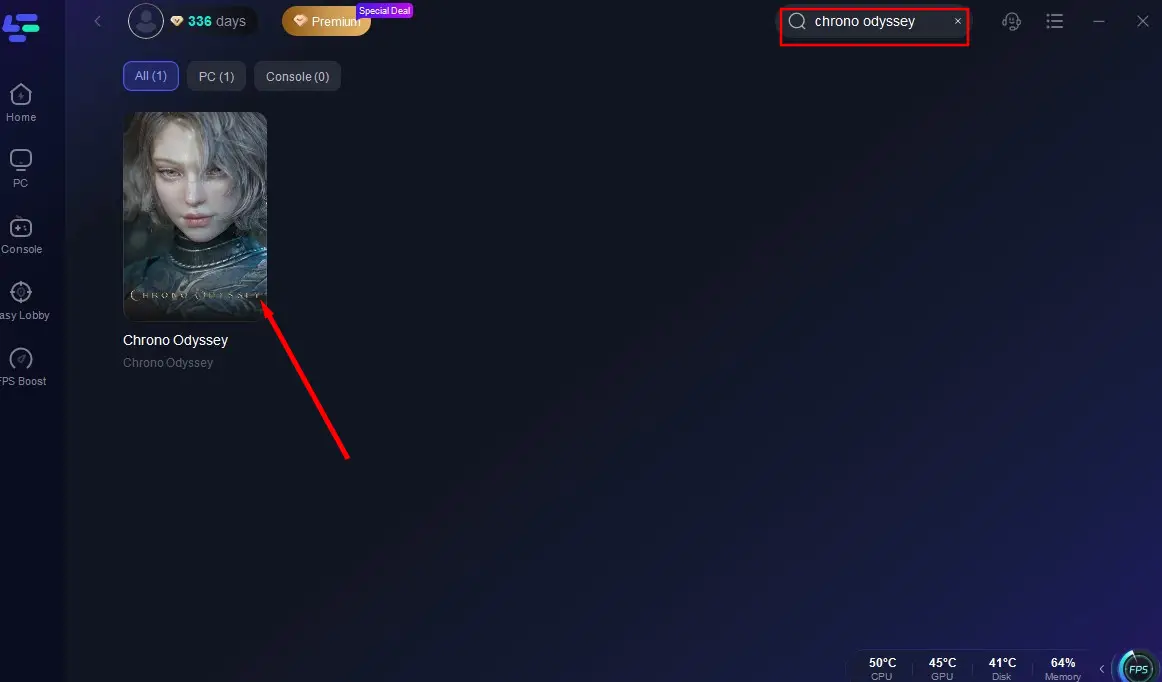
Step 2: Launch LagoFast and find Chrono Odyssey in the search box.
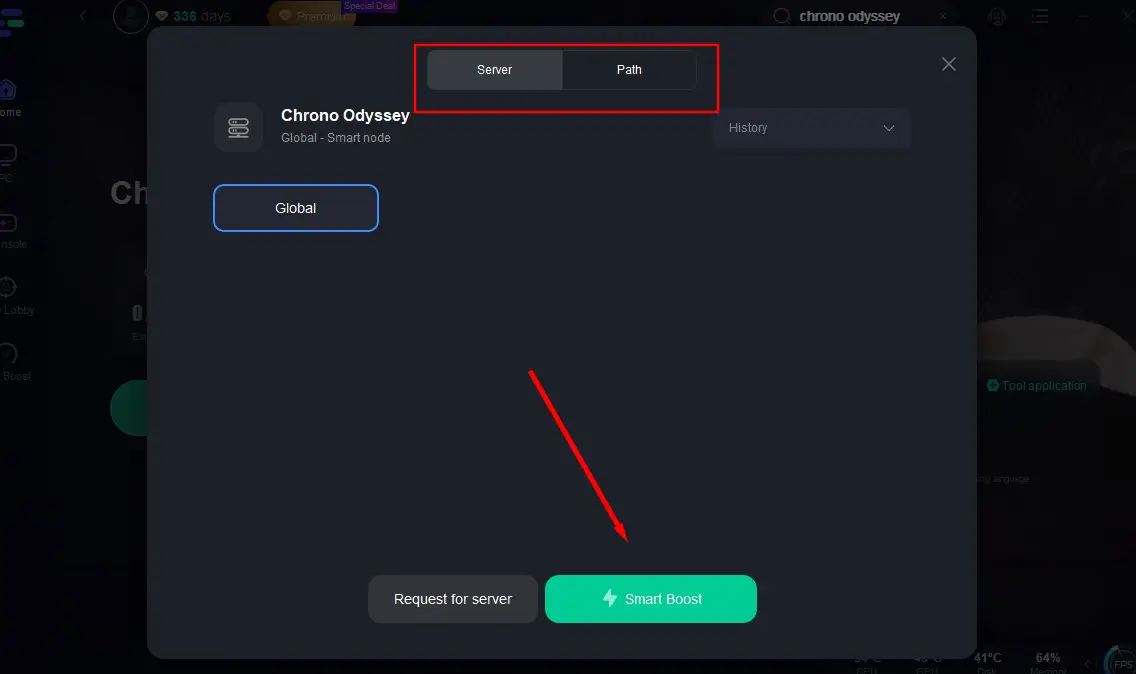
Step 3: Click "Select Server" to choose a suitable server node based on your needs, then click "Smart Boost" to activate the acceleration.
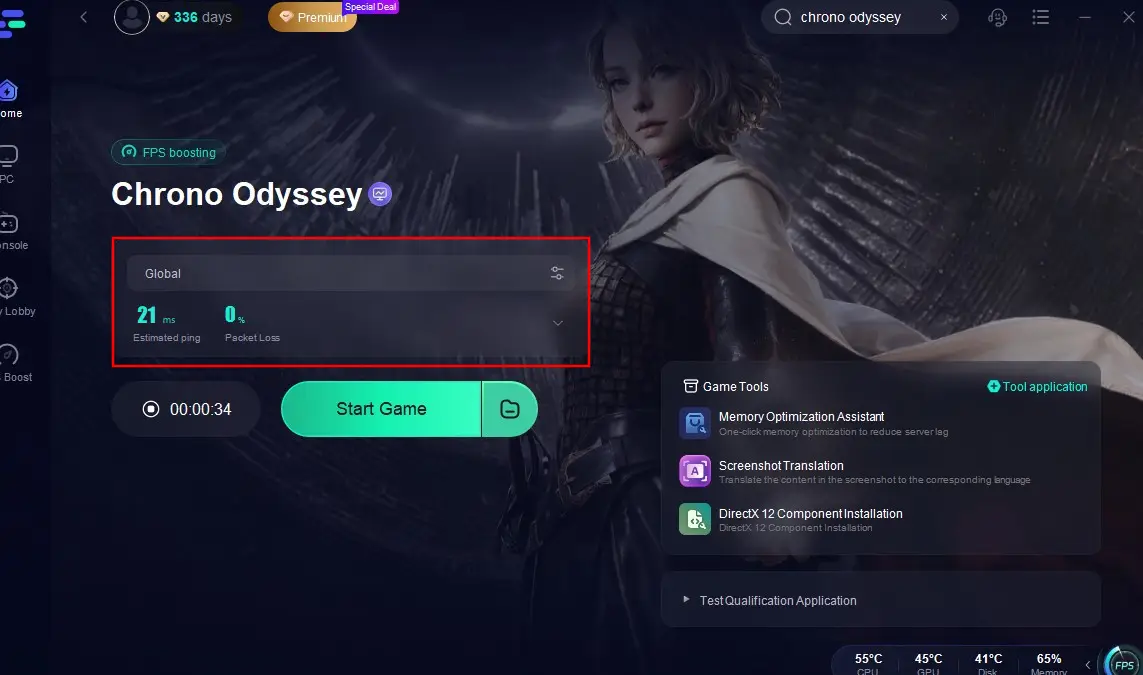
Step 4: Click "Start Game" to begin playing. After starting, you can check the game's real-time packet loss rate and ping.
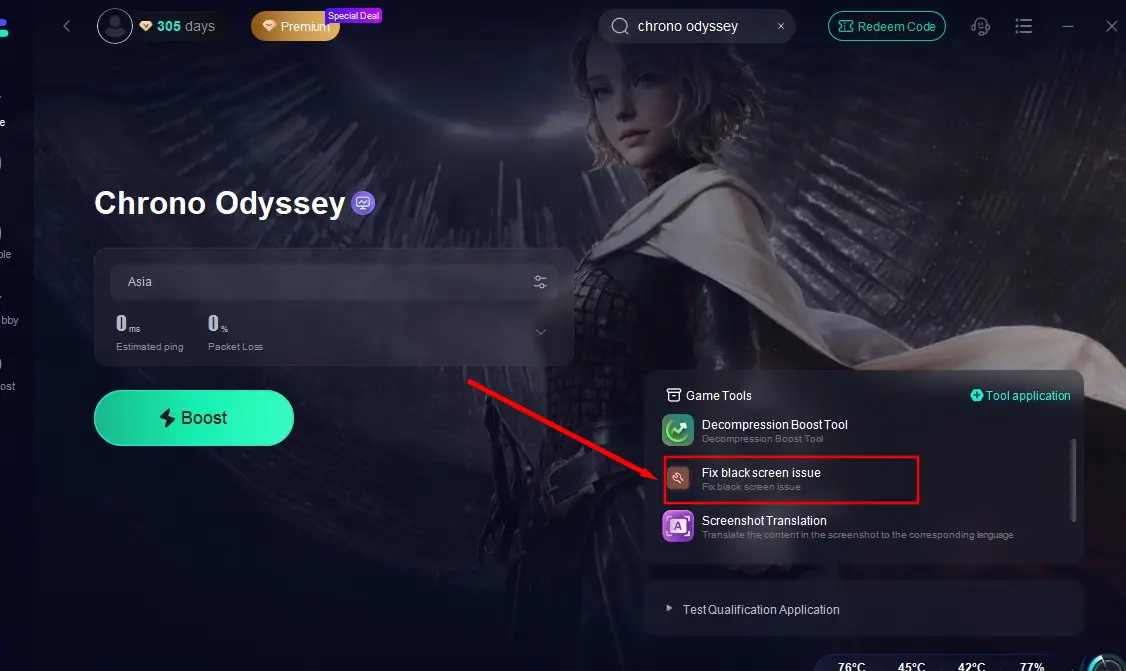
Additionally, for players who facing the black screen issue while login Chrono Odyssey, LagoFast provides Fix Black Screen tool to help them fix the problem by one click.
Hot Related: Best Way To Fix Chrono Odyssey Error Code 100150
Part 4: Other Methods to Fix Chrono Odyssey Connection Issues
Additionally, players can use the following methods to resolve common connection issues in Chrono Odyssey:
Fix 1: Check Server Status
If you encounter Chrono Odyssey connection issues, immediately visit:
- Official Chrono Odyssey Website & News
- Official Discord Server (discord.gg/chronoodyssey - verify at launch)
- Kakao Games Status Page (if available)
- Steam News Hub for Chrono Odyssey
- Twitter/X (@ChronoOdyssey, @KakaoGames)
Fix 2: Optimize Your Network
Manual Network Tweaks
1. Flush DNS Cache:
- bash
- ipconfig /flushdns
2. Change DNS Servers:
- Primary: 8.8.8.8 (Google DNS)
- Secondary: 1.1.1.1 (Cloudflare)
3. Enable QoS:
- Prioritize game traffic in your router settings (typically found under "Advanced" > "QoS").
Fix 3: Firewall and Antivirus Adjustments
1. Windows Defender:
- Navigate to "Firewall & network protection."
- Add Chrono Odyssey as an allowed app through both private and public networks.
2. Third-Party Antivirus:
- Temporarily disable protections during gameplay, then create an exclusion rule for the game's executable.
Fix 4: Game File Integrity Check
Corrupted installations often mimic connection issues:
- Open Steam Library.
- Right-click Chrono Odyssey > Properties > Local Files.
- Click "Verify Integrity of Game Files."
Fix 5: Driver and OS Updates
Outdated components frequently clash with modern titles:
1. Graphics Drivers:
- NVIDIA: Use GeForce Experience to install Game Ready Drivers.
- AMD: Download the latest Adrenalin Edition.
2. Windows Updates:
- Ensure KB5000000 series cumulative updates are installed for optimal DirectX 12 compatibility.
Fix 6: In-Game Settings Adjustment
1. Reduce Graphics Load:
- Set "Texture Quality" to Medium.
- Disable "Volumetric Lighting" and "Motion Blur."
2. Limit FPS:
- Cap frames at 60 via the console command fps_max 60 to prevent network saturation.
Conclusion
Chrono Odyssey's ambitious design demands robust connectivity to fully appreciate its time-bending battles and sprawling worlds. By systematically addressing network configurations, server interactions, and software conflicts, players can mitigate most disruptions. For persistent issues, leveraging LagoFast's specialized infrastructure ensures a competitive edge in this chrono-twisting saga.
Boost Your Game with LagoFast for Epic Speed
Play harder, faster. LagoFast game booster eliminates stutter and lags on PC, mobile, or Mac—win every match!
Quickly Reduce Game Lag and Ping!
Boost FPS for Smoother Gameplay!