
Chrono Odyssey has captured attention as one of 2025’s most ambitious MMOs, developed by Chrono Studio and published by Kakao Games. Built with Unreal Engine 5, it promises sprawling landscapes, epic boss fights, and time-manipulation mechanics. But while the visuals and customization are impressive, the beta and early access stages of the game have surfaced a litany of technical problems that hinder many players' experience.
From frustrating launch failures to perplexing in-game lag spikes and crashing instances, the common errors in Chrono Odyssey are more than just bugs—they're barriers to enjoyment. Understanding what’s causing them and how to fix each is critical, especially with the full launch just months away.

Part 1: Chrono Odyssey Common Errors Players Encounter
Part 2: How to Fix Chrono Odyssey Common Errors - Top 7 Fixes
Part 1: Chrono Odyssey Common Errors Players Encounter
As with many massive online titles still in development, players have been facing multiple types of issues in the Chrono Odyssey beta. Here are the most frequently reported ones:
Black Screen on Startup
One of the most widespread issues, the black screen bug usually occurs right after launching the game. Players hear sound, but visuals never load.
Stuck on "Connecting to Server"
This prevents players from logging in, either due to regional mismatches or corrupted cache.
Constant Lag or High Ping
Even with stable connections, many report severe latency, particularly outside of North America, Europe, and Asia server zones.
Crash to Desktop (CTD)
Players experience sudden game closures with no error message, often during cutscenes or combat-heavy areas.
Game Freezing During Boss Fights
When facing world bosses, especially during dungeon instances, the game may freeze or stutter, disrupting fights.
Missing or Invisible UI Elements
Some players see no UI elements like HP bars, quest trackers, or action buttons, making the game unplayable.
Incompatibility with DirectX 12
While Chrono Odyssey is optimized for DX12, certain systems report incompatibility even when the correct drivers are installed.
Part 2: How to Fix Chrono Odyssey Common Errors - Top 7 Fixes
Let’s walk through the complete solutions for each of these issues. While not every fix is guaranteed to work universally (since errors often depend on system specs or regional networks), the steps below address root causes systematically.
Best Fix: Use LagoFast for Optimized Game Performance and Error Prevention
If you're looking for a one-click solution that can address multiple Chrono Odyssey issues at once, LagoFast is currently one of the top-performing tools in the market. It’s more than just a ping booster; it offers system-level optimization tailored for MMORPGs.
Why LagoFast Works Best for Chrono Odyssey:
- Reduces lag and ping spikes by auto-routing traffic to the fastest path.
- Fixes server connection errors by optimizing DNS and network stack.
- Fix the black screen by adjusting the system load dynamically.
- Can repair corrupted launchers or startup crashes.
- One click to fix error 100150
Additional Features of LagoFast:
- Real-time FPS and latency monitoring
- Custom game booster profiles
- Region selection for avoiding server congestion
- Works with over 2000+ online games
- No need to tweak the registry or system files manually
For players tired of trial-and-error fixes, LagoFast offers both ease and efficiency. It’s especially helpful during closed beta events where server loads and bugs are more common.
Tutorial to use LagoFast to Fix Chrono Odyssey Lag on PC:
Click the button below to download and install LagoFast for free.
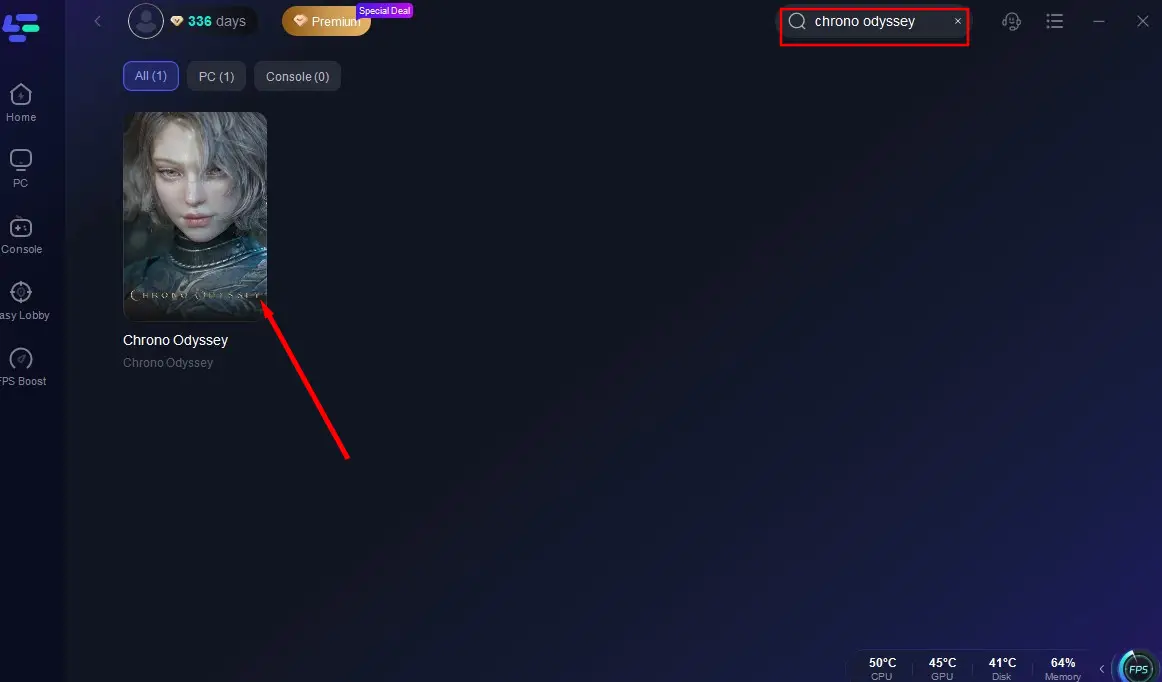
Launch LagoFast and find Chrono Odyssey in the search box.
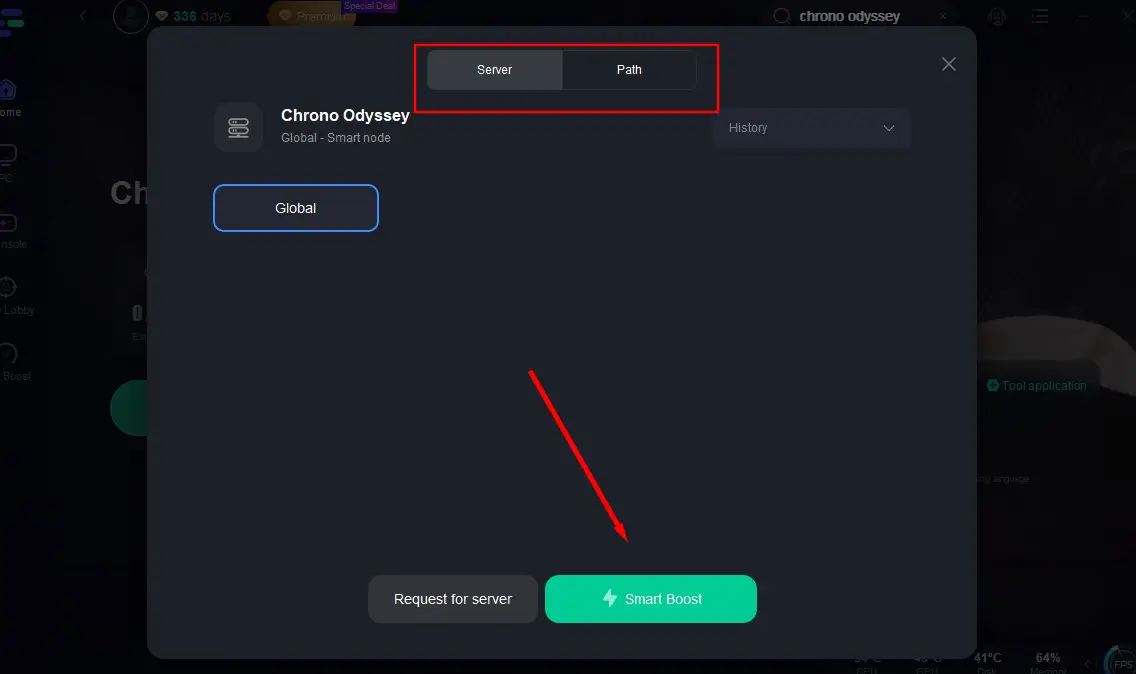
Click "Select Server" to choose a suitable server node based on your needs, then click "Smart Boost" to activate the acceleration.
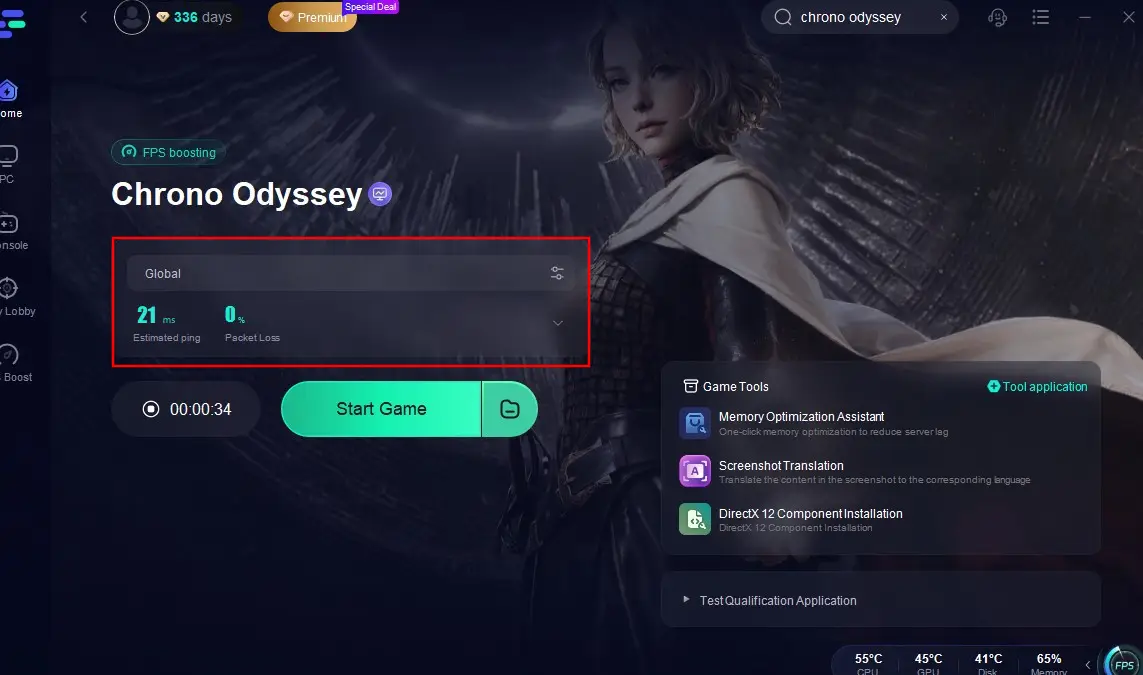
Click "Start Game" to begin playing. After starting, you can check the game's real-time packet loss rate and ping.
Repairing the Game Files via Steam
Corrupted or missing game files are a major cause of black screens and crashing issues.
Steps:
Step 1. Open Steam Library.
Step 2. Right-click on Chrono Odyssey.
Step 3. Select Properties.
Step 4. Go to the Installed Files tab.
Step 5. Click Verify integrity of game files.

Step 6. Wait until verification is complete, then relaunch the game.
Update GPU Drivers and DirectX
Outdated drivers and missing DirectX files often result in rendering problems and CTDs.
Steps:
Step 1. Go to your GPU vendor’s site (NVIDIA, AMD, Intel).
Step 2. Download and install the latest drivers.
Step 3. Open the DirectX Web Installer from Microsoft’s official site.
Step 4. Follow the prompts to update.
Step 5. Reboot your system.
Step 6. Try running Chrono Odyssey again.
Clear Steam Download Cache
When the game gets stuck on connecting or downloading updates slowly, this method helps.
Steps:
Step 1. Open Steam.
Step 2. Go to Settings and select Downloads.
Step 3. Click on Clear Download Cache.

Step 4. Confirm when prompted.
Step 5. Log back into Steam.
Step 6. Launch Chrono Odyssey.
Set High Priority for Chrono Odyssey Process
This can reduce freezing during high-load scenarios like world boss fights.
Steps:
Step 1. Launch Chrono Odyssey.
Step 2. Open Task Manager (Ctrl + Shift + Esc).
Step 3. Go to the Details tab.
Step 4. Find ChronoOdyssey.exe.
Step 5. Right-click, click Set Priority, and select High.

Step 6. Return to game.
Adjust In-Game Graphics and Resource Settings
Game optimization is still lacking, so lowering graphics helps avoid lag and freezing.
Steps:
Step 1. Open Chrono Odyssey Settings.
Step 2. Set Graphics Quality to “Medium” or “Low”.
Step 3. Disable Motion Blur and Depth of Field.
Step 4. Turn off V-Sync if experiencing input delay.
Step 5. Lower Texture and Shadow Quality.
Step 6. Apply changes and restart the game.
Switch to the Closest Server Region
Many connection issues are due to server distance or regional mismatches.
Steps:
Step 1: Launch the game and go to the Server Selection screen.
Step 2. Pick the closest server to your physical location (e.g., NA-1 for North America).
Step 3. Restart the game.
Step 4. Log in with your main character.
Step 5. Monitor ping for stability.
Part 3: Chrono Odyssey FAQs
Is Chrono Odyssey available on consoles?
Yes, Chrono Odyssey will launch on PC, PlayStation 5, and Xbox Series X|S by Q4 2025.
Why does my game crash during cutscenes?
This is a known issue, possibly due to cinematic video codec failures. Make sure your GPU drivers are updated and try launching in windowed mode.
I get stuck in loading screens. What can I do?
Try verifying files and clearing the shader cache via your GPU control panel. LagoFast can also prevent these freezes by optimizing how assets load.
Can I switch classes or weapons after character creation?
Yes, Chrono Odyssey allows you to equip two weapons and switch freely. While classes are fixed initially, weapon flexibility gives players room for variety.
Will my beta progress carry over?
No. The closed beta is primarily for testing server and gameplay stability. Progress will be wiped before the official launch.
What server should I play on if I live outside NA/EU/Asia?
Pick the nearest region, even if your country isn't officially supported. Then use LagoFast to reduce latency and bypass routing issues.
Conclusion
Chrono Odyssey is undeniably beautiful, promising a new take on time-based MMORPG mechanics. But that promise comes with the weight of technical instability and unresolved launch issues. Players are not just seeking good content; they’re seeking reliability. Until these common errors are fixed, tools like LagoFast offer a reliable safety net for smooth performance, low latency, and consistent uptime. If you're diving into the world of Setera, don’t let bugs and crashes ruin the journey. Try the manual fixes above, but if you're still facing issues, LagoFast is the shortcut to a frustration-free Chrono Odyssey experience.
Boost Your Game with LagoFast for Epic Speed
Play harder, faster. LagoFast game booster eliminates stutter and lags on PC, mobile, or Mac—win every match!
Quickly Reduce Game Lag and Ping!
Boost FPS for Smoother Gameplay!