
Want smoother matches, fewer lag spikes, or to squad up with friends all over the region in Black Ops 7? Changing your server region might just be the move you need. While Black Ops 7 is still unreleased, its server structure likely mirrors Black Ops 6, which offers us reliable insights. Let’s break it all down.

- ✅ Reduce Lag and High Ping.
- ✅ Boost FPS at the Same Time.
- ✅ Ensure Stable Server Connection.
- ✅ Change Server without Latency.
- ✅ Fix Crashing and Stuck Errors.
- ✅ 0% Packet Loss Rate
- ✅ Boost Game Downloading Speed.
Part 1. Is Black Ops 7 region locked?
Part 2. Which Regions Have Call Of Duty Black Ops 7 Servers?
Part 3. Why We Need to Change Call Of Duty Black Ops 7 Server Regions?
Part 4. The Easiest Way to Change Call Of Duty Black Ops 7 Servers — LagoFast
Part 1: Is Black Ops 7 region locked?
No—Black Ops 7 is not region-locked in terms of gameplay or matchmaking. Servers are shared, allowing players worldwide to connect flexibly. Simply put, it means there is no region lock, just use the country you live in.
That said, there is no built-in option to manually switch regions inside the game. Your match region is automatically chosen based on your IP location and lobby availability.
Related Article: How to Check Ping and Reduce High Latency in Call of Duty Black Ops 7
Part 2: Which Regions Have Call Of Duty Black Ops 7 Servers?
While specific locations for Black Ops 7 are not yet confirmed, they are expected to mirror the infrastructure used in prior entries, including Black Ops 6. According to global mapping:
- North America: New York, Los Angeles, Chicago, Dallas, and more
- Europe: London, Paris, Frankfurt, Amsterdam
- Asia: Tokyo, Singapore, Seoul (inferred from CoD network layout)
Reddit discussions around Black Ops 6 corroborate strong reliance on these regions, suggesting similar placements for Black Ops 7.

Part 3: Why We Need to Change Call Of Duty Black Ops 7 Server Regions?
Here are the top reasons players choose to switch regions:
Lower Latency & Smoother Gameplay
Connecting to a geographically closer server reduces ping and input lag—crucial for fast-paced gunplay.
Play with Friends in Other Regions
Manually selecting a region allows you to queue up with players from other countries without being limited by geographical location.
Explore Different Playstyles & Peak-Time Alternatives
Regions differ in meta, loadouts, and crowd behavior—switching up can offer fresh experiences. Playing during off-peak hours in other time zones can also help with finding match queues faster.
Avoid Congested Servers
Switching regions during high-traffic periods can reduce disconnections or packet bursts.
You May Like: Call of Duty: Black Ops 7 Pre-Order Guide — Editions, Bonuses, and Game Pass Access
Part 4: The Easiest Way to Change Call Of Duty Black Ops 7 Servers — LagoFast
LagoFast, a game-boosting network tool, is among the most streamlined options available:
Why Choose LagoFast:
- Change Server Seamlessly without Lag: Switch regions instantly for smooth and stable gameplay.
- Real-Time Routing Optimization: Reroutes your traffic efficiently to the game server you select.
- Ping and Packet-Loss Reduction: Prioritizes stable communication paths for smooth gameplay.
- Cross-Game Performance Boosting: Combined network and FPS enhancements in one solution.
How to use LagoFast on PC
Step 1: Click the Free Trial button to download and install LagoFast.
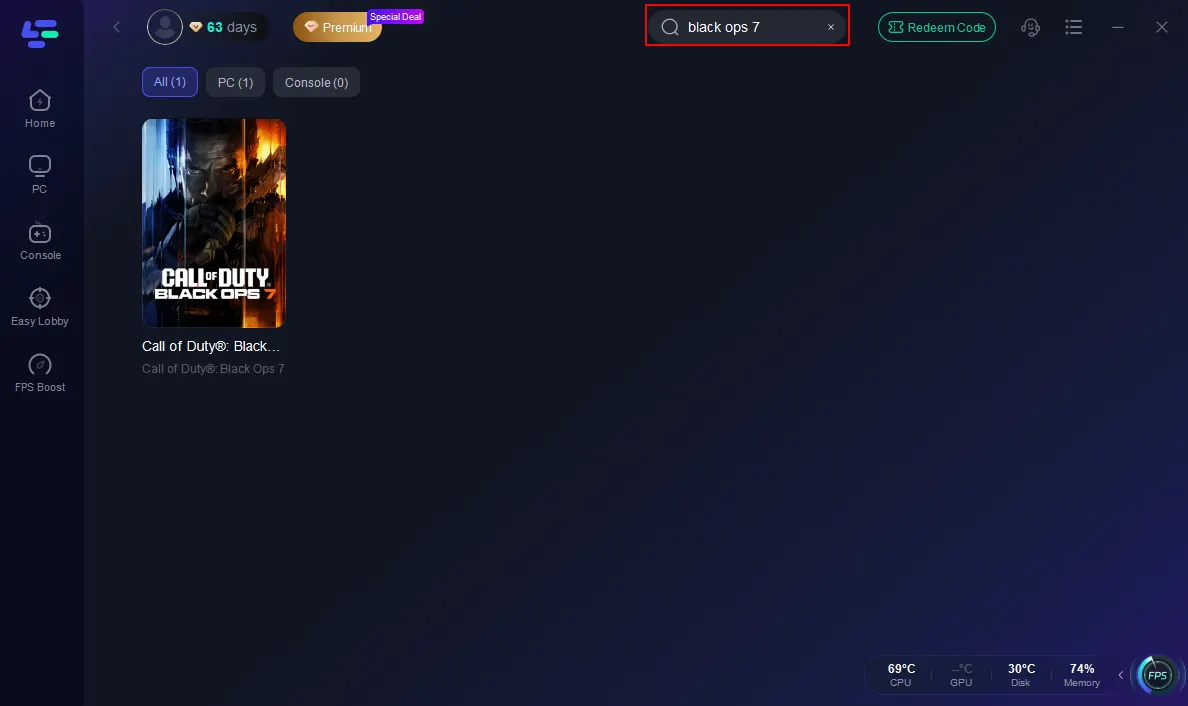
Step 2: Open LagoFast, then click the PC button on the left and search Black Ops 7 in the search bar, and click it after it appears.
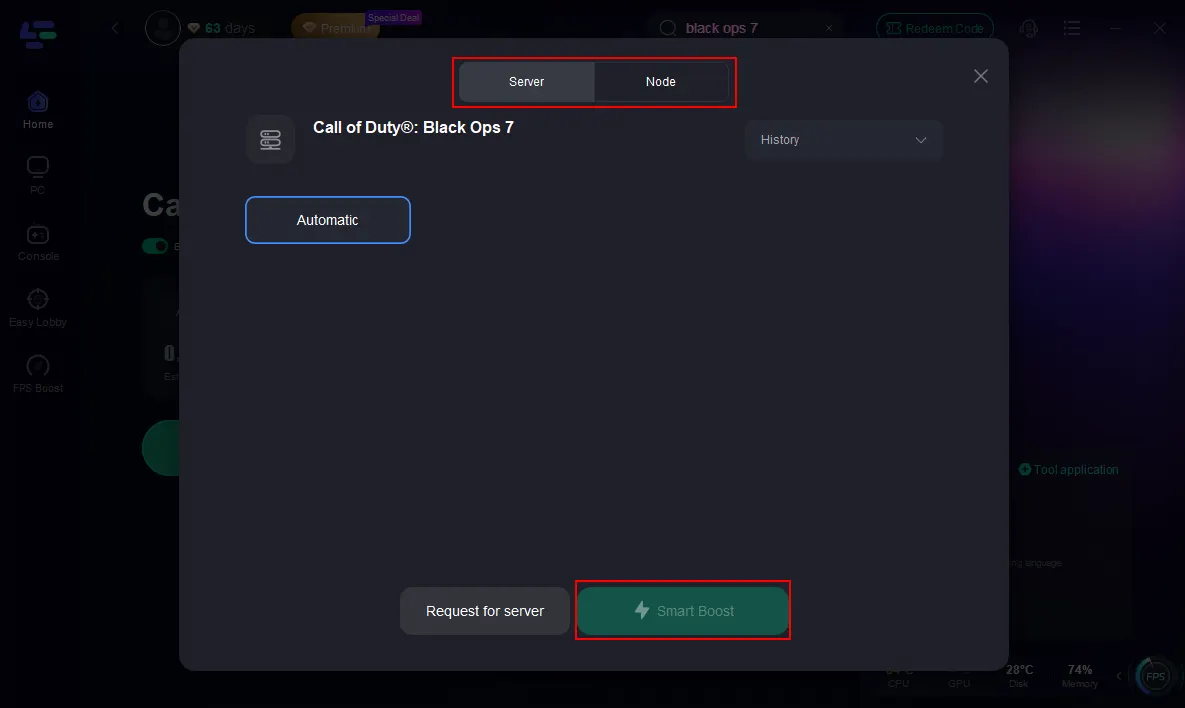
Step 3: Click on “Server” to change to a better server that ensures the Black Ops 7 gaming experience, then click on “Smart Boost”.
Step 4: Launch game and enjoy an enhanced gaming experience with reduced lag and improved stability.
For console players, LagoFast also provides the LagoFast Box, a dedicated hardware solution that delivers the same server-switching and lag-reduction benefits on PlayStation and Xbox.
Tutorial on using LagoFast Box to fix BO7 lag on consoles:
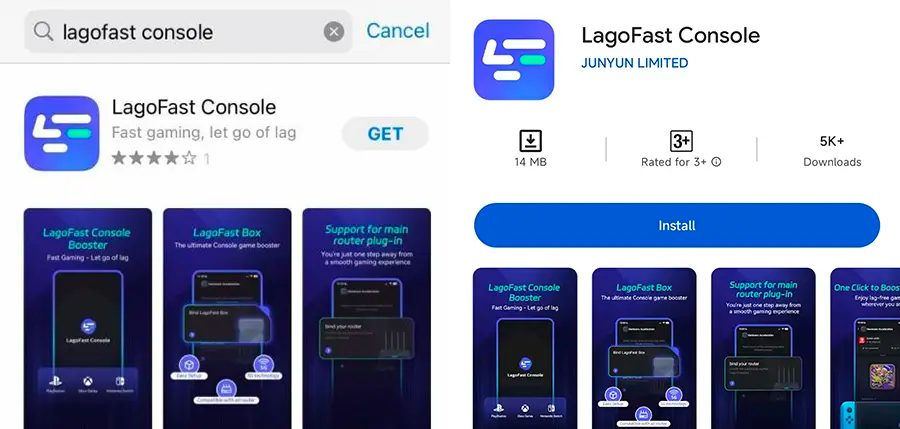
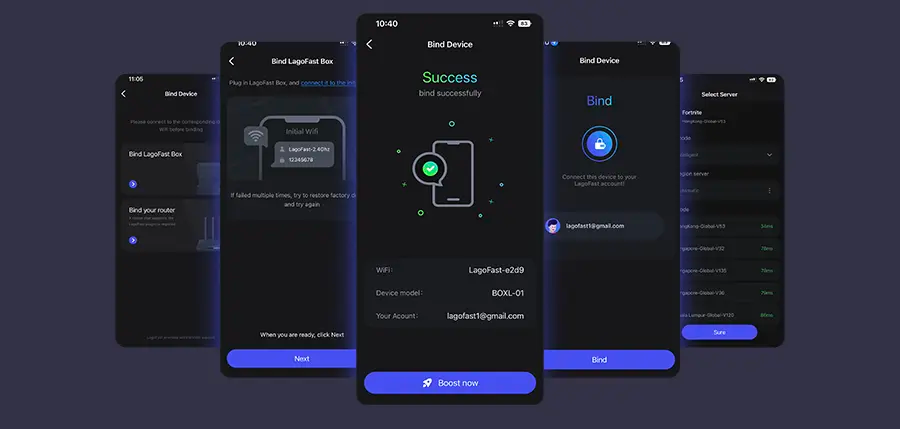
Step 1: Download the LagoFast Console App on your phone to control the LagoFast Box.
Step 2: Establish a connection between your LagoFast Box, router, and console, choosing between a wired or wireless connection.
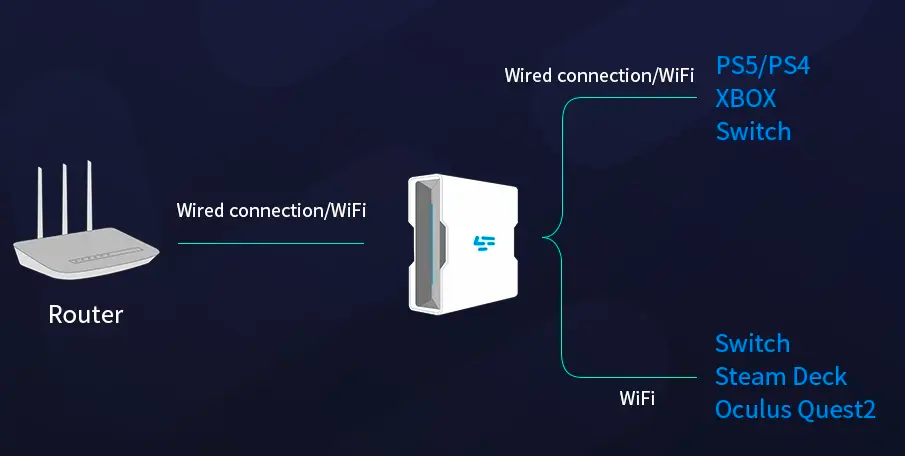
Step 3: Launch the LagoFast Console App and boost Black Ops 7. Once you have completed the binding process with the LagoFast Box, proceed to boost this game within the LagoFast Console App.
Related Article: Is CoD Black Ops 7 on Game Pass?
Part 5: FAQs
Q: Can I switch regions manually within the game’s menu?
No—Black Ops 7 does not include an in-game option to switch server regions.
Q: Will using a VPN achieve the same outcome as LagoFast?
Yes, VPNs can reroute traffic to another region, but LagoFast is optimized for gaming and avoids common VPN drawbacks like jitter and high latency.
Q: Do server differences impact gameplay?
Yes—different regions may reveal unique game metas, ping advantages, and even matchmaking behaviours.
Q: Does BO7 have DLC region restrictions?
No—modern Call of Duty titles like BO7 don’t enforce DLC region lockout, particularly on digital platforms.
You May Also Like: Call of Duty: Black Ops 7 Multiplayer: How to Play Co-Op
Conclusion
Call of Duty: Black Ops 7 offers rich, cross-region gameplay—but to truly control your latency, queue timing, or squad availability, you'll need tools like LagoFast. Although the game doesn’t natively support region switching, smart routing gives you the power to connect wherever you prefer. Lower ping, smoother matches, and fresh play styles await.
Boost Your Game with LagoFast for Epic Speed
Play harder, faster. LagoFast game booster eliminates stutter and lags on PC, mobile, or Mac—win every match!
Quickly Reduce Game Lag and Ping!
Boost FPS for Smoother Gameplay!