
Character creation week in Aion 2 should be the calm before the storm—a chance to finalize factions, make your perfect waifu/elf dude, and prepare for launch day.
But across Taiwan, Korea, Steam discussions, private servers, and even legacy NCSoft titles, players keep running into the same nightmare:
“I literally can’t create a character.”
“Character creation not available.”
“The creator is just broken—faces are distorted, and UI tabs are missing.”
“It disconnects before I can finish.”
“All servers are full and won’t let me in.”
This article pulls together all the real player reports and then explains why it happens and how to actually fix it.

- ✅Less ping and crashes.
- ✅ Higher FPS and better PC performance.
- ✅ Support for 2000+ games.
- ✅ Stable connection and region switching.
Part 1: What Players Are Reporting Right Now
Part 2: Why This Happens (Based Only on Real Reports)
Part 3: How LagoFast Can Fix Routing & Login Timeouts Faster
Part 4: Step-by-Step Fixes Using Real Player Solutions
Part 1: What Players Are Reporting Right Now
Here are the exact issues players are facing, in their own words.
1. Servers Won’t Let You Create Anything
Players trying to pre-create on TW/KR servers get locked out instantly:
- “When I choose servers it said character creation not available…”
- “All the servers are full right now so you have to wait for launch in about 9 hours.”
- “Can we no longer create a character beforehand if we just downloaded the client?”
And from older NCSoft titles (same pattern):
- “Even tho I have none, I can’t create one, it says to delete an existing one… but there is nothing to delete.”
- “7th of May 2020 and still cannot create characters. This is insanely RIDICULOUS.”
- “wtf is going on NCSoft >:( add more servers or something omg”
- “Character creation is open for 1 day a week right after maintenance… all servers are full tho.”
2. Character Creator Loads, But Is Completely Broken
In some versions or private servers, the character editor opens but nothing works:
- “The faces look all distorted.”
- “I can’t select hairstyles, face shapes, presets, or adornments… all of those tabs are just empty.”
Players tried reinstalling and deleting data. Pak, resetting config, swapping engines—nothing helped.
The eventual fix was shocking:
- “For me I had to change my ‘system locale’ from Japanese to English… then it worked.”
3. Instant Disconnect During Creation
From Steam’s classic Aion thread (but relevant to Aion 2 behavior, too):
- “No matter how fast I race through character creation, it always disconnects from the server before I can finish.”
- Community reply:
“Try closing your firewall, mate.”
4. The TW/KR Rush Completely Filled Servers
Players on Reddit:
- “Try again; they added 2 servers an hour ago and they filled.”
- “If not, it launches in 23 hours anyway.”
This matches NCSoft history:
When servers hit 100% capacity, NCSoft completely disables character creation rather than expanding slots.
Part 2: Why This Happens (Based Only on Real Reports)
Based on your full dump, there are four real causes, all confirmed by players—not theories.
Cause 1: The Server Is Full (Most Common for Aion 2 TW/KR)
Aion 2’s pre-launch servers in Taiwan filled within minutes.
When a server reaches max load:
- NCSoft disables character creation ENTIRELY.
- This can happen on every server simultaneously.
- Creation usually reopens after maintenance or new server launches.
This is not new—Lineage II and classic Aion did the same thing.
Cause 2: Region/Locale Conflicts Break the Character Editor UI
This is the most unexpected cause and affects people playing on:
- Japanese Windows locale
- Chinese locale
- Custom non-English locales
These break the editor:
- Missing presets
- Distorted faces
- No hairstyle/face tabs
- Sliders doing nothing
Final fix (confirmed):
Change Windows system locale to English. Restart. Character creator works normally.
Cause 3: Firewall / Routing Kicking You Out Mid-Creation
From the Steam report:
“No matter how fast I race it always disconnects before I finish.”
Community solution:
“try closing your firewall mate.”
This happens a LOT if you’re connecting to:
- Taiwan from NA/EU
- Korea from anywhere without Korean ISP whitelisting
- Traffic filtered by aggressive ISP middleboxes
Cause 4: NCSoft Soft-Locking Character Creation Windows
Across their games, NCSoft frequently:
- Locks character creation for days
- Only opens it after weekly maintenance
- Limits slots per faction/server
- Hard-locks creation when bot numbers spike
This explains players saying:
- “I can’t create characters for months.”
- “It only opens 1 day a week.”
Part 3: How LagoFast Can Fix Routing & Login Timeouts Faster
Most people outside Taiwan/Korea don’t realize this:
Bad routing to TW/KR servers can cause:
- Creator not loading
- Disconnections during editing
- “Character creation unavailable” errors
- Launcher timeouts
- Empty UI panels (failed data load)
LagoFast fixes this by:
- Creating a direct optimized route to Aion 2’s TW/KR login servers
- Avoiding ISP-level throttling and blocked hops
- Making the character creator load correctly
- Preventing disconnects during creation
- Stabilizing ping once you get into the game
Step-by-step: How to Use LagoFast for Aion 2 Login & Creator Issues
1. Download and install LagoFast
Create an account and launch the client.
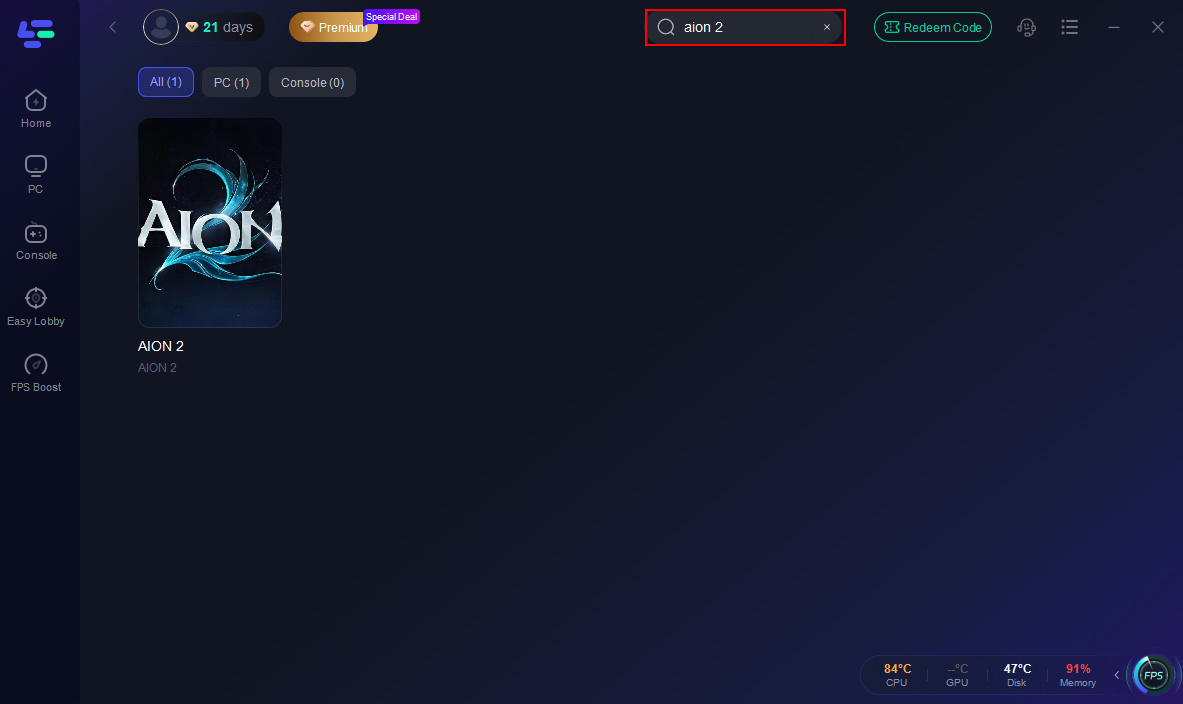
2. Search “Aion 2” and add it
This loads all TW/KR routes.
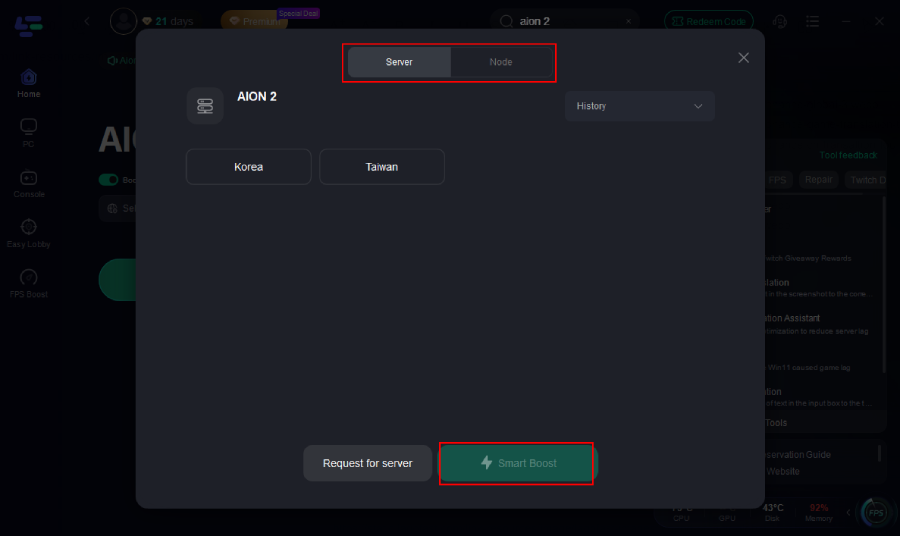
3. Select a Taiwan or Korea node
Choose the one with the lowest ping.
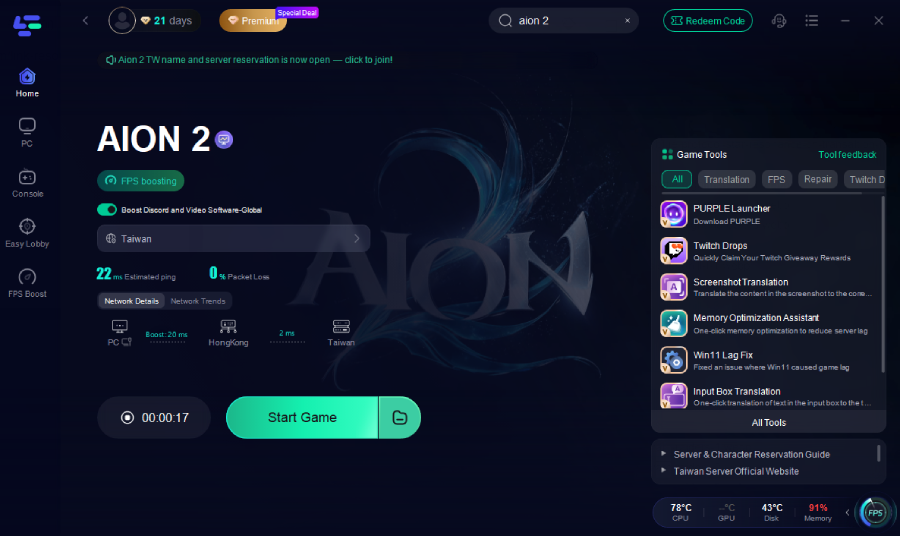
4. Click Start Game
This forces your traffic through the optimized route.
5. Retry entering the creator
The creator should now load consistently without disconnecting.
Part 4: Step-by-Step Fixes Using Real Player Solutions
Fix 1: Server Is Full? You Can’t Do Anything Except Wait
- Try switching servers
- Keep refreshing—new servers sometimes appear
- If all are locked, wait until the next maintenance cycle
- Aion 2 adds capacity quickly, but it fills instantly
Fix 2: Change Windows System Locale (Fixes Distorted Faces / Missing Tabs)
Players confirmed this works when UI is broken.
- Open Control Panel → Region
- Go to Administrative tab
- Click Change System Locale
- Select English (United States)
- Reboot PC
- Relaunch Aion 2
Fix 3: Firewall / Antivirus Disconnecting You
1. Add exceptions for:
- Purple Launcher
- Aion2.exe
2. Turn off Windows Firewall temporarily
3. Disable secondary firewalls (Bitdefender, Avast, etc.)
4. Relaunch the creator
Fix 4: Re-run Purple Launcher (Fixes “Creator won’t open yet”)
As players said:
“Try closing out Purple launcher then reopen it.”
Part 5: FAQ
Q1: Why are all TW/KR servers full?
Aion 2 is launching with massive hype. Servers fill instantly because everyone is trying to pre-create.
Q2: Can I delete a character and switch servers?
Yes — but if the new server is locked, you still can’t create until it reopens.
Q3: Does Aion 2 TW require VPN or KR phone number?
- Taiwan: No VPN, no ID needed.
- Korea: Requires Korean phone number/ID.
Q4: Why are faces distorted or presets missing?
Windows locale/encoding breaks the editor. Change system locale to English.
Final Thoughts
“Can’t create a character” in Aion 2 isn’t one problem — it’s four different issues depending on your system and your region.
The good news: every single one has already been solved by players.
- If the server is full → wait for new slots
- If editor is broken → change system locale
- If disconnecting → fix firewall or use LagoFast
- If UI won’t open → restart Purple launcher
Once you fix the routing or the locale, the creator works beautifully — as players said, “even the default presets look like models.”

Boost Your Game with LagoFast for Epic Speed
Play harder, faster. LagoFast game booster eliminates stutter and lags on PC, mobile, or Mac—win every match!
Quickly Reduce Game Lag and Ping!
Boost FPS for Smoother Gameplay!