
One of the most frustrating issues players can face in Dune Awakening is the dreaded “Connection Failed” error. This can prevent you from accessing the game, disrupting your gameplay, and leaving you stuck at the loading screen. If you’re encountering this issue, you’re not alone. In this article, we’ll explore the possible causes of the Dune Awakeningconnection failed error and provide step-by-step solutions to help you get back in the game.

Part 1. Why Does the “Connection Failed” Error Happen in Dune Awakening?
Part 2. How to Fix the “Connection Failed” Error in Dune Awakening
Part 3. Using LagoFast to Fix Dune Awakening Connection Issues
Part 1. Why Does the “Connection Failed” Error Happen in Dune Awakening?
Several factors can cause the Dune Awakening connection to fail. Understanding the potential causes will help you diagnose and fix the issue more effectively. Some common reasons include:
- Server Issues: The game servers may be down for maintenance or experiencing high traffic, leading to connection failures.
- Weak Internet Connection: A slow or unstable internet connection is one of the most common causes of this error.
- Firewall or Antivirus Interference: Sometimes, security software can block the game’s connection to the servers.
- Outdated Game Files: Corrupted or outdated files can prevent you from establishing a connection.
- Server Region Mismatch: If you’re trying to connect to a server in a different region, it could lead to latency issues or connection failures.
Part 2. How to Fix the “Connection Failed” Error in Dune Awakening
Here are some effective solutions you can try to fix the Dune Awakening connection failed issue and get back into the game:
1. Check the Game’s Server Status
The first step is to check whether the game’s servers are down. Sometimes, server maintenance or updates can cause temporary downtime, resulting in connection issues. You can check the Dune Awakening official website or social media pages for server status updates. If the servers are down, the only solution is to wait for them to come back online.
2. Test Your Internet Connection
If the servers are online, the next step is to ensure your internet connection is stable. A weak or unstable connection can lead to the “Connection Failed” error. Here’s how to test and improve your connection:
- Test Your Speed: Use an internet speed test tool to check your connection speed. You’ll want at least 3-5 Mbps for smooth gameplay.
- Reset Your Router: Sometimes, simply restarting your router can fix connection issues.
- Use a Wired Connection: If you’re using Wi-Fi, consider switching to a wired Ethernet connection for a more stable and faster connection. ### 3. Disable Firewall or Antivirus Blocking
Your firewall or antivirus software may be blocking the connection to the game servers. To check if this is the issue, temporarily disable your firewall or antivirus and attempt to connect again. If this solves the problem, you may need to create exceptions for Dune Awakening in your security software to prevent future issues.
4. Verify Game Files
Corrupted or outdated game files can cause the “Connection Failed” error. If you’re playing on Steam or another platform that offers file verification, follow these steps to repair the game:
- Open your game client (e.g., Steam).
- Right-click on Dune Awakening and select “Properties.”
- Go to the “Local Files” tab and click “Verify Integrity of Game Files.”
This will check for missing or corrupted files and automatically replace them.
5. Select the Right Server Region
Ensure you’re connecting to the correct server region. If you’re trying to connect to a server that’s too far from your location, it may lead to connection issues. Most games, including Dune Awakening, offer multiple server regions. Select the region closest to your geographical location for the best performance.
6. Use a Game Booster like LagoFast
If you’re still facing issues, a game booster like LagoFast can help optimize your internet connection and reduce latency. LagoFast automatically selects the best server and network route to ensure a smooth connection, reducing ping and packet loss.
Hot Related: Path of Exile Server Status: Recent Updates, Errors & Solutons
Part 3. Using LagoFast to Fix Dune Awakening Connection Issues
If you’re experiencing connection issues like “Connection Failed” in Dune Awakening, LagoFast can help improve your network performance. Follow these simple steps to reduce lag and get back to playing.
How to Enhance Dune: Awakening with LagoFast on PC:
Step 1: Download & Install: Click the free trial button to get LagoFast on PC.
Step 2: Launch & Search: Open LagoFast and type "Dune: Awakening" into the search bar.
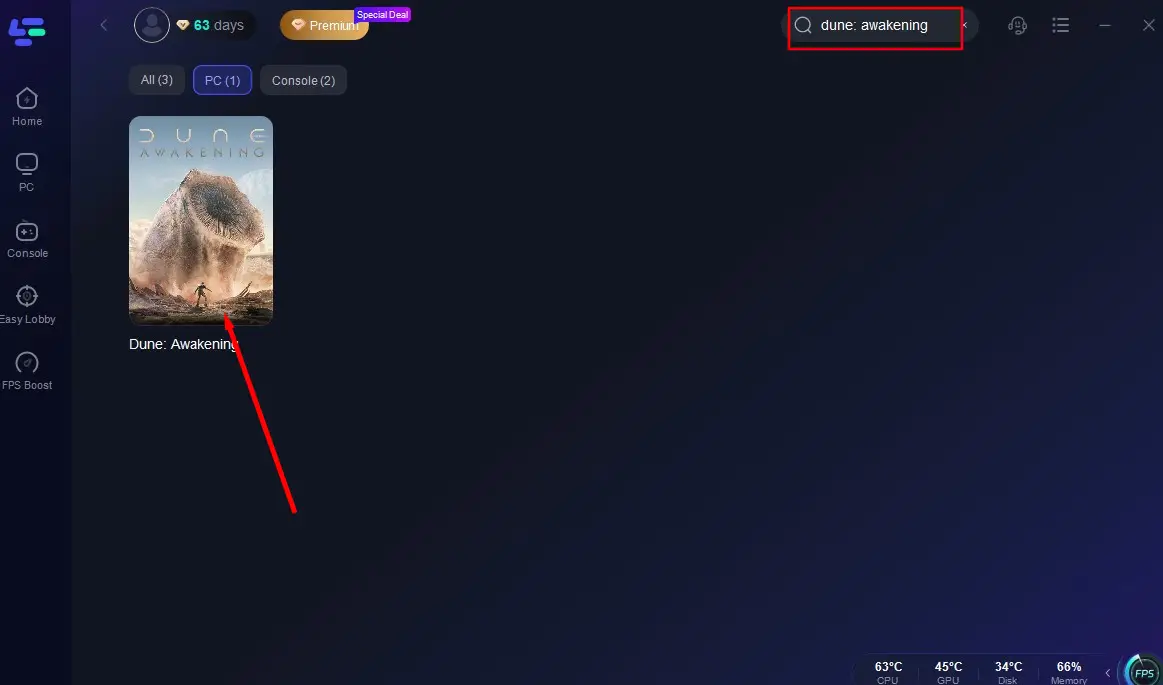
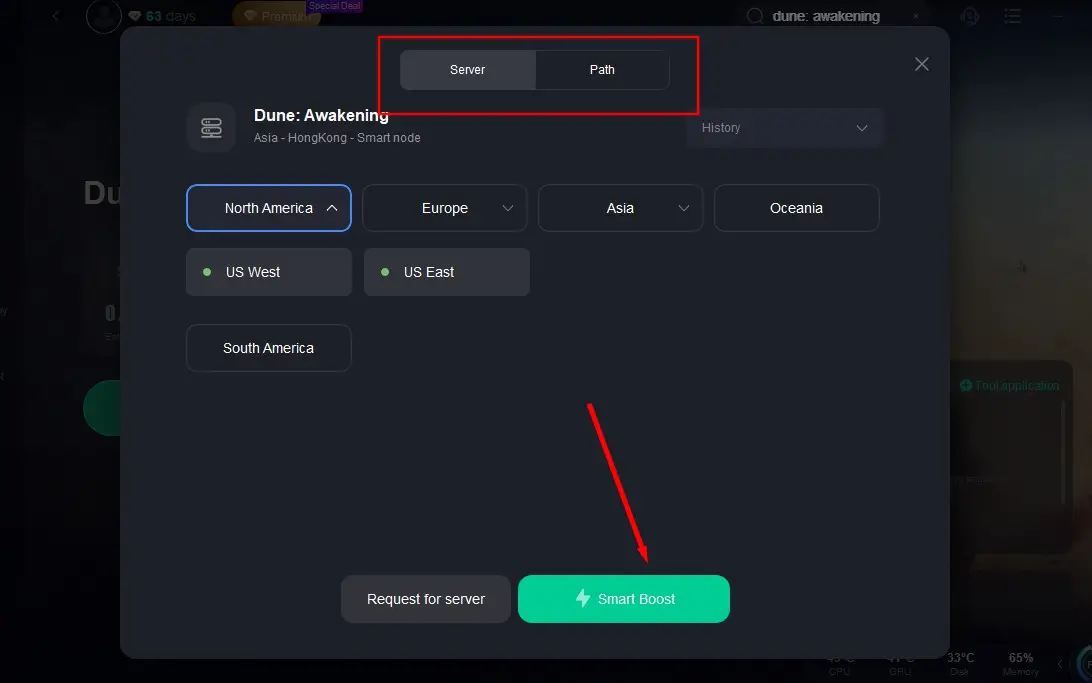
Step 3: Global Server Selection: Let LagoFast auto-scan the globe for the top-performing server node for your region, then hit "Smart Boost".
Step 4: Dive In, Lag-Free: Once optimized, monitor real-time performance data in-app and conquer Arrakis without delay!
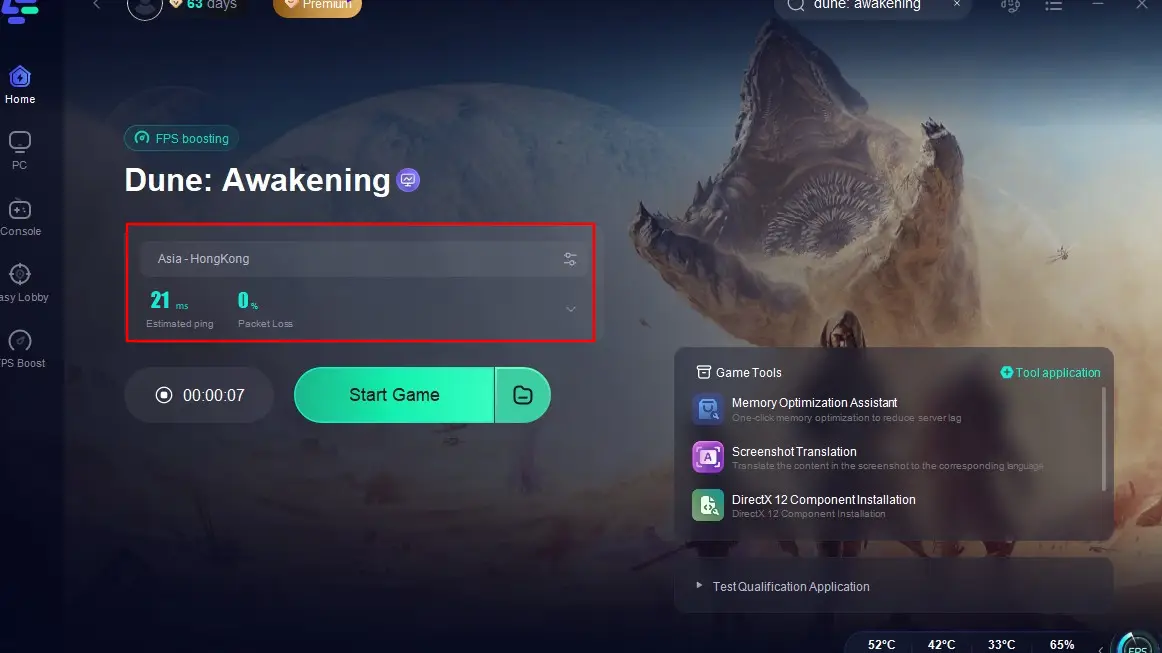
With LagoFast running in the background, you’ll experience smoother loading, lower latency, and a more stable gameplay environment—perfect for surviving Arrakis without technical hiccups.
LagoFast is a powerful tool for optimizing your connection, ensuring smoother gameplay and minimizing connection issues. By following these steps, you can quickly address network-related problems and enjoy a better experience in Dune Awakening.
Conclusion
The “Connection Failed” error in Dune Awakening can be frustrating, but by following the steps above, you can resolve the issue and get back to exploring the vast desert planet of Arrakis. Whether the problem lies with your internet connection, game files, or server status, the solutions provided should help you fix the issue quickly.

Boost Your Game with LagoFast for Epic Speed
Play harder, faster. LagoFast game booster eliminates stutter and lags on PC, mobile, or Mac—win every match!
Quickly Reduce Game Lag and Ping!
Boost FPS for Smoother Gameplay!