
Call of Duty: Black Ops 7 has quickly become one of the most talked-about titles in the franchise. With its intense gunfights, new maps, and next-level progression systems, players worldwide are diving into the action. But while the game offers exciting gameplay, it also comes with common frustrations: lag spikes, unfair matchmaking, regional restrictions, and crowded servers. This is where using a Call of Duty: Black Ops 7 VPN comes into play. A VPN not only enhances security and privacy but also helps players find smoother matches, avoid high ping, and even unlock easier bot lobbies. In this article, we’ll cover why you should use a VPN and review the seven best VPNs for Call of Duty: Black Ops 7, starting with our top recommendation, LagoFast.
Ukrainian version: Найкращий VPN Для Call Of Duty: Black Ops 7 – Як Грати Безпечно Та Отримувати Бот-Лобб

- ✅ Reduce Lag and High Ping.
- ✅ Boost FPS at the Same Time.
- ✅ Ensure Stable Server Connection.
- ✅ Change Server without Latency.
- ✅ Fix Crashing and Stuck Errors.
- ✅ 0% Packet Loss Rate
- ✅ Get BO7 Easier Lobby.
Part 1: Why You Should Use a VPN for Call of Duty: Black Ops 7
Part 2: Best VPN for Call of Duty: Black Ops 7
Part 1: Why You Should Use a VPN for Call of Duty: Black Ops 7
Many players wonder: Is a VPN really necessary for Call of Duty: Black Ops 7? The short answer is yes, and here’s why.
- Reduced Lag and Lower Ping – Online shooters like Call of Duty rely heavily on speed and precision. A high ping or packet loss can ruin a match. A good VPN reroutes your connection through optimized servers, lowering latency and stabilizing gameplay.
- Access to Easier Lobbies (Bot Lobbies) – Many players use a Call of Duty: Black Ops 7 VPN bot lobbies feature to match with less competitive opponents. By connecting to less-populated regions, you can find easier lobbies, practice your skills, and complete challenges more quickly.
- Bypass Geo-Restrictions – Some regions have stricter content regulations or delayed updates. With a VPN, you can connect to another server location and enjoy unrestricted access.
- Avoid Bandwidth Throttling – ISPs often throttle speeds during peak gaming hours. A VPN masks your activity, preventing your provider from slowing you down.
- Enhanced Privacy and Security – Whether you’re gaming on PC, PlayStation, or Xbox, a VPN protects your data from hackers, DDoS attacks, and malicious players who may target you.
In short, a VPN isn’t just about privacy—it’s about maximizing your Black Ops 7 experience.
Part 2: Best VPN for Call of Duty: Black Ops 7
After testing and reviewing numerous providers, here are the seven best VPNs for Call of Duty: Black Ops 7, starting with the one we strongly recommend: LagoFast.
LagoFast – Best VPN and Game Booster for Call of Duty: Black Ops 7
When it comes to gaming-focused VPNs, LagoFast stands in a league of its own. Unlike traditional VPNs, LagoFast isn’t just about rerouting traffic—it’s a dedicated game booster built to improve performance for competitive titles like Call of Duty.
Key Features of LagoFast:
- Low-Ping Optimization – LagoFast offers multi-route optimization, ensuring your data takes the fastest path possible to game servers.
- Easier Lobby Access – LagoFast’s “Easy Lobby” feature helps players connect to less crowded servers, increasing the chances of finding bot lobbies in Black Ops 7.
- Wide Server Coverage – Multiple global server options allow you to bypass restrictions and connect to different regions with ease.
- Flexible Pricing – LagoFast uses a pay-per-minute model, so you only pay for the time you actually use.
- Game Booster + VPN Combo – Unlike standard VPNs, LagoFast is designed specifically for gamers, providing both security and performance enhancements.
If you want the best VPN for Call of Duty: Black Ops 7, especially for reducing lag and finding bot lobbies, LagoFast is the top pick.
Tutorial to use LagoFast to optimize your gaming experience on PC:
Step 1: Click the Free Trial button to download and install LagoFast.
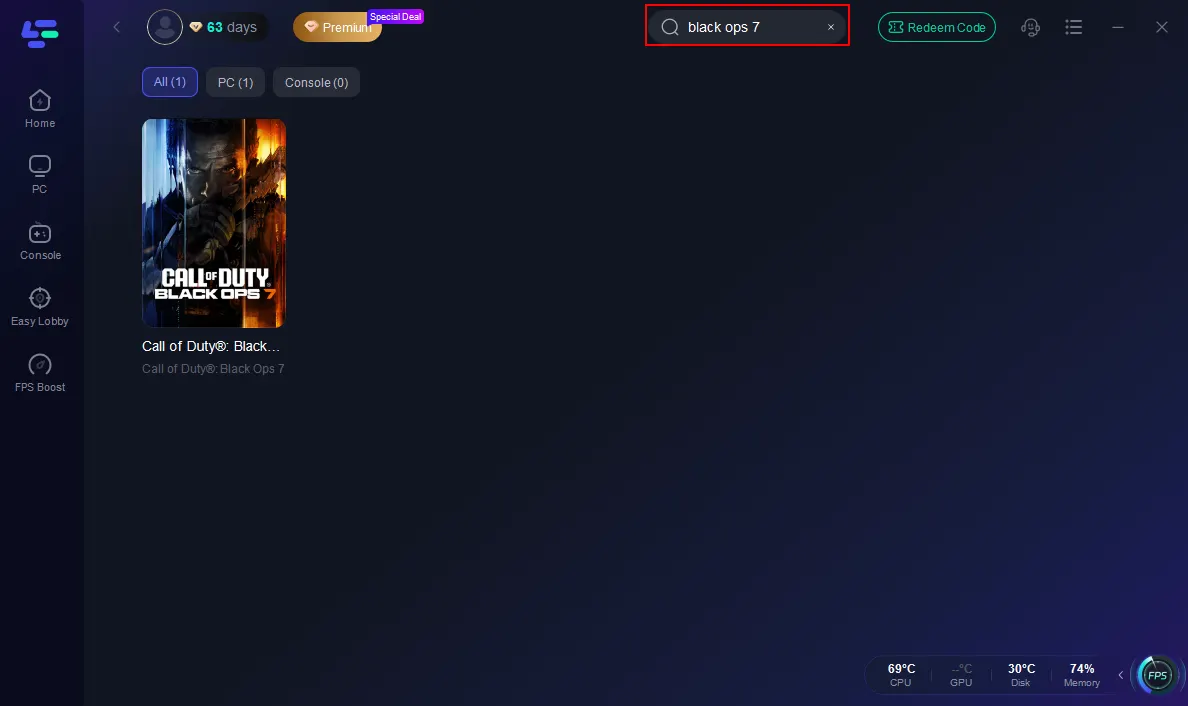
Step 2: Search Black Ops 7 in the search bar, and click it after it appears.
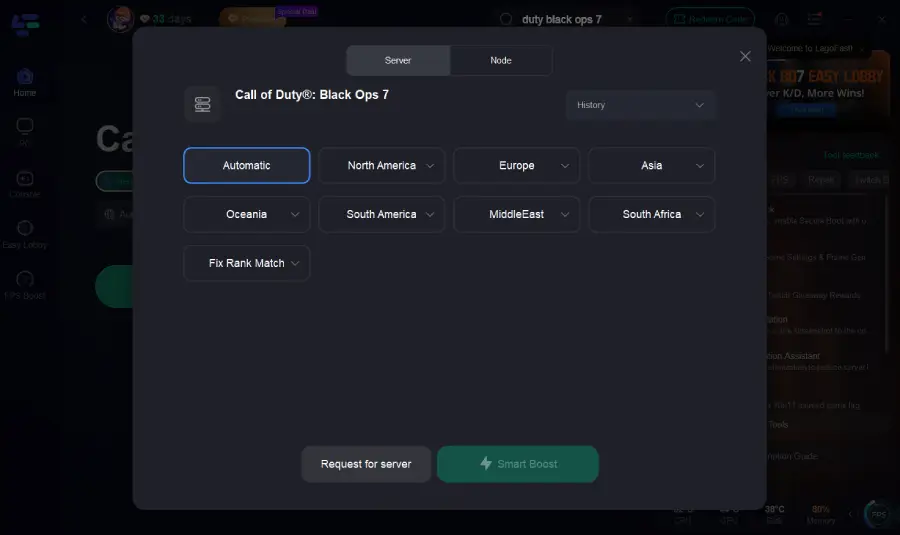
Step 3: Click on “Server” to change to a better server that ensures the Black Ops 7 gaming experience, then click on “Smart Boost”.
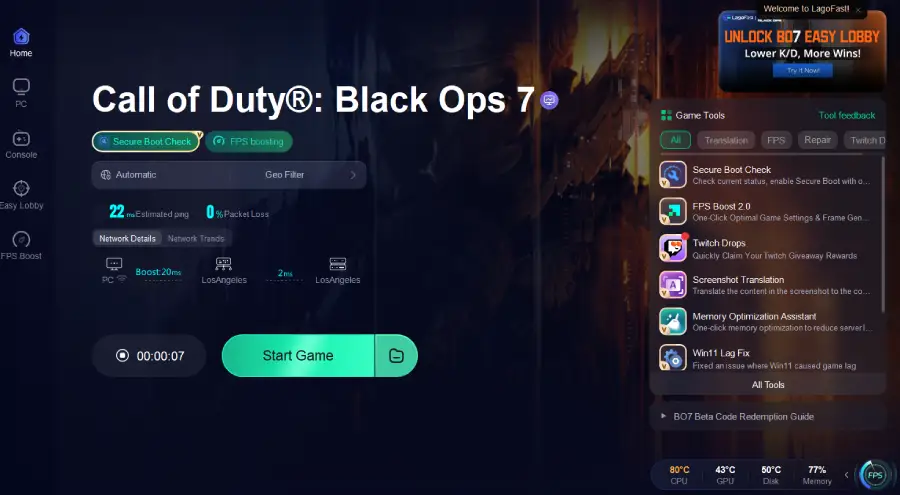
Step 4: Check the specific game ping, packet loss, and multiple path connections on the right side. Finally, click the “Start Game” to play the game.
More than just a game booster, LagoFast also impresses with its “Easy Lobby” feature. Easy Lobby Feature: LagoFast’s exclusive function helps you connect to easier matches, often filled with bots or casual players.
Tutorial: How to Use LagoFast to Get Bot Lobbies in Black Ops 7 on PC
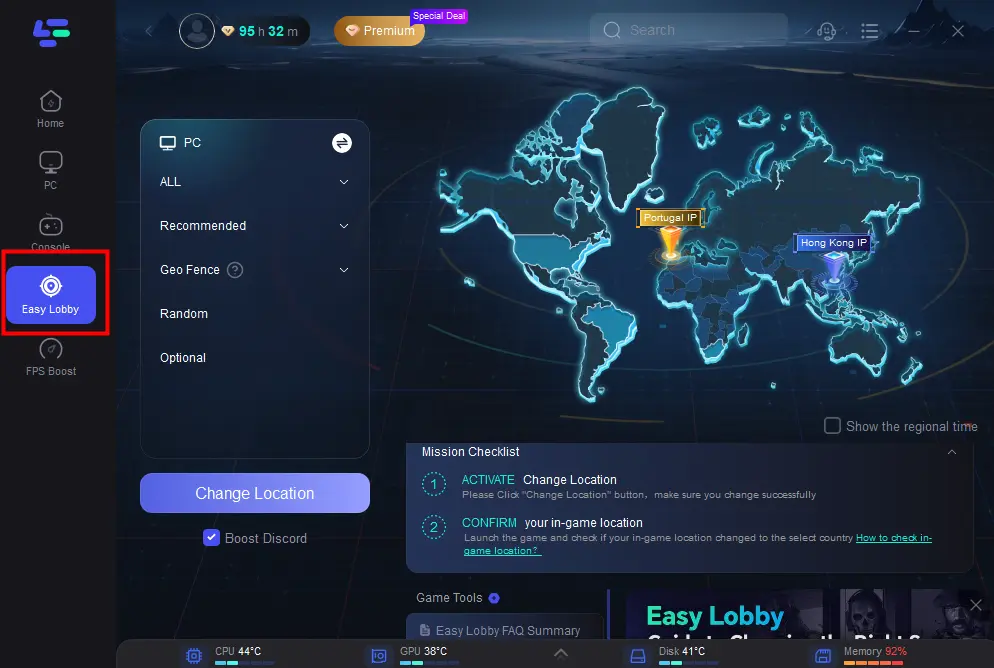
Step 1. Open the app and select the Easy Lobby feature from the left panel.
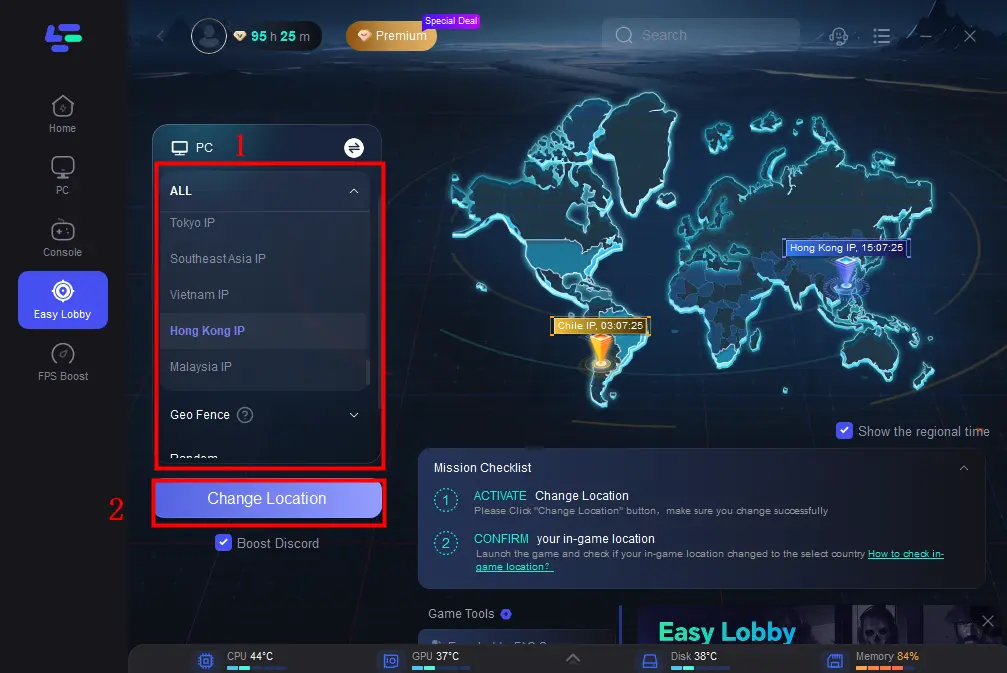
Step 2. Pick your preferred server (e.g., India IP) → then click Change Location to start matchmaking in that region.
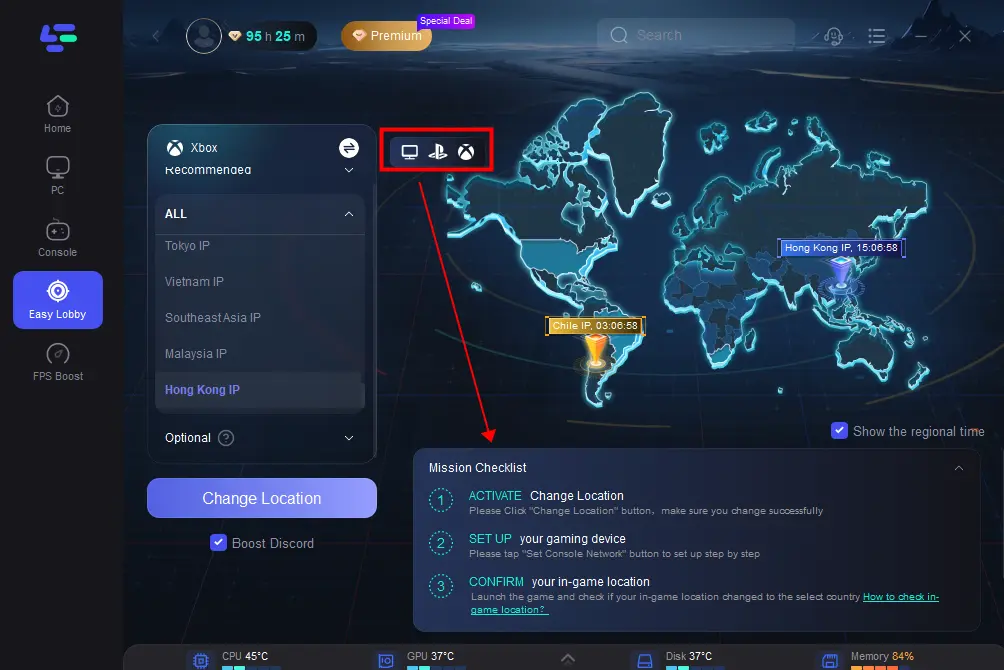
Step 3. For console players, LagoFast also provides upgrade options for PlayStation and Xbox, unlocking additional features for easier lobby access.
Faster Setup for Console Players:
If you don’t have a PC, LagoFast makes it simple with the EasyLobby WebApp, a web-based location switcher. The setup takes less than 30 seconds to get you into easier lobbies in Call of Duty: Black Ops 7.
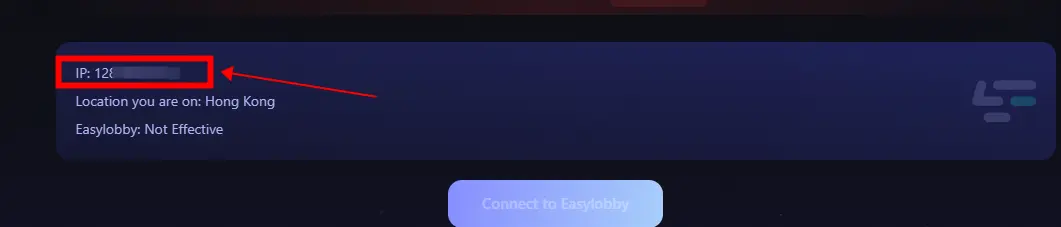
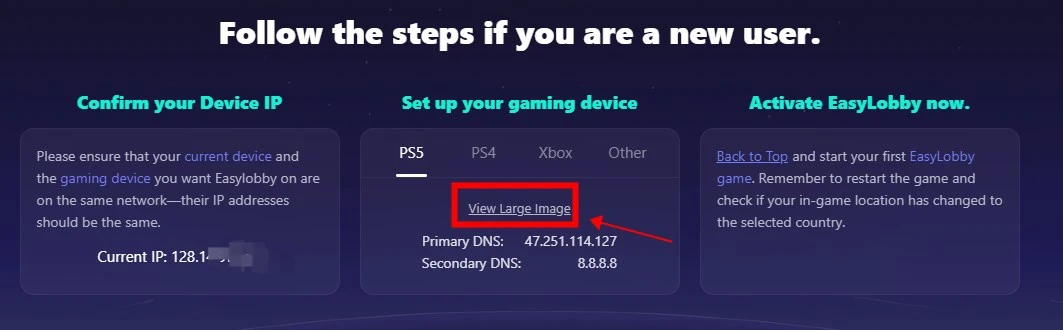
Step 1: Go to the LagoFast EasyLobby Console website and log in to your account > Confirm that your current device (PC or telephone) and the Console you want Easylobby on are on the same network.
Step 2: Follow our tutorial to change the DNS of your Console.
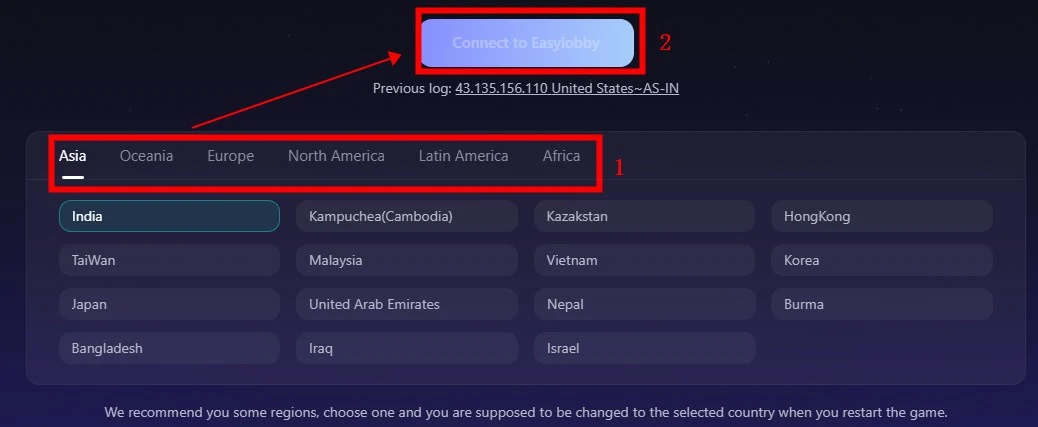
Step 3: Choose the IP, and click the button “Connect to Easylobby” to activate Easy Lobby.
ExpressVPN – Reliable and Fast for Gaming
ExpressVPN is one of the most popular VPNs in the world, known for its blazing-fast speeds and strong security. It’s a great choice for players who want reliable performance without complicated setups.
- 3,000+ servers across 90+ countries
- Strong encryption to prevent DDoS attacks
- Works smoothly on PC, PlayStation, and Xbox
- Trusted no-logs policy for privacy
While it doesn’t have a specific “easy lobby” feature, ExpressVPN’s server variety makes it easier to experiment with matchmaking regions.
NordVPN – Powerful Security and Low Latency
NordVPN is another powerhouse in the VPN industry, offering gamers both security and speed. Its NordLynx protocol ensures lower ping compared to traditional VPNs.
- Over 5,000 servers worldwide
- Built-in DDoS protection
- Customizable options for optimized gaming routes
- Compatible with consoles via router setup
NordVPN is especially good for players who want a balance between competitive security and reduced lag.
Surfshark – Budget-Friendly Gaming VPN
For players who want a strong VPN without breaking the bank, Surfshark is a great option. Despite being affordable, it offers unlimited device connections and reliable gaming speeds.
- 3,200+ servers in 100+ countries
- Unlimited simultaneous connections
- CleanWeb feature blocks ads and malware
- Competitive pricing with long-term plans
Surfshark is ideal if you play Call of Duty on multiple devices and want protection everywhere.
CyberGhost – User-Friendly and Region-Specific
CyberGhost is known for its easy-to-use interface and specialized servers for gaming and streaming. It’s especially useful if you want to connect to specific regions to access unique Black Ops 7 lobbies.
- 9,000+ servers across 91 countries
- Dedicated gaming servers for lower ping
- Automatic connection for best server available
- Strong privacy policies
CyberGhost is a great option for beginners who want straightforward functionality without deep customization.
Private Internet Access (PIA) – Massive Server Network
PIA is one of the most flexible VPNs, offering a huge number of servers and advanced configuration options. Gamers who enjoy fine-tuning their connection will appreciate what PIA provides.
- 10,000+ servers worldwide
- Highly customizable settings
- Port forwarding support for better connectivity
- Affordable long-term plans
Its large server pool makes it easier to connect to underpopulated regions and potentially find easier lobbies.
ProtonVPN – Secure and Transparent
ProtonVPN is developed by the team behind ProtonMail, focusing heavily on transparency and security. While not as fast as LagoFast or ExpressVPN, it’s still a solid choice for Call of Duty players.
- 2,900+ servers in 65+ countries
- Strong Swiss privacy laws
- Free plan with limited servers
- Built-in kill switch for added protection
ProtonVPN is best for players who prioritize privacy and security over advanced gaming features.
Conclusion
Using a VPN for Call of Duty: Black Ops 7 is no longer just an optional upgrade—it’s a must for serious players who want smoother performance, safer connections, and access to easier lobbies. Among the many providers, LagoFast stands out as the best choice thanks to its dual role as a game booster and VPN, plus its unique Easy Lobby feature that helps unlock bot lobbies. Whether you’re aiming for reduced ping, better matchmaking, or unrestricted access across regions, the right VPN will elevate your gaming experience. If you’re serious about dominating in Call of Duty: Black Ops 7, start with LagoFast and take your gameplay to the next level.

Boost Your Game with LagoFast for Epic Speed
Play harder, faster. LagoFast game booster eliminates stutter and lags on PC, mobile, or Mac—win every match!
Quickly Reduce Game Lag and Ping!
Boost FPS for Smoother Gameplay!