
The hype for Call of Duty: Black Ops 7 is heating up as players worldwide are eager to try the upcoming open beta. Alongside the standard early access options, Activision has teamed up with Twitch to give fans a chance to earn Call of Duty: Black Ops 7 Twitch drops—including valuable rewards and even beta access keys—just by watching streams.
LagoFast is now offering Black Ops 7 players a fast and free way to grab an early access key for the Call of Duty: Black Ops 7 open beta. Let’s dive in and see how you can secure yours!
→ How to Get Call of Duty: Black Ops 7 Beta Early Access Key Free
Ukrainian version: Швидкий Спосіб Отримати Twitch Drops Та Ключ Для Бети Call of Duty: Black Ops 7

- ✅ Reduce Lag and High Ping.
- ✅ Boost FPS at the Same Time.
- ✅ Ensure Stable Server Connection.
- ✅ Change Server without Latency.
- ✅ Fix Crashing and Stuck Errors.
- ✅ 0% Packet Loss Rate
- ✅ Boost Game Downloading Speed.
Part 1. Call of Duty: Black Ops 7 Open Beta and Early Access – What You Need to Know
Part 2. Call of Duty: Black Ops 7 Are Giving Away Early Access Keys – Twitch Drops
Part 3. How to Get Call of Duty: Black Ops 7 Twitch Drops
Part 4. How to Get Call of Duty: Black Ops 7 Twitch Drops Quickly with No Efforts
Part 5. How to Claim Call of Duty: Black Ops 7 Twitch Drops Rewards
Part 1. Call of Duty: Black Ops 7 Open Beta and Early Access – What You Need to Know
The Call of Duty: Black Ops 7 open beta is split into two phases: Early Access and Open Beta. The schedule is as follows:
- Early Access begins on October 2, 2025 at 10:00 AM PT, and lasts 72 hours.
- Open Beta opens to all players on October 5, 2025 at 10:00 AM PT, and runs through October 8, 2025 at 10:00 AM PT.
To participate in Early Access, you generally need one of the following:
- A pre-order of Call of Duty: Black Ops 7 (digital or physical)
- An eligible Game Pass subscription (such as Game Pass Ultimate or Game Pass PC)
- A redeemable beta code from promotional or retail sources (for physical pre-orders)
Once the Open Beta begins, everyone can join regardless of pre-order status.
This limitation on early access makes early access keys very valuable. That’s why many players turn to Twitch drops as a route to secure access to the Call of Duty: Black Ops 7 beta. Many still call it “BO7 beta” for short.
Part 2. Call of Duty: Black Ops 7 Are Giving Away Early Access Keys – Twitch Drops
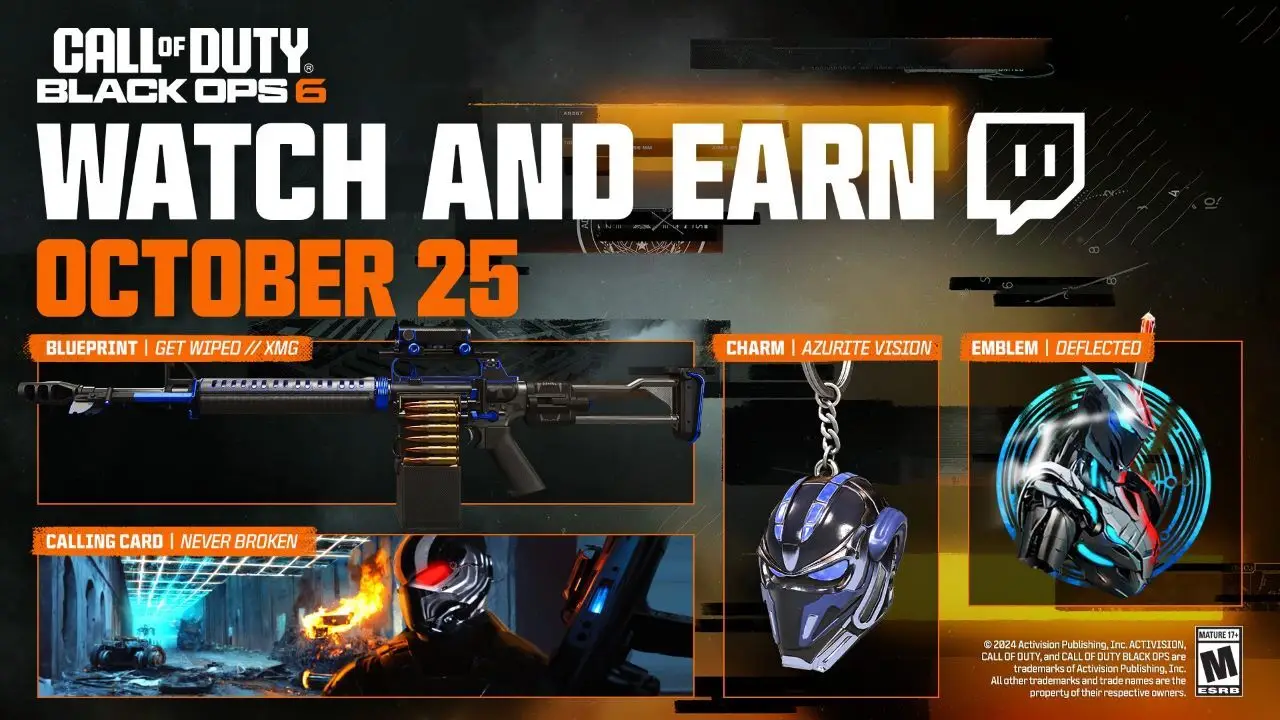
Activision is running an official Twitch Drops event tied to the Call of Duty Next showcase is scheduled to start 9:00 AM PT / 12:00 PM ET / 5:00 PM BST on that day. During this event, viewers who link their Activision and Twitch accounts and watch the stream for at least 60 minutes will have a chance to earn a Call of Duty: Black Ops 7 early access beta key.
Call of Duty: Black Ops 7 Twitch Drops Rewards
The rewards escalate depending on how long you watch the stream:
- 15 minutes → COD Next emblem
- 30 minutes → COD Next calling card
- 45 minutes → Black Ops 7 charm
- 60 minutes (Twitch only) → Early Access to Black Ops 7 Open Beta
In addition to beta access, other typical drops during the event include:
- Exclusive in-game cosmetics
- Double XP tokens
- Weapon blueprints
Part 3. How to Get Call of Duty: Black Ops 7 Twitch Drops
Make sure you actually receive the drop:
- Link your Twitch account to your Activision account before the event (Drops are only awarded to linked accounts). Follow Activision’s Viewership Rewards instructions.
- Log in to Twitch and join the Call of Duty official channel (look for the “Drops enabled” badge on the stream). Watching on other eligible channels or official partner streams may also qualify if they show the Drops banner.
- Watch for the required time (60 continuous minutes on Twitch for the beta drop). Keep the stream tab active and your account logged in.
- Claim the drop in your Twitch Inventory after it appears, then follow Activision instructions to redeem/receive the in-game code or entitlement. Allow up to 24 hours for rewards to appear in game; you may need to restart the game/client.
Pro tips
- Use the official Call of Duty Twitch channel and consider setting a reminder on Twitch for the 9:00 AM PT start so you don’t miss the first minutes.
- If you want the beta code specifically, prioritize watching on Twitch (the 60-minute beta drop is Twitch-only per the drops breakdown).
This method works, but it requires patience—and you must be online at specific times.
Part 4. How to Get Call of Duty: Black Ops 7 Twitch Drops Quickly with No Effort
If you don’t want to spend hours waiting on streams, LagoFast Game Booster offers a shortcut. Their Twitch Drops tool is designed to help Black Ops 7 players automatically collect drops and secure rewards—including early access codes—with just a few clicks.
With LagoFast, you can:
- Automate the Twitch drops collection process
- Save time while still getting every reward
- Instantly boost your chance of getting a Call of Duty: Black Ops 7 beta key
How to Use LagoFast to Get BO7 Twitch Drop without Wasting Time:
Step 1: Download LagoFast Free Trial.
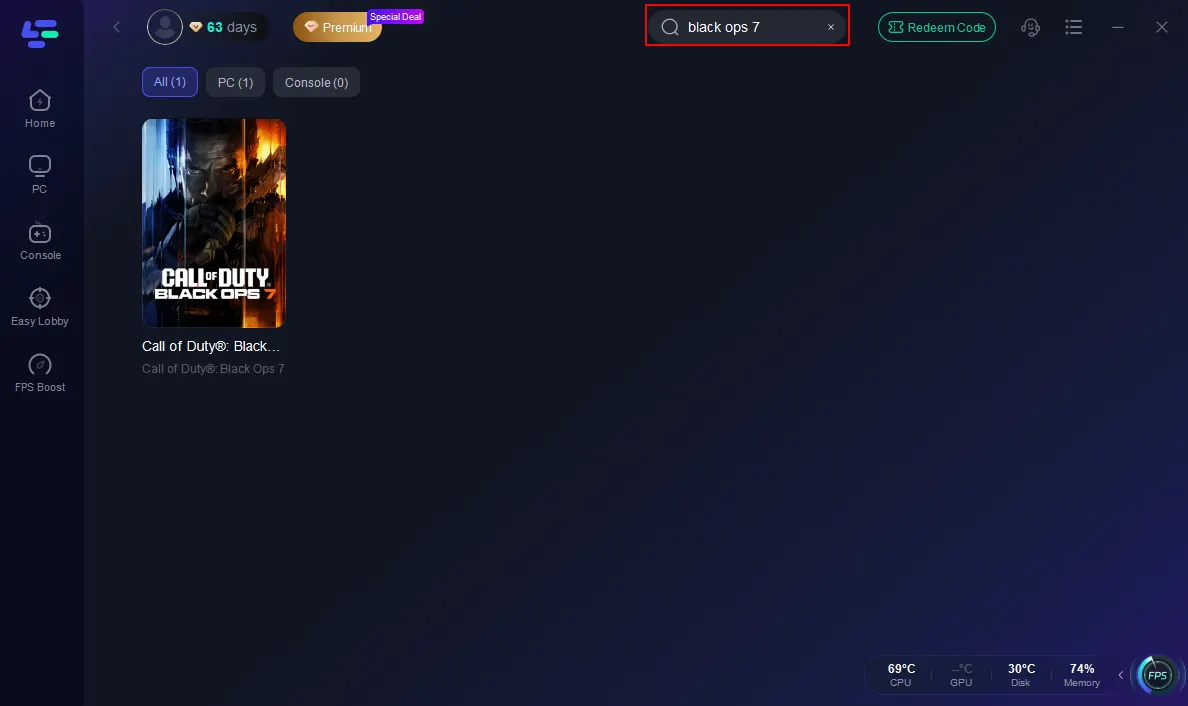
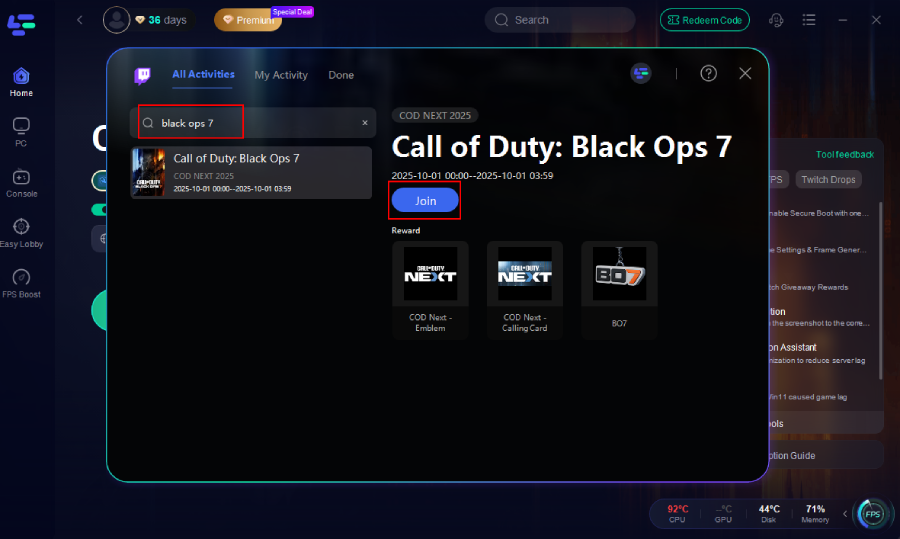
Step 2: Open LagoFast, then click the PC button on the left and search Black Ops 7 in the search bar, and click it after it appears.
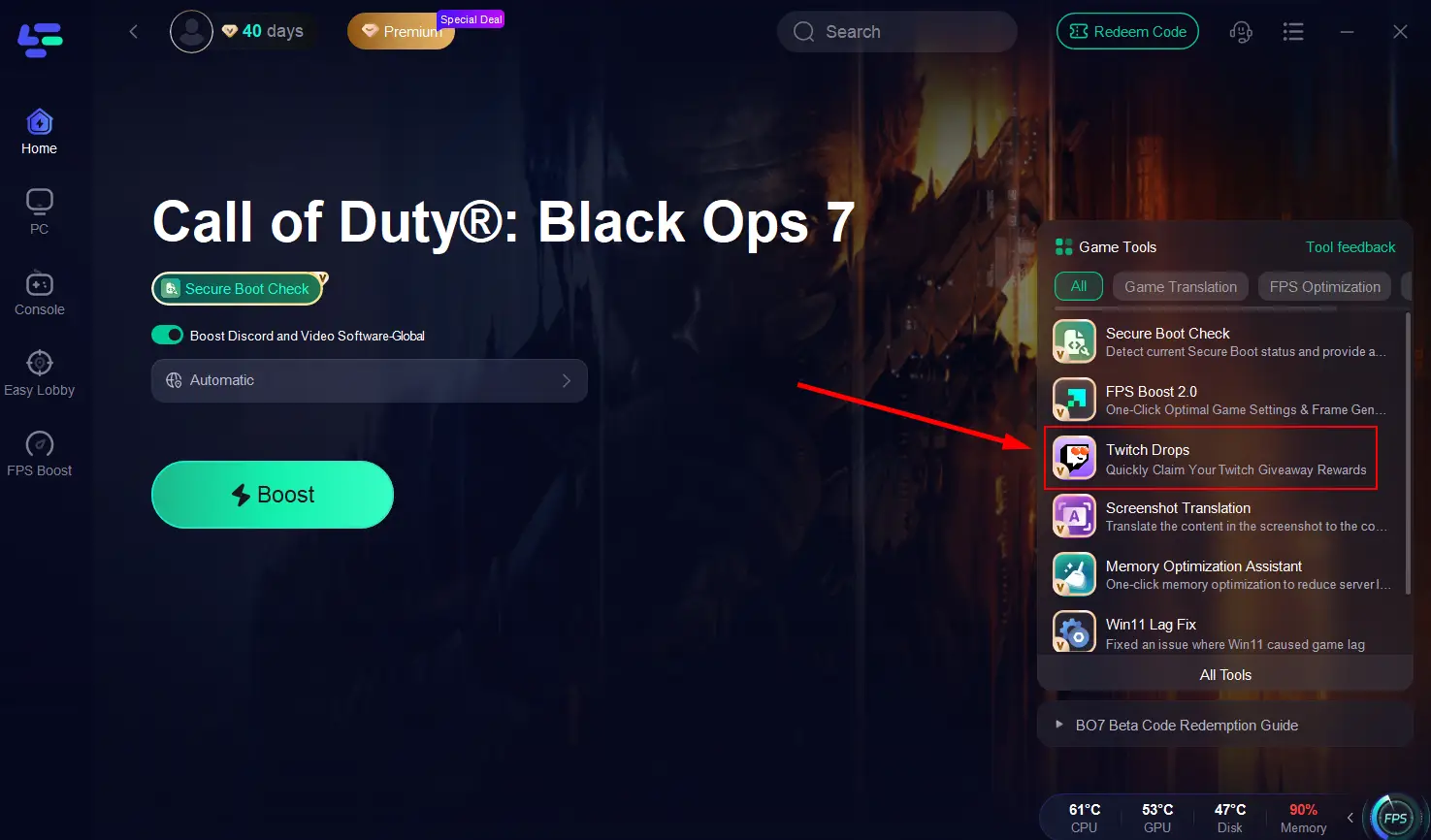
Step 3: Choose Twitch Drops Tool on the right side.
Step 4: Search and Choose Call of Duty: Black Ops 7, then click Join to start the activity.
LagoFast’s Other Features for Call of Duty: Black Ops 7 Players
Beyond Twitch drops, LagoFast also enhances your gameplay experience in Call of Duty: Black Ops 7 with a set of powerful tools:
Reduce Lag & Lower Ping
LagoFast optimizes your network routes in real time, cutting down packet loss and minimizing latency to give you smooth and stable matches.
Step 1: Open LagoFast, then click the PC button on the left and search Black Ops 7 in the search bar, and click it after it appears.
Step 2: Click on “Server” to change to a better server that ensures the Black Ops 7 gaming experience, then click on “Smart Boost”.
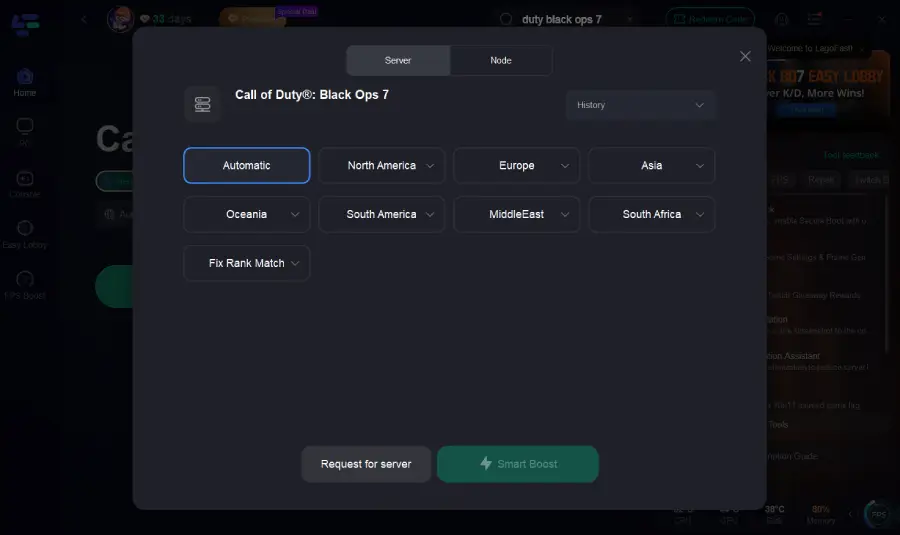
Step 3: Launch game and enjoy an enhanced gaming experience with reduced lag and improved stability.
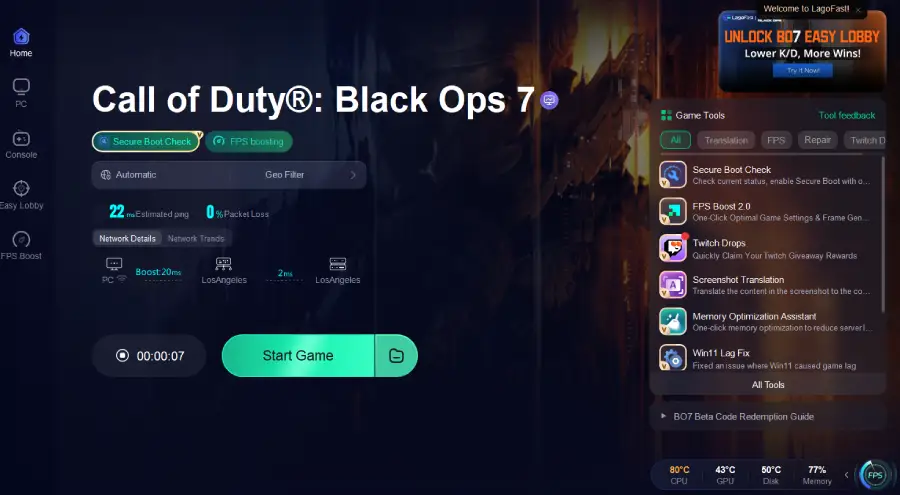
Multi-Platform Support
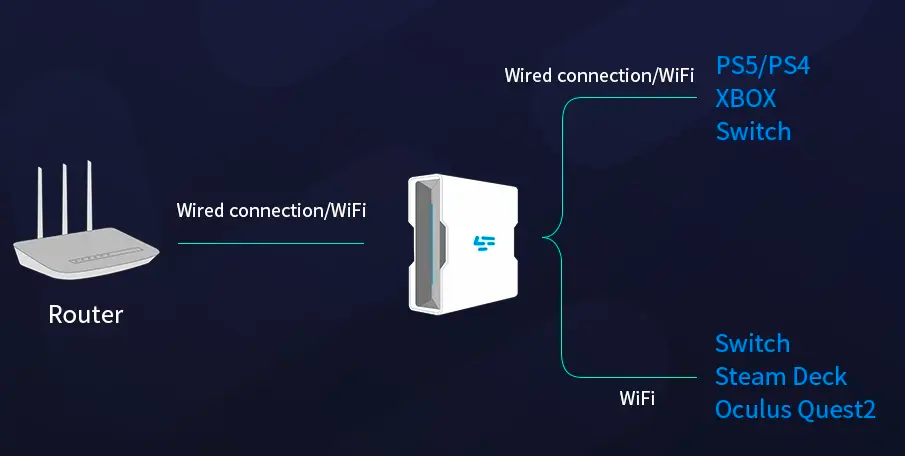
LagoFast is available across PC, console, and mobile. With the LagoFast Box, you can easily connect your PlayStation or Xbox for the same low-latency and optimized performance.
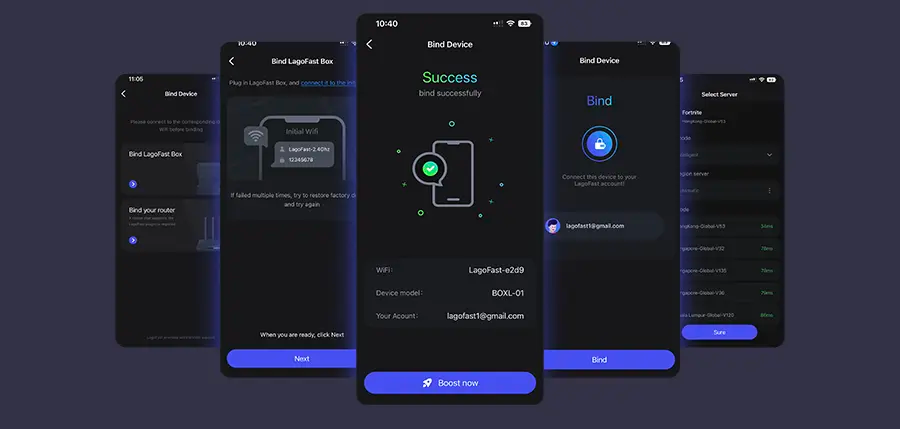
Step 1: Download the LagoFast Console App on your phone to control the LagoFast Box.
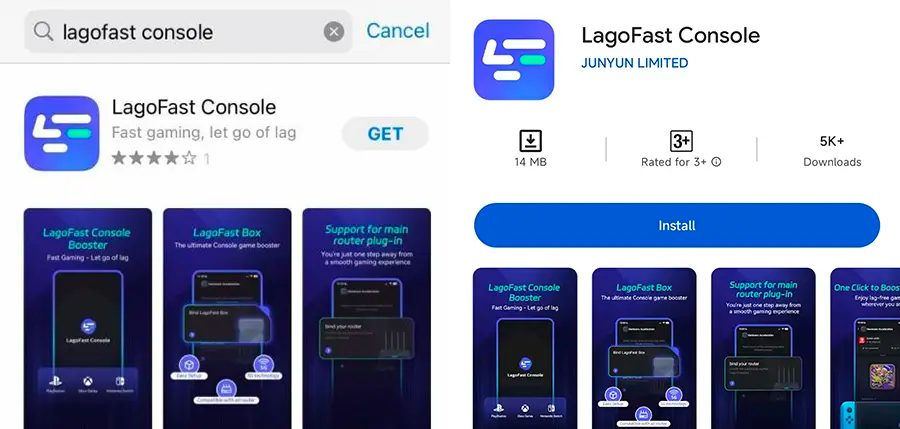
Step 2: Establish a connection between your LagoFast Box, router, and console, choosing between a wired or wireless connection.
Step 3: Launch the LagoFast Console App and boost Black Ops 7. Once you have completed the binding process with the LagoFast Box, proceed to boost this game within the LagoFast Console App.
Boost FPS with FPS Booster 2.0
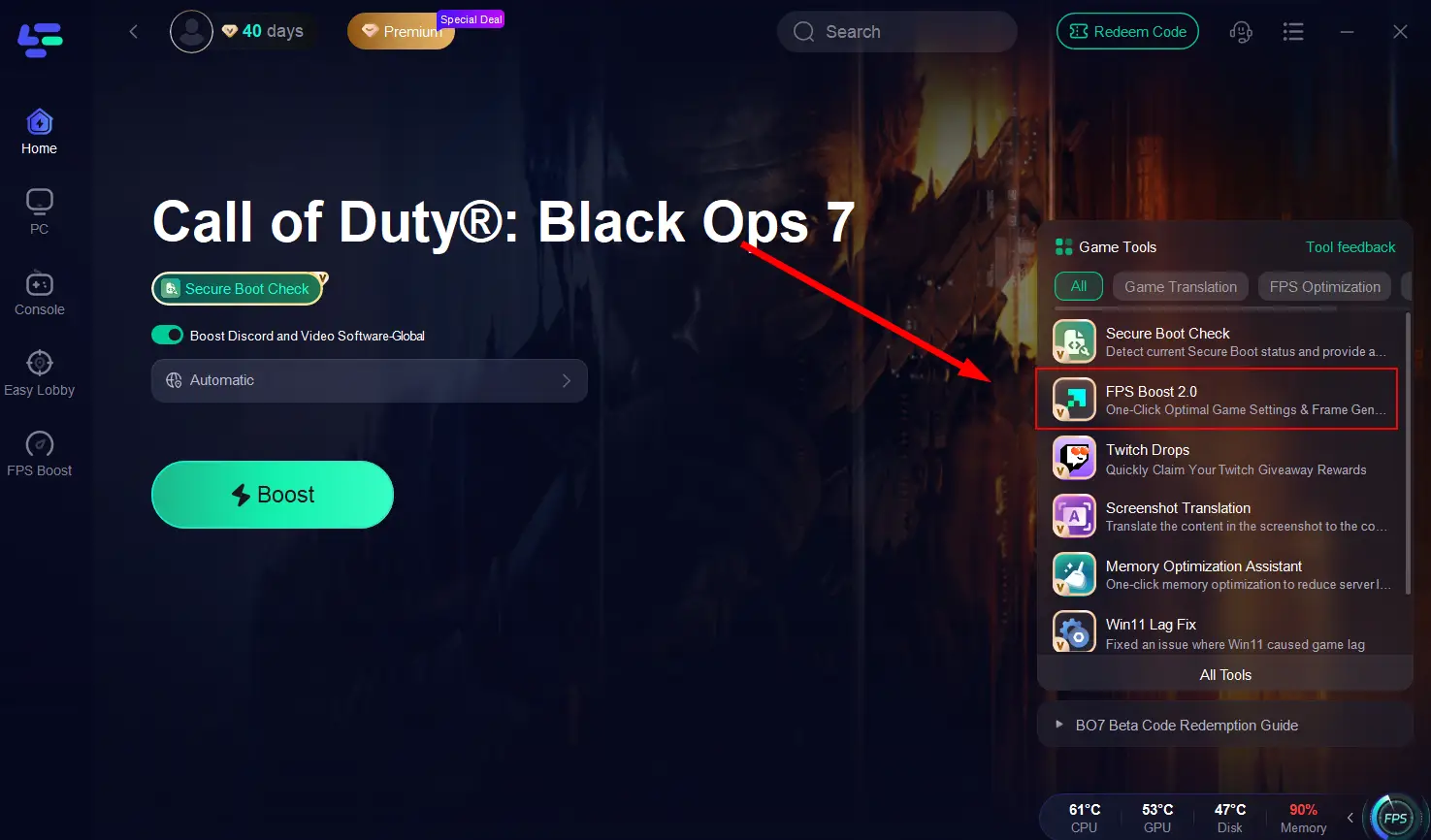
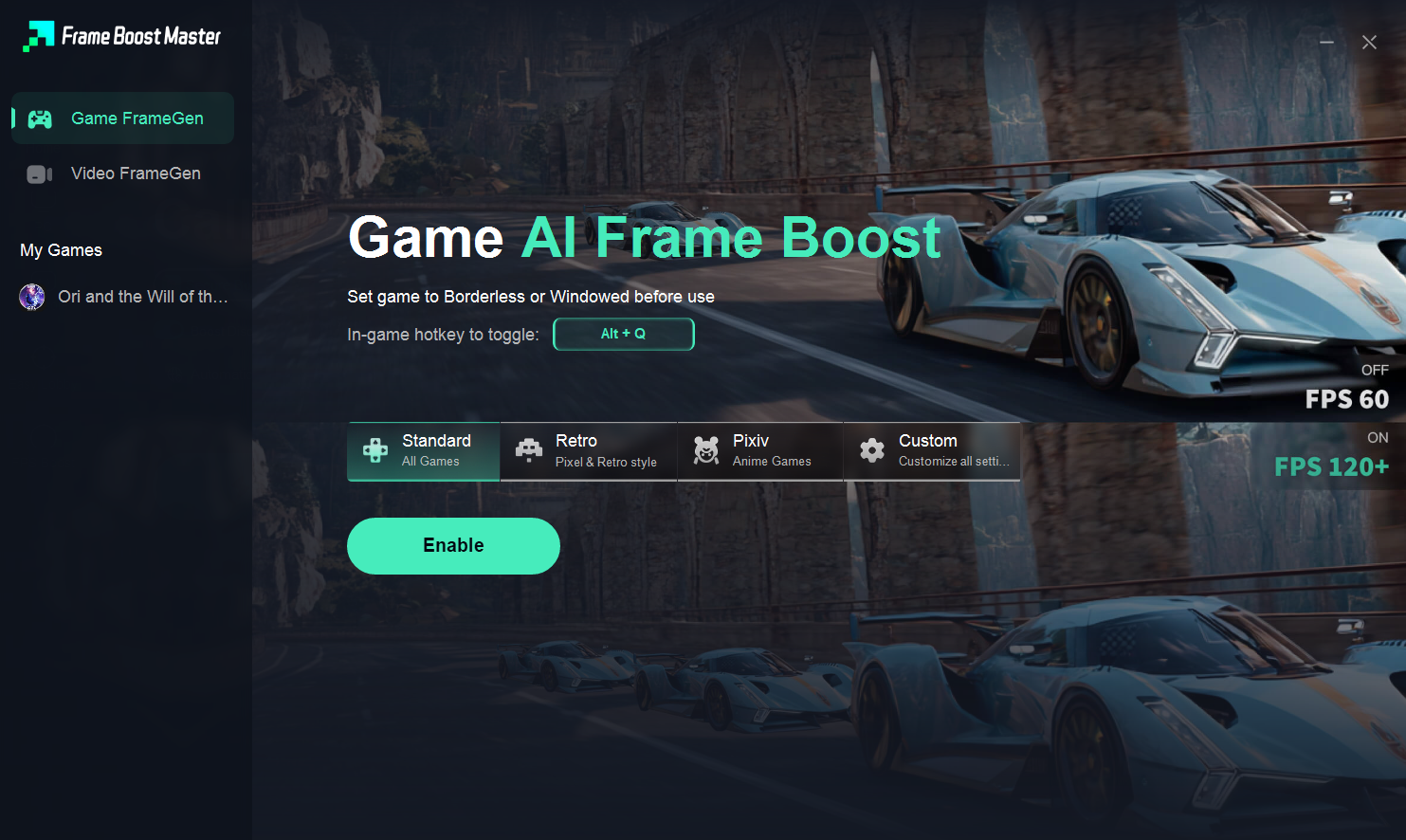
The built-in FPS Booster 2.0 automatically detects your system’s best settings and applies one-click optimization. With frame generation support, it can even create extra frames, allowing you to enjoy higher FPS without upgrading your hardware.
Step 1. Click the FPS Boost 2.0 Tool on the right.
Step 2. You can speed up games or local video/browser. Set a hotkey and click Enable.
Easy Lobby Access
LagoFast helps you find easier lobbies in Call of Duty: Black Ops 7, making your matches less stressful and more enjoyable. This feature ensures a smoother path to wins and unlocks.
Step 1: Choose the "Easy Lobby" feature on the left.
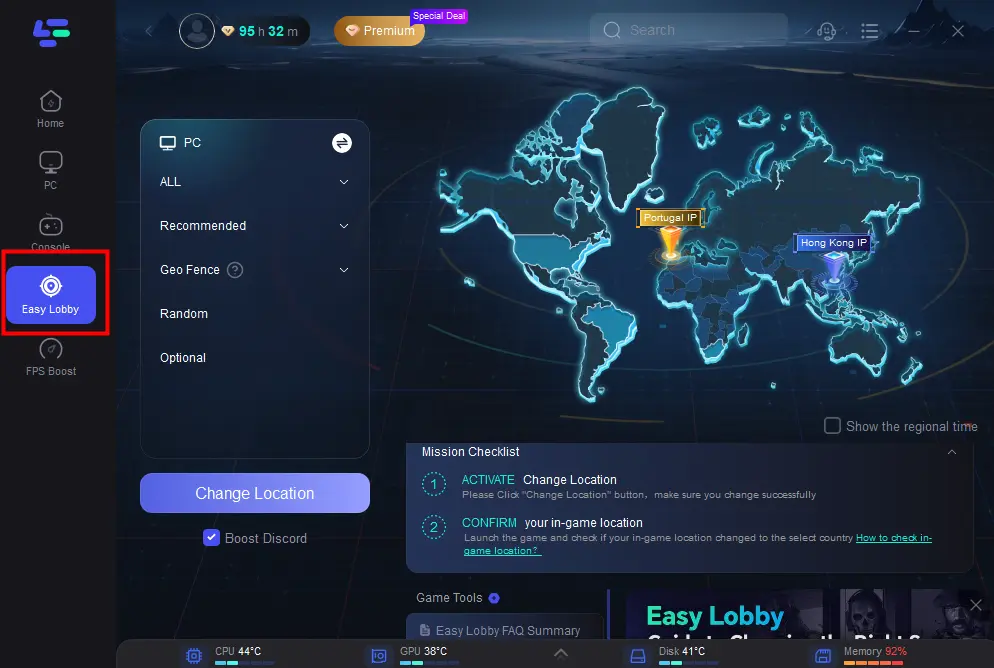
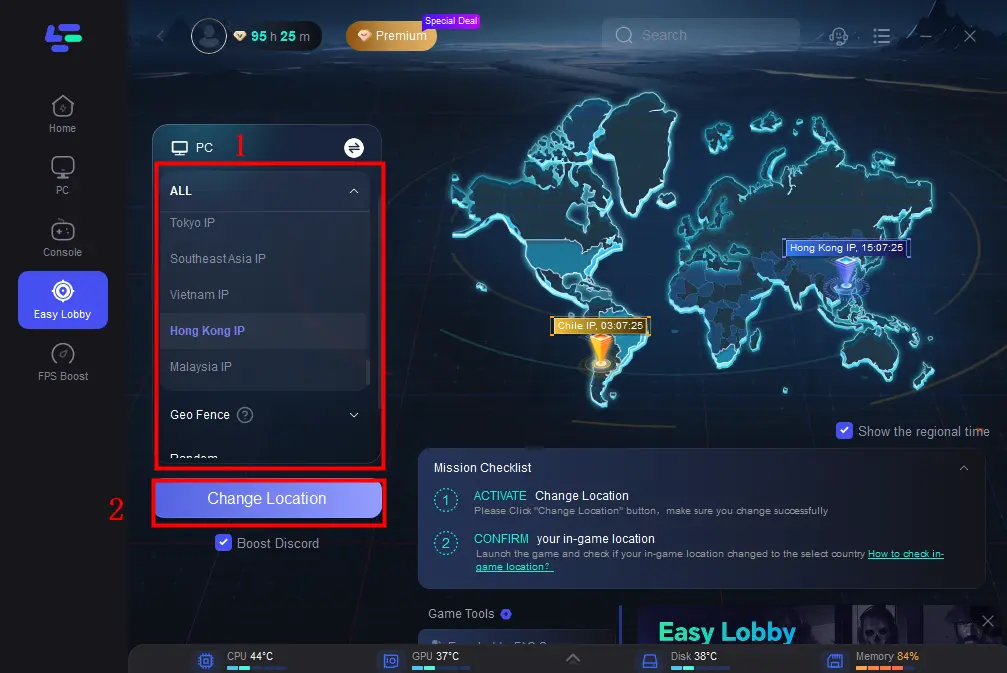
Step 2: Choose the server you like to match, like India IP > Click on the Change Location button to begin.
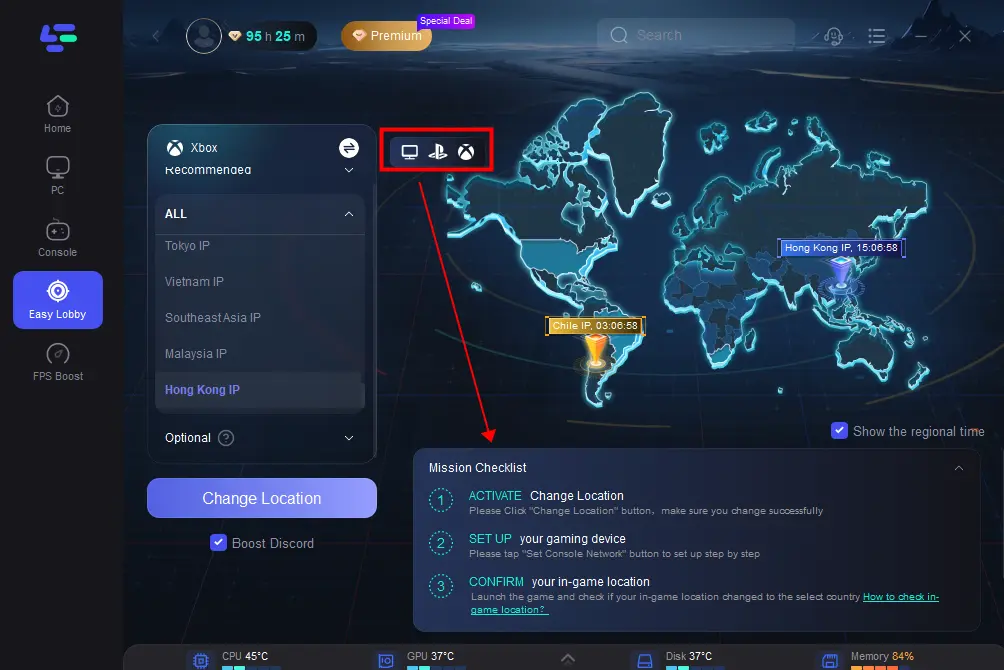
Step 3: You can also choose to upgrade to PS or Xbox, which gives you access to different features.
Part 5. How to Claim Call of Duty: Black Ops 7 Twitch Drops Rewards
Once you’ve secured your Twitch drops, claiming them is simple:
- Check your Twitch inventory to confirm your rewards.
- Log in to your Activision account linked to Twitch.
- Your rewards—including cosmetics, XP boosts, and possibly your beta access code—will appear automatically in Call of Duty: Black Ops 7.
Final Thoughts
The Call of Duty: Black Ops 7 Twitch drops campaign is one of the best opportunities to get free in-game rewards and even an early access key for the beta. You can follow the regular steps to watch streams, or save time by using LagoFast Game Booster to secure your drops effortlessly.
Ready to join the action? Don’t miss your chance to get access to the Call of Duty: Black Ops 7 beta today.
Boost Your Game with LagoFast for Epic Speed
Play harder, faster. LagoFast game booster eliminates stutter and lags on PC, mobile, or Mac—win every match!
Quickly Reduce Game Lag and Ping!
Boost FPS for Smoother Gameplay!