
Call of Duty: Black Ops 7 (BO7), the direct sequel to Black Ops 6, continues to push the boundaries of first-person shooters with its gripping campaign, immersive multiplayer, and fast-paced Zombies mode. However, like any major AAA release, players have also encountered technical problems that disrupt their experience.
One of the most common issues reported since launch is the Black Ops 7 error code 0x0. This error prevents players from launching the game properly, causes mid-session crashes, or interrupts gameplay without warning. If you’re seeing this error, don’t worry—it’s not unique to your system, and most of the time it can be fixed with a few adjustments.
This guide explains what error code 0x0 is in BO7, the reasons behind it, and the best ways to fix it step by step. By the end, you’ll know exactly how to get back into the game without interruptions.

- ✅ Reduce Lag and Boost FPS
- ✅ Ensure Stable Server Connection.
- ✅ Change Server without Latency.
- ✅Fix Crashing and Stuck Errors.
- ✅ 0% Packet Loss Rate
Part 1. What is the Black Ops 7 Error 0x0?
Part 2. Common Causes of the 0x0 Error
Part 3. How to Fix the 0x0 Error in Black Ops 7?
Part 4. Understanding BO7 wont launch error code 0x0 & Instantly crashes
Part 1: What is the Black Ops 7 Error 0x0?
The error code 0x0 in Call of Duty: Black Ops 7 is a generic error message that appears when the game encounters a problem during startup or gameplay. Instead of pointing to one specific issue, it acts as a “catch-all” code that signals something is preventing the game from running smoothly.
Players have reported the following scenarios where the 0x0 error typically appears:
- Game won’t start: BO7 crashes immediately when you try to launch it.
- Instant crash after loading screen: The game closes unexpectedly before reaching the menu.
- Random crashes during gameplay: The error pops up mid-match or during campaign missions.
- Post-update issues: After patches or updates, BO7 fails to launch and throws the 0x0 error.
Because it’s a broad error, understanding its root causes is crucial for troubleshooting effectively.
Part 2: Common Causes of the 0x0 Error
Several different factors can lead to the Black Ops 7 error code 0x0. Here are the most frequent culprits:
1. Corrupted or Missing Game Files
Game files may become corrupted during installation, patching, or updates. Missing files often trigger launch failures and 0x0 crashes.
2. Outdated Graphics Drivers
GPU drivers that aren’t updated to the latest version can cause compatibility issues, especially with new games like BO7.
3. Insufficient Permissions
If the game doesn’t have admin-level access, Windows may block certain processes, resulting in startup errors.
4. Background Software Conflicts
Programs like antivirus software, controller remapping tools, or overlays (Discord, MSI Afterburner, etc.) can interfere with BO7’s processes.
5. Compression or Storage Issues
If the game is installed on a compressed or fragmented disk, this can affect how it runs.
6. Outdated System Components
An old Windows build, outdated DirectX, or missing redistributables can cause the 0x0 error.
7. Xbox Game Pass or Microsoft Store Bugs (for PC Game Pass users)
Misconfigured apps or cached data can block the game from running.
8. Network or Connectivity Problems
Sometimes, the error isn’t local—it can also be triggered by server-side disruptions or unstable connections.
Part 3: How to Fix the 0x0 Error in Black Ops 7?
Here are the most effective fixes you can try, organized from the simplest to more advanced:
1. Restart Your PC or Console
A system restart can clear temporary conflicts that trigger the error.
- On PC: Restart Windows normally.
- On Console: Fully power down and unplug for 30 seconds before restarting.
2. Run BO7 as administrator.
Granting admin rights bypasses permission-related issues:
- Locate the BO7 installation folder.
- Right-click bo7.exe.
- Select Properties > Compatibility.
- Check Run this program as an administrator and hit Apply.
3. Verify or Repair Game Files
- Battle.net/Steam: Use “Scan and Repair” or “Verify integrity of game files.”
- This ensures corrupted files are re-downloaded.
4. Update GPU Drivers
Outdated drivers are the #1 cause of BO7 launch errors.
- Open Device Manager.
- Expand Display Adapters.
- Right-click your GPU > Update Driver.
- Download the latest drivers from NVIDIA or AMD websites if needed.
5. Disable Compression & Optimize Storage
- Right-click the BO7 installation folder > Properties.
- Go to Advanced.
- Uncheck Compress contents to save disk space.
Also, make sure you install the game on an SSD for faster performance.
6. Check for Windows Updates & DirectX
- Go to Settings > Update & Security > Windows Update.
- Install the latest Windows patches.
- Update or reinstall DirectX Runtime from Microsoft’s website.
7. Repair or Reset Xbox/Microsoft Store (For PC Game Pass Players)
- Go to Settings > Apps > Xbox App / Microsoft Store > Advanced Options.
- Select Repair first; if that fails, choose Reset.
8. Disable Background Software
- Temporarily disable antivirus and firewalls.
- Turn off overlays like Discord, GeForce Experience, or Steam Overlay.
- Close controller mapping tools like reWASD.
9. Use LagoFast to Improve Stability
If the 0x0 error is linked to lag, network drops, or instability, LagoFast can help.
LagoFast (LagoFast Game Booster—Get No Lag and Lower Ping) is designed to enhance your online experience with smart routing and server optimization.
Steps with LagoFast:
1. Click the Free Trial button to download and install LagoFast Free Trial.
2. Open LagoFast and select BO7 from the game list.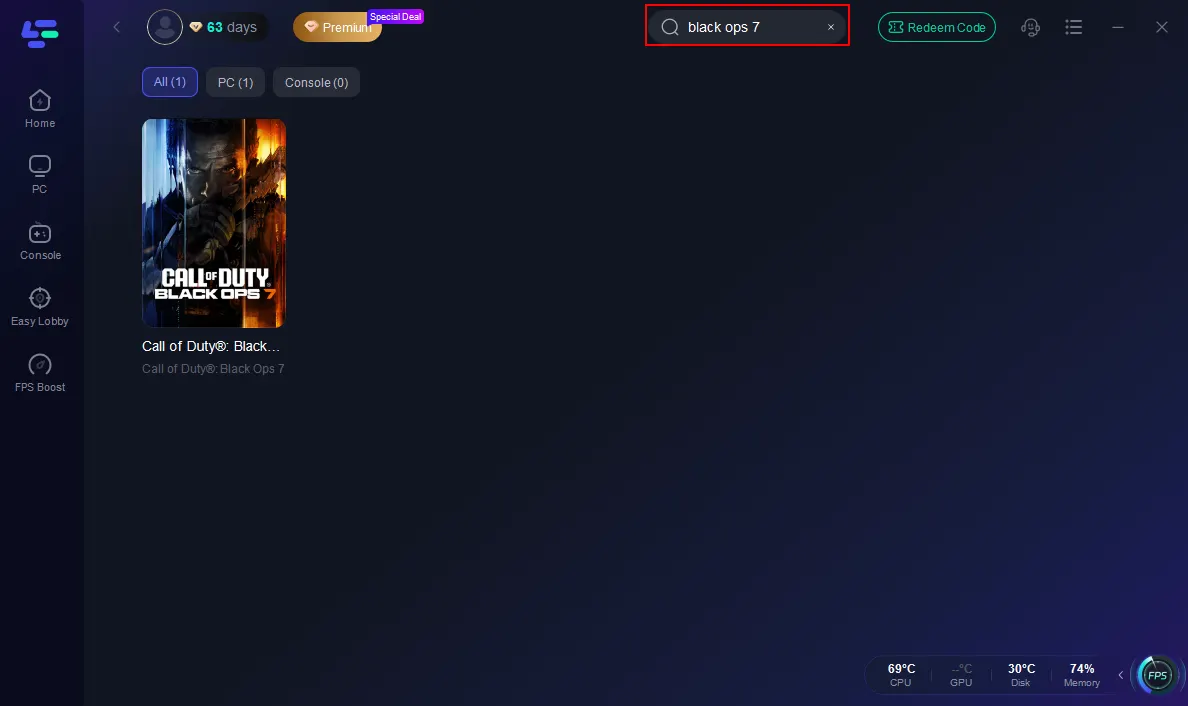
3. Choose the best server and enable Smart Boost.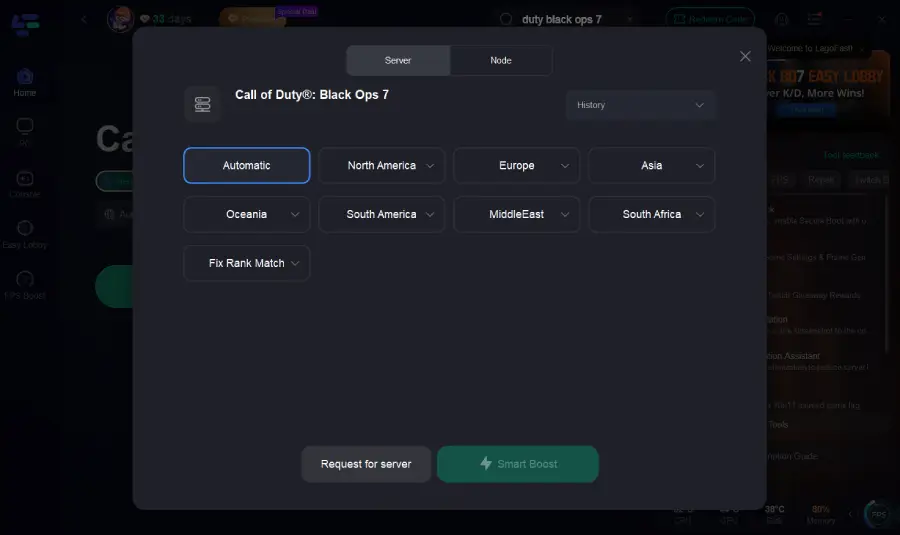
4. Launch BO7 with optimized connection, reduced ping, and higher FPS.
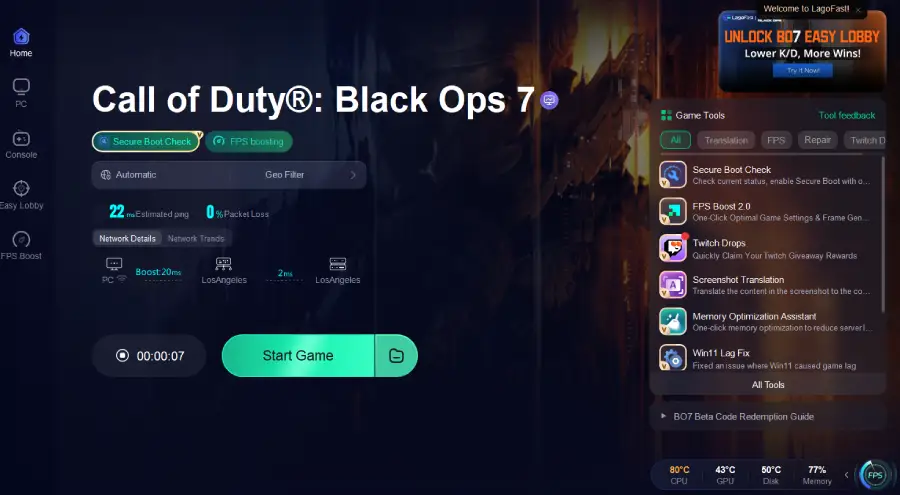
LagoFast not only bypasses connectivity errors but also stabilizes your system for smoother gameplay.
Part 4: Understanding BO7 wont launch error code 0x0 & Instantly crashes
One frustrating variation of the 0x0 error occurs when BO7 instantly crashes on startup without even showing an error message.
Why It Happens:
- DirectX conflicts between BO7 and outdated system components.
- Insufficient VRAM or RAM causing instant failure.
- Corrupted configuration files inside BO7’s local app data.
How to Fix Instant Crashes:
1. Delete Configuration Files
- Navigate to Documents\ Call of Duty\ Black Ops 7.
- Delete config files (they will regenerate upon restart).
2. Lower In-Game Graphics Settings Before Launch
- If BO7 crashes after changing graphics, start in Safe Mode and adjust.
3. Expand Virtual Memory/Page File
- Increase Windows paging file size to handle heavy RAM usage.
4. Switch to Wired Internet
- If it’s a network handshake crash, Ethernet is more stable than Wi-Fi.
Part 5: FAQs
Q1. Is the 0x0 error only on PC?
No. While most reports come from PC users, console players (Xbox/PlayStation) have also seen launch crashes tied to error code 0x0.
Q2. Can reinstalling BO7 fix the error?
Yes, reinstalling can help if the issue is tied to deeply corrupted or missing game files. However, it’s time-consuming, so try other fixes first.
Q3. Does the 0x0 error mean my system is incompatible?
Not necessarily. Most of the time, the problem is fixable by updating drivers, repairing files, or tweaking settings.
Q4. What if none of the fixes work?
If all local fixes fail, it may be a server-side issue with Activision or Xbox Live. Check Activision’s support page or official X/Twitter channels for outage updates.
Conclusion
The Black Ops 7 error code 0x0 is a frustrating but common problem that affects many players across PC and consoles. While the error itself is generic, its causes range from corrupted files and outdated drivers to network instability and software conflicts.
By applying the solutions above—running the game as admin, verifying files, updating drivers, disabling conflicting apps, and optimizing your connection with LagoFast—you can resolve the issue and enjoy BO7 without constant crashes.
Boost Your Game with LagoFast for Epic Speed
Play harder, faster. LagoFast game booster eliminates stutter and lags on PC, mobile, or Mac—win every match!
Quickly Reduce Game Lag and Ping!
Boost FPS for Smoother Gameplay!