
Quick Answer: How to Translate the Brown Dust 2 Game Language Instantly
If the game client natively supports your preferred language, you can quickly adjust it through the standard system options menu. However, if your native language is completely missing from the official client list, the absolute best solution is using the LagoFast Game Translator. This specialized software functions as an advanced, real-time overlay translation tool for both PC and mobile setups. It seamlessly translates on-screen foreign text into your chosen language instantly, eliminating the need for messy manual mod files or risking account bans from unauthorized game patches.
Introduction
Neowiz's tactical RPG masterpiece, Brown Dust 2, treats players to stunning 2D graphics, nostalgic grid-based strategy maps, and deep character stories. However, navigating complex skill multipliers, managing intricate gear sub-stats, or following immersive seasonal event plots can quickly turn into a headache if the game text isn't in your native tongue. Playing a globally released title shouldn't mean constantly having to guess your next tactical decision or missing out on the story due to language barriers.

- ✅ Reduce Lag and High Ping.
✅ Boost FPS at the Same Time.
✅ Brown Dust 2 Translation Tool.
✅ Change Server without Latency.
✅ Boost Game Loading Speed.
Part 1: Officially Supported Languages in Brown Dust 2
Part 2: How to Change Languages Manually in Brown Dust 2: Step-by-Step
Part 3: How to Translate Brown Dust 2 When Your Preferred Language Isn't Supported?
Part 1: Officially Supported Languages in Brown Dust 2
Before downloading external tools or modifying your setup, it is helpful to check if the developers have already included your language out of the box. Brown Dust 2 launched with a solid selection of localized text and audio options tailored specifically to major global markets.
The table below breaks down the officially supported configurations available within the global client:
|
Language Category |
Officially Supported Options |
|
In-Game Text & UI |
English, Korean, Japanese, Traditional Chinese, Simplified Chinese |
|
Character Voiceovers (Audio) |
Japanese, Korean |
|
Regional Servers |
Global, Asia, Americas, Europe |
If your preferred reading language appears in the text column above, you can easily alter your interface settings within less than a minute by using the game's built-in options menu.
Part 2: How to Change Languages Manually in Brown Dust 2: Step-by-Step
If you can read one of the officially supported default languages and want to switch to it, you can do so directly within the active game screen. Follow these steps to adjust your text or voice settings:
Step 1. Launch Brown Dust 2 on your PC standalone client, emulator, or mobile phone.
Step 2. Advance through the initial splash screens and loading bars until you arrive at your main home screen (your active Character Pack lobby or safe house).
Step 3. Look for the Menu interface icon, which is typically found in the upper corner of the screen, represented by a small cogwheel or list icon.
Step 4. Open the options window and locate the sub-tab labeled Language and Voice Settings (or the globe/audio icon).
Step 5. Choose your target language for text display (e.g., English) and select your preferred voice pack (Korean or Japanese).
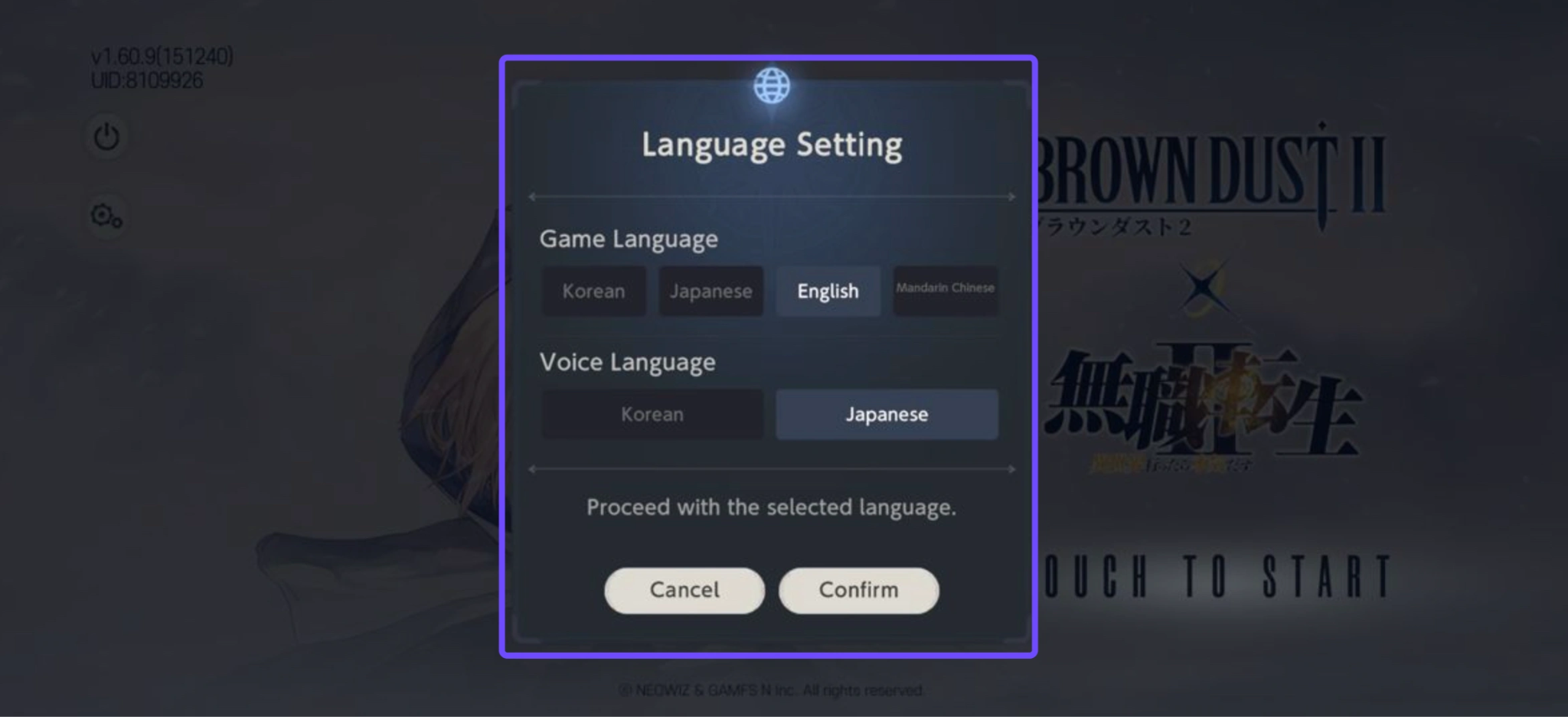
Step 6. Confirm the selection and save your settings.
Note: If you choose a language pack that hasn't been downloaded to your device yet, the game client will prompt you to download a small background patch before returning to the title screen.
Part 3: How to Translate Brown Dust 2 When Your Preferred Language Isn't Supported?
When the language you read best isn't an option in the official settings, relying on slow mobile camera apps or copying text into online web translators completely breaks the flow of combat.
This is where the LagoFast Game Translator steps in. Specifically designed to remove regional language boundaries, LagoFast applies a smart, real-time AI-powered translation overlay over your game. It works fluidly across immersive text cutscenes, tactical menus, and complex UI boards, delivering fast localization without modifying your core game installation files.
Key Translation Features of LagoFast:
- AI Real-Time In-Game Translation: Automatically translates all dialogue boxes, story elements, and user interfaces as you actively play.
- Auto Chat & Input Translation: Converts global or guild chat logs into your native language instantly, allowing you to converse with international teammates seamlessly.
- Ultra-Fast OCR Technology: Uses context-aware Optical Character Recognition to identify complex stylized fonts or busy UI grids in under 1 second.
- Multi-Platform Flexibility: Works smoothly on both dedicated desktop PC clients and Android mobile devices.
- Floating Translation Bubble (Mobile): Android users can tap a handy on-screen floating ball to instantly translate any visual elements without switching apps.
- Multi-Engine Game Support: Optimized to run perfectly alongside major game engines like Unity and Unreal, ensuring it won't crash or slow down Brown Dust 2.
Step-by-Step Tutorial to Use LagoFast Translation Tool:
Step 1: Click the Free Trial button to download and install LagoFast.
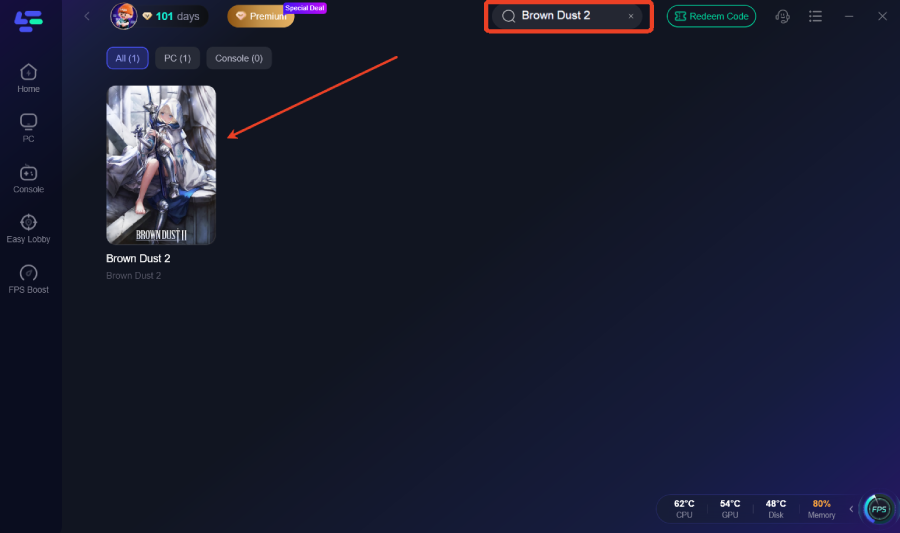
Step 2: After installation, search "Brown Dust 2" in the search bar and select the game.
Step 3. Enable Translation: On the game’s dashboard within LagoFast, look for the "Translation Tool" icon on the right-hand sidebar.
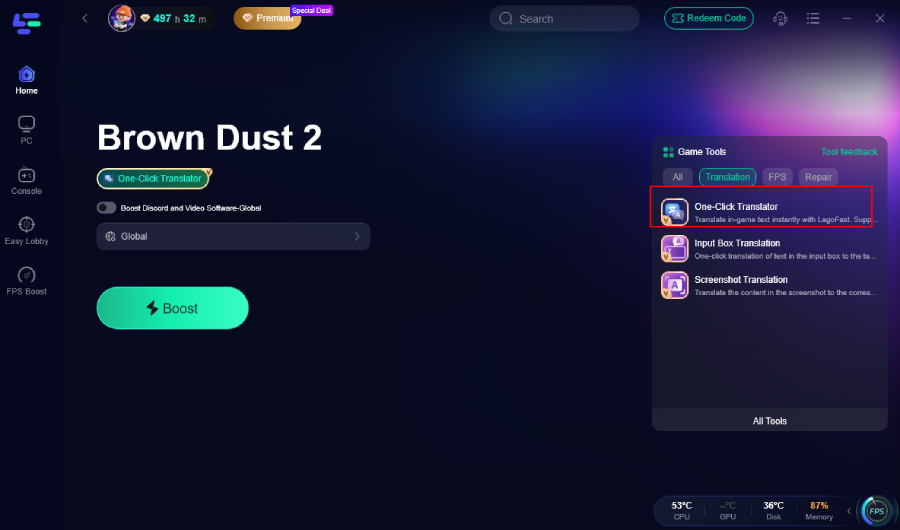
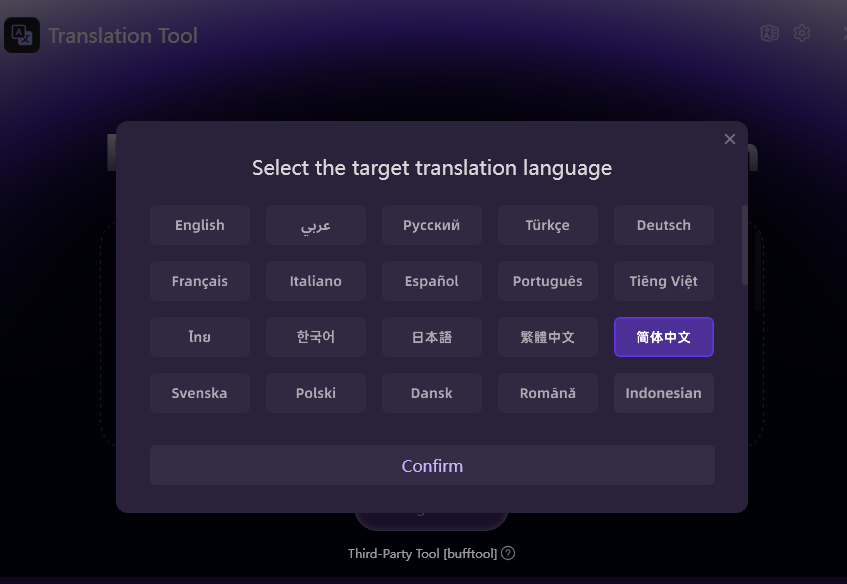
Step 4. Set Your Language: Select your target language (e.g., Turkish or Thai).
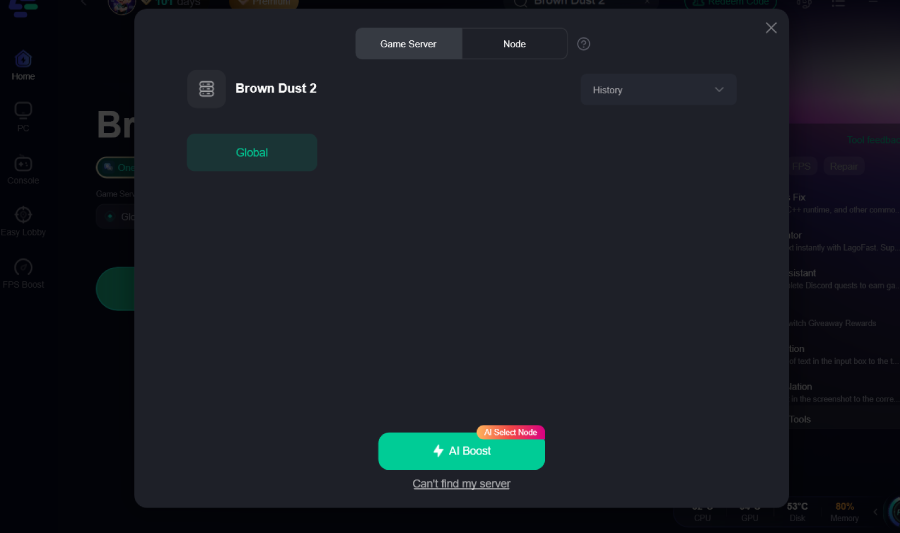
Step 5: Choose your preferred server node and click "Smart Boost" to start optimizing.
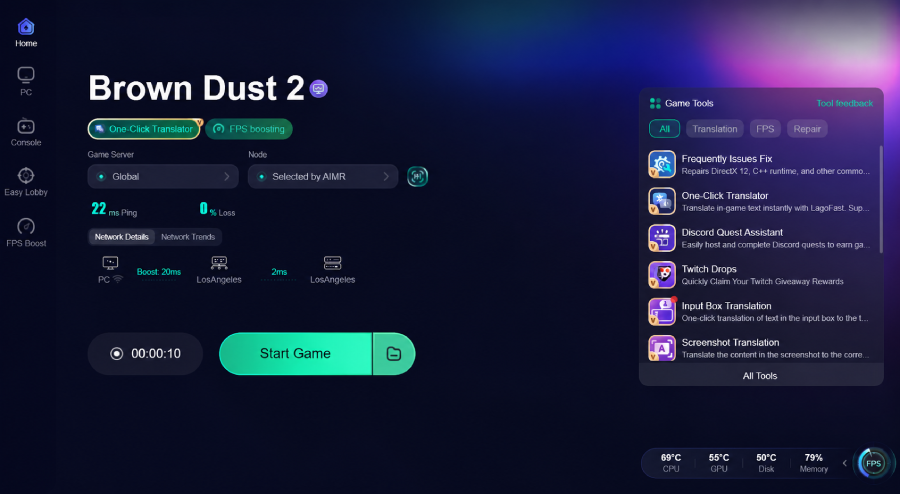
Step 6: Launch your game and enjoy smooth, optimized gameplay with lower ping and no stutter.
Will using the LagoFast Brown Dust 2 translation tool get my account banned?
No, it will not. Unlike traditional community fan mods or unofficial localization patches that overwrite internal game files, LagoFast relies entirely on a smart visual overlay and advanced OCR translation. It never tampers with the core game directory or client code, making it completely safe to use alongside official anti-cheat software.
Optimize Your Entire Gaming Experience With LagoFast
A great tactical RPG requires precise timing during map exploration and smooth framerates when pulling off massive ultimate skill chains. Lag spikes or sudden frame rate drops can ruin a perfect run on a difficult character pack.
Beyond its translation capabilities, LagoFast serves as an advanced, all-in-one game booster. By identifying and connecting your machine to the fastest possible regional data nodes, LagoFast stabilizes your network connection and clears out background system clutter. This guarantees optimal performance and a smooth, stutter-free gaming experience.
Key Performance Optimization Features:
- One-Click FPS Boost: Instantly cleans up background system resource hogs and reallocates memory directly to Brown Dust 2 to stop framerate drops and micro-stutters.
- High Ping Reducer: Bypasses congested internet pathways to secure the shortest route to the game servers, lowering high ping and preventing frustrating connection drops.
- One-Click Coupon Code Redeemer: Keeps track of active promotional events for games like Brown Dust 2, allowing you to claim free in-game gifts, pull tickets, and currency directly through the software panel without hunting down code lists online.
- Global Server Access: Grants you the power to download, update, and patch region-locked games easily, making it simple to play overseas titles months or years before their official Western localizations hit the market.
Tutorial: Use the LagoFast Mobile to Enjoy a Smooth Mobile Gaming Experience:
Step 1: Visit the official LagoFast Mobile website and download the APK version of the LagoFast Game Booster.
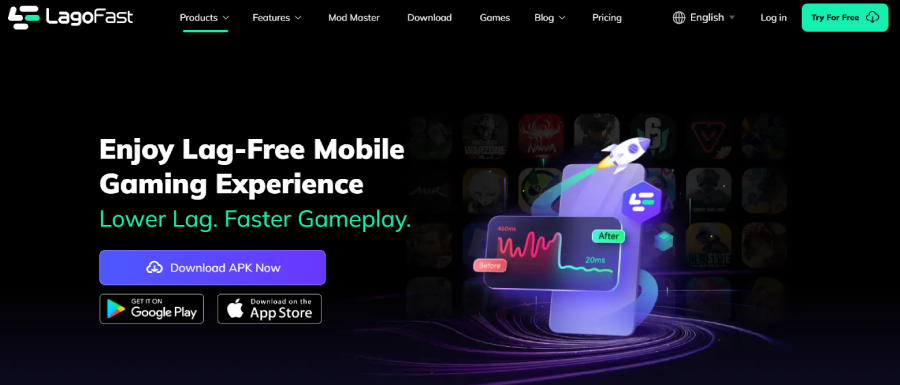
Step 2: Click the “Download” button, then install and launch “LagoFast Mobile Booster”.
Step 3: Start Brown Dust 2, then switch to LagoFast Mobile and search for it.
Step 4. Select and click Brown Dust 2 in the interface.
Step 5: Enter the server selection interface, where you can change to a stable server, then click the “Boost” button to fix lag and enhance the gaming experience
Step 6: Finally, go back to Brown Dust 2 and start playing it without any lag.
Part 4: FAQs
Do I need to close the game or switch apps to see translations?
Not at all. LagoFast operates in real time directly over your active screen. On a PC setup, the text updates right as it appears on your monitor. On mobile platforms, you can use the convenient floating tool ball to translate everything instantly with a single tap, keeping you immersed in the action.
Does LagoFast work on both PC and mobile versions of Brown Dust 2?
Yes. LagoFast is fully compatible across platforms. It offers dedicated optimization and overlay features for Windows desktop setups as well as a mobile app for Android devices.
Can I listen to Japanese voices while using a different text language overlay?
Absolutely. You can set the internal game settings to play Japanese or Korean voiceovers, and then use LagoFast to display the text overlay in your preferred native language, giving you a fully customized experience.
My internet connection is slow. Will running a translator cause lag?
Actually, it can help improve your connection. Because LagoFast combines real-time translation with an integrated game booster, it actively optimizes your network routing paths while running. This often leads to lower ping and a more stable connection than playing without it.
What makes LagoFast better than using a standard phone camera translator?
Standard translation apps require you to constantly pick up your phone, point your camera at the screen, and wait for a slow web response. LagoFast is built specifically for gaming. It reads context-aware fonts, translates in under a second, updates on your active screen, and includes built-in network tools like ping reduction and an FPS booster.
Conclusion
Missing out on the brilliant story patches, complex character skill builds, or seasonal tactical events in Brown Dust 2 because of a language barrier can be frustrating. While manual settings offer a few basic options, they don't cover every player worldwide. By downloading the LagoFast Game Translator, you can bypass these language limits completely. Enjoy real-time, accurate translations alongside stable ping and optimized FPS, and finally experience the game the way it was meant to be played.

Boost Your Game with LagoFast for Epic Speed
Play harder, faster. LagoFast game booster eliminates stutter and lags on PC, mobile, or Mac—win every match!
Quickly Reduce Game Lag and Ping!
Boost FPS for Smoother Gameplay!