

Brown Dust 2 is no longer limited to mobile devices. With the release of the official PC client, players can now enjoy the game on Windows without relying on emulators or Google Play Games. Whether you're switching from mobile or trying the game for the first time, this guide covers where to download the PC version, supported platforms, and the system requirements you'll need before installing the game.

- ✅ Reduce Lag and High Ping.
- ✅ Boost FPS at the Same Time.
- ✅ Support 8000+ Popular Online Games.
- ✅ Change Server without Latency.
- ✅ End Stuck & Crashing Issues.
Part 1: Can You Download Brown Dust 2 on PC?
Part 2: Brown Dust 2 Platforms Explained: PC Client, Steam, and Mobile
Part 3: Brown Dust 2 PC System Requirements
Part 4: How to Download and Play Brown Dust 2 on PC
Part 5: How to Enhance Your Brown Dust 2 Gaming Experience with LagoFast
Part 1: Can You Download Brown Dust 2 on PC?
Yes. Brown Dust 2 officially released its standalone PC client on June 4, 2026, allowing players to download and play the game directly on Windows without relying on Android emulators or Google Play Games.
The standalone PC version offers a more convenient experience for players who prefer gaming on a larger screen while keeping their progress synced across platforms. Simply log in with your existing account to continue playing with the same characters, gear, and progression.
For most players, the official PC client is now the recommended way to play Brown Dust 2 on Windows.
Part 2: Brown Dust 2 Platforms Explained: PC Client, Steam, and Mobile
Brown Dust 2 is currently available on PC, Android, and iOS, allowing players to continue their progress across different devices with the same account.
|
Platform |
Availability |
|
PC Client |
Available |
|
Android |
Available |
|
iOS |
Available |
|
Google Play Games |
Available |
|
Steam |
Not Available |
With the release of the official PC client, players can now enjoy Brown Dust 2 on Windows without relying on Google Play Games. The Google Play Games version remains available and is now listed as BrownDust2 (GPG) to distinguish it from the standalone PC client.
Brown Dust 2 is not currently available on Steam. Players who want to play on PC can download the standalone client directly from the official website.
Part 3: Brown Dust 2 PC System Requirements
Before downloading the official PC client, make sure your system meets the minimum requirements below.
PC Version System Requirements
- OS: Windows 10 / Windows 11
- CPU: Intel® Core™ i5 or higher, or AMD Ryzen™ 5 or higher
- RAM: 3 GB or more
- Graphics Card: NVIDIA GeForce 8 Series or higher, or AMD Radeon HD 2000 Series or higher
- DirectX: Version 11 or higher
- Browser: Microsoft Edge, Chrome, Firefox, Opera, Brave, or other modern browsers
The official requirements are relatively modest, so most modern PCs should have no trouble running the game. If you frequently multitask while gaming, additional RAM can help maintain smoother performance.
Part 4: How to Download and Play Brown Dust 2 on PC
Downloading the official PC version is a quick process. Just follow these steps to get started:
Step 1: Visit the Official Brown Dust 2 Website
Head to the official Brown Dust 2 website and locate the Download PC Version button on the homepage.

Step 2: Download the PC Client
Click the download button to get the installation file (BD2StarterSetup.exe) and save it to your PC.
Step 3: Install and Launch the Game
Run the downloaded installer and complete the setup process. Once the installation is finished, launch Brown Dust 2 using the desktop shortcut created during installation.
Step 4: Sign In and Continue Your Progress
Log in with your existing Brown Dust 2 account to access your characters, progress, and purchases. The PC client supports cross-platform progression, allowing you to seamlessly switch between PC and mobile devices.
Part 5: How to Enhance Your Brown Dust 2 Gaming Experience with LagoFast
While the official PC client provides a smoother way to play Brown Dust 2, network quality can still affect your overall experience. Issues such as high ping, packet loss, unstable connections, or unexpected lag spikes can become frustrating, especially during longer play sessions.
LagoFast is a network optimization tool designed for gamers. It helps reduce ping, fix packet loss, stabilize connections, and optimize network routes for smoother gameplay. In addition to network improvements, it also offers useful features like Frequently Issues Fix and One-Click Translator, helping players resolve common problems and enjoy a more seamless Brown Dust 2 experience.
How to Use LagoFast for Brown Dust 2:
Step 1: Click the Free Trial button to download and install LagoFast.
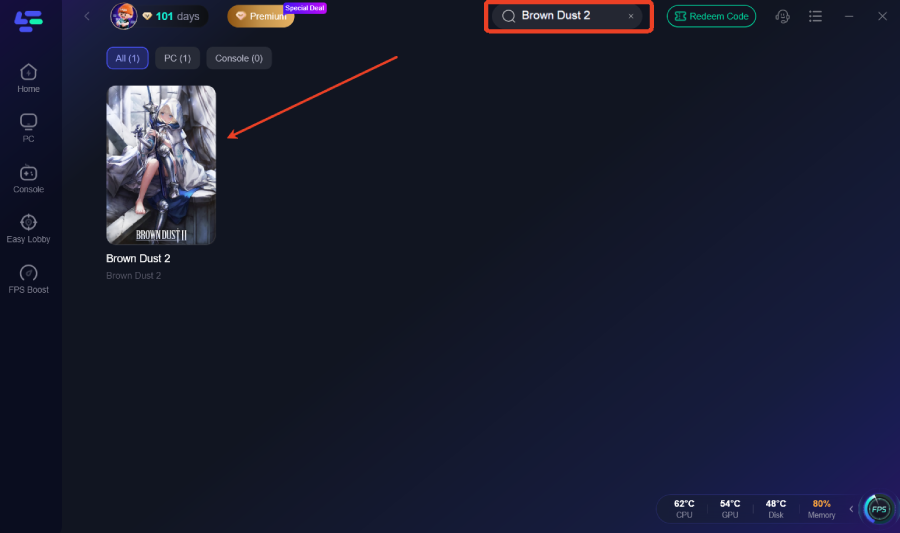
Step 2: After installation, search "Brown Dust 2" in the search bar and select the game.
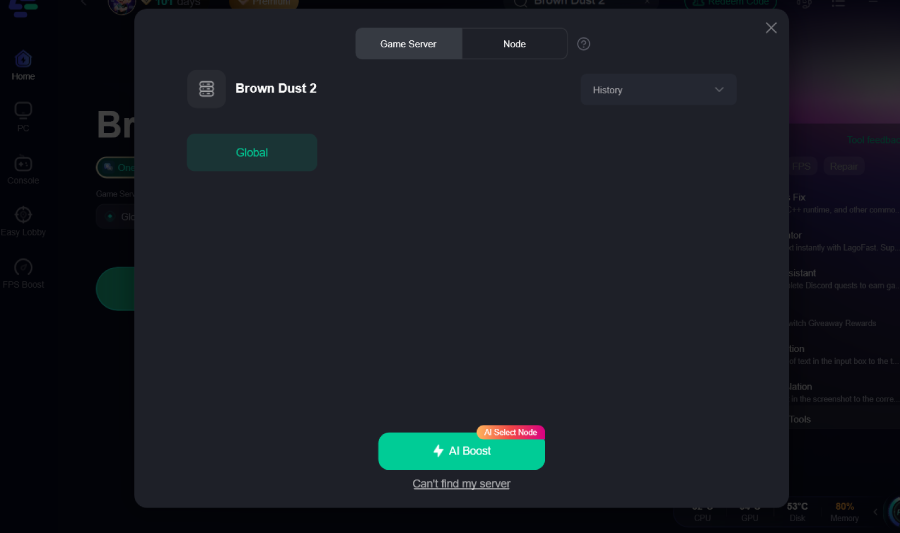
Step 3: Choose your preferred server node and click "Smart Boost" to start optimizing.
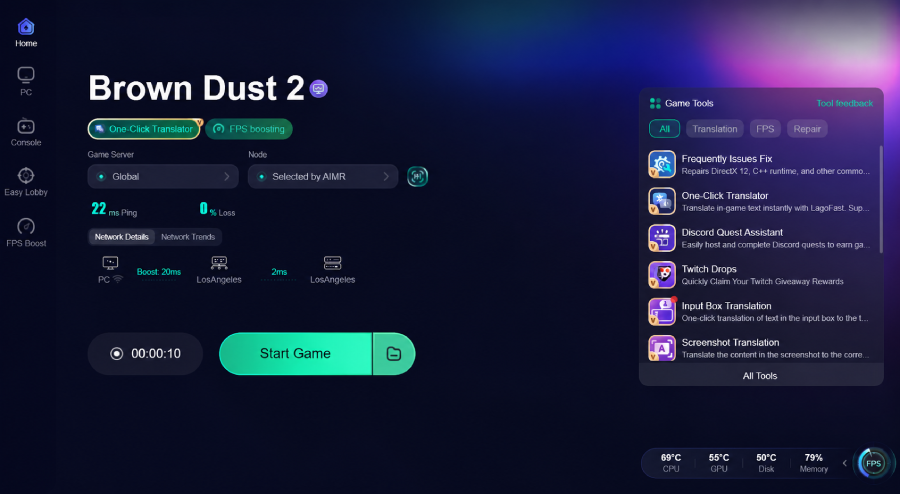
Step 4: Launch your game and enjoy smooth, optimized gameplay with lower ping and no stutter.
Final Thoughts
With the official PC client now available, playing Brown Dust 2 on Windows has never been easier. Players can download the game directly from the official website, sign in with their existing account, and continue their progress across PC and mobile devices. As long as your system meets the requirements, getting started only takes a few minutes. For an even smoother experience, tools like LagoFast can help improve connection stability and reduce network-related issues.

Boost Your Game with LagoFast for Epic Speed
Play harder, faster. LagoFast game booster eliminates stutter and lags on PC, mobile, or Mac—win every match!
Quickly Reduce Game Lag and Ping!
Boost FPS for Smoother Gameplay!