
You’ve eagerly downloaded the anime-MMO Blue Protocol: Star Resonance, ready to dive into the world of Magna and join your first co-op raid—only to be stopped by a black screen and the dreaded message: “Failed to retrieve server list.” Whether you’re a veteran MMORPG player or new to anime-style adventures, this can be frustrating. In this guide, we’ll explain why this error appears, explore the common causes, and walk through detailed fixes—including how the optimized networking tool LagoFast Game Booster can help you connect smoothly and enjoy the game without interruptions.

- ✅ Reduce Lag and High Ping.
- ✅ Boost FPS at the Same Time.
- ✅ Support 2000+ Popular Online Games.
- ✅ Change Server all over the World!
- ✅ Boost Game Loading Speed.
Part 1: Understanding the "Failed to Retrieve Server List" Error
Part 2: Common Causes of Server Connection Issues
Part 3: How to Fix the Blue Protocol Server List Error
Part 4: Enhance Your Connection with LagoFast Game Booster
Part 1: Understanding the "Failed to Retrieve Server List" Error
When you launch Star Resonance and reach the login or server-selection screen, you expect to see a list of available servers. But when the game displays “Failed to retrieve server list,” it means the client failed to fetch the server information from the backend.
Key points to understand:
- The game is currently region-locked with limited release areas.
- Players outside supported regions encounter the error immediately on startup.
Example:
“Why is it called a global release when I can’t even play it? I keep getting ‘Failed to retrieve server list.’ I live in the USA—what’s going on?” - The issue may stem from regional restrictions, server overload, or connection routing problems.
- It’s not necessarily a bug in your installation—often, it’s caused by external factors such as region lock, server downtime, or blocked network routes.
In short, the client fails to retrieve the server list either because your region is restricted or because your network can’t reach the appropriate servers.
Part 2: Common Causes of Server Connection Issues
Here are the main reasons you might encounter this error:
1. Region Lock / Unsupported Country
The game backend restricts access based on your IP location. Players in unsupported countries will see this error because the server list request is denied.
2. Server Downtime or Maintenance
Server maintenance or overload can also cause this issue. Community reports note high demand during peak hours:
“The servers are being slammed at the moment… up to 400 servers, all full.”
If the list appears empty or times out, it may not be your fault.
3. Network Routing Issues & High Latency
Poor routing or high latency from your ISP can lead to timeouts. This is especially common when connecting to servers located far away, such as those in China.
4. Firewall or Antivirus Blocking
Your local security software or Windows Firewall may block the game launcher’s communication. If certain ports or protocols are restricted, the game can’t retrieve the server list.
5. VPN or Proxy Conflict
Using a VPN or proxy with a mismatched region can confuse the client. Some VPNs expose your real region, triggering a block. A generic VPN may worsen latency or fail entirely.
Part 3: How to Fix the Blue Protocol Server List Error
Follow these steps to resolve the “Failed to Retrieve Server List” issue in Blue Protocol: Star Resonance.
Step 1: Confirm the Game’s Server Status & Region Support
- Visit the official Blue Protocol: Star Resonance website or social channels for region and server announcements.
- If your country isn’t supported, the only permanent fix is to wait for the official release.
- Check if servers are undergoing maintenance or overloaded—if so, try again later.
Step 2: Test Your Internet Connection & Route
- Use a wired Ethernet connection for better stability.
- In Command Prompt (Windows), run the following commands to reset your network stack:
netsh winsock reset netsh int ip reset ipconfig /flushdns - If ping to the game region exceeds 150 ms, your connection may fail due to latency.
Step 3: Disable or Configure Firewall & Antivirus
- Temporarily disable your firewall or antivirus to test if they block the game launcher.
- If disabling helps, add the game and launcher to the firewall’s allowed list.
- Ensure the required TCP/UDP ports are open as per the official game documentation.
Step 4: Adjust or Remove VPN/Proxy
- If you’re using a VPN, disconnect and try again without it.
- If you must use one for region bypass, choose a low-latency, gaming-optimized provider and connect to a supported region.
Step 5: Use a Gaming Booster / Optimizer
If your region is supported but you still face connection issues, try using LagoFast Game Booster to optimize your route and stabilize the connection.
Steps to use LagoFast (Global for example):
Download and install LagoFast Game Booster (Free Trial available).
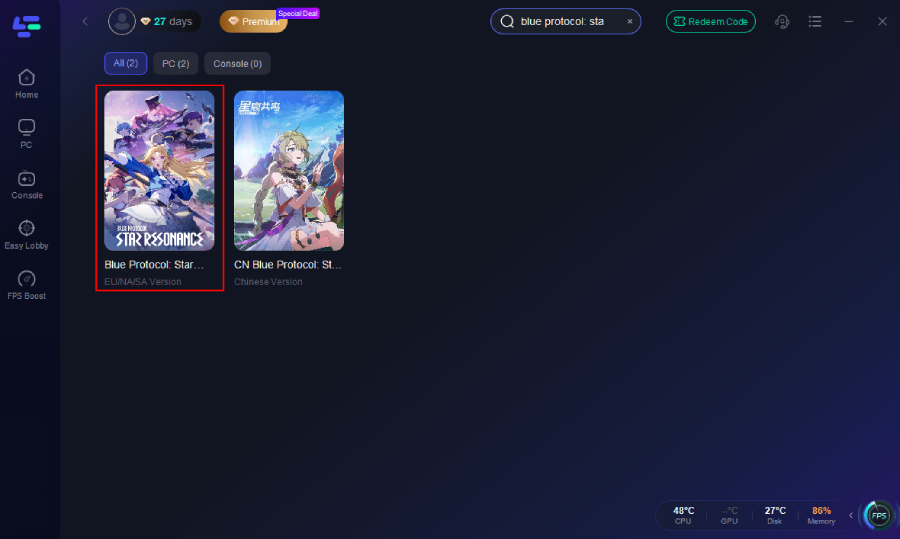
Open the client and search for “Blue Protocol: Star Resonance.”
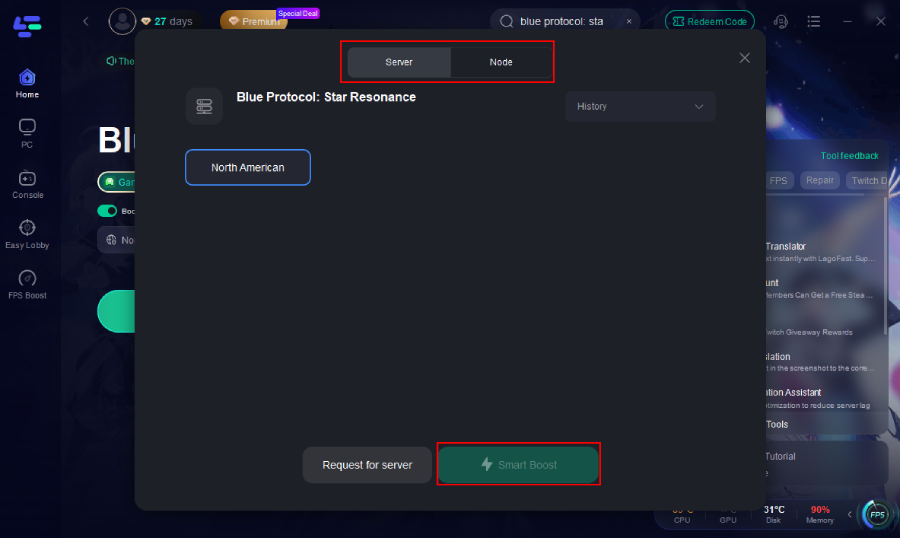
Select a recommended node and click Boost.
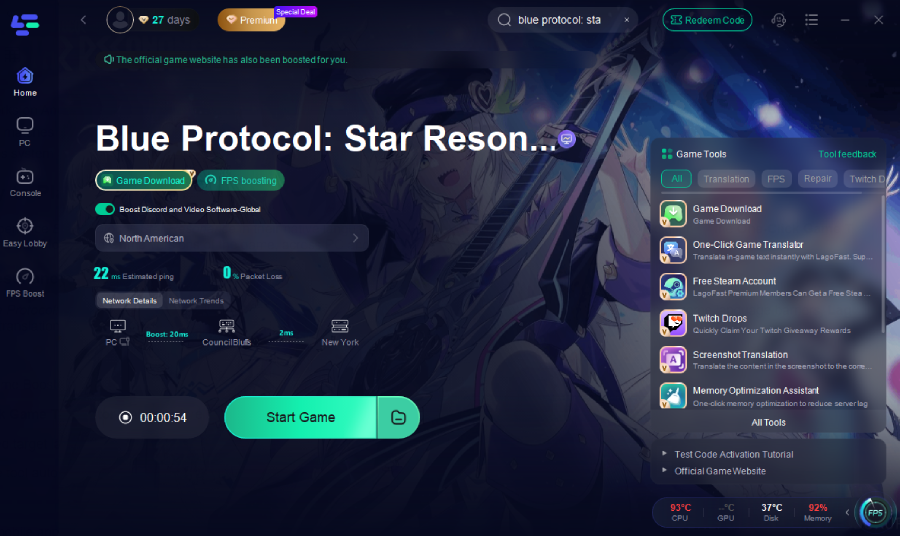
Launch the game through LagoFast—this often resolves the “Failed to retrieve server list” issue by improving connection quality.
Step 6: Retry Login After Applying Fixes
- Restart your PC and relaunch the game without unnecessary background programs.
- Check if the server list loads successfully.
- If it still fails, wait for maintenance to finish or confirm your region’s support status.
Part 4: Enhance Your Connection with LagoFast Game Booster
Using a tool like LagoFast Game Booster is not only helpful for bypassing region restrictions—it also improves your network performance in real-time.
Why LagoFast Helps:
- Uses smart-routing to select the least congested paths, reducing ping and packet loss.
- Supports both PC and mobile platforms for consistent cross-play performance.
- Players connecting from Europe or North America report improved latency—from 250 ms+ to around 80–100 ms.
Step-by-Step Setup On Mobile (Take CN version as an example)
1. Download LagoFast Mobile from Google Play or the App Store, or scan the QR code below.

2. After installation, search for "Blue Protocol: Star Resonance CN" in LagoFast's search bar.
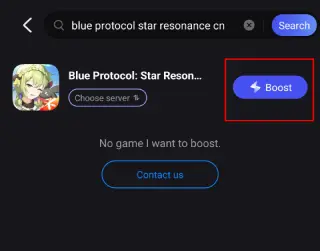
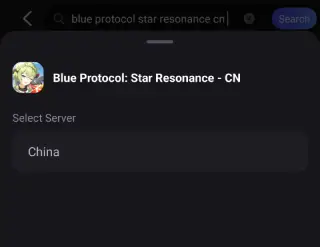
3. Select a suitable server node to connect to.
4. Once optimized performance is confirmed, click "Start Game" to launch the game.
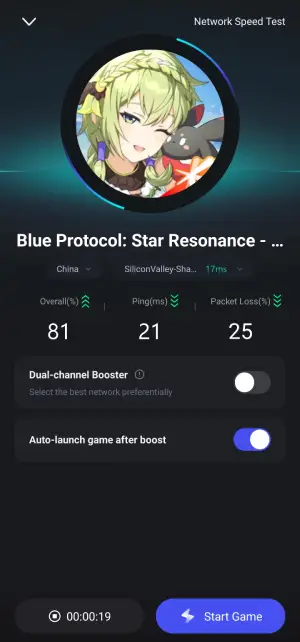
Gamers consistently report stable and low-latency experiences, even during large group content.
Part 5: FAQs
Q1: Does “Failed to retrieve server list” always mean the servers are down?
A1: Not necessarily. It can indicate downtime, but it often results from region-lock or network routing issues.
Q2: Will a generic VPN fix the error?
A2: A standard VPN may bypass region lock but usually causes high latency and instability. A game booster like LagoFast is a better alternative.
Q3: What if my region is blocked? Can I still play?
A3: You can, but only by waiting for your region’s official release or using a reliable booster to connect via a supported route. Be aware of possible limitations.
Q4: Will reinstalling the game help?
A4: Rarely. Since the error happens before server list retrieval, reinstalling typically won’t help unless your installation files are corrupted.
Conclusion
The “Failed to Retrieve Server List” error in Blue Protocol: Star Resonance can be discouraging, but with the right steps, it’s usually solvable. By following this guide, you can diagnose the issue, apply effective fixes, and enhance your gameplay experience. Jump back into Magna, join your next raid, and enjoy smooth, uninterrupted adventures.

Boost Your Game with LagoFast for Epic Speed
Play harder, faster. LagoFast game booster eliminates stutter and lags on PC, mobile, or Mac—win every match!
Quickly Reduce Game Lag and Ping!
Boost FPS for Smoother Gameplay!