

With the launch of Blade & Soul Heroes, players can team up with their friends in this anime-inspired adventure, experiencing a unique gameplay style that blends turn-based strategy with action combat! However, in discussions and forums about Blade & Soul Heroes, many players have reported encountering high ping issues, which force them to deal with stuttering visuals and input delays during gameplay. This article will dive into the causes behind the Blade & Soul Heroes high ping problem, explore effective solutions to fix it, and reveal the best ways to optimize your gaming experience!

- ✅ Reduce Lag and High Ping.
- ✅ Boost FPS at the Same Time.
- ✅ Support 1000+ Popular Online Games.
- ✅ End Stuck & Crashing Issues.
Part 1: Why Do I Encounter High Ping in Blade & Soul Heroes
Part 2: Best Way to Fix Blade & Soul Heroes High Ping - LagoFast
Part 3: Other Methods to Fix Blade & Soul Heroes High Ping
Part 1: Why Do I Encounter High Ping in Blade & Soul Heroes
Although the way high ping manifests may differ from player to player, the underlying causes can be identified and addressed. In Blade & Soul Heroes, the most common causes for experiencing high ping generally fall into the following titles:
- Distance to server: Players matched to a far-away region.
- Congestion: home network is busy (streams, updates, cloud backups) or your ISP is overloaded at peak hours.
- Wi-Fi issues: weak signal/interference, using 2.4 GHz instead of 5/6 GHz, or too many devices on the same channel.
- Bufferbloat: your router queues data poorly; latency spikes whenever you upload (voice chat, screen share, cloud sync).
- Routing/peering: the path from your ISP to the game’s servers is inefficient.
- VPN/Proxy/Firewall: adds distance or blocks optimal routes.
- NAT/Double-NAT: strict NAT can cause bad matchmaking or unstable sessions.
- Old firmware/drivers or bad cables.
- Connection type: cellular or satellite has inherently higher latency.
Part 2: Best Way to Fix Blade & Soul Heroes High Ping - LagoFast
Regardless of the cause behind high ping, the best solution is to use LagoFast. It can help switch server routes, optimize the data transmission path, and stabilize your network connection, effectively minimizing high ping issues in the game. Its main advantages include:
- Reduced Ping & Lag: Minimizes latency issues, ensuring real-time responsiveness during combat.
- Stable Connection: Provides a consistent network connection, preventing disconnections during crucial moments.
- Optimized Game Performance: Enhances system performance, allowing for smoother graphics and faster load times.
- Global Server Network: Deploys server nodes in over 60 countries and 150+ cities worldwide, offering diverse server options for players.
- Game-Specific Tool Support: Provides custom tools and mods for various games, enabling one-click installation to boost performance.
How to Lower Blade & Soul Heroes High Ping with LagoFast on PC
Step 1: Click the "Free Trial" button below to download and install the LagoFast for free.
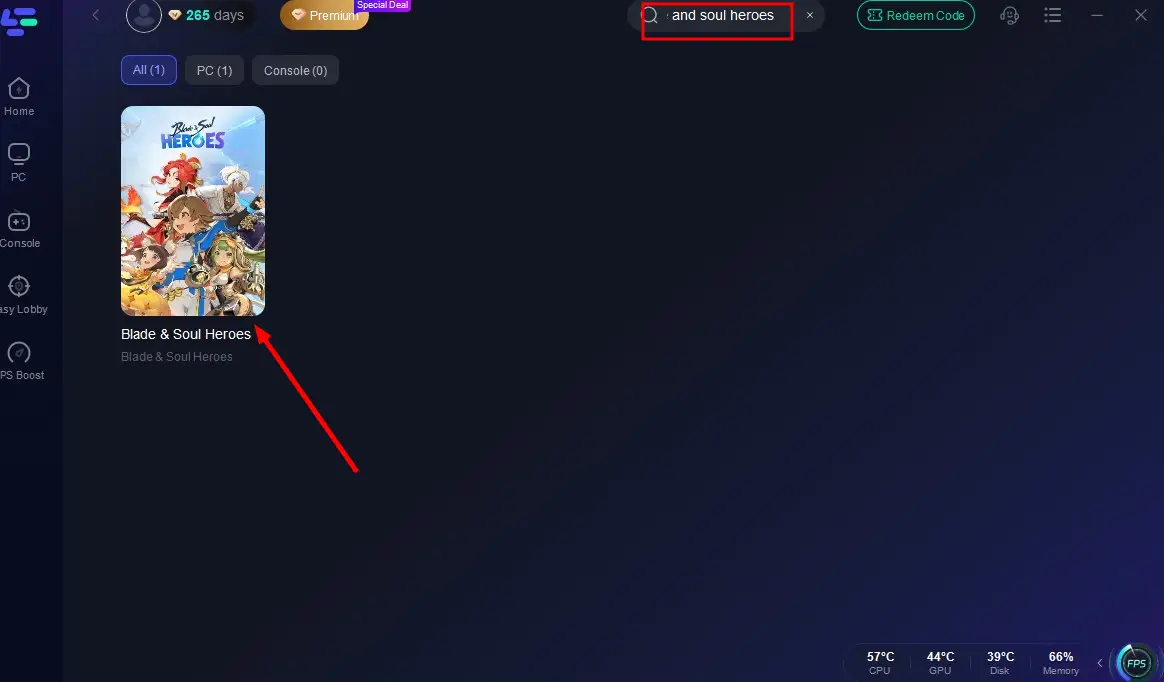
Step 2: Launch LagoFast, search for "Blade & Soul Heroes" in the search bar, and select the game.
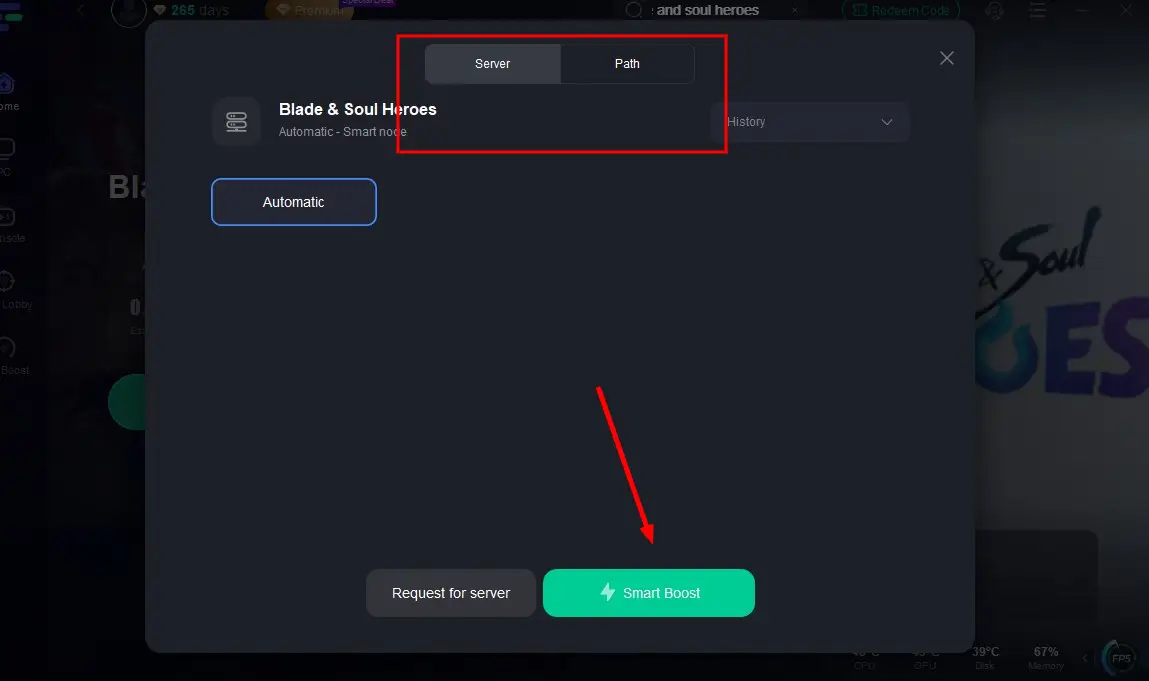
Step 3: Click the "Select Server" button to connect to an stable server node, then activate optimization via "Smart Boost".
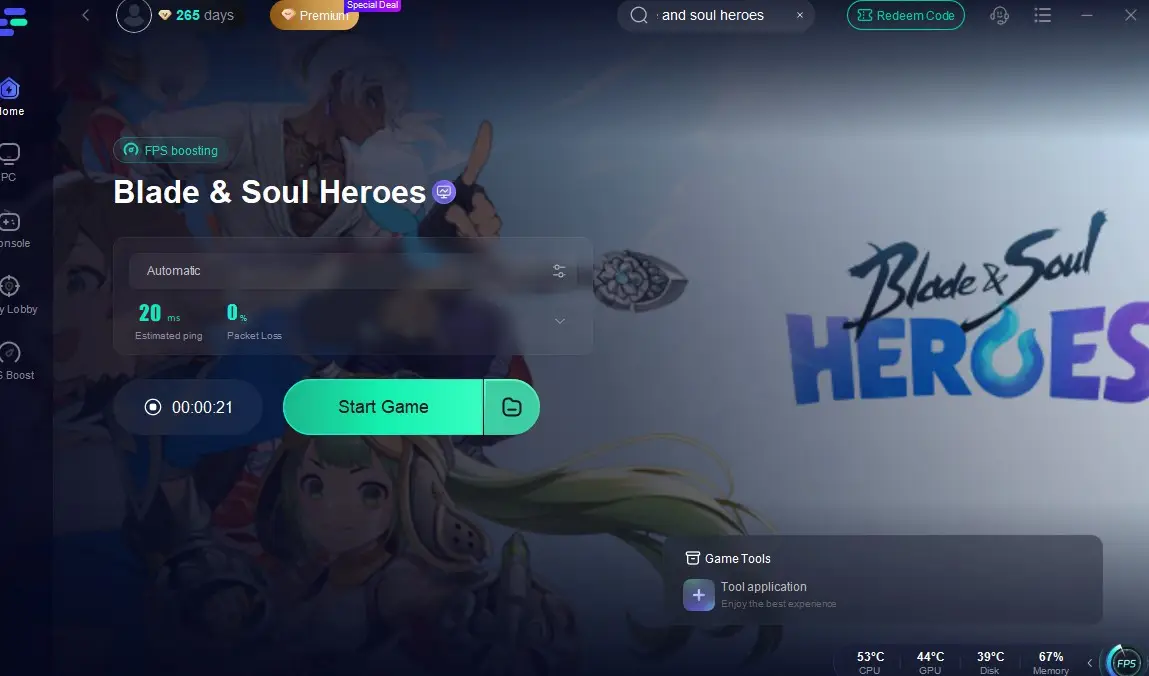
Step 4: After enabling real-time optimization, check the live ping and packet loss rates, then click "Start Game" to begin playing.
How to Fix Blade & Soul Heroes High Ping on Mobile:
1. Download LagoFast Mobile from the App Store or Google Play Store, or simply scan the QR code below to get it instantly!

2. Launch the LagoFast Mobile app and search for Blade & Soul Heroes in the search bar.
3. Select the best-performing server for Blade & Soul Heroes to connect.
4. Check real-time game data such as packet loss rate and ping, then click Start Game to begin playing!
Part 3: Other Methods to Fix Blade & Soul Heroes High Ping
There are some other methods for fixing Blade & Soul Heroes high ping:
1. Switch to a Wired Connection
Ethernet reduces lag caused by Wi-Fi interference. Tests show it can lower ping by 40% compared to 5GHz Wi-Fi.
- Use a Cat-7/Cat-8 cable between your router and device.
- Turn off Wi-Fi in your system settings.
2. Optimize Your Network
- Close apps that use lots of bandwidth (e.g., streaming or downloads).
- Update your router’s firmware via its admin page (e.g., 192.168.1.1).
- Enable QoS to prioritize gaming traffic.
- Try a faster DNS like Google (8.8.8.8) or AliDNS (223.5.5.5).
3. Adjust Game and System Settings
- Lower graphics settings: turn off ray tracing, lower shadows, enable DLSS/FSR.
- Disable fullscreen optimizations:
- Right-click Battlefield6.exe → Properties → Compatibility → Check "Disable fullscreen optimizations".
- Update your GPU drivers.
4. Repair Game Files and Increase Virtual Memory
- Use EA App/Steam to verify game file integrity.
- Increase virtual memory:
- Set initial size = 1.5x your RAM, max size = 3x your RAM.
5. Cool System and Close Background Apps
- Prevent overheating (keep temps below 85°C). Clean fans if needed.
- End unnecessary tasks in Task Manager.
7. Restart Device
If the previous methods don't resolve the issue, try powering down your device completely, waiting a few minutes, then restarting and relaunching Blade & Soul Heroes. However, note that this approach carries a small risk of potential in-game progress loss.
Conclusion
High ping in Blade & Soul Heroes is undoubtedly one of the most frustrating issues for players. Sudden lag and frame drops can catch them off guard, forcing them to interrupt their gameplay just to troubleshoot. To reduce both the frequency and severity of Blade & Soul Heroes high ping, LagoFast is without question the best choice! Download LagoFast now and fix the issue at its root!

Boost Your Game with LagoFast for Epic Speed
Play harder, faster. LagoFast game booster eliminates stutter and lags on PC, mobile, or Mac—win every match!
Quickly Reduce Game Lag and Ping!
Boost FPS for Smoother Gameplay!