
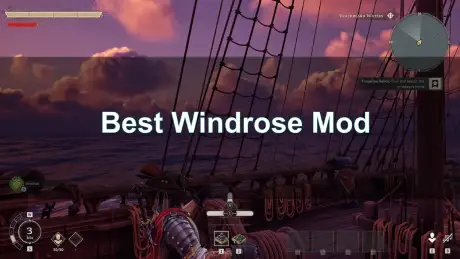
Windrose, the latest sensation in pirate survival, has captivated PC gamers with its stunning Unreal Engine 5 visuals, challenging souls-lite combat, and expansive naval exploration. Commanding your galleon across treacherous seas, battling supernatural foes, and building your base on uncharted islands is an experience unlike any other. Yet, for many veteran PC players, the journey truly begins when the modding community gets its hands on a game. Windrose is no exception.
This guide is your compass to navigating the vast ocean of community-created content, presenting a curated list of the best Windrose mods available in 2026. Our goal is to help you enhance your pirate adventure, improve performance, and tailor the game to your exact preferences, all while maintaining stability and avoiding common modding pitfalls.

- Reduce Lag and High Ping.
✅ Boost FPS at the Same Time.
✅ Support 8000+ Popular Online Games.
✅ Change Server without Latency.
✅ Boost Game Loading Speed.
Part 1. Why You Need the Best Windrose Mods in 2026
Part 2. Top Quality of Life (QoL) Mods for Windrose
Part 3. Best Windrose Mods for Graphics and Performance
Part 4. Gameplay Overhaul Mods: Changing the Pirate Loop
Part 5. How to Install Windrose Mods Safely
Part 6. How to Enhance Your Game Experience with LagoFast Game Booster
Part 1. Why You Need the Best Windrose Mods in 2026
Windrose, while brilliant in its vanilla state, is still in Early Access. This means there are rough edges, quality-of-life improvements waiting to be made, and performance optimizations that can always be pushed further. For a game that demands precise timing in combat and efficient resource management, even minor tweaks can significantly elevate the experience. Mods can transform tedious grinding into streamlined progression, turn a beautiful game into a visual masterpiece, or simply make the souls-lite combat feel more responsive. Whether you are struggling with the punishing difficulty, yearning for deeper immersion, or simply want to squeeze every last frame out of your rig, the right mods are essential for the ultimate Windrose experience.
Part 2. Top Quality of Life (QoL) Mods for Windrose
Quality of Life mods are the unsung heroes of any modding setup. They do not fundamentally alter the game's core mechanics but instead smooth out the rough edges, reducing frustration and letting you focus on the pure joy of piracy. For Windrose, these mods are particularly impactful in managing your vast inventory and streamlining repetitive tasks.
- Expanded Horizons - QOL Plus: This is arguably the most comprehensive QoL mod for Windrose. It tackles numerous small annoyances, from improving inventory sorting and crafting queues to enhancing UI elements. It is a must-have for any serious pirate looking to spend less time in menus and more time sailing.
- Auto-Loot Corpses: In the heat of battle, every second counts. The vanilla game's slow, unskippable animation for looting fallen enemies can be a real momentum killer. This mod sweeps all dropped doubloons and ammo directly into your inventory, ensuring you never miss a beat—or a valuable coin—during intense engagements.
- Filter Master: As your hoard of treasure and crafting materials grows, managing your storage chests can become a daunting task. Filter Master introduces advanced filtering options, allowing you to quickly sort your inventory by food, weapons, materials, and more. No more endless scrolling through a cluttered chest; find what you need with a single click.
- Clear Map Markers: The procedurally generated biomes of Windrose are vast and can be disorienting. This mod not only highlights rare resource nodes, such as ancient iron veins, but also allows for custom map markers. This ensures you can always find your way back to that lucrative mining spot or hidden cove, making exploration more efficient and less frustrating.
Part 3. Best Windrose Mods for Graphics and Performance
Windrose, built on Unreal Engine 5, is a visually stunning game. However, its advanced rendering features, like Lumen global illumination, can be demanding on hardware. These mods cater to both ends of the spectrum: those looking to push their high-end rigs to the limit and those needing a performance boost to maintain smooth frame rates.
- Smooth Sailing FPS Optimizer: For players with mid-range PCs or those experiencing frame drops in dense areas, this mod is a game-changer. It intelligently disables or optimizes heavy Lumen reflections and other demanding visual effects without drastically compromising the game's aesthetic, resulting in significant FPS boosts and a smoother sailing experience.
- True-Black Nights: For the ultimate immersive experience, this mod completely revamps the game’s global illumination during nighttime. Ocean storms become truly pitch-black, forcing you to rely on your ship’s lanterns and the moon for navigation. It adds a layer of realism and tension, making every night voyage a genuinely terrifying adventure.
- 4K Pirate Textures: If you possess a high-end GPU and want to see Windrose in its full glory, this mod is for you. It upscales character models, weathered leather armor, and the intricate wooden textures of your ship hull to true 4K resolution. Every plank, every buckle, and every scar on your pirate's face will be rendered with breathtaking detail.
- Cinematic Seas ReShade: This visual mod goes beyond simple texture packs. It removes the game’s default blurry Temporal Anti-Aliasing (TAA) and applies a cinematic, gritty color grade. The result is a darker, more atmospheric visual style that perfectly complements the dark pirate theme, making your screenshots and gameplay feel like they are straight out of a swashbuckling film.
Part 4. Gameplay Overhaul Mods: Changing the Pirate Loop
For players who have mastered the vanilla game and are looking for new challenges or a fresh perspective on the pirate life, gameplay overhaul mods are the answer. These mods can adjust everything from naval combat to economic systems, offering a completely new way to experience Windrose.
- Aggressive Naval AI: Tired of predictable enemy ships? This mod rebalances enemy ship logic, making royal navy hunters and skeleton crews smarter, more aggressive, and significantly more accurate with their cannons. Sea battles become more tactical, demanding sharper maneuvers and strategic use of your broadsides.
- Expanded Ship Arsenal: Why stick to the basic cannons when you can have a full array of destructive power? This mod adds entirely new swivel guns, mortar types, and even ramming spikes to your ship customization skill tree. Experiment with different loadouts to find the perfect combination for sinking any foe that dares cross your path.
- Hardcore Economy: For the ultimate survivalist, this mod drastically alters the game's economic balance. Merchant vendor prices are adjusted, and loot drop rates are significantly lowered, forcing you to truly scavenge and make every doubloon count. This creates a brutal, ultra-realistic survival experience where every resource is precious.
Part 5. How to Install Windrose Mods Safely
Modding Unreal Engine 5 games can be a delicate process. To ensure a smooth experience and avoid corrupting your save files, follow these general guidelines:
- Understand Mod Types: Windrose mods typically come in two forms: .pak files (which are essentially packaged game assets) and script injectors (often utilizing the Unreal Engine 5 Scripting System, or UE5SS). .pak files are usually placed in a ~mods folder within your game directory, while UE5SS files go into specific Binaries\Win64 folders.
- Use a Mod Manager: For managing multiple .pak files and ensuring proper load order, a dedicated mod manager like Vortex or Mod Organizer 2 is highly recommended. These tools help prevent conflicts and make installation/uninstallation much easier.
- Back Up Your Saves: Before installing any new mods, always back up your original world save files. These are typically located at R5\Saved\SaveProfiles\. This precaution can save you from losing hours of progress if a mod causes unforeseen issues.
- Check for Compatibility: Always verify that a mod is compatible with the latest version of Windrose. Early Access games receive frequent updates, and script-heavy mods can break with each new patch. Outdated mods are a common cause of crashes.
- Beware of Conflicts: If multiple mods try to alter the same game asset or script, it can lead to load order conflicts and game crashes. Mod managers can help identify some conflicts, but manual troubleshooting may be necessary for complex setups.
Part 6. How to Enhance Your Game Experience with LagoFast Game Booster
While mods can enhance your visual and gameplay experience, they cannot fix underlying network issues that might plague your online co-op sessions or affect your overall system performance. Even in a single-player game like Windrose, background processes and system bottlenecks can impact your frame rate and responsiveness. This is where LagoFast(LagoFast Game Booster - Get No Lag and Lower Ping) Game Booster comes into play, ensuring your system is optimized for peak gaming performance.
LagoFast is a powerful tool designed to reduce ping, stabilize network connections, and optimize system resources for gaming. It works by intelligently routing your game traffic through its global network of dedicated servers, bypassing congested internet paths. For Windrose, especially if you engage in co-op multiplayer, LagoFast can be invaluable in maintaining a smooth, lag-free experience.
How to Use LagoFast Game Booster
Step 1: Click the Free Trial button to download and install LagoFast Free Trial.
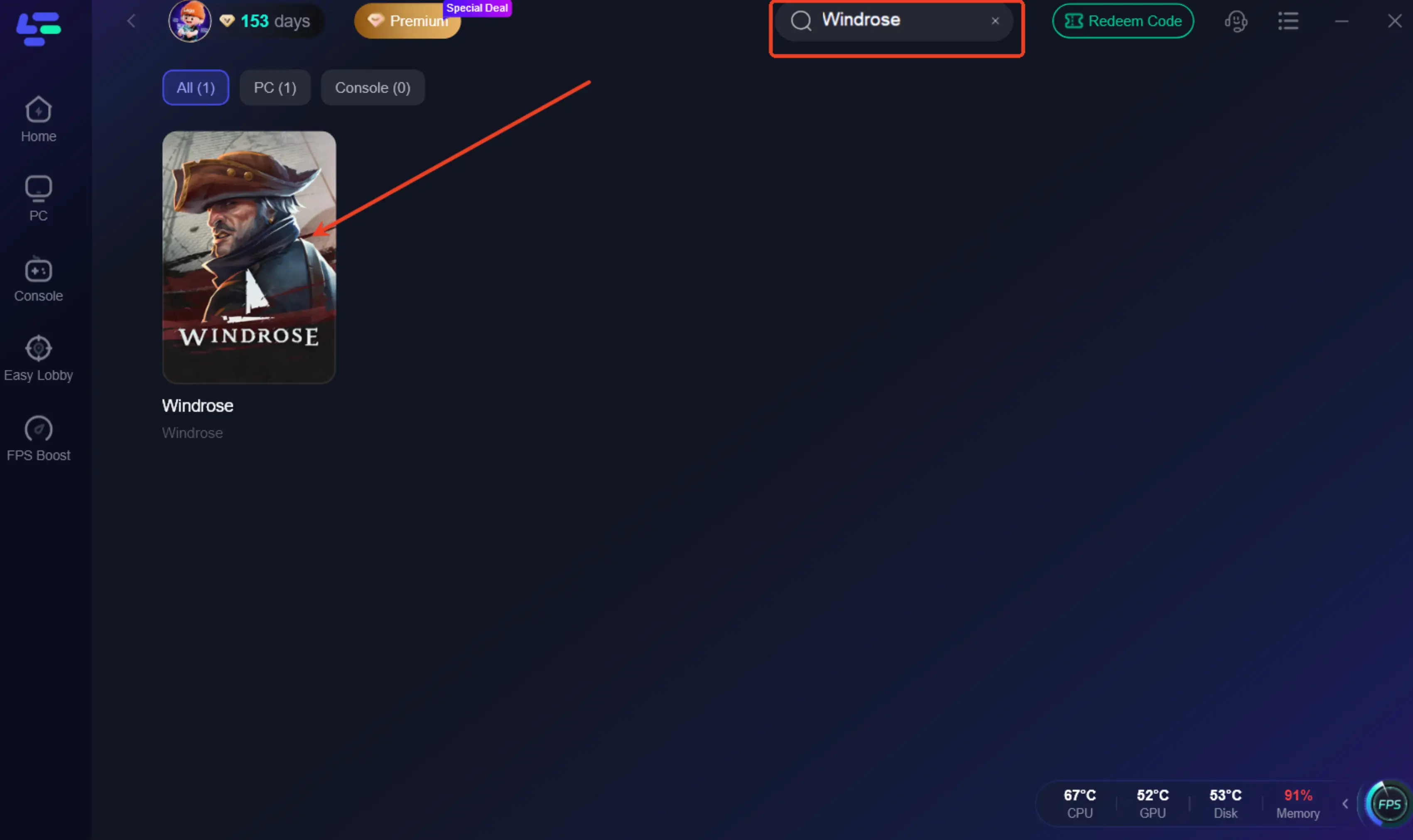
Step 2: Launch LagoFast and Search for Windrose: Open the LagoFast application. In the search bar, type "Windrose" to find the game in its extensive library.
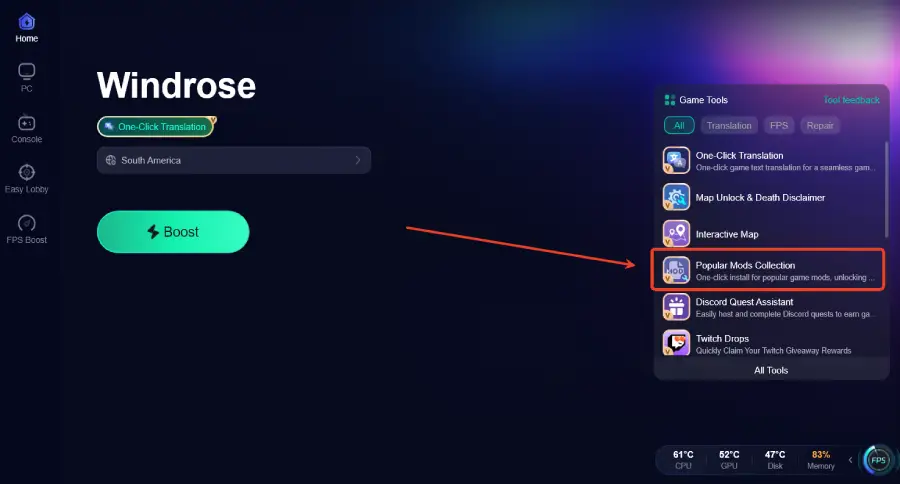
Step 3: Click the Popular Mods Collection tool option in the lower-right corner.
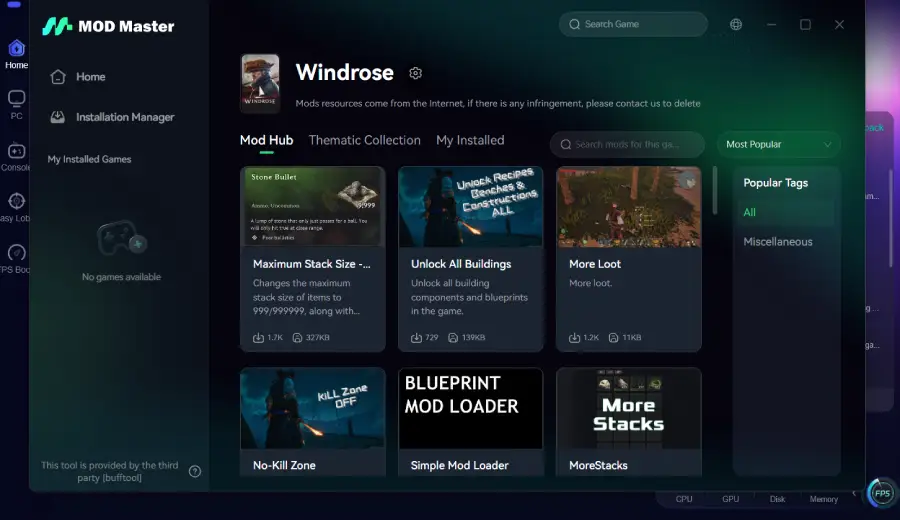
Step 4: Choose your desired mods from the available options, install them, then launch the game to activate the features.
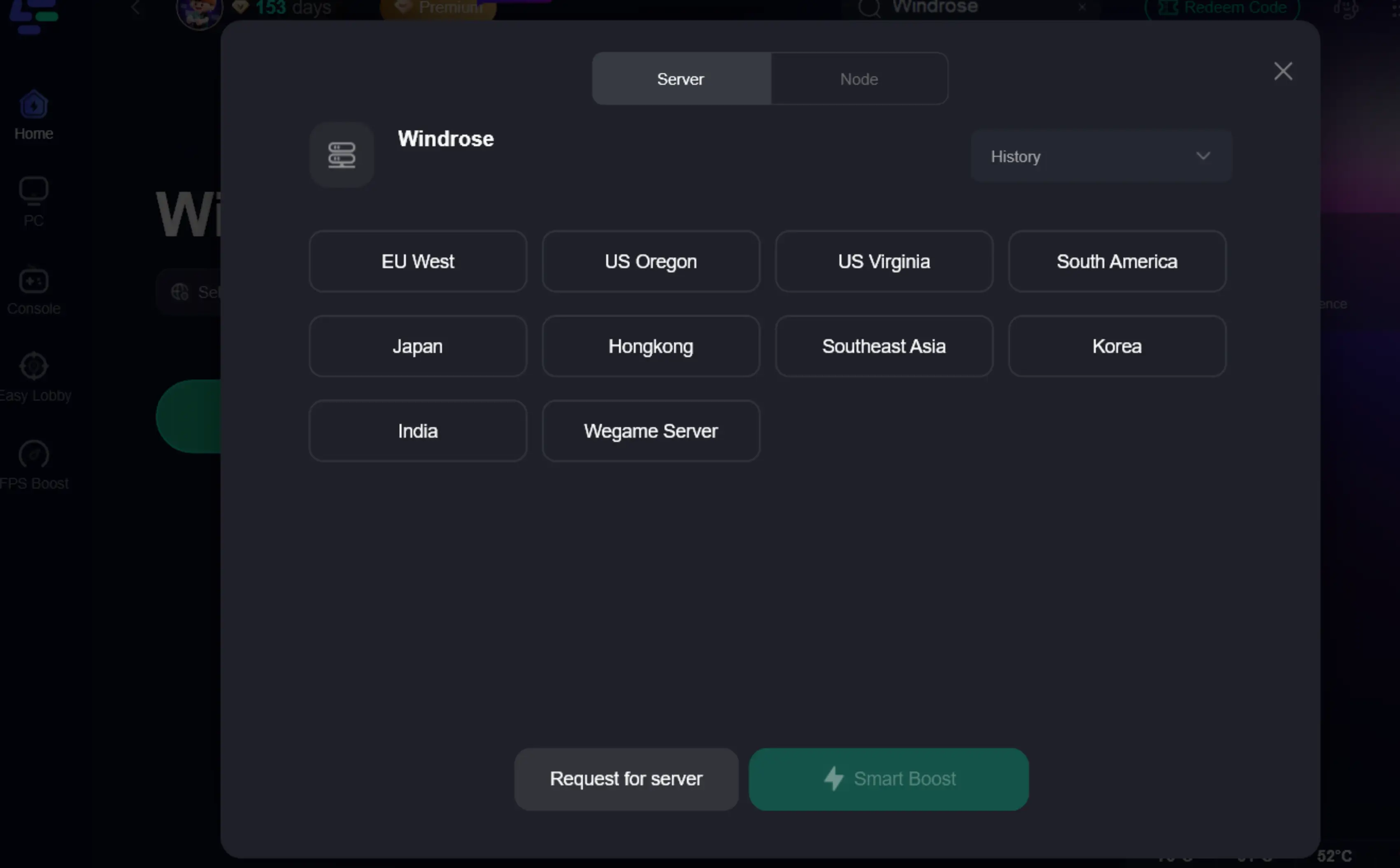
Step 5: Select the Optimal Server/Node: LagoFast will automatically recommend the best server or node for your region, ensuring the most stable and lowest-latency connection. If you are playing co-op with friends in a different region, you can manually select a server closer to their location for a more balanced connection.
Step 6: One-Click Boost: Click the "Boost" button. LagoFast will then optimize your network settings and system resources, preparing your PC for the best possible gaming experience. You will see real-time statistics on your ping and network stability.
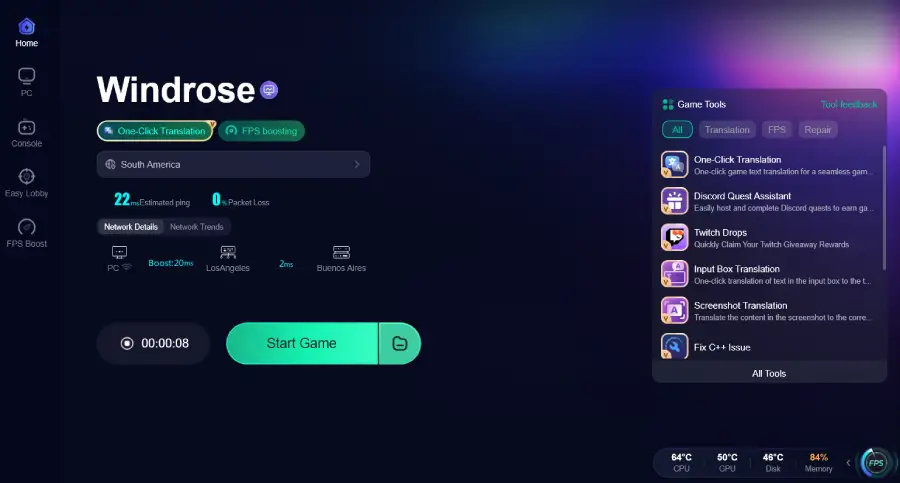
Step 7: Activate FPS Boost (Optional): Beyond network optimization, LagoFast also offers an FPS Boost feature. This can further enhance your Windrose experience by optimizing CPU, GPU, and RAM usage, ensuring you get the highest possible frame rates, especially when running demanding visual mods.
Part 7. FAQs
Q: Will installing mods ban me from multiplayer in Windrose?
A: For single-player or private co-op sessions, developers typically do not ban players for modifying local game files. However, if Windrose introduces official dedicated multiplayer servers with anti-cheat, you must disable all memory-altering mods and unauthorized .pak files before joining, as they could trigger a ban.
Q: Do mods disable Steam achievements in Windrose?
A: Many games detect modified script files and will disable achievement progression for the duration of the modded session. Some mods or external tools might offer an "Achievement Enabler" to bypass this. Always check the mod's description for specific information regarding achievement compatibility.
Q: What is the best mod for FPS in Windrose?
A: The "Smooth Sailing FPS Optimizer" is highly recommended for improving frame rates, especially for systems struggling with Unreal Engine 5's Lumen global illumination. Combining this with LagoFast's built-in FPS Boost can provide the most significant performance gains.
Q: Can I use multiple mods at once?
A: Yes, but with caution. Using a mod manager is crucial for handling multiple .pak files and managing load order. Be aware of potential conflicts between mods that alter the same game elements, and always test your mod setup incrementally.
Conclusion
Windrose offers a rich, immersive pirate survival experience, and the modding community has already begun to unlock its full potential. From essential Quality of Life improvements that streamline your inventory to breathtaking visual overhauls and challenging gameplay adjustments, the right mods can transform your journey across the high seas. However, a truly optimized gaming experience extends beyond just mods. By pairing your curated mod list with the network and system enhancements provided by LagoFast Game Booster, you ensure that your adventures are not only visually stunning and deeply engaging but also smooth, stable, and free from performance bottlenecks. Don't just play Windrose; master it with the best mods and the power of LagoFast. Download LagoFast today and set sail for the ultimate pirate legend you were meant to be.

Boost Your Game with LagoFast for Epic Speed
Play harder, faster. LagoFast game booster eliminates stutter and lags on PC, mobile, or Mac—win every match!
Quickly Reduce Game Lag and Ping!
Boost FPS for Smoother Gameplay!