
Battlefield 6 is finally here, but not everyone's getting into the action. Many players report the game won't open, crashes during startup, or gets stuck on the loading screen. If you've run into any of these, you're not alone.
This article breaks down the top Battlefield 6 not working problems and how to solve them, one step at a time
German Version: Battlefield 6 funktioniert nicht? Behebe Startprobleme, SecureBoot-Fehler und Ladeprobleme.
Korean Version: Battlefield 6 EA Javelin Anticheat 오류 수정: 해결 방법
Part 1: Why Is Battlefield 6 Not Opening or Launching?
Part 2: How to Fix Battlefield 6 Not Opening or Launching?
Part 3: How to Fix Battlefield 6 "SecureBoot is not enabled" Message?
Part 4: How to Fix Battlefield 6 Stuck on Loading Screen?
Part 5: How to Enhance Battlefield 6 Game Experience with LagoFast Game Booster
Part 1: Why Is Battlefield 6 Not Opening or Launching?
Before fixing the issue, it's important to understand what might be going wrong. Battlefield 6 won't launch for several reasons, and the cause might be different depending on your system.
Some common symptoms include:
- Game fails to respond after clicking "Play"
- EA launcher stuck or frozen
- A message saying “SecureBoot is not enabled”
- Account not linking properly for rewards
These issues mostly arise from system requirements, software conflicts, or network instability.
Understanding the cause can help you choose the right fix in the next step.
Part 2: How to Fix Battlefield 6 Not Opening or Launching?
Now that you know the main reasons, let's fix them one by one. Don't worry—most issues can be solved without reinstalling the whole game.
Here's what you can try:
- Enable SecureBoot in BIOS Restart your PC, enter BIOS settings, and turn on SecureBoot. This is a must for Battlefield 6 to run.
- Run the game as administrator Right-click on the game icon and select “Run as administrator” to give it full access.
- Close background apps Disable apps like Discord, Chrome, or VPNs that may be interfering.
- Verify game files Use the EA or Steam launcher to check for missing or corrupt files.
Part 3: How to Fix Battlefield 6 "SecureBoot is not enabled" Message?
This error has become a top frustration for PC players. Luckily, it's fixable in a few simple steps.
Follow this:
- Restart your PC and enter BIOS (usually with F2 or Delete key)
- Look for the Secure Boot setting and enable it
- Save and exit BIOS
On some systems, you may need to disable “CSM” or enable UEFI mode first. Be cautious and check your motherboard manual if needed.
After enabling SecureBoot, Battlefield 6 should launch without any issues.
Part 4: How to Fix Battlefield 6 Stuck on Loading Screen?
These steps solve the most common startup issues and get you back into the battlefield quickly.
Still not getting in? Many users report that the game loads halfway and freezes. This can be caused by cache conflicts or network instability.
Try the following:
- Fully exit and restart the EA launcher
- Clear your cache from local folders
- Disable any VPN or proxy service
- Make sure your graphics drivers and DirectX are updated
If done properly, these fixes will help clear the freeze and let you progress past the loading screen.
Don't forget to restart your system after applying these changes for best results.
Hot Related: Battlefield 6 Queue Login - How to be First to Access
Part 5: How to Enhance Battlefield 6 Game Experience with LagoFast Game Booster
Once you're in the game, the last thing you want is lag or high ping ruining the fun. That's where a game booster like LagoFast comes in.
LagoFast can help by:
- Reducing ping and improving response time
- Avoiding packet loss and lag spikes
- Automatically selecting the best route and region server
Especially for players experiencing connection drops or rubberbanding, a booster can make a huge difference.
With the technical setup fixed and your network optimized, you'll finally enjoy Battlefield 6 the way it was meant to be played.
Use LagoFast for Network Optimization
LagoFast enhances your gaming experience by optimizing network routes, reducing latency, and stabilizing connections. This can indirectly improve FPS by minimizing lag and ensuring smoother gameplay.
Step 1: Begin by clicking the Free Trial button to download and install the LagoFast Free Trial.
Step 2: Search for Your Game: Open LagoFast and find your game in the search bar.

Step 3: Choose the Best Server: Click "Select Server" and pick a stable server for your region.

Step 4: Activate Smart Boost: Hit the "Smart Boost" button to monitor your ping, packet loss, and network type in real time.

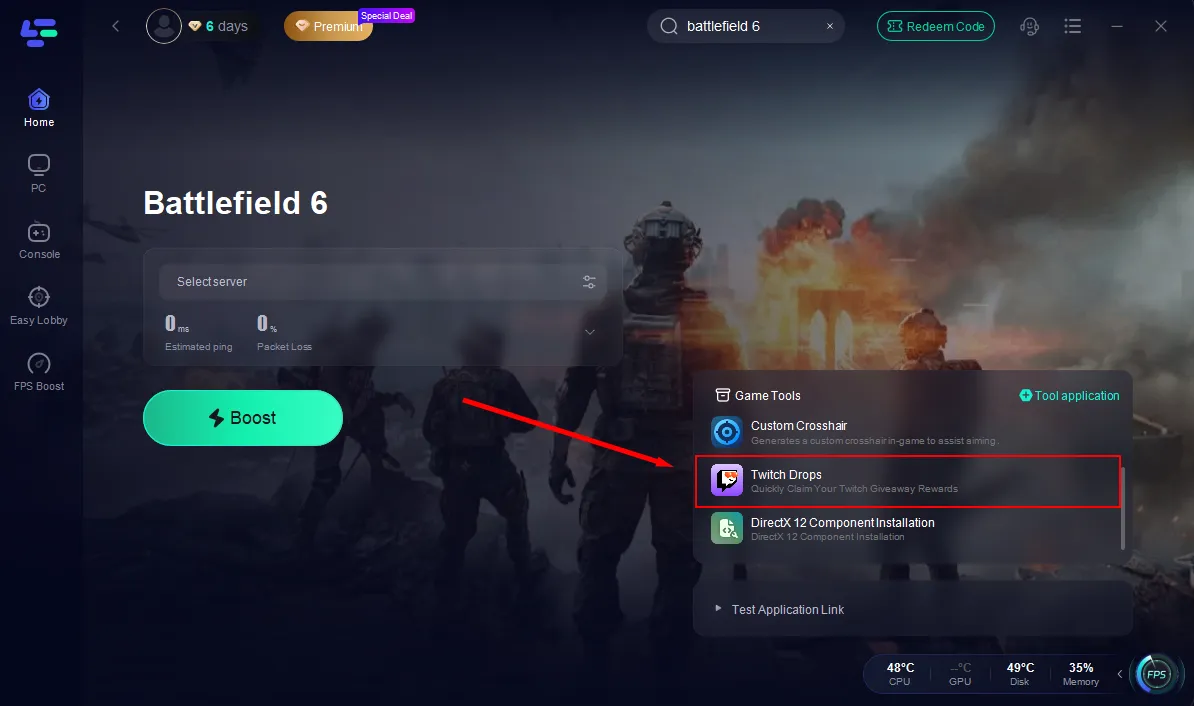
Besides, for players short on time but eager to claim Batterfield 6 rewards, LagoFast's Twitch Drops tool offers the fastest and easiest solution. Through official partnerships, LagoFast lets you claim Batterfield 6 Twitch rewards with one click—no hours-long grind required. It automatically detects claimable drops and delivers them to your linked account. Simply check your Twitch Inventory to receive them.
Conclusion
Technical issues shouldn't stand in the way of epic gameplay. Whether it's Battlefield 6 not working, stuck on loading screen, or SecureBoot blocking you, now you have clear solutions.
Take the time to configure your system, apply the right fixes, and optimize your connection. Once everything's running smoothly, it's time to gear up and hit the frontlines.
Boost Your Game with LagoFast for Epic Speed
Play harder, faster. LagoFast game booster eliminates stutter and lags on PC, mobile, or Mac—win every match!
Quickly Reduce Game Lag and Ping!
Boost FPS for Smoother Gameplay!