
The Battlefield 6 launch has been rough for many players. Thousands are stuck at login screens, watching queues climb from 100 K to 600 K+, and even the single-player campaign won’t load. If you keep seeing errors like “An unknown error occurred” or “Failed to connect to EA servers,” this guide covers everything you need to know.

- ✅ Reduce Lag and High Ping.
✅ Boost FPS at the Same Time.
✅ Support 2000+ Popular Online Games. - ✅ Change Server without Latency.
- ✅ End Stuck & Black Screen Issues.
Part 1. What’s Happening Right Now
Part 3. Quick Fixes That Actually Work
Part 4. If You Can’t Even Launch the Game
Part 5. Why EA Tied the Campaign to Online Servers
Part 6. When Will It Be Fixed?
Part 1. What’s Happening Right Now
Massive Login Queues
EA’s authentication servers are overloaded. Players across Reddit and Steam report queues exceeding half a million, looping back to the start after reaching 0.
“Got to 10 K and got kicked back to 385 K. DICE, pls.” — r/Battlefield
Even those who only want to play the offline campaign are blocked, because Battlefield 6 still requires an online login before menu access.
“Unknown Error” or “Failed to Retrieve Server List”
When the queue finishes, many are met with this pop-up. It means your game reached the server but didn’t receive a valid response before the timeout expired. The queue then restarts.
Always-Online Design
Unlike older Battlefield titles, even the campaign is tied to EA Play authentication. The launcher checks your EA account and verifies game ownership through the same servers used for multiplayer—if those go down, everyone gets locked out.
Intermittent Timeout After Playing for Hours
Some players report that Battlefield 6 initially runs fine, but after a few hours, attempting to join any server results in a black screen followed by a “Connection Timeout” message. This typically happens when EA’s session tokens expire or lose synchronization with the login servers.
It’s another symptom of the always-online design—even after a stable login, the client must constantly renew authentication. When the renewal fails, the game kicks the player out and can’t connect to any server.
These symptoms are closely tied to Battlefield 6’s online verification system—and they often appear under different error messages, which we’ll break down below.
Part 2. Common Error Messages
- “Failed to Connect to EA ”Servers”—authentication timeout or DNS issue.
- “An Unknown Error Occurred”—the queue session expired before validation.
- “Failed to Retrieve Server ”List”—backend outage or packet loss.
- “You Must Be Online to ‘Play’”—EA App or Origin connection failure.
Part 3. Quick Fixes That Actually Work
Solution 1: Use LagoFast Game Booster (Verified by Players)
LagoFast’s Smart Boost routes Battlefield 6 traffic through low-latency nodes that avoid congested EA gateways—proven effective in the beta.
Steps:
1. Download and install LagoFast Game Booster on PC or mobile.
2. Search “Battlefield 6” → click Boost.
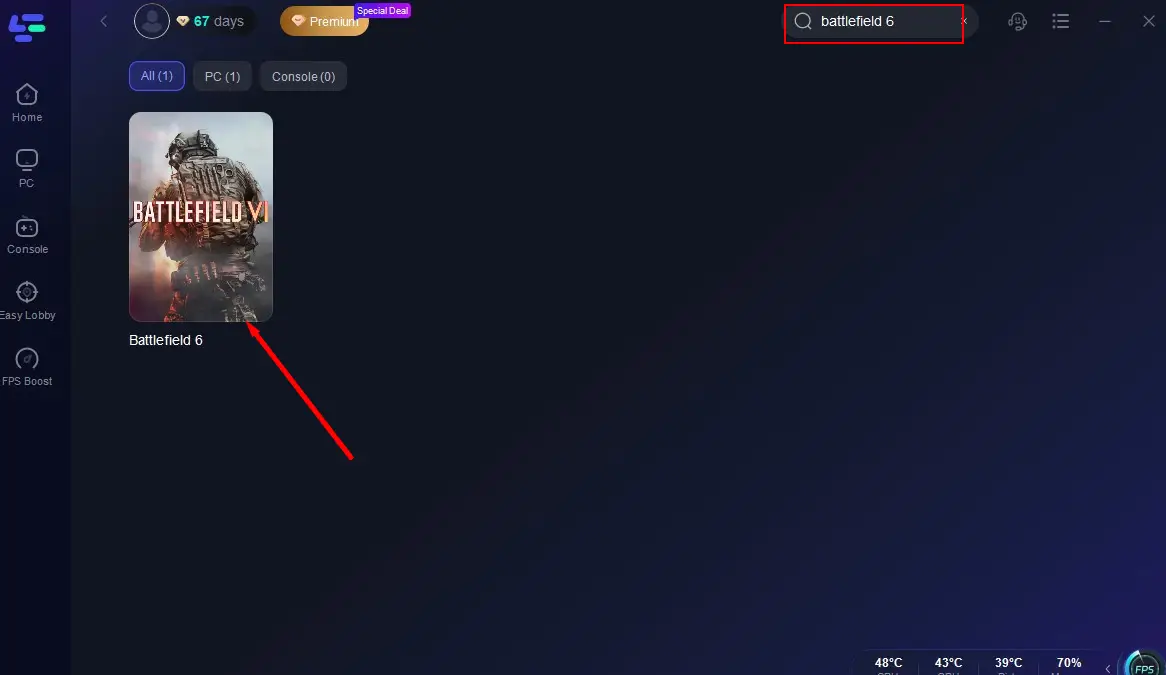
3. Choose a server close to your region (EU/US/Asia) and enable Smart Boost.

4. Launch the game through LagoFast to reduce queue timeouts and packet loss.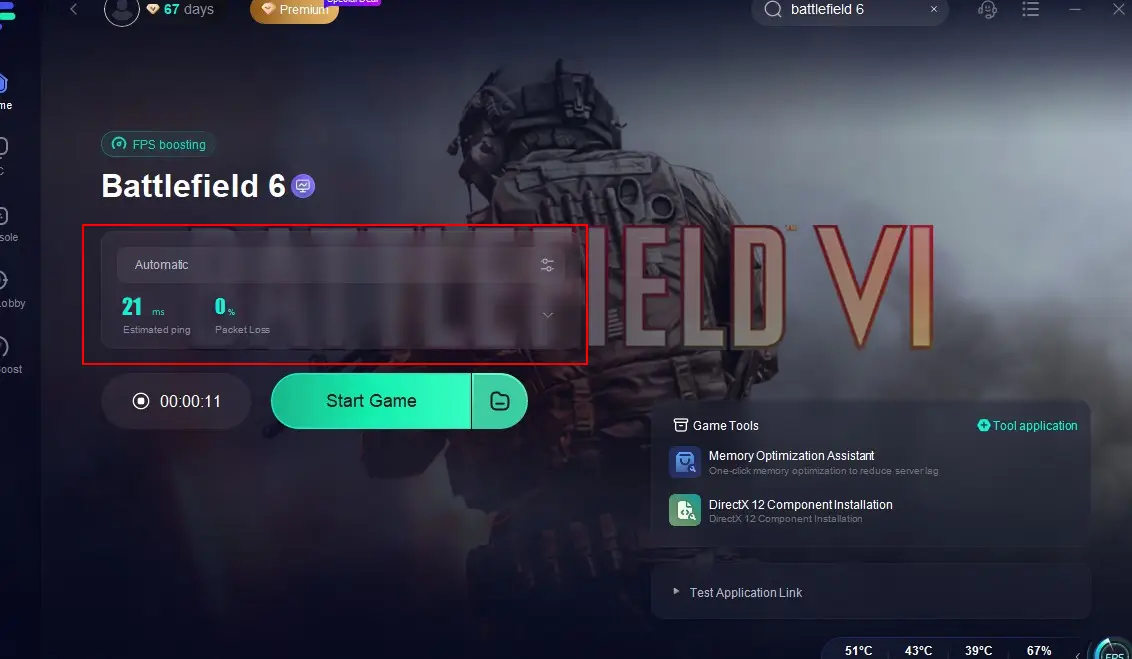
Players report cutting queue loops and reaching the menu successfully after enabling LagoFast.
Solution 2: Check EA Server Status
Sometimes the problem isn’t you.
- Go to EA Help Server Status
- Select Battlefield 6 and your platform.
If servers are marked "Down" or "Maintenance," all you can do is wait—retry every 30 minutes.
Solution 3: Reset Your Network Stack
If you’re looping the same error even when servers are up:
1. Open Command Prompt (Admin).
Enter the following commands sequentially:
netsh winsock reset
netsh int ip reset
ipconfig /flushdns
2. Restart your router and PC.
3. Relaunch Battlefield 6.
This refreshes DNS and TCP/IP, clearing blocked sessions from EA servers.
Solution 4: Disable Firewall and Antivirus Conflicts
Security software often blocks Battlefield 6’s authentication traffic.
Windows Firewall:
- Control Panel > System and Security > Windows Defender Firewall → Turn Off.
Third-party AV:
- Temporarily disable or whitelist the game (Battlefield6.exe) and the EA app.
Then retest login.
Solution 5: Launch EA App As Administrator
EA App or Origin sometimes fails to refresh tokens if launched without elevated permissions.
- Right-click the EA App → Run as Administrator.
- Log out → log back in.
- Relaunch Battlefield 6.
Solution 6: Switch to a Different DNS
If you keep timing out at the “retrieving server list” stage:
1. Open Network & Internet Settings > Change Adapter Options.
2. Right-click your active connection > Properties > Internet Protocol Version 4 (IPv4).
3. Set DNS to:
- 8.8.8.8 and 8.8.4.4 (Google).
- 1.1.1.1 and 1.0.0.1 (Cloudflare).
4. Apply and restart.
Part 4. If You Can’t Even Launch the Game
Some Steam and EA App users can’t start the game at all (“unpacking” or “not installed” loop).
Fix:
- Close both EA App and Steam completely.
- Delete the Battlefield6 folder inside Documents/Battlefield.
- Re-verify files in Steam or EA App.
- Restart your PC → run EA App as admin.
- The game should now re-detect files and boot properly.
Part 5. Why EA Tied the Campaign to Online Servers
EA claims that single-player progress and unlock synchronization require live profile data, which means every Battlefield 6 player must log into EA servers —even for offline modes.
This design ensures unified stat tracking but causes major issues when authentication fails.
Part 6. When Will It Be Fixed?
EA and DICE acknowledged server overloads on official channels and are rolling out additional capacity.
Expect gradual stability within 24–48 hours post-launch, similar to Helldivers 2 and Battlefield 2042 rollouts.
Conclusion
Battlefield 6’s login and server issues are caused by overloaded EA servers and the game’s always-online design. To fix them quickly, try using LagoFast Game Booster, checking server status, resetting your network, adjusting firewall or antivirus settings, running the EA app as administrator, or switching DNS servers. These steps can help you bypass queues, reduce errors, and get back into the game faster while waiting for EA to stabilize servers.
Boost Your Game with LagoFast for Epic Speed
Play harder, faster. LagoFast game booster eliminates stutter and lags on PC, mobile, or Mac—win every match!
Quickly Reduce Game Lag and Ping!
Boost FPS for Smoother Gameplay!