
Ready for action? Starting August 7, Battlefield 6 kicks off its massive open beta before the full release. Whether you're jumping in early access for a sneak peek or joining later after the open beta test beginning, there is one thing certain: to survive the fast-paced chaos of Battlefield 6's large-scale gunfights, you’ll need to keep your in-game ping as low as possible. Otherwise, you risk falling victim to frustrating lag. In this article, we’ll explore the causes behind Battlefield 6 high ping and share practical fixes to help you dominate the battlefield with lightning-fast reactions.
Korean Version: Battlefield 6 높은 핑: 해결을 위한 종합 가이드
German Version: Battlefield 6 Hoher Ping: Ein umfassender Leitfaden zur Behebung
Want to get Battlefield 6 early access? Click here>>Battlefield 6 Early Access keys & Play Battlefield 6 Beta Early

- ✅ Reduce Lag and High Ping.
- ✅ Boost FPS at the Same Time.
- ✅ Support 2000+ Popular Online Games.
- ✅ Explore Battlefield 6 Classes.
- ✅ Ensure Server Status.
Part 1: Why is My Ping so High in Battlefield 6
Part 2: Best Battlefield 6 High Ping Reducer - LagoFast
Part 3: Other Fixes for Reducing High Ping in Battlefield 6
Part 1: Why is My Ping so High in Battlefield 6
There are five main reasons why high latency may occur in Battlefield 6:
- Distant Servers: Most official servers are overseas. Players in Asia, Europe, or rural areas suffer from extended data travel distances37.
- ISP Throttling & Routing Issues: Internet providers often prioritize non-gaming traffic or use inefficient routes, especially during peak hours14.
- Wi-Fi Interference: Wireless signals face interference from walls, appliances, or other networks, causing jitter and packet loss12.
- Network Congestion: Background downloads, streaming, or family devices hog bandwidth, starving BF6 of critical resources28.
- Hardware Limitations: Old routers or overheating CPUs/GPUs throttle performance, increasing processing delays210.
Part 2: Best Battlefield 6 High Ping Reducer - LagoFast
As a professional game booster, LagoFast provides Battlefield 6 server nodes across the globe, allowing players to connect to the nearest and most stable servers for lowest ping. This helps significantly reduce in-game latency and effectively lower high ping, ensuring smoother performance and more efficient routing during gameplay. The key advantages of using LagoFast include:
- Global Server Network: Deploys server nodes in over 60 countries and 150+ cities worldwide, offering diverse server options for players.
- Stable Connections: Avoids congested networks to minimize disconnects and maintain connection reliability.
- Ping Reduction: Lowers latency by optimizing data transmission routes and avoiding server congestion.
- Simple Operation: No complicated setup required - just click and install, players can instantly boost game performance with one button.
How to Reduce High Ping in Battlefield 6 with LagoFast:
Click the "Free Trial" button to download LagoFast and complete the installation.
Use the search bar to find Battlefield 6 and click on the search result.

Choose the best server location based on your geographical area and desired gaming performance, then click "Smart Boost" to initiate real-time optimization.

Verify your real-time ping and packet loss rates, then click "Start Game" to dive into the intense battles of Battlefield 6!

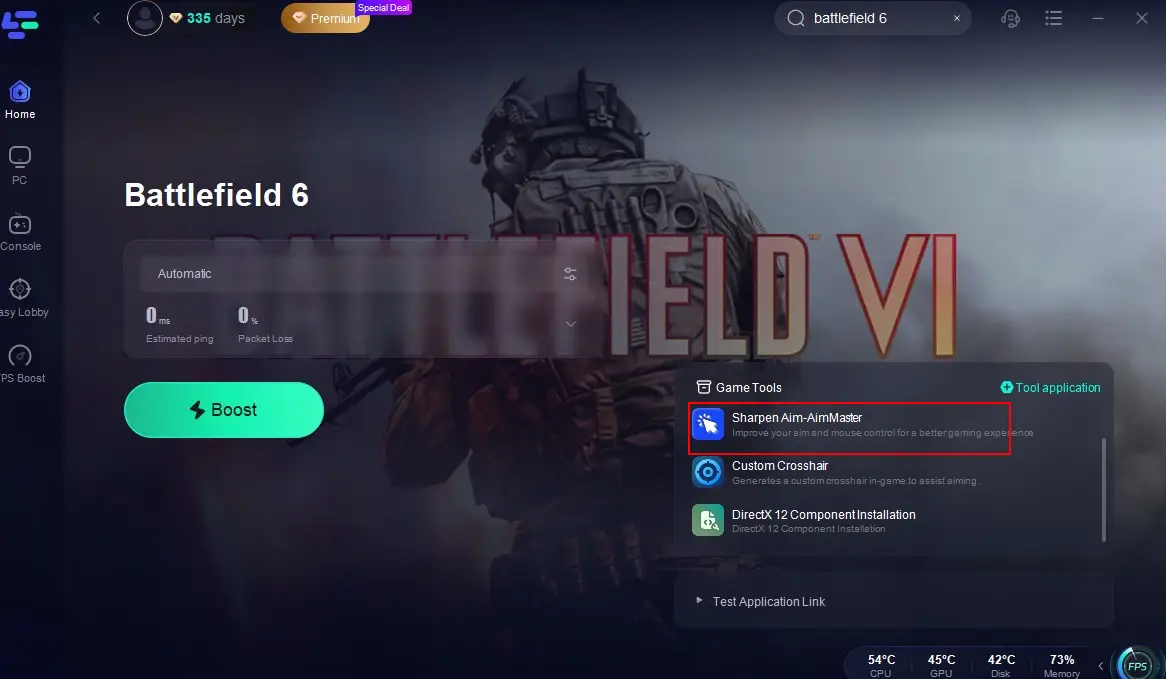
What's more, LagoFast's Battlefield 6 game tools can also help you to further improve your gaming experience:
Open LagoFast and find Battlefield 6, click the "Sharpen Aim-AimMaster" tool in the bottom-right corner of the screen.
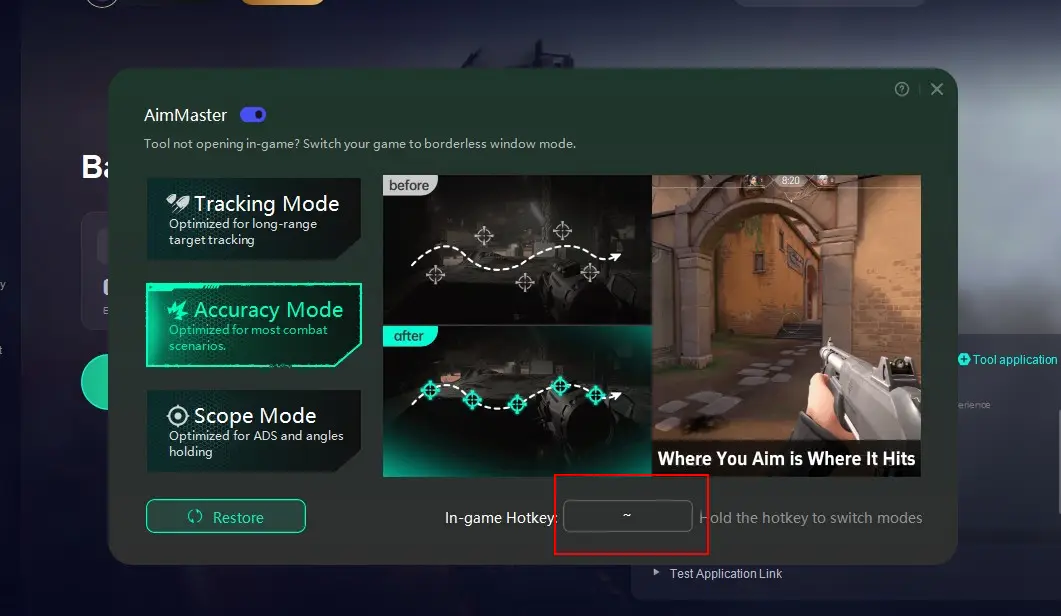
Select a mode that matches your combat scenario (Tracking, Accuracy, or Scope) and set an In-game Hotkey in the bottom-right corner.
Part 3: Other Fixes for Reducing High Ping in Battlefield 6
Of course, there are also a few basic fixes for Battlefield 6 ping issues that require manual adjustments from the player:
1. Ditch Wi-Fi for Ethernet
Wired connections slash latency spikes caused by signal interference. In tests, Ethernet reduced average ping by 40% vs. 5GHz Wi-Fi.
- Plug a Cat-7/Cat-8 cable into your router and PC/console.
- Disable Wi-Fi in system settings.
2. Optimize Your Local Network
- Free Up Bandwidth: Close bandwidth-hungry apps (Zoom, Netflix, torrents).
- Update Router Firmware: Log into your router’s admin panel (e.g., 192.168.1.1) and check for updates.
- Enable QoS: Prioritize BF6 traffic in router settings.
- Switch DNS: Use 8.8.8.8 (Google) or 223.5.5.5 (AliDNS) for faster domain resolution.
3. Tweak In-Game & System Settings
- Lower Graphics Settings: Disable ray tracing, reduce shadow quality, and turn on DLSS/FSR.
- Disable Fullscreen Optimization: Right-click Battlefield6.exe → Properties → Compatibility → Check "Disable fullscreen optimizations".
- Update GPU Drivers: Clean-install latest drivers via NVIDIA GeForce Experience or AMD Adrenalin.
4. Verify Game Files & Increase Virtual Memory
Corrupted files cause network-like lag:
- EA App/Steam: Right-click BF6 → "Repair" or "Verify integrity".
- Virtual Memory Expansion: Set Initial Size = 1.5x RAM | Maximum Size = 3x RAM (e.g., 24GB for 16GB RAM).
5. Cool Your Hardware & Stop Background Apps
Overheating CPUs/GPUs throttle performance → lag spikes:
- Monitor temps with HWMonitor (keep <85°C).
- Clean dust from fans/reapply thermal paste.
- End non-essential tasks via Task Manager (e.g., browser tabs, updaters)
German Version: Battlefield 6 Hoher Ping: Umfassender Leitfaden zur Reduzierung von Lag
Conclusion
High ping in Battlefield 6 may be caused by server distance, poor routing, or local issues—not magic. Start with an game booster like LagoFast, switch to Ethernet, and close background apps. With these fixes, you’ll slash latency to sub-70ms, turning chaotic battles into victories.

Boost Your Game with LagoFast for Epic Speed
Play harder, faster. LagoFast game booster eliminates stutter and lags on PC, mobile, or Mac—win every match!
Quickly Reduce Game Lag and Ping!
Boost FPS for Smoother Gameplay!