
If you’ve tried logging into Arc Raiders and got hit with messages like “connection to game server lost” or “failed to connect to server,” you’re not alone. Many players encounter Arc Raiders online connection errors, Arc Raiders connection errors, or sudden disconnections. High ping, network instability, or server overload can ruin your session—but the good news is, Lagofast can fix these issues quickly and get you back into the game without frustration.

- ✅ Reduce Lag and High Ping.
- ✅ Boost FPS at the Same Time.
- ✅ Support 2000+ Popular Online Games.
- ✅ Fix High Ping Easily
- ✅ Change Server without Latency
Part 1: Why Arc Raiders Cannot Connect to Servers
Part 2: Best Way to Fix Arc Raiders Connection Errors
Part 3: Additional Tips to Prevent Connection Issues
Part 1: Why Arc Raiders Cannot Connect to Servers
Before fixing the problem, it helps to know why it happens:
- Unstable internet or high ping—Even minor network fluctuations can trigger Arc Raiders connection to game server lost errors.
- Server overload—Too many players at peak times can cause online connection errors.
- Firewall or antivirus interference—Security software may block the game, causing connection errors.
- Bandwidth-heavy apps—downloads, streaming, or background apps can affect connectivity.
These issues are the main reasons for errors like “failed to connect to server” in Arc Raiders.
Part 2: Best Way to Fix Arc Raiders Connection Errors
The most effective way to fix Arc Raiders connection errors and prevent Arc Raiders connection to game server lost issues is by using Lagofast, a lightweight game booster that stabilizes your network and reduces lag. It automatically optimizes your connection, chooses the fastest server route, and prevents disconnections.
Here’s why it works:
- Optimizes your network—reduces latency and packet loss for smoother gameplay.
- Chooses the fastest server route—minimizes delays and prevents disconnections.
- Prevents connection drops—keeps you online even when your network fluctuates.
- Simple and lightweight—works on PC or console without complicated setup.
In short, Lagofast handles all the network tweaks, letting you focus on fighting, looting, and exploring instead of worrying about errors.
How to Fix Arc Raiders Connection Errors Using Lagofast
Follow these simple steps to ensure a smooth and stable Arc Raiders experience:
Step 1: Click the “Free Trial” button below to download and install Lagofast for free.
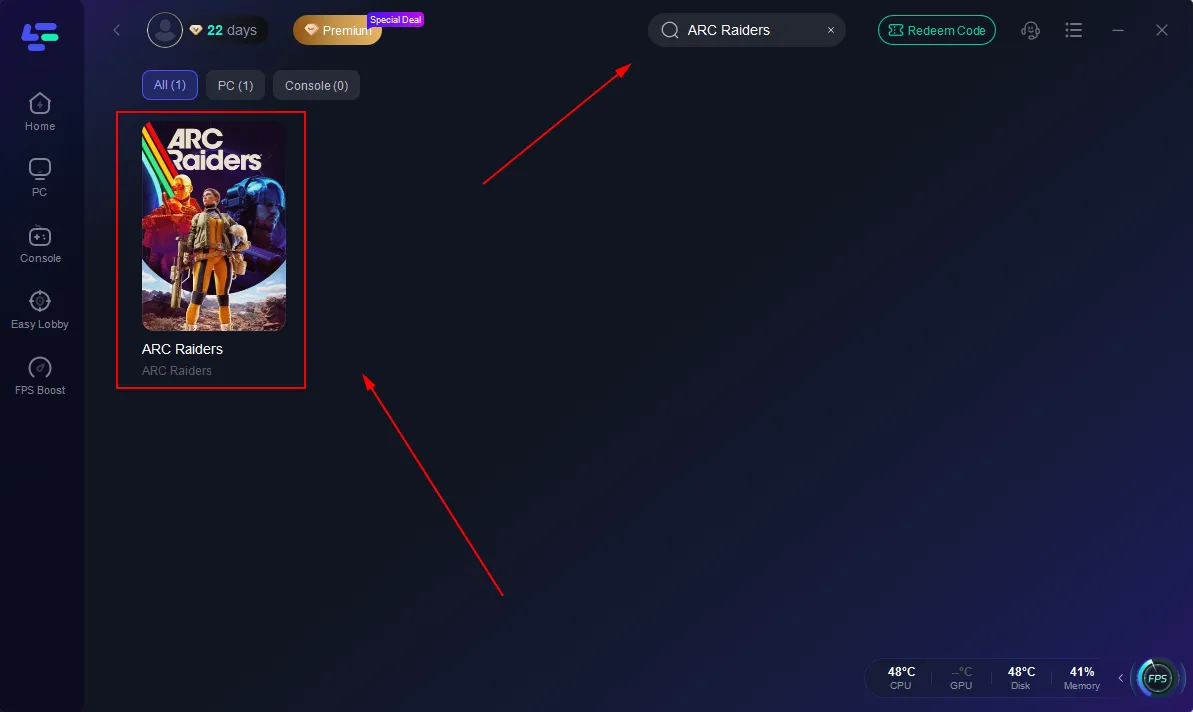
Step 2: Launch Lagofast, type “Arc Raiders” in the search bar, and select the game.
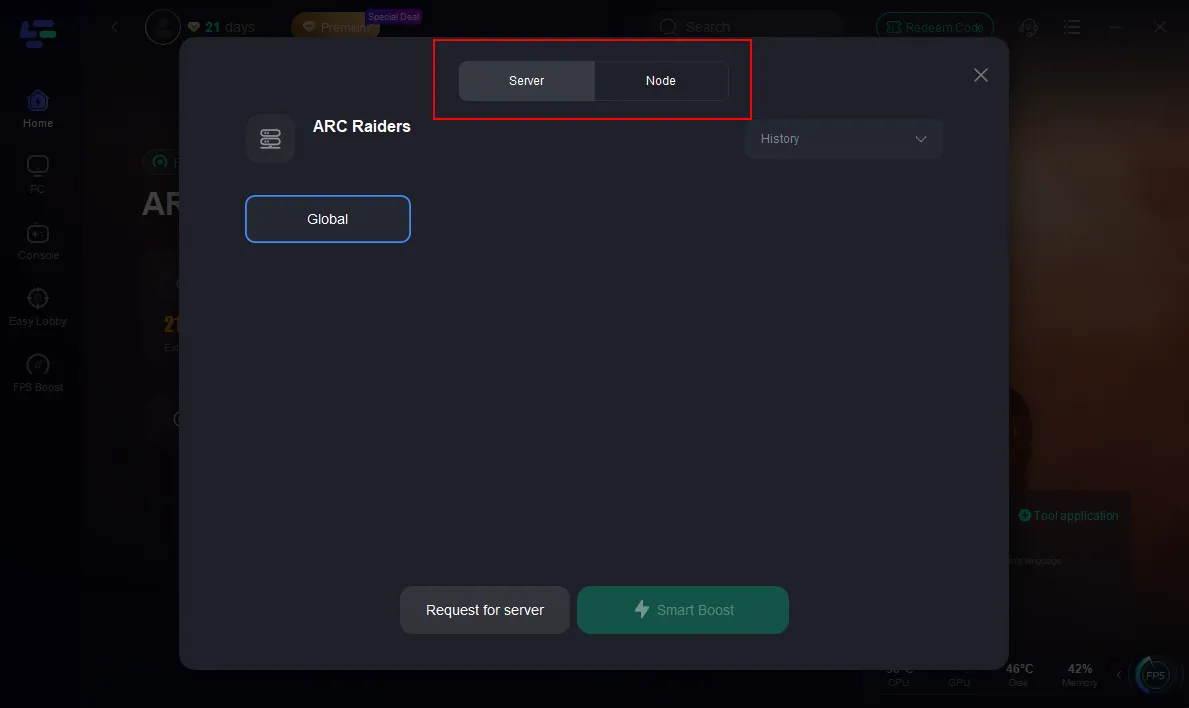
Step 3: Click “Select Server” to connect to a stable server node, then activate optimization via “Smart Boost.”
Step 4: After enabling real-time optimization, check your live ping and packet loss, then click “Start Game” to begin playing.
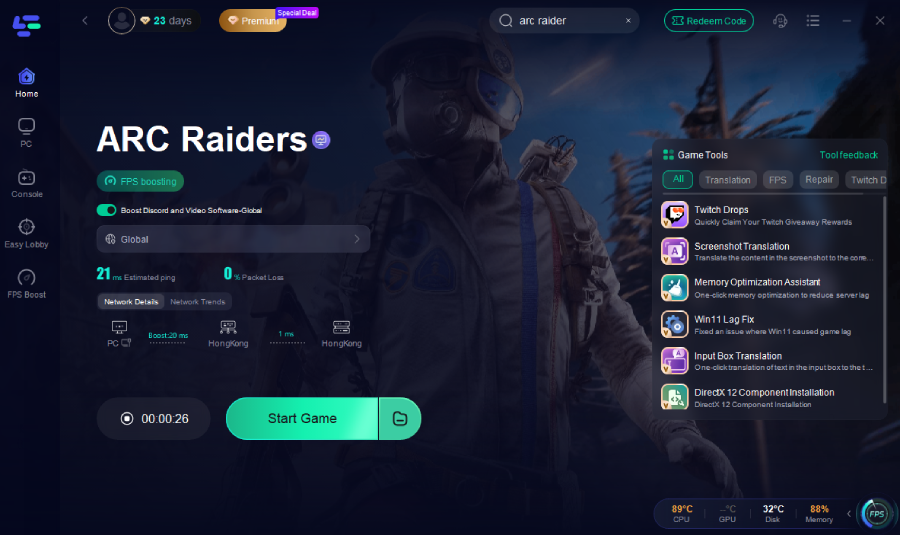
Lagofast handles all network adjustments automatically, eliminating issues like failed to connect to server or Arc Raiders online connection errors, so you can focus on gaming.
Part 3: Additional Tips to Prevent Connection Issues
Even with Lagofast, adopting some smart habits can help you maintain smooth and uninterrupted gameplay in Arc Raiders. Here are some practical tips:
- Use a wired connection – A direct Ethernet connection is much more stable than Wi-Fi, reducing lag spikes and sudden disconnects during intense battles or co-op raids.
- Close bandwidth-heavy apps while gaming—streaming videos, large downloads, or other apps running in the background can steal bandwidth, causing higher ping or packet loss.
- Check firewall and antivirus settings—make sure Arc Raiders is allowed through your security software. Blocking the game can cause repeated failed to connect to server errors.
- Play during off-peak hours—Servers are less congested during off-peak times, which can reduce delays and improve matchmaking speed.
- Keep your game and system updated – New patches often include server improvements and bug fixes, ensuring smoother connectivity.
- Restart your router and device regularly—this clears temporary network issues and ensures your connection is optimized before gaming.
- Monitor ping and packet loss—While Lagofast automatically optimizes your connection, keeping an eye on live ping and packet loss can help you spot potential network issues early.
- Understand server locations and latency—Some Arc Raiders missions or co-op sessions may require connecting to servers far from your region. Choosing the closest server or using Lagofast’s fastest route feature ensures you experience minimal lag.
- Plan long gaming sessions wisely—for longer raids or missions, ensure your network remains stable and avoid multitasking with other bandwidth-heavy activities. This prevents sudden disconnects that could cost progress or rewards.
Conclusion
Tired of “Arc Raiders connection to game server lost” or “failed to connect to server” errors? Lagofast offers the easiest way to stabilize your network, lower ping, and stop disconnections. Download it, choose the best server, enable Smart Boost—and enjoy smooth, lag-free gameplay every time.

Boost Your Game with LagoFast for Epic Speed
Play harder, faster. LagoFast game booster eliminates stutter and lags on PC, mobile, or Mac—win every match!
Quickly Reduce Game Lag and Ping!
Boost FPS for Smoother Gameplay!