
If you’re gearing up to play Anno 117: Pax Romana and want to enjoy it in your native language without losing immersion, you’ll want to know not just about the game itself but also how you can get around any language barriers. In this article, we provide a quick overview of the game, list the officially supported languages (audio, subtitles and interface), highlight what language support is not provided, and then introduce a top-tier solution: the “Anno 117: Pax Romana game translation tool” that allows you to play the game seamlessly in more languages than the developer offers.
Part 1. Anno 117: Pax Romana Gameplay Overview
Part 2. Anno 117: Pax Romana Supported Languages
Part 3. Why Anno 117: Pax Romana Does Not Support Languages Like Turkish
Part 4. Best Anno 117: Pax Romana Translation Tool — LagoFast
Part 1. Anno 117: Pax Romana Gameplay Overview
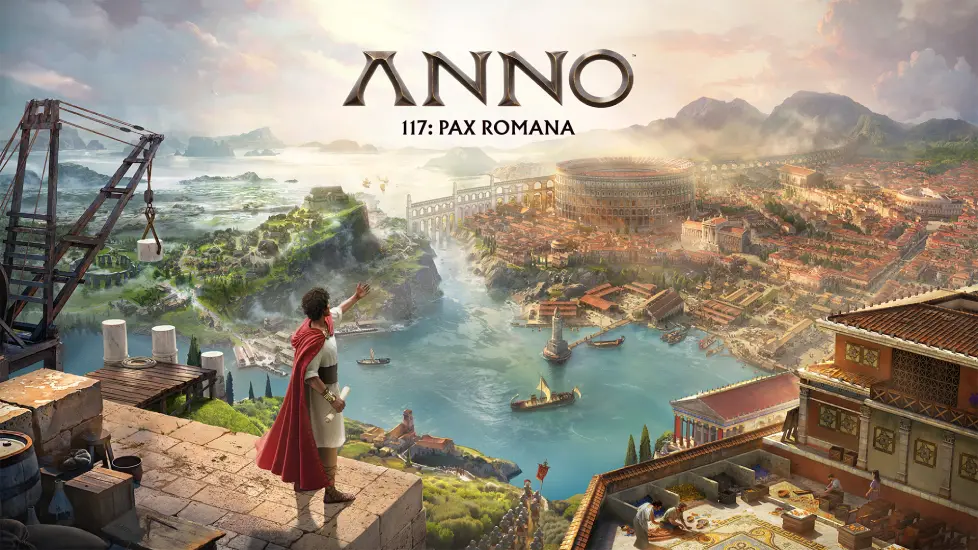
Anno 117: Pax Romana is a city-building real-time strategy game set in Ancient Rome, developed by Ubisoft Mainz and published by Ubisoft.
The game lets you play as a Roman governor in the year AD 117, expanding your province, managing resources, trade, and culture.
You’ll build cities, trade, possibly engage in conflicts or diplomacy, manage growth and citizen needs—typical of the Anno series but now with the Roman theme.
With this kind of strategy-citybuilder gameplay, having clear text, interface menus and subtitles in your language helps a lot—not just for immersion but for making sound decisions in the economy and strategy.
Part 2. Anno 117: Pax Romana Supported Languages
Here’s how the game stacks up in official support across Audio, Subtitles and Interface for various languages:
|
Language (Region) |
Audio |
Subtitles |
Interface |
|---|---|---|---|
|
Chinese (Simplified) |
x |
x |
x |
|
Chinese (Traditional) |
x |
x |
|
|
English |
x |
x |
x |
|
French |
x |
x |
x |
|
German |
x |
x |
x |
|
Italian |
x |
||
|
Japanese |
x |
||
|
Korean |
x |
||
|
Polish |
x |
||
|
Portuguese (Brazilian) |
x |
||
|
Russian |
x |
||
|
Spanish |
x |
x |
Please note: This list reflects the publicly documented support (or inferred from community discussion) and might not be entirely exhaustive. For example, some languages might appear in interface but not fully in audio or subtitles.
One example of uncertainty: a Steam community post mentions “only English” for certain aspects, which suggests additional language support might be incomplete.
Always check your platform store page for the full language list when you purchase.
Part 3. Why Anno 117: Pax Romana Does Not Support Languages Like Turkish
Anno 117: Pax Romana launches with a limited set of languages, and Turkish is not one of them. The reasons are not officially stated, but the industry usually comes down to a few simple factors:
- Localisation cost vs. market size: Publishers focus on languages with the highest sales potential. Turkish-speaking regions are growing, but still not prioritized at launch.
- Large amount of text in strategy games: City-builders like Anno contain huge amounts of UI text, tutorials and dialogues. Translating all of it for many languages is time-consuming.
- No Turkish voice-over pipeline: Without existing studio resources for Turkish audio, publishers often skip the language entirely instead of offering text-only localisation.
- Staged localisation plans: Additional languages may or may not be added later, depending on player demand and budget.
Because of these limitations, players who prefer Turkish or other unsupported languages often turn to an external Anno 117: Pax Romana game translation tool to enjoy the game more comfortably.
Part 4. Best Anno 117: Pax Romana Translation Tool — LagoFast
Screenshot Translation Tool – play Anno 117: Pax Romana in any language
The tool we recommend is LagoFast, a game translation & acceleration client. It supports features like screenshot translation and input box translation (on PC) which let you translate in-game text in real time.
With a screenshot translation tool you can:
- Capture portions of the game interface (menus, tool-tips, dialogue boxes) and view instant translations.
- Use input-box translation to chat or enter text and have it converted to your target language.
This means even if a language like Turkish is not officially supported by Anno 117: Pax Romana, you can still play the game in your language of choice by overlaying translated text.
How to Use LagoFast Screenshot Translation Tool for Anno 117: Pax Romana:
Step 1: Download LagoFast Start by visiting the LagoFast website and clicking the “Free Trial” button.
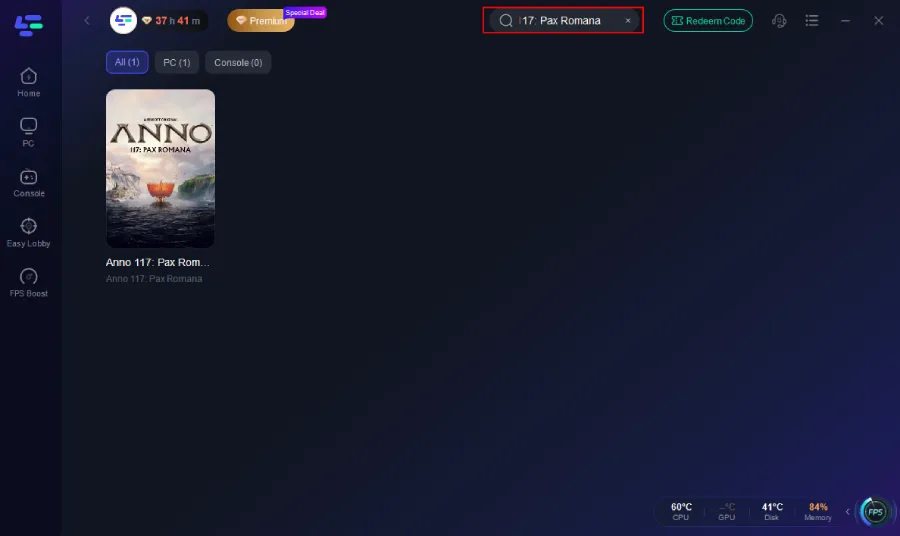
Step 2: Integrate Your Game Open LagoFast and use the search function to find your specific game. This should be done before launching the game to ensure it can be optimized.
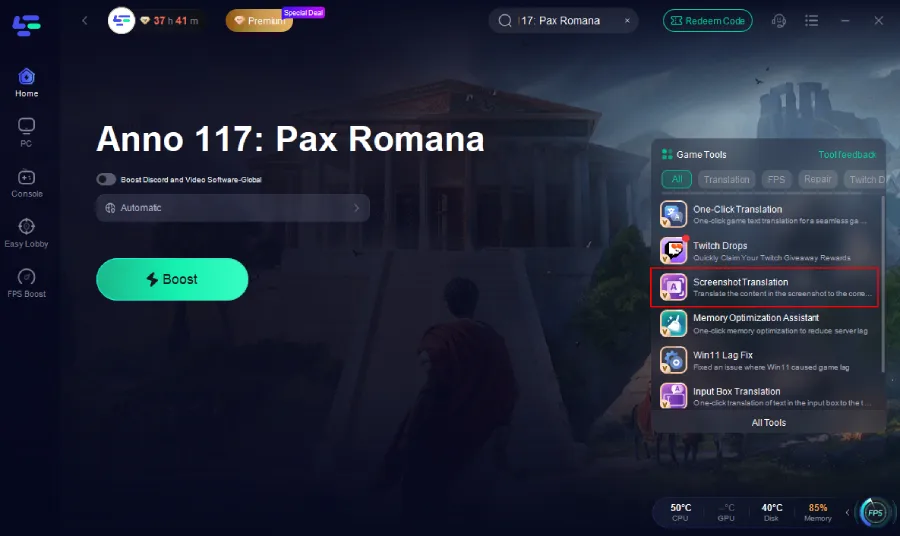
Step 3: Click the Screeshot Translation Tool on the right.
Step 4: Choose your target language and set up the hotkeys.
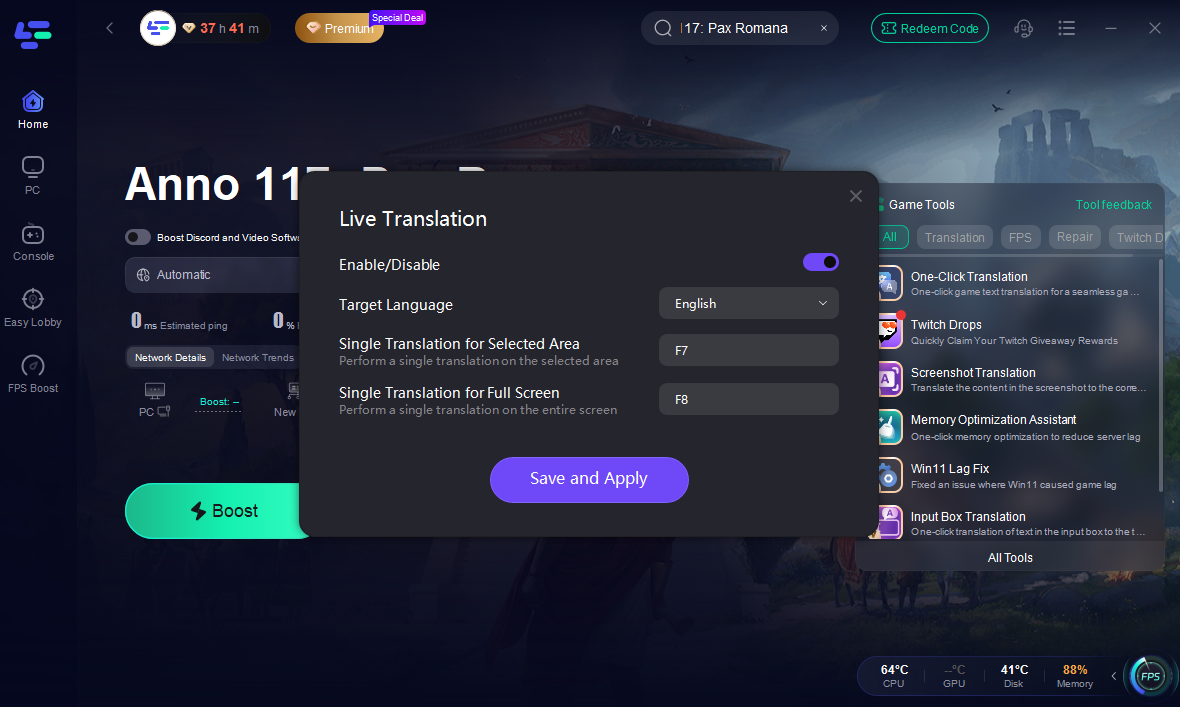
Step 5: Server Selection Navigate to “Select Server” within LagoFast. Then select the most efficient Node displayed on the right side to connect.
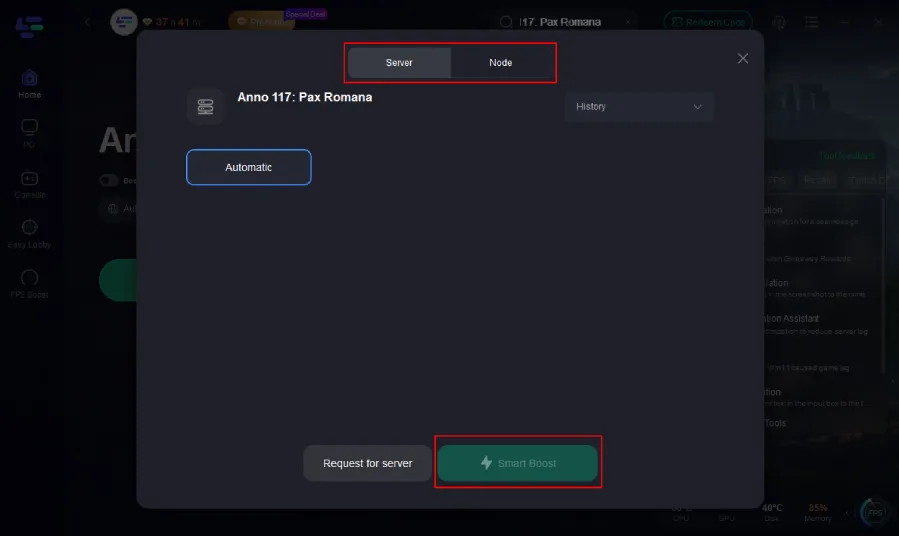
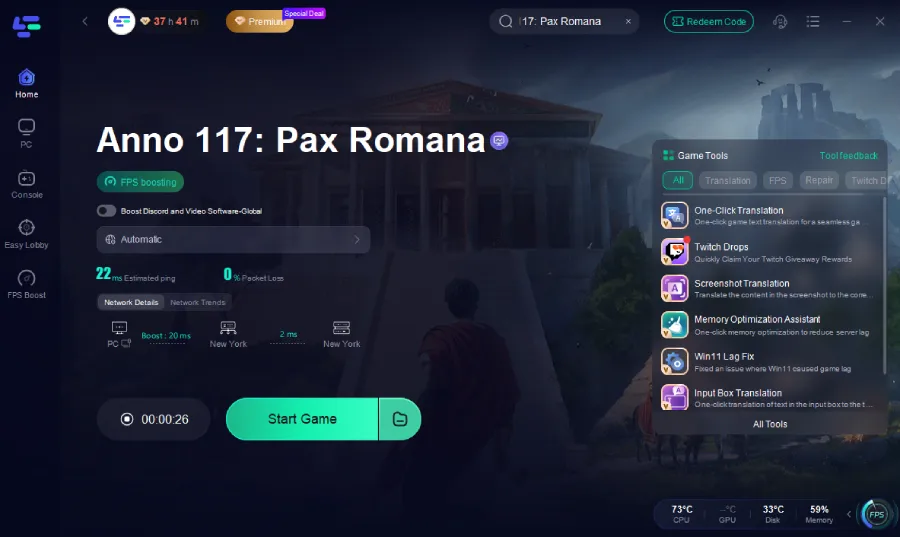
Step 6: Activate Smart Boost Click the “Smart Boost” button to start optimizing your game connection. LagoFast will then display real-time stats such as game ping, packet loss, and network type.
Play Anno 117: Pax Romana in Turkish seamlessly with LagoFast
For a language like Turkish (which is missing official support) you can use LagoFast’s One-Click Translation Tool: this isn’t just overlaying text—it replaces or patches game text so that the UI, interface or subtitles show up in your target language. Unlike screenshot translation, this tool installs the translated text directly into the game files, replacing the original strings so the language integrates naturally into the interface. It produces no garbled text, contains no viruses, and won’t cause lag or performance issues. And since LagoFast is also a game accelerator, it can further improve your overall gameplay experience.
How to Play Anno 117: Pax Romana in Turkish:
Step 1. Click the One-Click Translation Tool on the right.
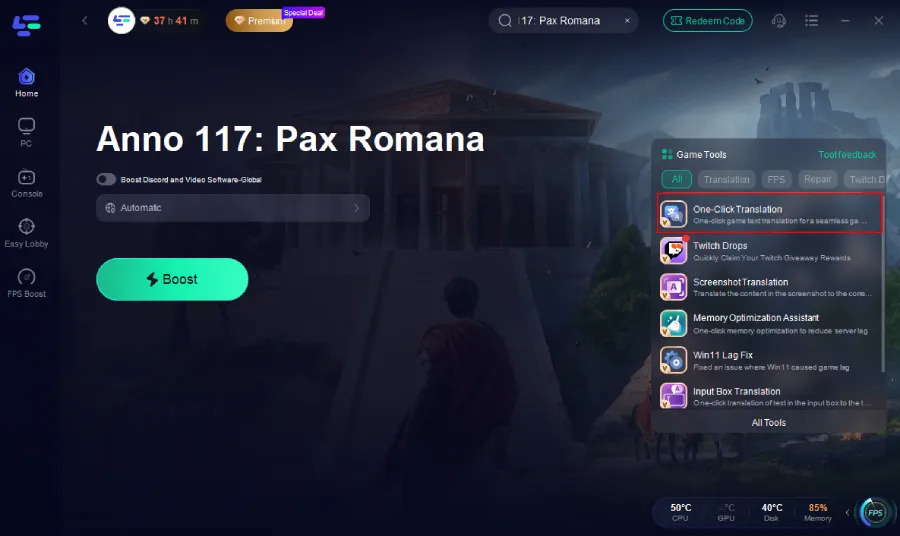
Step 2. Choose the game file path and install the translation text file.
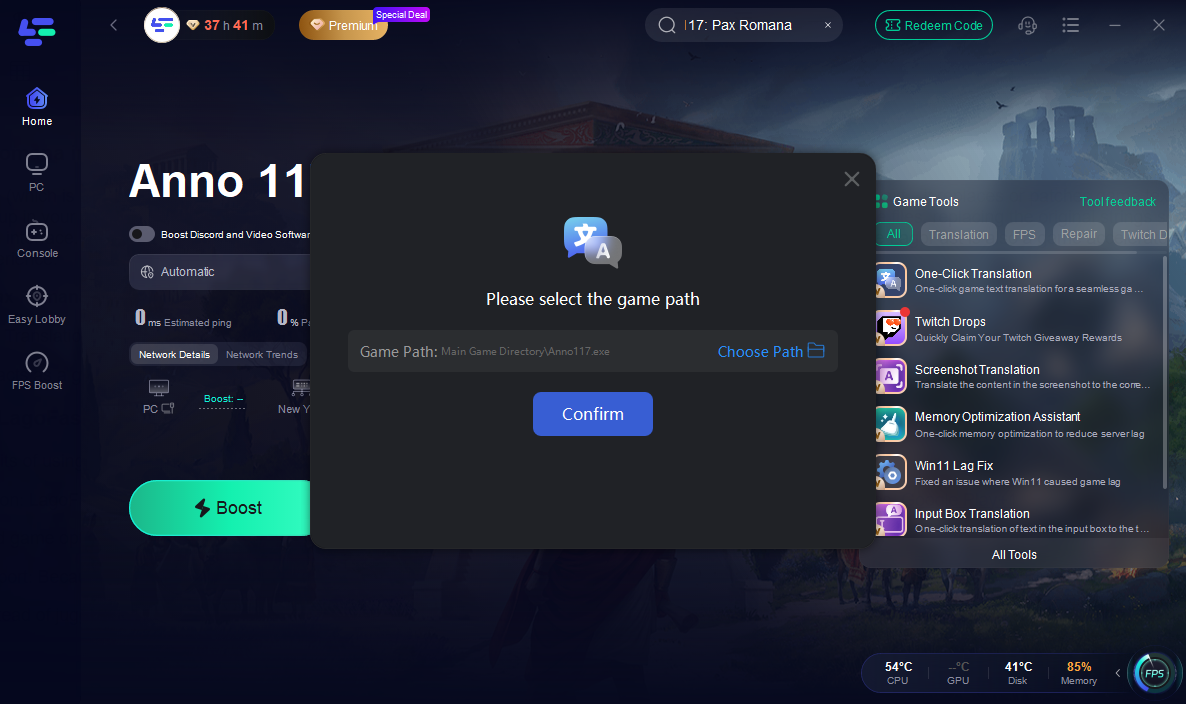
In addition, LagoFast also acts as a game booster/accelerator, optimizing game performance while performing translations.
Other Benefits of LagoFast
Here are some other benefits of using LagoFast when playing Anno 117: Pax Romana or similar games:
- Lag and ping reduction: Optimises network traffic and routing, which helps especially in online or connected modes.
- FPS stabilisation and game optimisation: Reduces background load and improves frame rates on PC.
- Server switching: Allows you to change servers easily for better connectivity.
- Fix crashing and freezing: Resolves common stability issues to ensure smoother gameplay.
Conclusion
In short, whether you're diving into Anno 117: Pax Romana for its city-building strategy in Ancient Rome or simply want to enjoy the game in your preferred language, language support matters—and sometimes the official options aren’t enough. By leveraging a reliable “Anno 117: Pax Romana game translation tool” like LagoFast you can bridge the gap, play in languages like Turkish (or many others), and enjoy the full game experience without missing key interface details or story elements. Combine that with its performance-boosting features and you’ll be well-equipped to build your empire in the year 117 AD with confidence.

Boost Your Game with LagoFast for Epic Speed
Play harder, faster. LagoFast game booster eliminates stutter and lags on PC, mobile, or Mac—win every match!
Quickly Reduce Game Lag and Ping!
Boost FPS for Smoother Gameplay!