

Eager to dive into the world of Aion 2, only to be stopped by a persistent "Unable to Connect to Login Server" error? You're not alone. This common connection issue, particularly for players outside the game's official launch regions, can be caused by regional restrictions, network instability, or platform configuration problems.
This guide provides a clear, step-by-step roadmap to troubleshoot and resolve these login errors. We'll cover the essential fixes, from optimizing your connection with gaming tools to verifying your account settings, so you can get back into the game quickly.

- ✅Less ping and crashes.
- ✅ Higher FPS and better PC performance.
- ✅ Support for 2000+ games.
- ✅ Stable connection and region switching.
Part 2: Common Causes of Login Server Connection Issues
Part 3: Steps to Fix Aion 2 Unable to Connect to Login Server
Part 4: Enhance Your Login Experience with LagoFast Game Booster
Part 1: Introduction
As an MMORPG enthusiast, there's nothing more frustrating than settling in for a gaming session only to be greeted by login server errors. If you're attempting to play Aion 2, the highly anticipated sequel to NCSoft's popular fantasy MMORPG, you might have encountered the infamous "unable to connect to login server" message that has plagued numerous players since the game's recent launch. This widespread issue has left many gamers stranded at the login gate, unable to access their characters and explore the expanded world of Atreia.
The login connection problems in Aion 2 primarily affect players attempting to connect to the Taiwan and Korean servers from outside these regions. While the game officially launched in Taiwan and Korea on November 18, 2025, international players initially enjoyed relatively smooth access until recent restrictions were implemented. Now, many players find themselves unable to establish a stable connection to the login servers, resulting in failed authentication attempts, endless loading screens, and unexpected disconnections. Understanding the root causes of these issues and implementing proven solutions is crucial to getting back into the game and enjoying the immersive experience Aion 2 offers.
Part 2: Common Causes of Login Server Connection Issues
When dealing with Aion 2 login problems, several factors typically contribute to the connection failures. Identifying the specific cause affecting your access is the first step toward implementing an effective solution.
- Network Instability and Geographic Distance: The physical distance between your location and the game servers in Taiwan or Korea significantly impacts connection quality. Data packets must travel through multiple network nodes, and each hop increases latency and potential packet loss. This manifests as extended loading times, authentication failures, or sudden disconnections during login . Internet service provider routing inefficiencies can further exacerbate these issues, creating suboptimal paths that increase ping times and instability.
- Regional Restrictions and IP Blocks: Recent changes to Aion 2's access policies have implemented stricter regional controls. While the game initially allowed global connections to Taiwan servers, NCSoft has since enforced region-based restrictions that prevent international IP addresses from completing the authentication process . This has created a situation where players who could previously access the game now find themselves blocked at the login screen without using region-specific workarounds.
- Purple Platform Complications: Aion 2 utilizes the Purple launcher as its gateway, which introduces its own potential failure points. Account region mismatches occur when your Purple account is registered to a different region than your game client, causing authentication servers to reject your connection . Additionally, corrupted client cache files or outdated Purple launcher versions can disrupt the handshake process between your system and the login servers . Firewall and security software interference often blocks the Purple client's network access, especially after game updates that modify executable files.
- System Configuration Problems: On the user's end, improper system configuration can prevent successful login. Outdated or missing Microsoft Visual C++ redistributables and DirectX components, particularly the DirectX 12 requirement for Aion 2, create compatibility issues that manifest as connection failures . Security software such as antivirus programs and Windows Firewall may mistakenly identify the game client as a threat and block its network access . Additionally, background applications that monitor system performance or manage overclocking settings can conflict with Aion 2's anti-cheat protection, resulting in connection termination during the login process.
Part 3: Steps to Fix Aion 2 Unable to Connect to Login Server
Thankfully, most login connection issues in Aion 2 can be resolved through methodical troubleshooting. These proven techniques address the most common causes and have helped numerous players restore their access to the game.
- Network Optimization and Acceleration: Given the geographical distance to Aion 2's servers and the implemented region restrictions, using a specialized gaming accelerator is the most effective solution for international players. These tools optimize your connection route to the game servers, significantly reducing ping and stabilizing data transmission.
To utilize this solution, select a reputable gaming accelerator such as LagoFast Game, install the client, and search for Aion 2 Taiwan or Korea servers in its game list. After selecting the appropriate server, the accelerator will automatically optimize your connection route. For best results, choose nodes specifically designated for Taiwan or Korea, then launch the Purple platform and attempt to log in while the accelerator remains active . This method bypasses inefficient internet routes and potential regional blocks by tunneling your connection through optimized paths.
- Account and Region Verification: Incorrect account region settings represent one of the most common causes of login failures. Your Purple account must be registered in the same region as the game client you're attempting to access. Verify your account region by logging into the NCSoft website and checking your profile settings . If your account is set to an incorrect region, you may need to create a new account with the proper regional setting. During account creation, ensure you select Taiwan or Korea as your region when prompted, as this determines which game clients you can access.
- Purple Platform and Game Client Repair: Corrupted or outdated game files often disrupt the login process. Begin by completely exiting the Purple client via the system tray to ensure no background processes are running. Navigate to C:Users[YourUsername]AppDataLocalPurple and C:Users[YourUsername]AppDataRoamingPurple and delete these folders to clear potentially corrupted cache files . After clearing the cache, reopen Purple and allow it to rebuild these files. If issues persist, consider uninsting and reinstalling the Purple client completely, downloading the latest version directly from the official Aion 2 Taiwan or Korea website.
- System and Software Configuration: Ensure your system meets all prerequisites for running Aion 2. Install the latest Microsoft Visual C++ redistributables, both x64 and x86 versions, from the official Microsoft website . Update to DirectX 12, which is required for Aion 2, using the DirectX End-User Runtime Web Installer . Temporarily disable your firewall and antivirus software during login attempts to rule out security software interference, remembering to re-enable them afterward . Additionally, close background applications that might conflict with the game, particularly system monitoring tools like MSI Afterburner or Process Explorer.
- Connection and Routing Alternatives: If persistent issues continue, consider alternative connection methods. Switching from Wi-Fi to a wired Ethernet connection provides more stable and reliable connectivity . Restart your router and modem to refresh your internet connection and clear DNS caches. Changing your DNS servers to public alternatives like Google DNS (8.8.8.8 and 8.8.4.4) can improve domain resolution speed and reliability.
Part 4: Enhance Your Login Experience with LagoFast Game Booster
For players seeking a comprehensive solution that addresses both connection quality and technical issues, LagoFast(LagoFast Game Booster - Get No Lag and Lower Ping)Game Booster offers specialized tools designed specifically for Aion 2 login problems. This all-in-one approach can significantly improve your chances of successful authentication while enhancing overall gameplay stability.
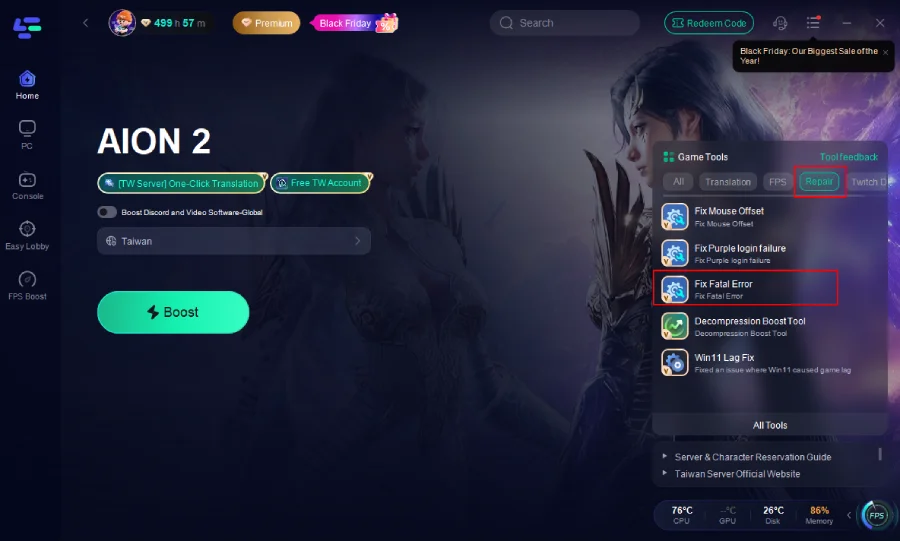
Fixing Aion 2 PURPLE Fatal Error: The fatal error crash that occurs when launching Aion 2 through the Purple launcher is particularly frustrating, as it typically happens after the login process and just as the game begins to load. This "UE Aion 2 Game Has Crashed" error often relates to connection instability during the critical handoff between the Purple platform and the game client .
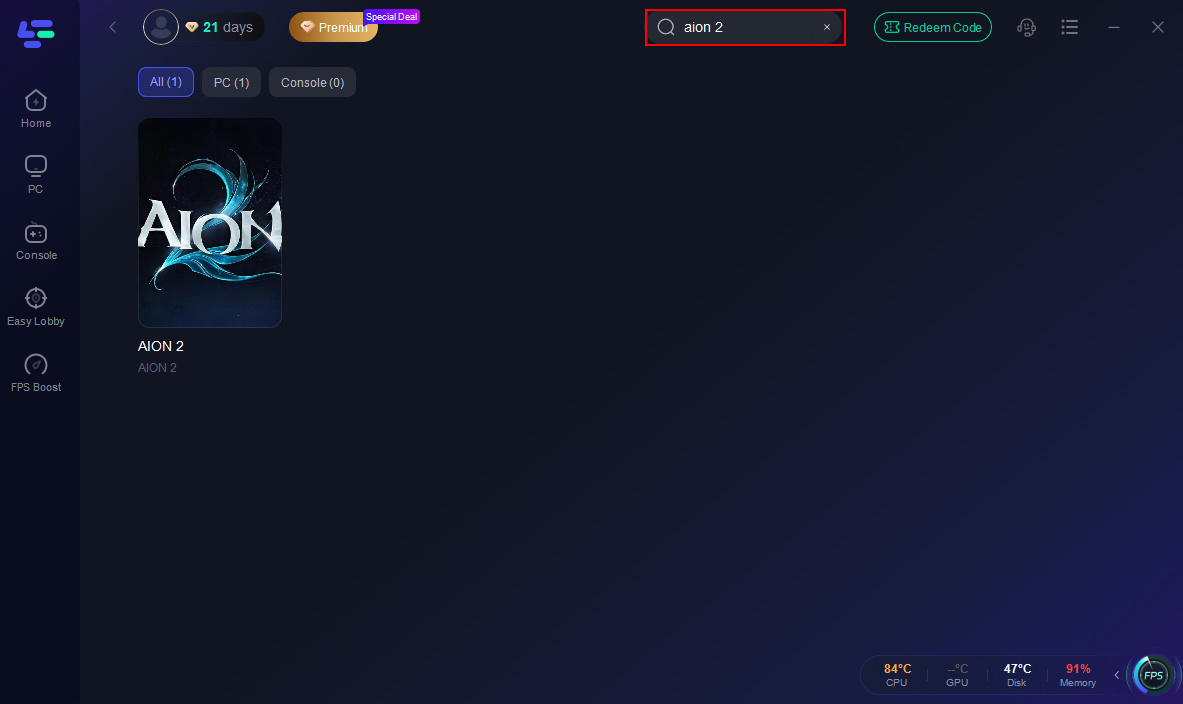
LagoFast addresses this specific issue with a targeted solution. After installing and launching LagoFast, search for Aion 2 in the application's game list.
How to Use LagoFast with Aion2
Step 1: Begin by clicking the Free Trial button to download and install the LagoFast Free Trial.
Step 2: Search for Aion2: Open LagoFast and use the search bar to find Aion2.
Step 3: Instead of using the standard acceleration feature, locate and click the "Fix Fatal Error" tool specifically designed for this Purple launcher crash.
Step 4: Within this tool, select the "One-Click Fix" option, which automatically applies the necessary adjustments to prevent the fatal error.
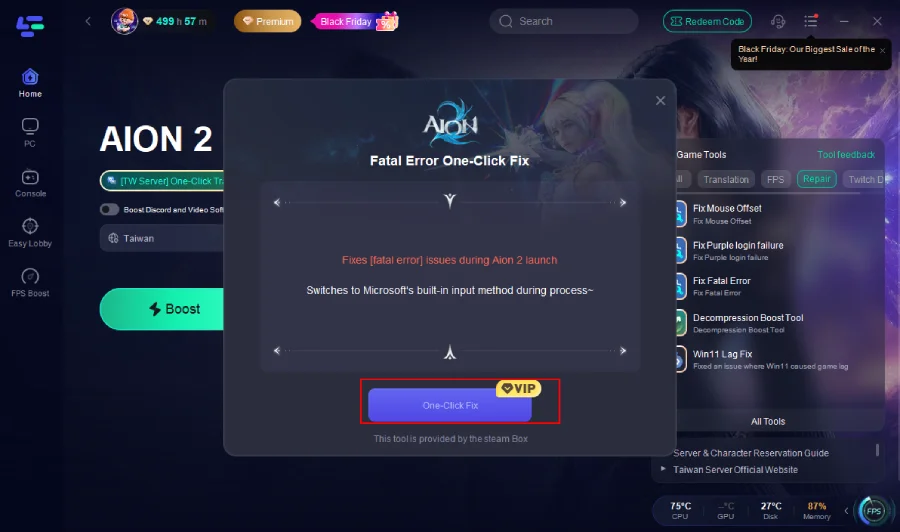
This process works by optimizing the network pathway during the transition between the launcher and game, ensuring stable communication that prevents the crash trigger.
Part 5: FAQs
Why can't I connect to Aion 2 login servers from my country?
Aion 2 implements regional restrictions on its Taiwan and Korean servers, limiting access primarily to players within these regions . While the game initially allowed international connections, recent enforcement of these restrictions has blocked many overseas players. Using gaming acceleration services that offer optimized routing through Taiwan or Korea typically resolves this issue by bypassing these regional blocks .
Do I need a Taiwan IP address to play Aion 2?
Current player reports indicate that a Taiwan IP address is now necessary for accessing the Taiwan servers, unlike the initial launch period when international connections were possible .
Will using an accelerator significantly improve my connection?
Yes, quality gaming accelerators can dramatically improve connection stability and reduce latency by optimizing your route to the game servers . These services use dedicated lines and multiple connection paths to minimize packet loss and ping spikes, which is particularly important for bandwidth-intensive activities like MMORPG gameplay .
What should I do if my Purple launcher shows the wrong region?
If your Purple launcher displays an incorrect region, you'll need to create a new account with the proper regional setting . During registration, carefully select Taiwan or Korea as your region when prompted, as this determines which game clients and servers you can access .
How can I distinguish between server issues and my connection problems?
Server-side issues typically affect large numbers of players simultaneously and are often announced on official channels . If other players in your region report similar login problems at the same time, the issue is likely server-related. Conversely, if friends can login while you cannot, the problem is probably on your end. During peak hours, server load may also cause login delays or failures .
What do specific error codes like 0xE0000015 mean?
Error code 0xE0000015 typically indicates a security module conflict or process issue . Resolve this by opening Task Manager, ending all Aion2.exe and NCGuard.exe processes, then restarting your computer and launching the game through Purple again . Other common errors include network-related codes that typically respond well to accelerator solutions .
Conclusion
Successfully connecting to Aion 2's login servers from outside Taiwan or Korea is undoubtedly challenging due to regional restrictions and network limitations, but it's far from impossible. By methodically addressing network optimization through gaming accelerators, verifying account region settings, maintaining your Purple client and game files, and configuring your system properly, you can overcome these authentication barriers.
The key is recognizing that there's no universal solution—what works for one player may need adjustment for another depending on their location, internet infrastructure, and specific technical environment. Persistence and willingness to experiment with different solutions typically yield positive results. As Aion 2 continues to stabilize and optimize its infrastructure, many of these login issues may become less severe, but until then, these proven methods offer your best chance at exploring the expansive world of Atreia.

Boost Your Game with LagoFast for Epic Speed
Play harder, faster. LagoFast game booster eliminates stutter and lags on PC, mobile, or Mac—win every match!
Quickly Reduce Game Lag and Ping!
Boost FPS for Smoother Gameplay!