Save Recovery Guide
03/25/2026
Note: Firing up certain mods might cause your vanilla save files to get overwritten or temporarily disappear. If you run into this issue, follow these steps:
1. Navigate to your local AppData directory: C:\Users\<YourUsername>\AppData\Roaming\SlayTheSpire2\steam (Tip: You can just press Win+R and type %appdata% to get there faster).
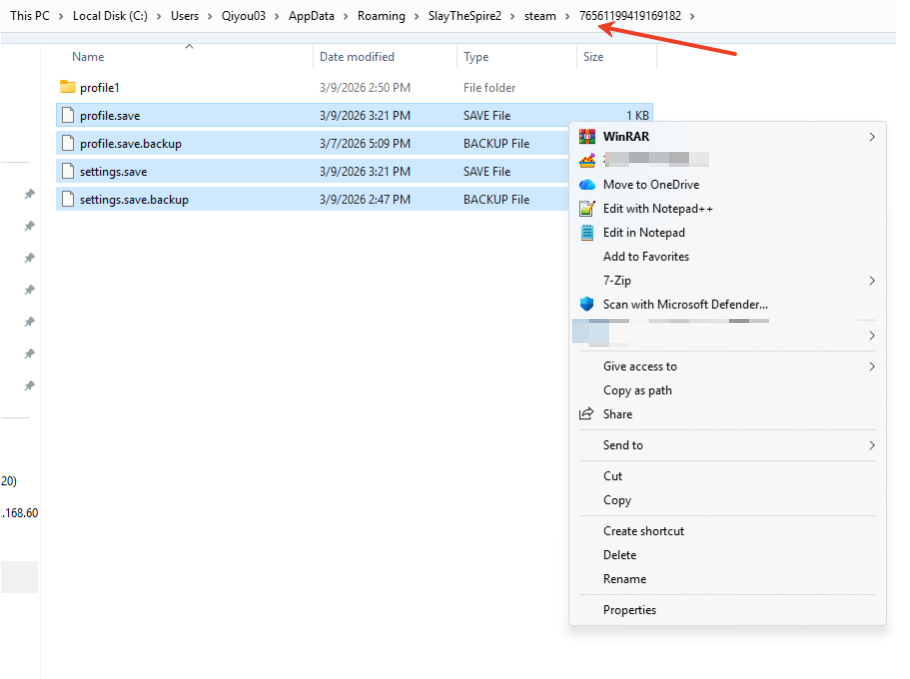
2. Open the folder with the long string of numbers (that's your Steam ID).
3. Select everything inside this folder EXCEPT the [modded] folder, and copy/paste all those vanilla files straight into the [modded] folder.
4. Boom! Your save data is successfully restored. You're good to go.
Was this helpful?

Yes

No
Can't find the answer you're looking for?
Contact usWe use cookies to make interactions with our websites andservices easy and meaningful. For more information aboutthe cookies we use or to find out how you can disable cookies, click here.