StarUI Inventory improves all inventory screens for use on a PC. Compact display style. More details in sortable columns. Item tag icons. Category as left sidebar. Many quality of life features!
StarUI Inventory improves all inventory screens for use on a PC. Compact display style. More details in sortable columns. Item tag icons. Category and subcategories as left sidebar. Many quality of life features!
Optimized for PC
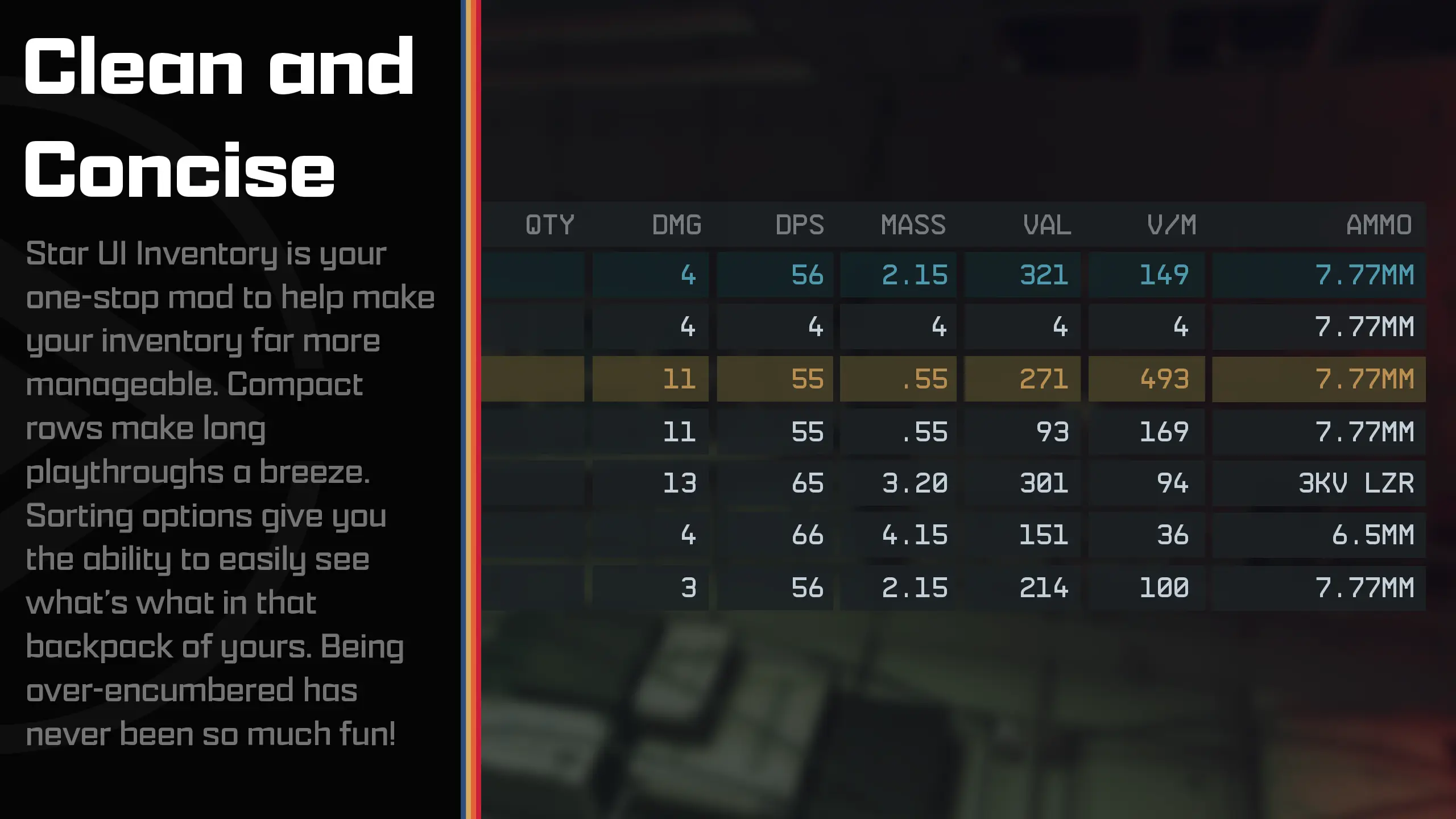
Compact style - See more information at once
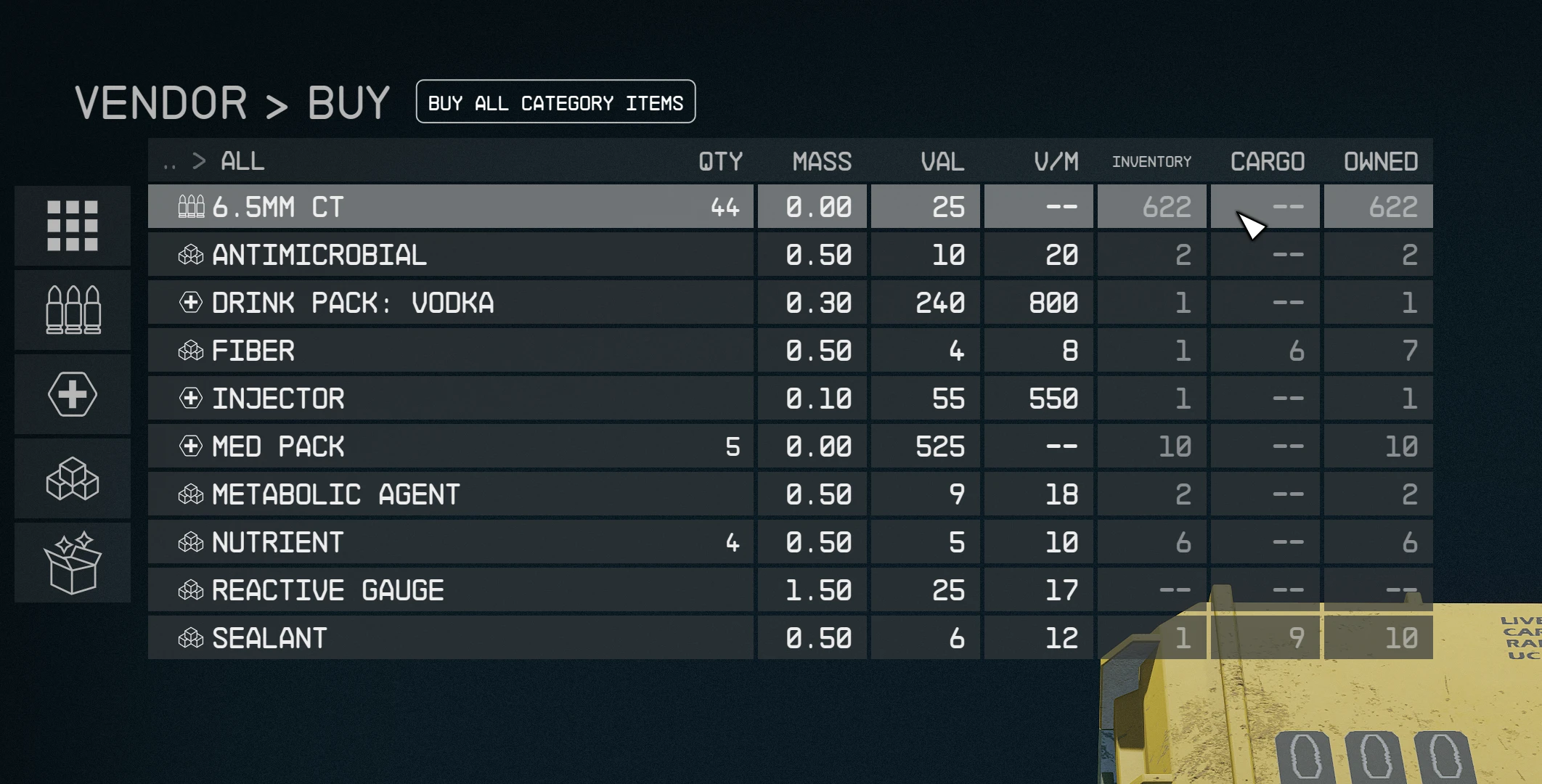
Over 40 different columns available - Including standards like mass, value, damage, calculated ones like value/mass, mass of stack or DPS ("Burst DPS") and new ones like item-count of other inventories
Sort any column with a simple click - Toggle asc/desc by another click
New special inventory-lookup column OWNED/SHIP/CARGO - See how many items you have in your backpack/ship!
You can (temporarily) add columns directly in-game
You can fold the columns to take a look at your item
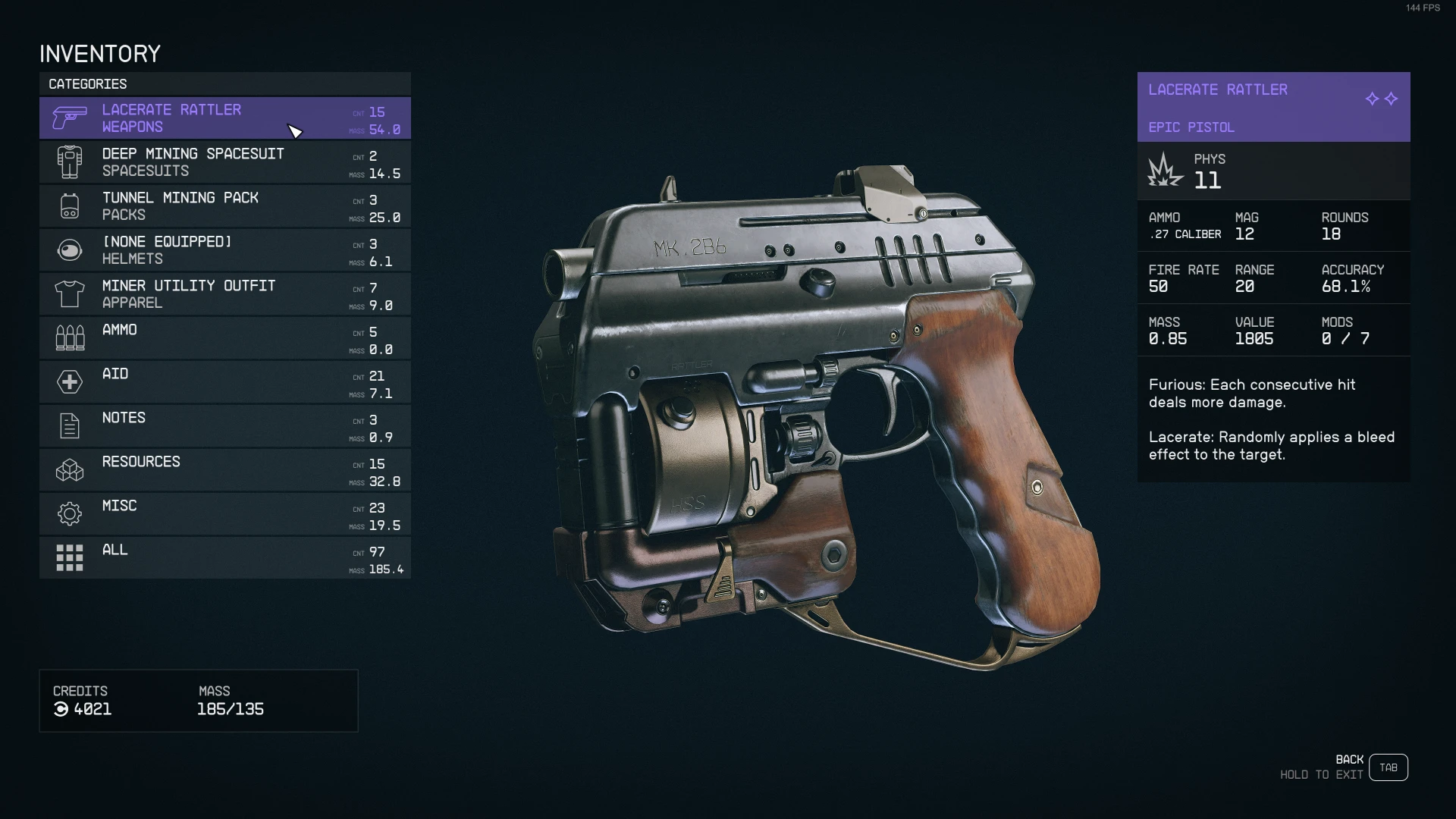
Category icons for all items - So you can directly see what a item is
Automatic tagging and sub-categorizing of most important items to further filter your item list down
Show all inventory overview in the bottom panel - Including sum/max mass and transfer direction indicator
Show summarized mass of each categories
Mass-transfer of a single category from/to container or ship and buy/sell for trading - Skips equipped, favorite and configurable excluded items
Press CTRL or SHIFT key to transfer/buy/sell one or all items - Without quantity popup
Adds list navigation keys: Page-Up, Page-Down, Home and End for fast navigation
Configurable list mouse wheel scroll amount
Bigger scrollbar - It's just easier to grab
Change the font or font size - If you don't like UPPERCASE try font number 3
Option to make <TAB> go directly back to the game instead of the character screen.
Option to disable the start/en animation
Option to show the items FormID in the item card
Full Multi-language support - Most languages are available
Increases the frame-rate to 60 fps - Optional variants in 30fps and 120fps are available too
Contain no plugins and no quests - Absolutely safe to install and uninstall at any time!
Doesn't affect the possibility to get Steam achievement
Full controller support - Hold L1 to access the new StarUI Inventory functions
Works with Steam and Game Pass (X-Box) version
Completely customizable!
Simply install with Vortexor Mod Organizer 2 (for manual installation open the spoiler below)
Enable Archive Invalidation in your INI
It's just one click in Bettini (enable "Load Loose Files" and save)
Copy the folder Interface\ from the zip into your Starfield\Data\ folder (where the ba2 files are) - ignore folders fomod and Optional
For some people that folder won't work, copy the files to your Documents\My Games\Starfield\Data\ folder in that case (create Data\ if it doesn't exist)
To install the 30fps or 120fps version: After doing the above steps copy the files from the appropriate sub-folder in Optional\ and overwrite the existing ones.
There are two presets available: With color and without color. You can find them in the StarUI Inventory Presets\. Simply copy it to your StarUI Inventory (default).ini or your own-created update-proof StarUI Inventory. This.
Use the StarUI Configuratorto configure all settings with an easy-to-use graphical interface.
Manual configuration You can also do it manually - Everything can be controlled in the INI Data\ Interface\ StarUI Inventory.ini Don't worry, the file is completely commented and easy to use - you will find your setting pretty quick!
INI preview
Spoiler:
Show
[Old Inventory]
; StarUI Inventory configuration file ; ----------------------------------- ; ; Allows you to customize many aspects of the StarUI Inventory mod. ; ; Tips: ; * You can edit this file while the game is running. Just close an re-open the inventory to load the new settings! ; * You can copy this file to "StarUI Inventory.ini" to store your own settings which won't be overwritten by updates! ; If you like it clean: Both files will be read, so you only need to put changed settings in your "StarUI Inventory.ini". ; Note: Make sure your new INI include the sections [StarUI Inventory] and [CategoryColumns] when you like to change settings in these. ;
; Auto-adjust values when game setting "Large Font Mode" is activated ; Please note, that the StarUI Inventory shows much more information than the vanilla inventory, so there may be simply not enough place to show everything. BautoAdjustTolar
; Player inventory: Switch the category name and equipped item name bPlayerInventoryCatListSwitchCatNameAndItem
; Show a category sidebar on the left in Inventory bLeftCategorySidebar
; Show a subcategory sidebar for more filtering bLeftSubCategorySidebar
; Collapse space for subcategory sidebar when no subcategories available (will move the main items list a bit) bLeftSubCategorySidebarCollapse = 1
; Font Size for main text in category entries (Default: 20) iCategoryListFontSize
; Font size for subtitle in category entries iCategoryListSubtitleFontSize = 20
; Font Size for count/mass in category entries (Default: 18) iCategoryListCountMassFontSize = 18
; Font Size for count/mass in category entries (Default: 9) iCategoryListCountMassLabelFontSize = 9
; Height of a category entry. Should be min. 40 iCatListEntryHeight = 55
; Max characters per line for category text iCategoryListMaxChars = 40
; Show tag icon for item (in items list) - previously bShowItemCategoryIcon bShowItemTagIcon
; Use colored item icons bItemTagColorized
; Show your favorite assignment number in the items heart icon bShowHeartFavorite = 1
; Font size (Default: 20) iItemListFontSize = 20
; Height of an item entry (Min 26) iItemListEntryHeight = 30
; Width of the main name column iItemListMainColWidth = 417
; Width of the extra columns iItemListExtraColWidth = 75
; Extra padding on left and right in the cells iItemListColPadding = 8
; Make the item list opaque, so it's easier to read with item model in background. Value in percent. iItemListOpaqueBackground = 66
; Scaling (size) for other parts of the inventory interface (in percent) iItemCardScale = 100 iButtonBarScale iMassPanelScale = 100
; Font ; Available fonts: ; 0 Default ("NB Architekt") ; 1 NB Architekt Light ; 2 NB Architect ; 3 NB Grotesk R Semibold ; 4 NB Grotesk R Bold ; 5 Arial (Contains only ASCII characters for EN) ; 6 Consolas (Contains only ASCII characters for EN) iUseFont = 0
; Quality Of Life!
; Show category mass bShowCatMass
; Show stolen and contraband indicators in mass panel - shows you if that inventory contains stolen or contraband items bMassPanelShowStolen = 0 bMassPanelShowContraband
; Enable mass transfer from and to container bEnableMassTransfer
; Don't transfer favorites or equipped! bMassTransferNoFavorites bMassTransferNoEquipped = 1
; Ignore certain items for mass transfer to other inventories (as FormID). Multiple entries separated by comma (Default: Ignore Digipack, Cutter and a mission item which can be sold but shouldn't) ; This list doesn't applies when you mass-transferring into your inventory (So you can still loot everything) sMassTransferIgnoreFormIDs = 0000000A, 00016758, 000ECCED ; Tip: Beside this INI file there is a file StarUI Inventory - FormIDs.txt containing collected FormIDs to ignore certain groups of items.
; Stop mass selling when vendor is out of credits bMassTransferOnlySellForCredits
; Enlarge the scrollbar, so you can actually grap it with the mouse! Benlargescrollable
; How much should a wheel step scroll? iListMouseWheelScrollAmount = 3
; Should the <TAB> key in inventory view go back to the game (instead of it's normal behavior to go to the wheel menu) bTabToGame = 1
; Should the <TAB> key in container view go back to te game (like when viewing your ship's cargo) bTabToGameContainer = 1
; Should the <TAB> close the inventory when in the item list bTabInItemListToGame
; Show FormID of item in ItemCard (Inventory only) bItemCardShowFormId = 0
; Performance: Delays inventory update requests to cummulate multiple requests by the game engine into a single one. Value in milliseconds. Increase for bigger inventories. Default:10 iInventoryUpdateDelay = 10
; = = = = = = ; Colors ; = = = = = = ; The colors are specified as "red, green, blue(, alpha)" where alpha is optional. ; RGB values are from 0 to 255. Alpha is from 0 to 100 (percent).
; Default inventory color (washed out color, if you want to use standard rarity colors: 164, 190, 222) sInventoryDefaultColor
; Color elements individually (will override default and per-type color) sCategoryListColor = sSubcategoryListColor = sItemListColor = sMassPanelColor = sMassPanelEncumberedColor = 196, 64, 64 sButtonHintsColor = ; Item card coloring (Keep in mind: the item cards has own colors, which will look different when using a new overall item card color) sItemCardColor =
; Show QTY above item counts as column title bShowCountTitle
; Show toggle button to enable/disable additional columns bShowColumnsToggleButton = 1 ; Default setting (when enabled) bShowColumnsToggleButtonDefault
; Show a button to add temporary columns in the game (lasts until inventory is closed) bShowColumnsAddTemporaryButton = 1
; Defines which column sort should be active by default. Leave empty for vanilla sorting. Default: TAG (Sorts by special column item tag, then name) ; When bAllowSecondarySortKey is enabled, you can specify a secondary key, e.g.: RARITY, VPM sDefaultSort = TAG
; Should the secondary sort key are customizable. Either by specified in this INI or the previously clicked column. ; If disabled the secondary sort key is the name. bAllowSecondarySortKey = 0
; Configure your own table!
; Available columns: ; (Experimental) AID_HP - Shows hp effects of aid items (currently only working in EN and DE) ; AMMO - Show used ammo type ; AMMO_ROUNDS - Show available rounds for ammo type ; QTY - Shows a separate column for QTY. Will remove the default QTY in the name cell. ; CONTRABAND - Shows if the item is contraband ; DR - Damage resistance ; DMG - Weapon damage ; DPS - Weapon damage per second (Burst DPS, so without reload-time) ; EQUIPPED - Shows if the item is equipped ; FAV - Shows your favorite assignment number ; MASS - Weight ; MASS_STACK - Weight per stack ; RARITY - Shows the rarity of the item (rare, epic, legendary for weapon/apparel and common, uncommon, rare,... for other items) ; (Experimental) TARGET_INV_COUNT - Shows the amount of that item in the transfer target inventory (So when buying how many you already have) ; PLAYER_INV_COUNT - Shows your inventory count of an item (Only visible when useful and the inventory data is available) ; SHIP_INV_COUNT - Shows your ships cargo count of an item (Only visible when useful and the inventory data is available) ; CONTAINER_INV_COUNT - Shows the item count in the container when you are transferring into a container. ; STOLEN - Shows if the item is stolen ; TREATMENT - Shows the treatment for an aid item ; TOTAL_INV_COUNT - Add a column OWNED/SHIP/PLAYER (which depends on situation) - Summarizes the columns PLAYER_INV_COUNT and SHIP_INV_COUNT. Will be automatically converted to player or ship column in their inventory ; VALUE - VALUE ; VALUE_STACK - Value per stack ; VPM - Value / Mass
; Detail columns for weapon ; WMANUFACTURER - Shows the manufacturer of the weapon ; WACC - Weapon accuracy ; WBASENAME - Shows the base name of the weapon (e.g. Eon, Grendel, Maelstrom,...) ; WMAG - Weapon ammo capacity ; WMODS - Weapon mod slots ( used / max ) ; WRANGE - Weapon range ; WROF - Weapon rate of fire (gund) / Attack speed (melee) ; WTYPE - Weapon Type
; Detail columsn for Damage ; PHYS - Weapon physical damage / Armor physical resistance ; ENGY - Weapon energy damage / Armor energy resistance ; EM - Weapon EM damage / Armor EM resistance ; ELEC - Weapon electrical damage / Armor electrical resistance [Currently unused in the game]
sWeapons = DMG, DPS, MASS, VALUE, VPM, AMMO ; Apparel will be used as fallback for Spacesuits, Packs and Helmets Saparel = DR, MASS, VALUE, VPM ; All will be used as fallback for any not specified sAid = MASS, VALUE, VPM, TREATMENT, TOTAL_INV_COUNT, CONTAINER_INV_COUNT sAmmo = VALUE, TOTAL_INV_COUNT, CONTAINER_INV_COUNT sThrowables = DMG, MASS, VALUE, VPM, TOTAL_INV_COUNT, CONTAINER_INV_COUNT Hall = MASS, VALUE, VPM, TOTAL_INV_COUNT, CONTAINER_INV_COUNT ; If you like to specify the columns for more categories, just remove the ";" in the following lines: ;sNewItems = MASS, VALUE, VPM, TOTAL_INV_COUNT ;sSpacesuits ;sPacks ;sHelmets = DR, MASS, VALUE, VPM, TOTAL_INV_COUNT ; sNotes ;sResources ;sSpells ;sMisc = MASS, VALUE, VPM, TOTAL_INV_COUNT
; Define separate default sortings per category (Remove the ";" before the category line to specify it) ; To sort by the special QTY column (inside the name cell) you can use COUNT ; When bAllowSecondarySortKey is enabled you can specify a secondary sort key by adding another COLUMN after the first (separated by comma) ;sDefaultSortWeapons = DPS, day ;sDefaultSortSpacesuits = TAG ;sDefaultSortPacks ;sDefaultSortHelmets ; SDefaultSortDrop = DR ;sDefaultSortThrowables ;sDefaultSortAmmo = COUNT ;sDefaultSortAid ;sDefaultSortNotes ;sDefaultSortResources = TAG ; sDefaultSortMisc ;sDefaultSortNewItems ;sDefaultSortAll = TAG
; Define individual column widths for any column you like! ; Define more in the schema iColWidth... (e.g. for DMG iColWidthDMG) iColWidthAMMO = 135 iColWidthRARITY = 110 iColWidthWMANUFACTURER = 200 iColWidthSTOLEN = 50 iColWidthCONTRABAND = 50 iColWidthPHYS iColWidthENGY iColWidthEM iColWidthELEC = 60 iColWidthFAV = 50
Most interface mods have no conflicting files, so those should be absolutely compatible. The following mods have conflicts or are worthy to note:
Spoiler:
Show
Undelayed Menus - Fully compatible. Install StarUI Inventory after it. Enable "bInstantOpenCloseAnimation" in StarUI Inventory.ini to to make the inventory undelayed. 60 FPS - Smooth UI - Fully compatible. Install StarUI Inventory after it. The recommended standard install of StarUI Inventory is already 60fps, so it's the same. 120 FPS - Smooth UI - Fully compatible. Install StarUI Inventory after it. Select 120fps in the FOMOD installer (or copy the 120fps files from the Optional folder). Icon Sorting Tags - Fully compatible. Disable "bShowItemTagIcon" in the StarUI Inventory.ini to prevent double tags. Also only use the default font.
Old inventory - Improves all inventory screens for use on a PC. Many Quality-of-Life features and completely customizable. StarUI HUD - Customize your HUD. Relocate, resize and recolor widgets. Item tag icons, loot list item cards, Loot-O-Meter and many more features. StarUI Workbench - Improves all workbenches with columns, comparison, compact design, individual layout, Quality-of-Life features and more. StarUI Outpost - Improves the outpost interface with a new build menu, better key handling and many Quality-of-Life features. StarUI Ship Builder - Improves the ship builder interface with sort-able columns, category and variant list, as well as plenty Quality-of-Life features StarUI Configurator - Configure all StarUI mods in a well aligned graphical interface with many helpful functions.
Bethesda for making another great RPG! Cala for making the awesome teaser images Collective Modding discord - for morale support, testing, ideas and more! (Check it out!) The xEdit-Team for their great continues work The NexusMods community
This tool is provided by the third party [bufftool]
Download Mods For Free
Install LagoFast, start Starfield and play with the mods you love.
We use cookies to make interactions with our websites andservices easy and meaningful. For more information aboutthe cookies we use or to find out how you can disable cookies, click here.