No Crack for AI - Difficulty and suspect count selection
Autor:SkebbZLast updated:13/08/2025 17:33:11275.7K55KB


Pre-dependencies


Mod Introduction
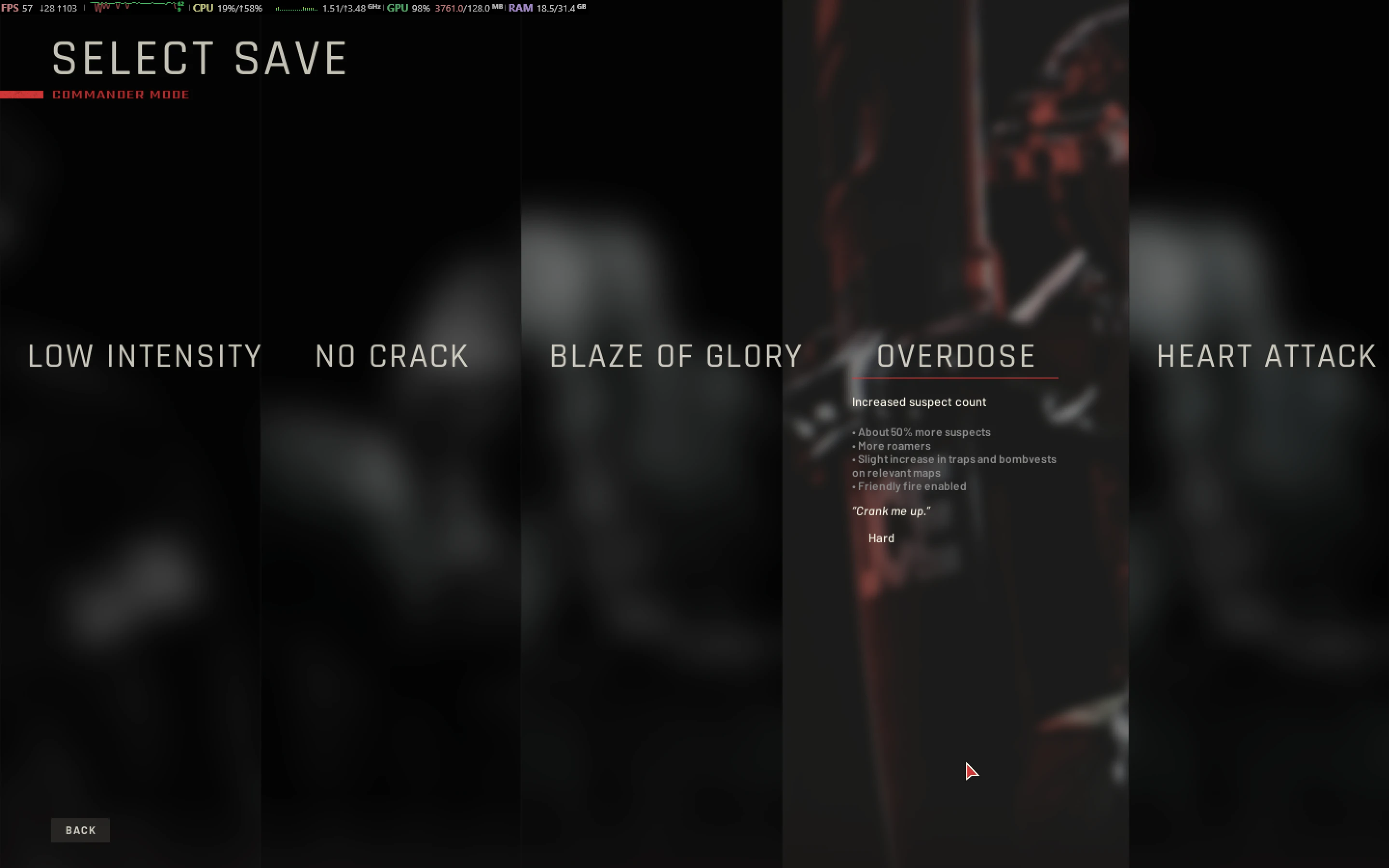
Many difficulty modes for various playstyles. From slow and steady, to all out war with explosions everywhere - now selectable in-game. Suspects tuned according to their level of training and experience. Now with suspect count selectable
Overview
Updated for Los Suenos Stories (DLC3).
Adjustable AI accuracy based on chosen difficulty mode. Adjusted reaction times, reload speed, stress, hearing range, flashlights and explosions being more easily noticed and other things per type of suspect and map.
Types of suspect include:
Be mindful of the fact that suspects already firing upon you will be much harder to subdue, and that some maps have hardcore suspects with high morale.
Note: balanced for multiplayer.
Difficulty info
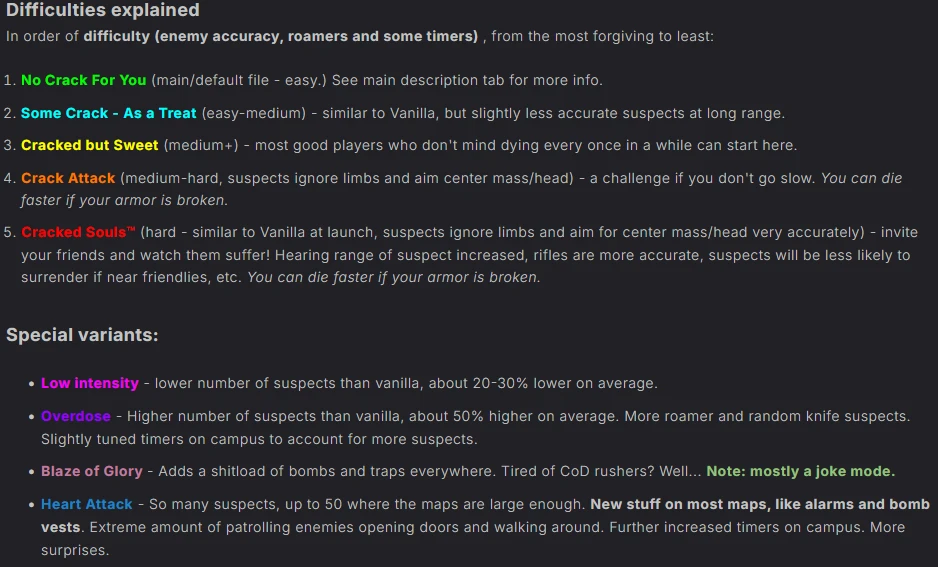
See the posts tab for info on the various difficulties. They mostly differ by how accurate the enemies are, and what parts of your body they aim for.
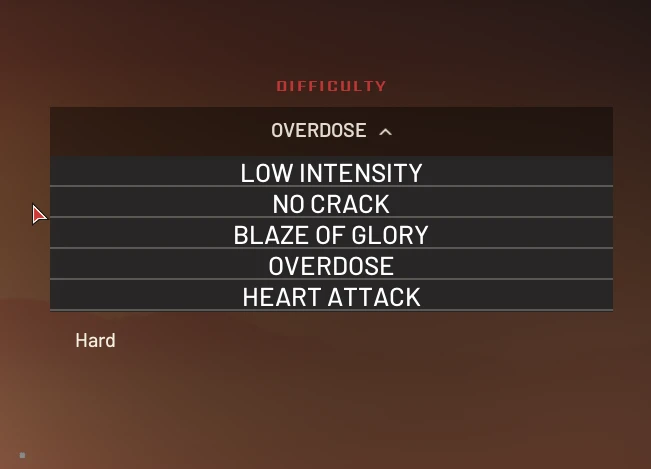
In general, anything marked Low Intensity will have a reduced suspect count and anything marked Overdose will have a large increase (random count each time).
The Heart Attack mode will be all out insanity with added bomb vests on some maps and generally insane suspect counts going up to 50.
Blaze of Glory - Insane amount of traps and bombvests added. Host public and punish those rushers I guess.
Since the DLC3 patch, all of the special variants (Overdose, Heart Attack, etc) are included in each file and selectable in-game.
My other mods
No Mercy for Terrorists - scoring changes to remove penalties for killing suspects and missing weapons.
No Stress for SWAT - softens up the Commander mode stress relief a bit and adds more therapy slots.
No Suppression for SWAT - Removes suppression blur and camera shake for player.
Some hints
Bashing people in the face has been buffed significantly, as well as tasers. In most cases this will cause surrender. If you see a suspect hesitating, rushing them and punching them in the face might just do the trick (though watch your flanks while doing so).
Slightly increased chance of fake death - make sure to zip-tie those downed suspects!
Suspects taking fire from multiple SWAT members while isolated will be likely to surrender, so suppressing them should work now.
Stun timers are increased, which makes flashbang very useful.
Beanbag shotgun should now be very nice for taking down those VIP targets. One or two hits should do it in most cases, though a headshot might break their neck or just knock them out for a few seconds, so be sure to zip them fast.
Civilians will be easier to arrest in most cases.
Install instructions
FAQ - common
Can I use this in multiplayer?
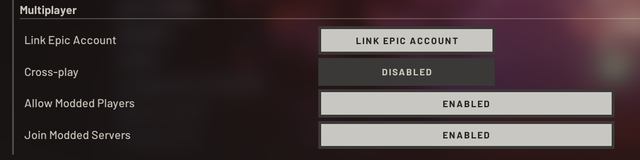
Yes, only the host needs it installed. However, you may need to set these options in gameplay settings:
Does it affect cosmetic unlocks or achievements?
Guaranteed to still unlock cosmetics, and achievements unlock in singleplayer (even unmodded, the achievements do not consistently unlock in any form of multiplayer). The score at the end of a game will have a red text with "modded score - unofficial" or something, but it doesn't seem to affect anything.
Does it affect the SWAT teammate AI?
It does not change anything regarding SWAT teammates at all, as the main focus is to be used with human teammates in parties of 2-4. Playing Singleplayer, you probably want one of the harder variants. Or not. Just have fun.
Do I need to install both/multiple files to get the variants working?
Just choose ONE file and install it, if you choose multiple one will probably overwrite the other depending on alphabetic filename or something.
I can't get it to work, the AI is still vanilla!
If you installed any custom maps, you may have a hidden AI file included with the map overwriting this mod. More detailed troubleshooting guide here.
What is the "Default AiLevelData file" in the files tab? Do I need this?
It is a modder's resource, for making your own mod. It is easier than you think, all you need is some basic text editing skills, basic file explorer use and a feel for what a centimeter is (all the distances are in centimeters, so the metric system. Not that heretical other one, which we don't talk about.) More info in the technical FAQ below.
Technical FAQ
How do I make/customize my own AI mod?
What is the easiest way to create a .pak mod?
Upload your .ini file (from the previous step above) to this site (click modify existing mod) and then immediately click "Generate Mod" to get a usable .pak mod. The site has been updated, so you can also use it as an editor if you prefer. (If you do not upload your own file, it will start with all values set to default.)
I would personally recommend you edit the file manually in Notepad++ before uploading, as it is much easier to manage that way unless you are just changing a single entry or so.
There is also a detailed guide available there. All credits to recursiveGecko for this method and the site.
Currently outdated.
What is the significance of the various map headers compared to the "Global" header in the AI file?
The Global parameters will be applied first. When you load a map, any map specific parameters will then overwrite the global ones.
Example 5, but the Club map header has this variable set to 3. When loading Club, the value 3 will be used.
Example 2: You set global SuspectAccuracy to 5, but the 213 Park home map header does not have this variable under it's header. The value 5 will be used.
What is the significance of the difficulty .ini files in relation to the AiLevelData.ini file?
My current understanding is that the AiLevelData.ini is loaded first, and then the user's selected difficulty will trigger the relevant Difficulty .ini file to be loaded after. This means that if you have the same variable in both files, the Difficulty one will take priority. Anything not in the Difficulty file will cause the AiLevelData.ini variables to be used. Technically this means that you could leave the AiLevelData.ini blank, as long as the Difficulty files cover everything. Or you could put everything in the AiLevelData.ini and just do minor tweaks like suspect counts in the Difficulty files.
Donations
If you are feeling generous, you can donate anonymously through Co-Fi or through PayPal (click the piggybank Donate button in my profile).

Overview
Updated for Los Suenos Stories (DLC3).
Adjustable AI accuracy based on chosen difficulty mode. Adjusted reaction times, reload speed, stress, hearing range, flashlights and explosions being more easily noticed and other things per type of suspect and map.
Types of suspect include:
- Meth-people, homeless (weak morale, slow, etc)
- Street thugs (somewhat better)
- Cartel, ecoterrorists, etc (mid)
- Organized crime, trained security (mid+)
- Military veterans, trained terrorists, etc (high)
- Elite forces (SAS, Secret Service) (very high)
Be mindful of the fact that suspects already firing upon you will be much harder to subdue, and that some maps have hardcore suspects with high morale.
Note: balanced for multiplayer.
Difficulty info
See the posts tab for info on the various difficulties. They mostly differ by how accurate the enemies are, and what parts of your body they aim for.
In general, anything marked Low Intensity will have a reduced suspect count and anything marked Overdose will have a large increase (random count each time).
The Heart Attack mode will be all out insanity with added bomb vests on some maps and generally insane suspect counts going up to 50.
Blaze of Glory - Insane amount of traps and bombvests added. Host public and punish those rushers I guess.
Since the DLC3 patch, all of the special variants (Overdose, Heart Attack, etc) are included in each file and selectable in-game.
My other mods
No Mercy for Terrorists - scoring changes to remove penalties for killing suspects and missing weapons.
No Stress for SWAT - softens up the Commander mode stress relief a bit and adds more therapy slots.
No Suppression for SWAT - Removes suppression blur and camera shake for player.
Some hints
Bashing people in the face has been buffed significantly, as well as tasers. In most cases this will cause surrender. If you see a suspect hesitating, rushing them and punching them in the face might just do the trick (though watch your flanks while doing so).
Slightly increased chance of fake death - make sure to zip-tie those downed suspects!
Suspects taking fire from multiple SWAT members while isolated will be likely to surrender, so suppressing them should work now.
Stun timers are increased, which makes flashbang very useful.
Beanbag shotgun should now be very nice for taking down those VIP targets. One or two hits should do it in most cases, though a headshot might break their neck or just knock them out for a few seconds, so be sure to zip them fast.
Civilians will be easier to arrest in most cases.
Install instructions
- Choose a version and install only one of them, not multiple at the same time. Recommend you start with the main file to try it out.
- Works with Vortex, just remember to click "elevate" and "deploy" in the top right notification bell. Otherwise it won't actually install.
- Manual install:
- Unpack the .zip file to path ....\SteamLibrary\steamapps\common\Ready Or Not\ReadyOrNot\Content\Paks\
- If you cant find this folder, right click the game in Steam --> manage --> browse game files or something to this effect.
- Launch game
- If you don't understand this, check out recursiveGecko's mod install guide here for some added pictures.
FAQ - common
Can I use this in multiplayer?
Yes, only the host needs it installed. However, you may need to set these options in gameplay settings:
Does it affect cosmetic unlocks or achievements?
Guaranteed to still unlock cosmetics, and achievements unlock in singleplayer (even unmodded, the achievements do not consistently unlock in any form of multiplayer). The score at the end of a game will have a red text with "modded score - unofficial" or something, but it doesn't seem to affect anything.
Does it affect the SWAT teammate AI?
It does not change anything regarding SWAT teammates at all, as the main focus is to be used with human teammates in parties of 2-4. Playing Singleplayer, you probably want one of the harder variants. Or not. Just have fun.
Do I need to install both/multiple files to get the variants working?
Just choose ONE file and install it, if you choose multiple one will probably overwrite the other depending on alphabetic filename or something.
I can't get it to work, the AI is still vanilla!
If you installed any custom maps, you may have a hidden AI file included with the map overwriting this mod. More detailed troubleshooting guide here.
What is the "Default AiLevelData file" in the files tab? Do I need this?
It is a modder's resource, for making your own mod. It is easier than you think, all you need is some basic text editing skills, basic file explorer use and a feel for what a centimeter is (all the distances are in centimeters, so the metric system. Not that heretical other one, which we don't talk about.) More info in the technical FAQ below.
Technical FAQ
How do I make/customize my own AI mod?
- Extract or download a default AiLevelData.ini (see miscellaneous files) and Difficulty files
- Edit values with Notepad++or similar
- Repack into game files or create a .pak mod (see below)
What is the easiest way to create a .pak mod?
I would personally recommend you edit the file manually in Notepad++ before uploading, as it is much easier to manage that way unless you are just changing a single entry or so.
There is also a detailed guide available there. All credits to recursiveGecko for this method and the site.
What is the significance of the various map headers compared to the "Global" header in the AI file?
The Global parameters will be applied first. When you load a map, any map specific parameters will then overwrite the global ones.
Example 5, but the Club map header has this variable set to 3. When loading Club, the value 3 will be used.
Example 2: You set global SuspectAccuracy to 5, but the 213 Park home map header does not have this variable under it's header. The value 5 will be used.
What is the significance of the difficulty .ini files in relation to the AiLevelData.ini file?
My current understanding is that the AiLevelData.ini is loaded first, and then the user's selected difficulty will trigger the relevant Difficulty .ini file to be loaded after. This means that if you have the same variable in both files, the Difficulty one will take priority. Anything not in the Difficulty file will cause the AiLevelData.ini variables to be used. Technically this means that you could leave the AiLevelData.ini blank, as long as the Difficulty files cover everything. Or you could put everything in the AiLevelData.ini and just do minor tweaks like suspect counts in the Difficulty files.
Donations
If you are feeling generous, you can donate anonymously through Co-Fi or through PayPal (click the piggybank Donate button in my profile).
This tool is provided by the third party [bufftool]

Download Mods For Free
Install LagoFast, start Ready or Not and play with the mods you love.
We use cookies to make interactions with our websites andservices easy and meaningful. For more information aboutthe cookies we use or to find out how you can disable cookies, click here.